Network Diagram
Chart overview
Network diagrams (graph visualizations) display nodes and the connections (edges) between them, revealing structure in relationship data such as clusters, central hubs, bridges, and isolated elements.
Key points
- In Python they are most often built with NetworkX, which handles the graph model and layout algorithms (spring/force-directed, circular, Kamada-Kawai), then drawn with Matplotlib for static figures or PyVis/Plotly for interactive, zoomable networks.
- Node size typically encodes an importance metric like degree or betweenness centrality, while color encodes community or type, so the most influential nodes and tightly-knit groups stand out at a glance.
- They are the standard tool for social network analysis, citation and knowledge graphs, dependency mapping, and any dataset best understood as entities and their relationships.
Create a Network Diagram with your data using AI — no coding required.
Further reading
Complete Guide to Scientific Data Visualization
Chart selection, figure design, and publication-ready workflows for scientific teams.
Read the guideExample Visualization
Create This Chart Now
Generate publication-ready network diagrams with AI in seconds. No coding required – just describe your data and let AI do the work.
View example prompt
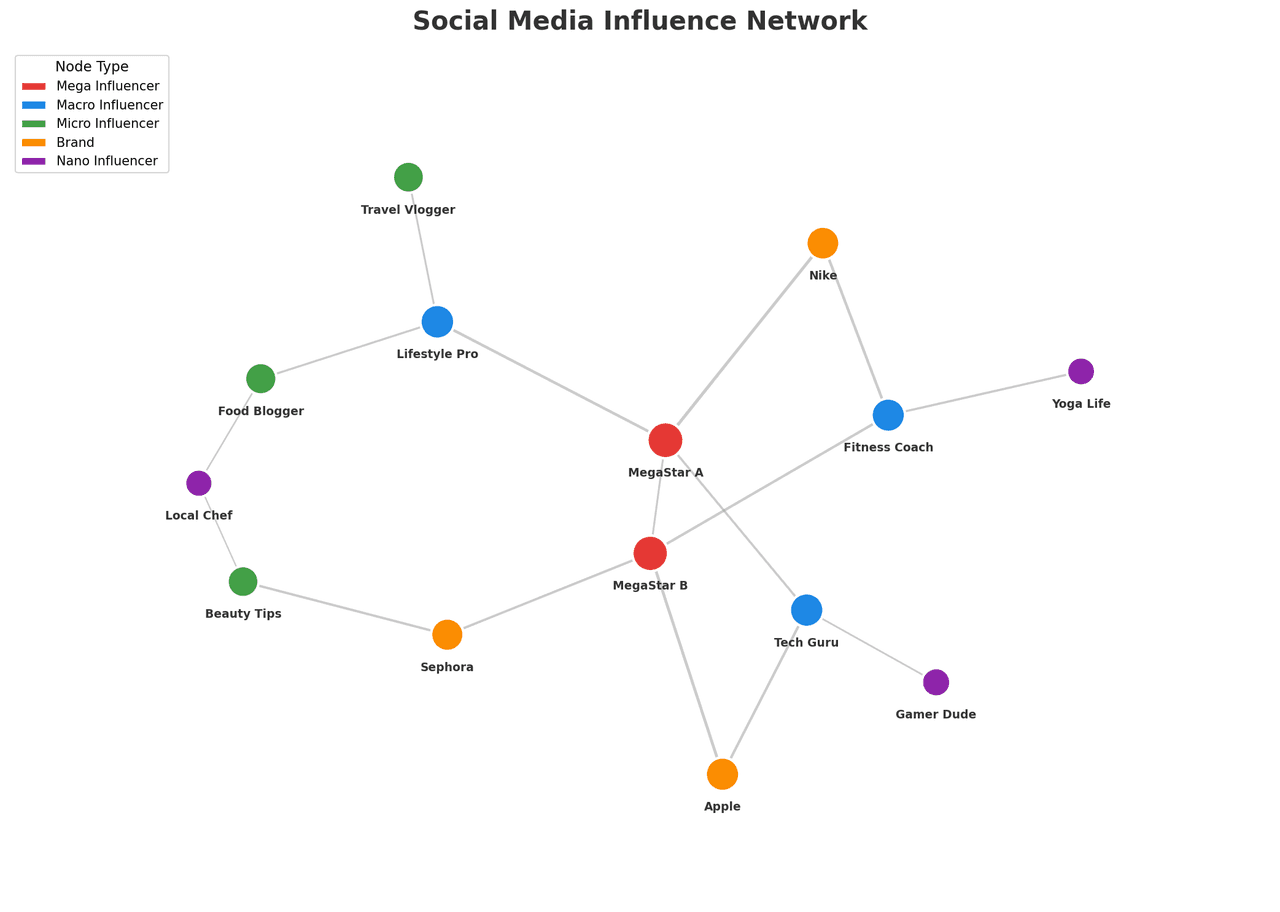
"Create an interactive network diagram showing a 'Social Media Influence Network' with 30 nodes representing users. Generate realistic network data with 3-4 community clusters (influencers, content creators, casual users, brands). Size nodes by 'Follower Count' (100 to 1M range, use log scale). Color nodes by 'User Type': Influencers (gold), Creators (blue), Brands (green), Users (gray). Edge thickness represents interaction frequency. Use force-directed layout (spring layout) for organic clustering. Add hover tooltips showing username, followers, and post count. Highlight the top 5 most connected nodes. Include a legend and network statistics (nodes, edges, avg degree). Interactive: click to highlight ego network."
How to create this chart with your data
Upload Data
Upload your Excel or CSV file. Data used to generate charts is sent to Plotivy's server for processing.
AI Generation
Our AI analyzes your data and generates the Network Diagram code automatically.
Customize & Export
Tweak the design with natural language, then export as high-res PNG, SVG or PDF.
Newsletter
Get one weekly tip for better network diagrams
Join researchers receiving concise Python plotting techniques to improve chart clarity and reduce revision cycles.
Python Code Example
# === IMPORTS ===
import numpy as np
import matplotlib.pyplot as plt
import networkx as nx

# === USER-EDITABLE PARAMETERS ===
title = "Social Media Influence Network"
figsize = (14, 10)

# === EXAMPLE DATASET ===
np.random.seed(42)

# Node data: (name, type, followers)
nodes_data = [
    # Mega Influencers
    ('MegaStar A', 'Mega Influencer', 5000000),
    ('MegaStar B', 'Mega Influencer', 3500000),
    # Macro Influencers
    ('Lifestyle Pro', 'Macro Influencer', 800000),
    ('Tech Guru', 'Macro Influencer', 650000),
    ('Fitness Coach', 'Macro Influencer', 550000),
    # Micro Influencers
    ('Food Blogger', 'Micro Influencer', 120000),
    ('Travel Vlogger', 'Micro Influencer', 95000),
    ('Beauty Tips', 'Micro Influencer', 88000),
    # Brands
    ('Nike', 'Brand', 400000),
    ('Apple', 'Brand', 600000),
    ('Sephora', 'Brand', 250000),
    # Nano Influencers
    ('Local Chef', 'Nano Influencer', 8000),
    ('Yoga Life', 'Nano Influencer', 12000),
    ('Gamer Dude', 'Nano Influencer', 15000),
]

# Edge data: (source, target, weight)
edges_data = [
    ('MegaStar A', 'Lifestyle Pro', 85),
    ('MegaStar A', 'Nike', 95),
    ('MegaStar A', 'Tech Guru', 70),
    ('MegaStar B', 'Fitness Coach', 80),
    ('MegaStar B', 'Apple', 90),
    ('MegaStar B', 'Sephora', 75),
    ('Lifestyle Pro', 'Food Blogger', 65),
    ('Lifestyle Pro', 'Travel Vlogger', 60),
    ('Tech Guru', 'Gamer Dude', 55),
    ('Fitness Coach', 'Yoga Life', 70),
    ('Nike', 'Fitness Coach', 85),
    ('Apple', 'Tech Guru', 80),
    ('Sephora', 'Beauty Tips', 75),
    ('Food Blogger', 'Local Chef', 50),
    ('Beauty Tips', 'Local Chef', 45),
    ('MegaStar A', 'MegaStar B', 60),
]

# Create graph
G = nx.Graph()
for name, node_type, followers in nodes_data:
    G.add_node(name, type=node_type, followers=followers)
for source, target, weight in edges_data:
    G.add_edge(source, target, weight=weight)

# Print summary
print("=== Social Media Network Analysis ===")
print(f"\nNodes: {G.number_of_nodes()}")
print(f"Edges: {G.number_of_edges()}")
print(f"\nTop 5 by Degree:")
degrees = dict(G.degree())
for node, deg in sorted(degrees.items(), key=lambda x: x[1], reverse=True)[:5]:
    print(f"  {node}: {deg} connections")

# === CREATE NETWORK DIAGRAM ===
fig, ax = plt.subplots(figsize=figsize, facecolor='white')
ax.set_facecolor('white')

# Use Kamada-Kawai layout for better spacing
pos = nx.kamada_kawai_layout(G)

# Color mapping by type
color_map = {
    'Mega Influencer': '#E53935',
    'Macro Influencer': '#1E88E5',
    'Micro Influencer': '#43A047',
    'Brand': '#FB8C00',
    'Nano Influencer': '#8E24AA'
}

# Node colors and sizes
node_colors = [color_map[G.nodes[node]['type']] for node in G.nodes()]
node_sizes = [np.log10(G.nodes[node]['followers']) * 120 for node in G.nodes()]

# Draw edges - thin gray lines
edge_widths = [G.edges[edge]['weight'] / 40 for edge in G.edges()]
nx.draw_networkx_edges(G, pos, width=edge_widths, alpha=0.5,
                       edge_color='#999999', ax=ax)

# Draw nodes - solid circles with white border
nx.draw_networkx_nodes(G, pos, node_color=node_colors, node_size=node_sizes,
                       edgecolors='white', linewidths=2, ax=ax)

# Draw labels - positioned below nodes
label_pos = {node: (coords[0], coords[1] - 0.08) for node, coords in pos.items()}
nx.draw_networkx_labels(G, label_pos, font_size=9, font_weight='bold',
                        font_color='#333333', ax=ax)

# Legend
from matplotlib.patches import Patch
legend_elements = [
    Patch(facecolor=color, label=label, edgecolor='white', linewidth=1.5)
    for label, color in color_map.items()
]
legend = ax.legend(handles=legend_elements, loc='upper left',
                   frameon=True, facecolor='white', edgecolor='#CCCCCC',
                   fontsize=10, title='Node Type', title_fontsize=11)

# Title
ax.set_title(title, fontsize=20, fontweight='bold', color='#333333', pad=15)

# Clean layout
ax.axis('off')
ax.margins(0.15)

plt.tight_layout()
plt.savefig('chart.png', dpi=150, bbox_inches='tight', facecolor='white')
print("Saved: chart.png")
plt.show()
# END-OF-CODE
Opens the Analyze page with this code pre-loaded and ready to execute
Console Output
=== Social Media Network Analysis ===

Nodes: 14
Edges: 16

Top 5 by Degree:
  MegaStar A: 4 connections
  MegaStar B: 4 connections
  Lifestyle Pro: 3 connections
  Tech Guru: 3 connections
  Fitness Coach: 3 connections
Saved: chart.png
Common Use Cases
- 1Social network analysis
- 2Citation networks
- 3Infrastructure mapping
- 4Knowledge graphs
- 5Dependency and supply-chain mapping
- 6Fraud and anomaly detection
Pro Tips
Size nodes by importance metrics
Color by community/cluster
Use force-directed layouts for organic arrangement
Compute centrality (degree or betweenness) and size nodes by it
Use NetworkX spring_layout for an organic force-directed arrangement
Switch to PyVis or Plotly when the graph needs interactive zoom and pan
Frequently asked questions
When should you use a network diagram?
Network diagrams (graph visualizations) display nodes and the connections (edges) between them, revealing structure in relationship data such as clusters, central hubs, bridges, and isolated elements. In Python they are most often built with NetworkX, which handles the graph model and layout algorithms (spring/force-directed, circular, Kamada-Kawai), then drawn with Matplotlib for static figures or PyVis/Plotly for interactive, zoomable networks. Common applications include social network analysis, citation networks, and infrastructure mapping.
Which Python libraries can create a network diagram?
A network diagram can be built in Python with networkx, pyvis, and plotly — networkx, pyvis, and Plotly for interactive hover, zoom, and web sharing. In Plotivy you describe the figure and it writes the networkx code for you.
Can I make a network diagram without writing Python code?
Yes. Describe the network diagram you need in plain language and upload your dataset — Plotivy's AI writes the Python code and renders a publication-ready figure. You still get the full, editable networkx source, so nothing is locked in a black box.
What are best practices for a clear network diagram?
Size nodes by importance metrics. Color by community/cluster.
Library comparison for this chart
networkx
Useful in specialized workflows that complement core Python plotting libraries for network-diagram analysis tasks.
pyvis
Useful in specialized workflows that complement core Python plotting libraries for network-diagram analysis tasks.
plotly
Best for interactive hover, zoom, and web sharing when collaborators need to inspect values directly from network-diagram figures.
Scientific Chart Selection Cheat Sheet
Not sure whether to use a Violin Plot, Box Plot, or Ridge Plot? Download our single-page reference mapping the most-used scientific chart types, exactly when to use them, and the core Matplotlib/Seaborn functions.