Chord Diagram
Chart overview
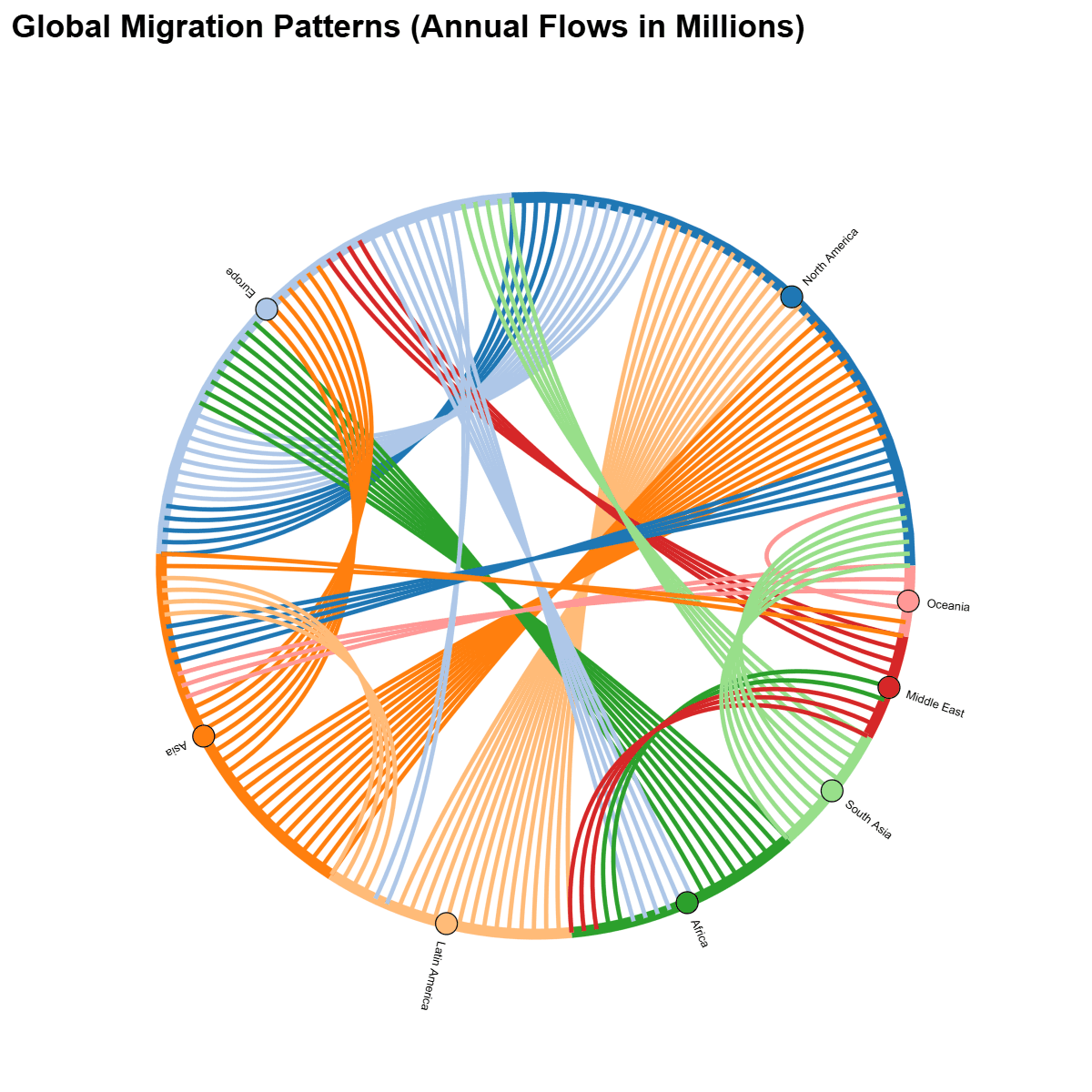
Chord diagrams display relationships between entities arranged in a circle, with ribbons connecting related nodes.
Key points
- Ribbon width represents the magnitude of the relationship, making it easy to see both individual connections and overall patterns of interaction.
- The underlying data is a square matrix of flows between a fixed set of entities, so a chord diagram is the right choice when every entity can both send and receive (migration between regions, trade between countries, hand-offs between teams) and you want to see the whole web of exchange at once, not just one direction.
- If your flows only move one way through stages — source to intermediate to sink — a Sankey diagram reads more naturally; if the entities have real geographic positions that matter, a flow map does.
Practical guidance
Chord diagrams degrade quickly past roughly 10-15 nodes as ribbons pile up, so aggregate small categories into an 'Other' node and order the arcs to minimize ribbon crossings. Color ribbons by their source (or by net direction) so readers can trace who sends to whom, size each arc by the entity's total volume, and label arcs directly around the ring. In Python, holoviews (with the Bokeh backend) and plotly produce interactive chords where hovering isolates one entity's connections — a big help for dense matrices that are hard to read statically.
Create a Chord Diagram with your data using AI — no coding required.
Further reading
Complete Guide to Scientific Data Visualization
Chart selection, figure design, and publication-ready workflows for scientific teams.
Read the guideExample Visualization
Create This Chart Now
Generate publication-ready chord diagrams with AI in seconds. No coding required – just describe your data and let AI do the work.
View example prompt
"Create a chord diagram showing 'International Migration Flows' between 8 major regions. Generate realistic migration data (in millions, annual): North America → Europe (0.5M), Europe → North America (0.8M), Latin America → North America (1.5M), Asia → North America (1.2M), Africa → Europe (0.9M), Asia → Europe (0.7M), Middle East → Europe (0.4M), Oceania → Asia (0.3M), and additional bidirectional flows. Arc width proportional to migration volume. Color arcs by origin region. Order regions by total migration volume. Add hover tooltips showing exact numbers and direction. Include a legend mapping colors to regions. Title: 'Global Migration Patterns (Annual Flows in Millions)'."
How to create this chart with your data
Upload Data
Upload your Excel or CSV file. Data used to generate charts is sent to Plotivy's server for processing.
AI Generation
Our AI analyzes your data and generates the Chord Diagram code automatically.
Customize & Export
Tweak the design with natural language, then export as high-res PNG, SVG or PDF.
Newsletter
Get one weekly tip for better chord diagrams
Join researchers receiving concise Python plotting techniques to improve chart clarity and reduce revision cycles.
Python Code Example
# === IMPORTS ===
import pandas as pd
import holoviews as hv
from holoviews import opts, dim
from bokeh.plotting import show
hv.extension('bokeh')

# === USER-EDITABLE PARAMETERS ===
# Change: List of region names (length determines number of nodes)
regions = [
    'North America',
    'Europe',
    'Latin America',
    'Asia',
    'Africa',
    'Middle East',
    'Oceania',
    'South Asia'
]

# Change: List of raw migration flows as (source_index, target_index, value_in_millions) tuples
# Indices must be integers from 0 to len(regions)-1
links_raw = [
    (0, 1, 0.5),   # North America → Europe
    (1, 0, 0.8),   # Europe → North America
    (2, 0, 1.5),   # Latin America → North America
    (3, 0, 1.2),   # Asia → North America
    (4, 1, 0.9),   # Africa → Europe
    (3, 1, 0.7),   # Asia → Europe
    (5, 1, 0.4),   # Middle East → Europe
    (6, 3, 0.3),   # Oceania → Asia
    (1, 4, 0.6),   # Europe → Africa (additional)
    (1, 2, 0.2),   # Europe → Latin America (additional)
    (0, 3, 0.4),   # North America → Asia (additional)
    (7, 1, 0.5),   # South Asia → Europe (additional)
    (2, 3, 0.4),   # Latin America → Asia (additional)
    (4, 5, 0.2),   # Africa → Middle East (additional)
    (5, 4, 0.3),   # Middle East → Africa (additional)
    (6, 0, 0.1),   # Oceania → North America (additional)
    (3, 6, 0.2),   # Asia → Oceania (additional)
    (7, 0, 0.6)    # South Asia → North America (additional)
]

title = "Global Migration Patterns (Annual Flows in Millions)"  # Change: Plot title
chord_width = 1000  # Change: Width of the chord diagram (increased for better visibility)
chord_height = 1000  # Change: Height of the chord diagram (increased for better visibility)
cmap = 'Category20'  # Change: Colormap for categorical colors (regions); use 'Category20', 'Set3', etc.

# === Data Preparation ===
# Compute total volumes (in + out) for ordering regions by migration volume
totals = {i: {'out': 0.0, 'in': 0.0} for i in range(len(regions))}
for source, target, value in links_raw:
    totals[source]['out'] += value
    totals[target]['in'] += value
# Ensure total_volumes is defined (list for stable indexing)
total_volumes = [totals[i]['out'] + totals[i]['in'] for i in range(len(regions))]

# Order regions by total volume descending
sorted_indices = sorted(range(len(regions)), key=lambda i: total_volumes[i], reverse=True)
index_mapping = {old_idx: new_idx for new_idx, old_idx in enumerate(sorted_indices)}

# Create nodes DataFrame (MUST have 'index' column with sequential integers 0-N)
nodes_df = pd.DataFrame({
    'index': range(len(regions)),
    'name': [regions[old_idx] for old_idx in sorted_indices]
})

# Remap links to new sorted indices
links_list = []
for source, target, value in links_raw:
    new_source = index_mapping[source]
    new_target = index_mapping[target]
    links_list.append({
        'source': new_source,
        'target': new_target,
        'value': value
    })
links_df = pd.DataFrame(links_list)

# === Print Relevant Statistics ===
print("=== Migration Analysis (Annual Flows in Millions) ===")
print("Total volumes by region (in + out, sorted descending):")
for new_idx in range(len(regions)):
    old_idx = sorted_indices[new_idx]
    volume = total_volumes[old_idx]
    region_name = nodes_df.loc[new_idx, 'name']
    print(f"{region_name}: {volume:.1f}M (out: {totals[old_idx]['out']:.1f}M, in: {totals[old_idx]['in']:.1f}M)")

print("\nAll migration flows:")
for _, row in links_df.iterrows():
    source_name = nodes_df.loc[row['source'], 'name']
    target_name = nodes_df.loc[row['target'], 'name']
    print(f"{source_name} → {target_name}: {row['value']:.1f}M")

print(f"\nTotal global migration volume: {sum(total_volumes):.1f}M")
print(f"Highest volume region: {nodes_df.loc[0, 'name']} ({max(total_volumes):.1f}M)")

# === Create Chord Diagram ===
# CRITICAL: nodes must use hv.Dataset with 'index' as key dimension
nodes = hv.Dataset(nodes_df, 'index')

# Create Chord: (links_df, nodes), kdims=['source','target'], vdims='value'
chord_plot = hv.Chord((links_df, nodes), ['source', 'target'], 'value')

# Style: color arcs by origin (source), nodes by index; proportional widths; hover tooltips; node labels
# Improvements: larger fonts, more padding for labels, explicit label styling, interactive tools, larger nodes/chords
styled_chord = chord_plot.opts(
    opts.Chord(
        title=title,
        cmap=cmap,
        edge_cmap=cmap,
        edge_color=dim('source').astype(str),  # Color arcs by origin region
        node_color=dim('index').astype(str),   # Color nodes by region
        labels='name',                         # Label nodes with region names
        padding=0.35,                          # Increased padding for label space
        node_size=20,                          # Larger nodes for better visibility
        edge_line_width=4,                     # Thicker chords for emphasis
        width=chord_width,
        height=chord_height,
        fontsize={
            'title': 22,     # Larger title font size
            'labels': 18,    # Larger node labels font size
            'ticks': 14      # Tick labels (if any)
        },
        # Enhanced hover and interaction tools
        tools=['hover', 'pan', 'wheel_zoom', 'reset']
    )
)

renderer = hv.renderer('bokeh')
fig = renderer.get_plot(styled_chord).state
show(fig)
# END-OF-CODE
Opens the Analyze page with this code pre-loaded and ready to execute
Console Output
Total Annual Migration: 18.9M people
Top Source Region: Asia
Top Destination: North America
Common Use Cases
- 1Trade flow visualization
- 2Migration patterns
- 3Communication networks
- 4Collaboration mapping
Pro Tips
Order nodes to minimize ribbon crossings
Use color gradients for direction
Limit to 10-15 nodes maximum
Frequently asked questions
When should you use a chord diagram?
Chord diagrams display relationships between entities arranged in a circle, with ribbons connecting related nodes. Ribbon width represents the magnitude of the relationship, making it easy to see both individual connections and overall patterns of interaction. Common applications include trade flow visualization, migration patterns, and communication networks.
Which Python libraries can create a chord diagram?
A chord diagram can be built in Python with holoviews and plotly — holoviews and Plotly for interactive hover, zoom, and web sharing. In Plotivy you describe the figure and it writes the holoviews code for you.
Can I make a chord diagram without writing Python code?
Yes. Describe the chord diagram you need in plain language and upload your dataset — Plotivy's AI writes the Python code and renders a publication-ready figure. You still get the full, editable holoviews source, so nothing is locked in a black box.
What are best practices for a clear chord diagram?
Order nodes to minimize ribbon crossings. Use color gradients for direction.
Library comparison for this chart
holoviews
Useful in specialized workflows that complement core Python plotting libraries for chord-diagram analysis tasks.
plotly
Best for interactive hover, zoom, and web sharing when collaborators need to inspect values directly from chord-diagram figures.
Scientific Chart Selection Cheat Sheet
Not sure whether to use a Violin Plot, Box Plot, or Ridge Plot? Download our single-page reference mapping the most-used scientific chart types, exactly when to use them, and the core Matplotlib/Seaborn functions.