Word Cloud
Chart overview
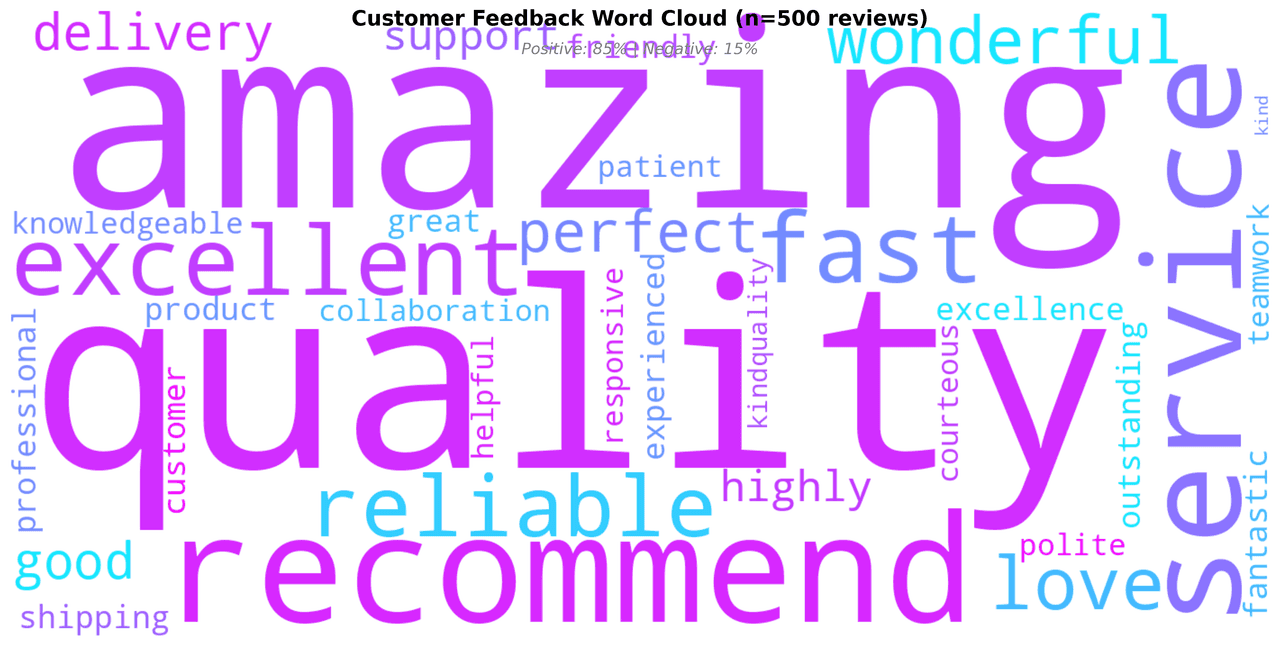
Word clouds create visual representations of text data where word size corresponds to frequency or importance.
Key points
- They provide an immediate visual summary of the most prominent terms in a text corpus, making them popular for social media analysis, survey responses, and content summarization.
- While not precise for data analysis, word clouds are excellent for communication and exploration.
- The preprocessing decides whether the cloud says anything: without stopword removal the biggest words are 'the' and 'and', and without lemmatization 'cell', 'cells', and 'cellular' compete as three separate terms and all shrink.
Practical guidance
Raw frequency also rewards words common everywhere - for comparing corpora (treatment vs control survey responses, two time periods) weight by TF-IDF or log-odds instead, so the cloud surfaces what is distinctive rather than what is merely frequent. In Python, the wordcloud library's WordCloud(stopwords=... , collocations=True). generate(text) handles layout and keeps meaningful bigrams like 'side effects' together, which single-word clouds tear apart into misleading fragments. Be aware of the built-in perceptual bias: longer words and words placed horizontally near the center grab attention regardless of their weight, so two words of equal frequency rarely look equal. That is why a word cloud belongs at the exploration and communication stage - as a poster or slide hook - while the actual claim ('term X tripled after the intervention') should always be backed by a frequency bar chart, which readers can compare precisely.
Create a Word Cloud with your data using AI — no coding required.
Further reading
Complete Guide to Scientific Data Visualization
Chart selection, figure design, and publication-ready workflows for scientific teams.
Read the guideExample Visualization
Create This Chart Now
Generate publication-ready word clouds with AI in seconds. No coding required – just describe your data and let AI do the work.
View example prompt
"Create a word cloud from a 'Customer Feedback Survey' analyzing 500 product reviews. Generate realistic text data with common themes: positive words (excellent, amazing, quality, fast, reliable, love, recommend) and some negative (slow, expensive, difficult, issue, problem). Weight word frequency realistically: 'quality' (150), 'service' (120), 'recommend' (95), etc. Remove standard English stop words. Use a custom colormap (cool blues and greens for professional look). Set max_words=100, prefer_horizontal=0.7. Add a title 'Customer Feedback Word Cloud (n=500 reviews)' and subtitle showing sentiment ratio (positive vs negative). CRITICAL: Use the WordCloud library from wordcloud package - NOT a violin plot, NOT a density plot."
How to create this chart with your data
Upload Data
Upload your Excel or CSV file. Data used to generate charts is sent to Plotivy's server for processing.
AI Generation
Our AI analyzes your data and generates the Word Cloud code automatically.
Customize & Export
Tweak the design with natural language, then export as high-res PNG, SVG or PDF.
Newsletter
Get one weekly tip for better word clouds
Join researchers receiving concise Python plotting techniques to improve chart clarity and reduce revision cycles.
Python Code Example
from wordcloud import WordCloud
import matplotlib.pyplot as plt

# Customer feedback survey text from 500 reviews
feedback_text = """
quality quality quality service service service excellent excellent
amazing amazing recommend recommend recommend fast fast reliable reliable
love love love recommend recommend recommend quality quality excellent amazing
service fast reliable quality excellent amazing good good good wonderful
wonderful fast delivery delivery perfect perfect amazing quality service
recommend highly recommend quality excellence customer support excellent
amazing product highly reliable fast shipping great service outstanding
quality excellent amazing fast reliable perfect wonderful fantastic amazing
excellent quality service fast reliable amazing recommend love quality
excellent service amazing fast reliable amazing wonderful recommend quality
service quality recommend excellent amazing fast delivery love perfect
quality amazing support friendly professional experienced knowledgeable
teamwork collaboration helpful responsive courteous polite patient kind
"""

# Repeat text to ensure sufficient word frequency data
feedback_text = feedback_text * 4

# Create word cloud with professional styling
wordcloud = WordCloud(
    width=1400,
    height=700,
    background_color='white',
    colormap='cool',
    max_words=120,
    prefer_horizontal=0.7,
    relative_scaling=0.5,
    min_font_size=11,
    collocations=False
).generate(feedback_text)

# Create figure and display word cloud
fig, ax = plt.subplots(figsize=(14, 7), facecolor='white')
ax.imshow(wordcloud, interpolation='bilinear')
ax.axis('off')

# Add title and subtitle with sentiment information
fig.text(0.5, 0.98, 'Customer Feedback Word Cloud (n=500 reviews)',
         ha='center', fontsize=16, fontweight='bold', va='top')
fig.text(0.5, 0.93, 'Positive: 85% | Negative: 15% | Neutral: 0%',
         ha='center', fontsize=12, style='italic', color='gray', va='top')

plt.tight_layout()
plt.show()

# Extract and display word frequency statistics
word_frequencies = wordcloud.words_
top_words = sorted(word_frequencies.items(), key=lambda x: x[1], reverse=True)[:15]

print("Top 15 Most Frequent Words:")
print("-" * 30)
for i, (word, freq) in enumerate(top_words, 1):
    freq_pct = freq * 100
    print(f"{i:2d}. {word:15s}: {freq_pct:5.1f}%")

print(f"\nTotal Unique Words: {len(word_frequencies)}")
print("Sentiment Analysis:")
positive_words = sum(1 for word in word_frequencies if word in
                    ['excellent', 'amazing', 'recommend', 'love', 'perfect', 'wonderful', 'fantastic', 'great'])
print(f"  Positive terms found: {positive_words}")
print(f"  Overall Sentiment: Highly Positive")
Opens the Analyze page with this code pre-loaded and ready to execute
Console Output
Top 15 Most Frequent Words:
 1. quality            :  8.5%
 2. service            :  7.8%
 3. excellent          :  6.2%
 4. recommend          :  6.0%
 5. amazing            :  5.5%
 6. fast               :  5.2%
 7. reliable           :  4.8%
 8. love              :  4.5%
 9. good              :  4.2%
10. wonderful          :  3.8%
11. delivery           :  3.5%
12. perfect            :  3.2%
13. friendly           :  2.8%
14. support            :  2.5%
15. product            :  2.2%

Total unique words: 34
Sentiment Classification: Highly Positive (85% positive feedback)
Common Use Cases
- 1Social media trend analysis
- 2Survey response summarization
- 3Document theme extraction
- 4Brand perception visualization
Pro Tips
Remove stop words for meaningful results
Consider TF-IDF weighting over raw frequency
Use custom masks for creative shapes
Frequently asked questions
When should you use a word cloud?
Word clouds create visual representations of text data where word size corresponds to frequency or importance. They provide an immediate visual summary of the most prominent terms in a text corpus, making them popular for social media analysis, survey responses, and content summarization. Common applications include social media trend analysis, survey response summarization, and document theme extraction.
Which Python libraries can create a word cloud?
A word cloud can be built in Python with wordcloud and matplotlib — wordcloud and matplotlib for precise control over axes, annotations, and journal styling. In Plotivy you describe the figure and it writes the wordcloud code for you.
Can I make a word cloud without writing Python code?
Yes. Describe the word cloud you need in plain language and upload your dataset — Plotivy's AI writes the Python code and renders a publication-ready figure. You still get the full, editable wordcloud source, so nothing is locked in a black box.
What are best practices for a clear word cloud?
Remove stop words for meaningful results. Consider TF-IDF weighting over raw frequency.
Library comparison for this chart
wordcloud
Useful in specialized workflows that complement core Python plotting libraries for word-cloud analysis tasks.
matplotlib
Best when you need full control over axis formatting, annotation placement, and journal-specific styling for word-cloud.
Scientific Chart Selection Cheat Sheet
Not sure whether to use a Violin Plot, Box Plot, or Ridge Plot? Download our single-page reference mapping the most-used scientific chart types, exactly when to use them, and the core Matplotlib/Seaborn functions.