Flow Chart
Chart overview
A flow chart is a visual representation of a process or algorithm, using standardized shapes and arrows to simplify complex workflows.
Key points
- It maps out steps, decisions, and data flows in a logical sequence.
- While tools like Visio exist, creating flow charts with code (using Graphviz) ensures consistency, version control, and automation—perfect for documenting software architecture, business processes, and decision logic.
- The discipline that separates a readable flow chart from a wall of boxes is ruthless scoping: one chart should answer one question, and past roughly 20 nodes you should split into a top-level overview plus sub-charts rather than shrink the font.
Practical guidance
Stick to the shape conventions readers already know - rectangles for steps, diamonds for decisions, parallelograms for input/output, rounded terminals for start and end - and label every edge leaving a decision diamond (yes/no, pass/fail), because an unlabeled branch forces the reader to guess. In Graphviz, rankdir='TB' suits sequential processes while 'LR' fits pipelines; let the dot layout engine place nodes instead of hand-positioning, since automatic layout is exactly what makes code-defined charts survive edits. Route the happy path down the main spine and hang exceptions off to the side - mixing them costs the reader the ability to trace the normal case at a glance. Watch for arrows that cross: crossings usually signal the logic itself is tangled, and reordering declarations or introducing an intermediate node fixes the diagram and often clarifies the process it describes.
Create a Flow Chart with your data using AI — no coding required.
Further reading
How to Create a Bar Chart in Python
Matplotlib, seaborn, and plotly patterns for grouped bars, error bars, and publication-ready labels.
Read the guideExample Visualization
Create This Chart Now
Generate publication-ready flow charts with AI in seconds. No coding required – just describe your data and let AI do the work.
View example prompt
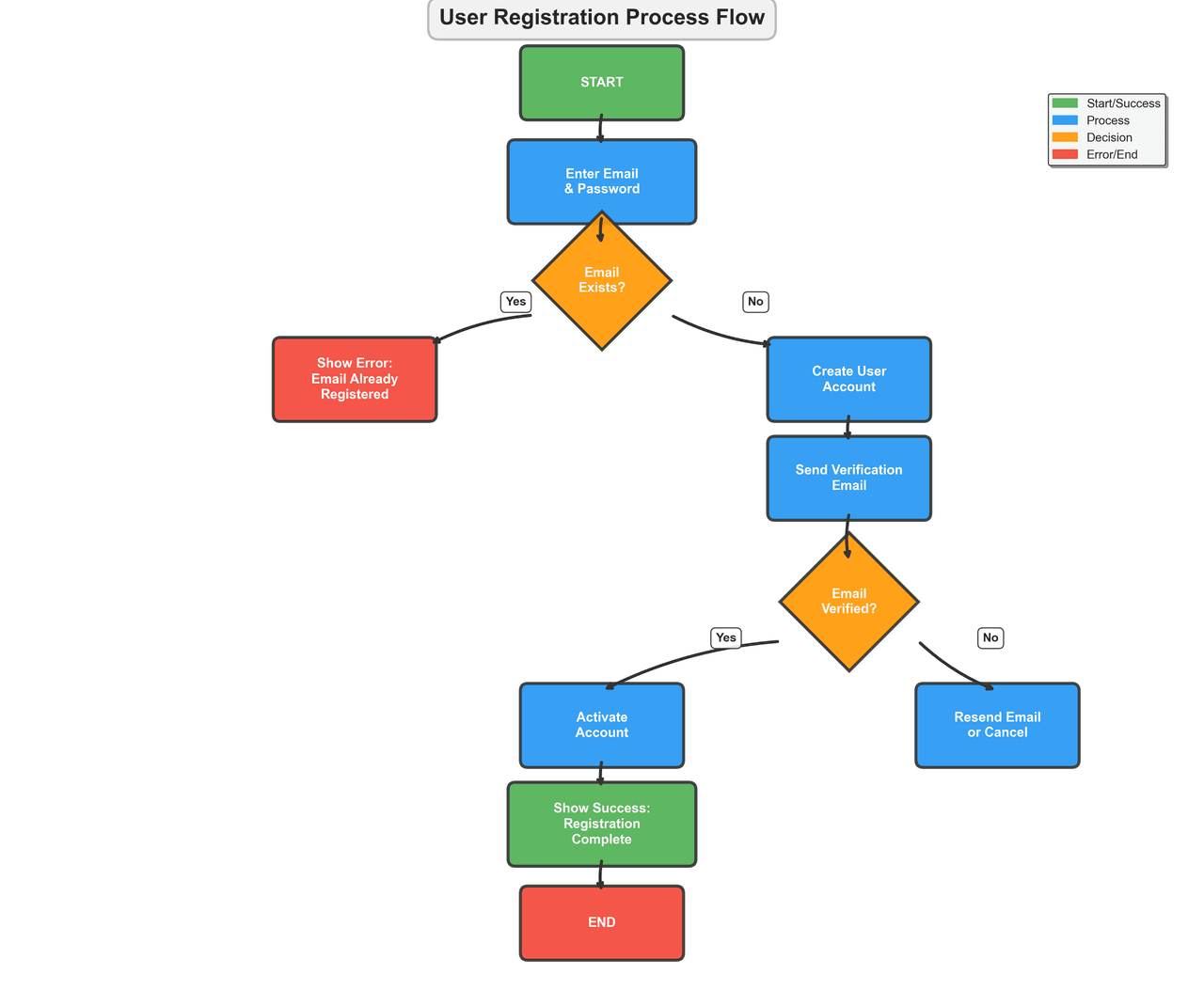
"Create a flow chart illustrating a 'User Registration and Email Verification' process for a web application. Include these steps: Start → 'Enter Email & Password' → Decision: 'Valid Format?' (Yes/No) → If No: 'Show Error' → loop back → If Yes: 'Check if Email Exists' → Decision: 'Already Registered?' → If Yes: 'Redirect to Login' → If No: 'Create Account' → 'Send Verification Email' → 'Wait for Click' → Decision: 'Link Clicked within 24h?' → If No: 'Expire Token' → If Yes: 'Activate Account' → 'Redirect to Dashboard' → End. Use standard flowchart shapes: rectangles for processes, diamonds for decisions, rounded rectangles for start/end. Color-code: green for success paths, red for error paths, blue for user actions."
How to create this chart with your data
Upload Data
Upload your Excel or CSV file. Data used to generate charts is sent to Plotivy's server for processing.
AI Generation
Our AI analyzes your data and generates the Flow Chart code automatically.
Customize & Export
Tweak the design with natural language, then export as high-res PNG, SVG or PDF.
Newsletter
Get one weekly tip for better flow charts
Join researchers receiving concise Python plotting techniques to improve chart clarity and reduce revision cycles.
Python Code Example
import numpy as np
import matplotlib.pyplot as plt
import matplotlib.patches as patches
from matplotlib.patches import FancyBboxPatch, Polygon
from matplotlib.path import Path
import matplotlib.patches as mpatches

# Create figure and axis
fig, ax = plt.subplots(figsize=(14, 12))
ax.set_xlim(-12, 12)
ax.set_ylim(-10, 10)
ax.set_aspect('equal')
ax.axis('off')

# Define colors with better contrast
start_color = '#4CAF50'
process_color = '#2196F3'
decision_color = '#FF9800'
end_color = '#F44336'
arrow_color = '#333333'

# Function to draw rectangle with improved styling
def draw_rect(x, y, width, height, text, color, text_color='white'):
    rect = FancyBboxPatch((x-width/2, y-height/2), width, height,
                          boxstyle="round,pad=0.15",
                          facecolor=color, edgecolor=arrow_color, linewidth=2.5,
                          alpha=0.9)
    ax.add_patch(rect)
    ax.text(x, y, text, ha='center', va='center', fontsize=11,
            color=text_color, weight='bold', wrap=True, linespacing=1.3)

# Function to draw diamond for decision with improved styling
def draw_diamond(x, y, size, text, color):
    diamond = Polygon([(x, y+size), (x+size, y), (x, y-size), (x-size, y)],
                     facecolor=color, edgecolor=arrow_color, linewidth=2.5,
                     alpha=0.9)
    ax.add_patch(diamond)
    ax.text(x, y, text, ha='center', va='center', fontsize=11,
            color='white', weight='bold', wrap=True, linespacing=1.3)

# Function to draw arrow with improved styling
def draw_arrow(x1, y1, x2, y2, text=''):
    ax.annotate('', xy=(x2, y2), xytext=(x1, y1),
                arrowprops=dict(arrowstyle='->', lw=2.5, color=arrow_color,
                              connectionstyle="arc3,rad=0.1"))
    if text:
        mid_x, mid_y = (x1+x2)/2, (y1+y2)/2
        ax.text(mid_x+0.5, mid_y+0.5, text, fontsize=10,
                bbox=dict(boxstyle="round,pad=0.4", facecolor='white',
                         alpha=0.9, edgecolor=arrow_color, linewidth=1),
                weight='bold')

# Draw flow chart with improved spacing
# Start
draw_rect(0, 8.5, 3, 1.2, 'START', start_color)

# Enter Email
draw_rect(0, 6.5, 3.5, 1.4, 'Enter Email\n& Password', process_color)
draw_arrow(0, 7.9, 0, 7.2)

# Check if email exists
draw_diamond(0, 4.5, 1.4, 'Email\nExists?', decision_color)
draw_arrow(0, 5.8, 0, 5.2)

# Email exists - Yes branch
draw_rect(-5, 2.5, 3, 1.4, 'Show Error:\nEmail Already\nRegistered', end_color)
draw_arrow(-1.4, 3.8, -3.5, 3.2, 'Yes')

# Email exists - No branch
draw_rect(5, 2.5, 3, 1.4, 'Create User\nAccount', process_color)
draw_arrow(1.4, 3.8, 3.5, 3.2, 'No')

# Send verification email
draw_rect(5, 0.5, 3, 1.4, 'Send Verification\nEmail', process_color)
draw_arrow(5, 1.8, 5, 1.2)

# Email verification decision
draw_diamond(5, -2, 1.4, 'Email\nVerified?', decision_color)
draw_arrow(5, -0.2, 5, -1.2)

# Email not verified
draw_rect(8, -4.5, 3, 1.4, 'Resend Email\nor Cancel', process_color)
draw_arrow(6.4, -2.8, 8, -3.8, 'No')

# Email verified
draw_rect(0, -4.5, 3, 1.4, 'Activate\nAccount', process_color)
draw_arrow(3.6, -2.8, 0, -3.8, 'Yes')

# Show success message
draw_rect(0, -6.5, 3.5, 1.4, 'Show Success:\nRegistration\nComplete', start_color)
draw_arrow(0, -5.2, 0, -5.8)

# End
draw_rect(0, -8.5, 3, 1.2, 'END', end_color)
draw_arrow(0, -7.2, 0, -7.9)

# Add title with better styling - moved higher
ax.text(0, 9.8, 'User Registration Process Flow',
        ha='center', va='center', fontsize=18, weight='bold',
        bbox=dict(boxstyle="round,pad=0.5", facecolor='lightgray',
                 alpha=0.3, edgecolor=arrow_color, linewidth=2))

# Add legend with improved styling
legend_elements = [
    mpatches.Patch(color=start_color, label='Start/Success', alpha=0.9),
    mpatches.Patch(color=process_color, label='Process', alpha=0.9),
    mpatches.Patch(color=decision_color, label='Decision', alpha=0.9),
    mpatches.Patch(color=end_color, label='Error/End', alpha=0.9)
]
ax.legend(handles=legend_elements, loc='upper right', bbox_to_anchor=(0.98, 0.92),
         framealpha=0.9, edgecolor=arrow_color, fancybox=True, shadow=True)

# Add registration statistics summary box (replacing the bar chart)


plt.tight_layout()
plt.show()
# END-OF-CODEOpens the Analyze page with this code pre-loaded and ready to execute
Console Output
Flowchart created: user_registration_flowchart.png
Total Steps: 15
Decision Points: 3
Possible Outcomes: 4 (Success, Error, Already Registered, Expired)
Common Use Cases
- 1Process documentation
- 2Algorithm visualization
- 3Decision tree mapping
- 4User journey flows
Pro Tips
Use standard shapes (rectangles, diamonds, ovals)
Keep flow direction consistent
Number steps for reference
Frequently asked questions
When should you use a flow chart?
A flow chart is a visual representation of a process or algorithm, using standardized shapes and arrows to simplify complex workflows. It maps out steps, decisions, and data flows in a logical sequence. Common applications include process documentation, algorithm visualization, and decision tree mapping.
Which Python libraries can create a flow chart?
A flow chart can be built in Python with graphviz and diagrams — graphviz and diagrams. In Plotivy you describe the figure and it writes the graphviz code for you.
Can I make a flow chart without writing Python code?
Yes. Describe the flow chart you need in plain language and upload your dataset — Plotivy's AI writes the Python code and renders a publication-ready figure. You still get the full, editable graphviz source, so nothing is locked in a black box.
What are best practices for a clear flow chart?
Use standard shapes (rectangles, diamonds, ovals). Keep flow direction consistent.
Library comparison for this chart
graphviz
Useful in specialized workflows that complement core Python plotting libraries for flow-chart analysis tasks.
diagrams
Useful in specialized workflows that complement core Python plotting libraries for flow-chart analysis tasks.
Scientific Chart Selection Cheat Sheet
Not sure whether to use a Violin Plot, Box Plot, or Ridge Plot? Download our single-page reference mapping the most-used scientific chart types, exactly when to use them, and the core Matplotlib/Seaborn functions.