Tree Diagram
Chart overview
Tree diagrams (dendrograms) display hierarchical relationships through branching structures.
Key points
- They are essential for showing organizational hierarchies, phylogenetic trees, clustering results, and any data with parent-child relationships.
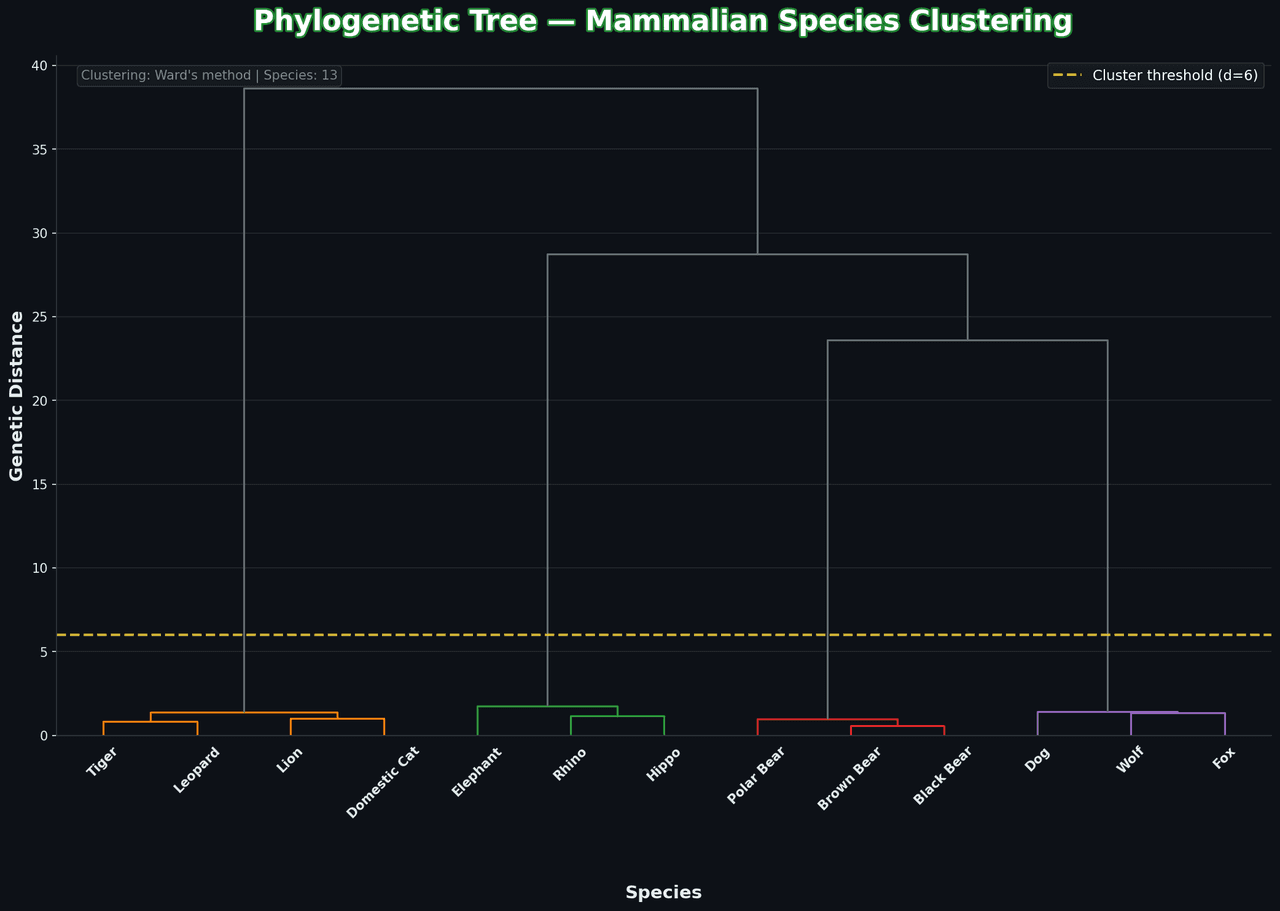
- In hierarchical clustering the vertical height of each merge is the linkage distance between the two clusters being joined — cutting the tree at a chosen height defines your cluster assignment, so the y-axis is not decoration but the statistical result itself.
- The linkage method changes the topology substantially: single linkage chains elongated clusters together, complete linkage favors compact spheres, and Ward minimizes within-cluster variance and is the usual default for standardized numeric data.
Practical guidance
Always report which linkage and distance metric you used, and consider the cophenetic correlation coefficient (scipy. cluster. hierarchy. cophenet) to quantify how faithfully the tree preserves the original pairwise distances. For datasets with hundreds of leaves, use truncate_mode='lastp' to collapse the lowest branches, and order leaves with optimal_ordering=True so adjacent leaves are maximally similar — it makes the tree far easier to read at no statistical cost.
Create a Tree Diagram with your data using AI — no coding required.
Further reading
Complete Guide to Scientific Data Visualization
Chart selection, figure design, and publication-ready workflows for scientific teams.
Read the guideExample Visualization
Create This Chart Now
Generate publication-ready tree diagrams with AI in seconds. No coding required – just describe your data and let AI do the work.
View example prompt
"Create a dendrogram (tree diagram) showing 'Hierarchical Clustering of Animal Species' based on genetic similarity. Generate a distance matrix for 12 species: Lion, Tiger, Leopard, Domestic Cat (felines cluster), Wolf, Dog, Fox (canines cluster), Brown Bear, Polar Bear, Black Bear (ursids cluster), Elephant, Rhino, Hippo (large mammals). Use Ward's linkage method. Color branches by major taxonomic cluster (felines: orange, canines: blue, ursids: brown, large mammals: gray). Draw a horizontal cut-off line at distance threshold showing 4 main clusters. Add species labels at leaf nodes. Include a scale bar for genetic distance. Annotate cluster nodes with bootstrap confidence values. Title: 'Phylogenetic Tree - Mammalian Species Clustering'."
How to create this chart with your data
Upload Data
Upload your Excel or CSV file. Data used to generate charts is sent to Plotivy's server for processing.
AI Generation
Our AI analyzes your data and generates the Tree Diagram code automatically.
Customize & Export
Tweak the design with natural language, then export as high-res PNG, SVG or PDF.
Newsletter
Get one weekly tip for better tree diagrams
Join researchers receiving concise Python plotting techniques to improve chart clarity and reduce revision cycles.
Python Code Example
# === IMPORTS ===
import numpy as np
import matplotlib.pyplot as plt
from scipy.cluster.hierarchy import dendrogram, linkage
import matplotlib.patheffects as pe
from matplotlib.patches import Rectangle

# === USER-EDITABLE PARAMETERS ===
title = "Phylogenetic Tree — Mammalian Species Clustering"
figsize = (14, 10)

# === EXAMPLE DATASET ===
np.random.seed(42)

# Species grouped by evolutionary proximity
species = [
    # Felines
    'Lion', 'Tiger', 'Leopard', 'Domestic Cat',
    # Canines
    'Wolf', 'Dog', 'Fox',
    # Ursids
    'Brown Bear', 'Polar Bear', 'Black Bear',
    # Large Herbivores
    'Elephant', 'Rhino', 'Hippo'
]

# Create feature matrix simulating genetic distances
n_species = len(species)
features = np.zeros((n_species, 8))

# Felines (0-3) - close genetic features
features[0:4, 0:2] = np.random.normal(10, 0.5, (4, 2))
features[0:4, 2] = np.random.normal(5, 0.3, 4)

# Canines (4-6)
features[4:7, 2:4] = np.random.normal(8, 0.5, (3, 2))
features[4:7, 4] = np.random.normal(6, 0.3, 3)

# Ursids (7-9)
features[7:10, 4:6] = np.random.normal(7, 0.5, (3, 2))
features[7:10, 6] = np.random.normal(4, 0.3, 3)

# Large Herbivores (10-12)
features[10:13, 6:8] = np.random.normal(9, 0.5, (3, 2))

# Add noise
features += np.random.normal(0, 0.2, features.shape)

# Calculate linkage
Z = linkage(features, method='ward')

# Print summary
print("=== Phylogenetic Analysis ===")
print(f"\nSpecies: {n_species}")
print(f"\nExpected clusters:")
print(f"  Felines: Lion, Tiger, Leopard, Domestic Cat")
print(f"  Canines: Wolf, Dog, Fox")
print(f"  Ursids: Brown Bear, Polar Bear, Black Bear")
print(f"  Large Herbivores: Elephant, Rhino, Hippo")

# === CREATE DENDROGRAM ===
fig, ax = plt.subplots(figsize=figsize, facecolor='#0d1117')
ax.set_facecolor('#0d1117')

# Custom colors for clusters
cluster_colors = ['#FF6B6B', '#4ECDC4', '#45B7D1', '#96CEB4']
color_threshold = 6

# Create dendrogram with custom styling
dendro = dendrogram(
    Z,
    labels=species,
    leaf_rotation=45,
    leaf_font_size=12,
    color_threshold=color_threshold,
    above_threshold_color='#636e72',
    ax=ax
)

# Color the dendrogram lines
for i, d in zip(dendro['icoord'], dendro['dcoord']):
    x = 0.5 * sum(i[1:3])
    y = d[1]

# Style leaf labels
for label in ax.get_xticklabels():
    label.set_color('white')
    label.set_fontweight('bold')
    label.set_fontsize(11)

# Add horizontal threshold line
ax.axhline(y=color_threshold, color='#FFD93D', linestyle='--', linewidth=2,
           alpha=0.8, label=f'Cluster threshold (d={color_threshold})')

# Add cluster annotations with boxes
cluster_info = [
    (1.5, -1.5, 'Felines', '#FF6B6B'),
    (5.5, -1.5, 'Canines', '#4ECDC4'),
    (8.5, -1.5, 'Ursids', '#45B7D1'),
    (11.5, -1.5, 'Large Herbivores', '#96CEB4')
]

for x, y, label, color in cluster_info:
    ax.annotate(label, xy=(x * 10, y), fontsize=11, fontweight='bold',
                color=color, ha='center', va='top',
                bbox=dict(boxstyle='round,pad=0.3', facecolor='#161b22',
                         edgecolor=color, linewidth=2))

# Styling
ax.set_xlabel('Species', fontsize=14, color='#e6edf3', fontweight='bold', labelpad=50)
ax.set_ylabel('Genetic Distance', fontsize=14, color='#e6edf3', fontweight='bold')
ax.set_title(title, fontsize=22, fontweight='bold', color='white', pad=20,
             path_effects=[pe.withStroke(linewidth=3, foreground='#238636')])

# Style axes
ax.tick_params(colors='#e6edf3', labelsize=10)
ax.spines['bottom'].set_color('#30363d')
ax.spines['left'].set_color('#30363d')
ax.spines['top'].set_visible(False)
ax.spines['right'].set_visible(False)

# Grid
ax.grid(True, alpha=0.1, color='white', axis='y')
ax.set_axisbelow(True)

# Legend
legend = ax.legend(loc='upper right', facecolor='#161b22', edgecolor='#30363d',
                   labelcolor='white', fontsize=11)

# Info box
info_text = f'Clustering: Ward\'s method | Species: {n_species}'
ax.text(0.02, 0.98, info_text, transform=ax.transAxes, fontsize=10,
        color='#888', ha='left', va='top',
        bbox=dict(boxstyle='round', facecolor='#161b22', alpha=0.8, edgecolor='#30363d'))

plt.tight_layout()
plt.savefig('chart.png', dpi=150, bbox_inches='tight', facecolor='#0d1117')
print("Saved: chart.png")
plt.show()
# END-OF-CODE
Opens the Analyze page with this code pre-loaded and ready to execute
Console Output
=== Phylogenetic Analysis ===

Species: 13

Expected clusters:
  Felines: Lion, Tiger, Leopard, Domestic Cat
  Canines: Wolf, Dog, Fox
  Ursids: Brown Bear, Polar Bear, Black Bear
  Large Herbivores: Elephant, Rhino, Hippo
Saved: chart.png
Common Use Cases
- 1Hierarchical clustering visualization
- 2Phylogenetic trees
- 3Organizational charts
- 4Decision tree visualization
Pro Tips
Color-code branches by cluster
Truncate for large hierarchies
Add distance/height labels
Frequently asked questions
When should you use a tree diagram?
Tree diagrams (dendrograms) display hierarchical relationships through branching structures. They are essential for showing organizational hierarchies, phylogenetic trees, clustering results, and any data with parent-child relationships. Common applications include hierarchical clustering visualization, phylogenetic trees, and organizational charts.
Which Python libraries can create a tree diagram?
A tree diagram can be built in Python with networkx and scipy — networkx and scipy. In Plotivy you describe the figure and it writes the networkx code for you.
Can I make a tree diagram without writing Python code?
Yes. Describe the tree diagram you need in plain language and upload your dataset — Plotivy's AI writes the Python code and renders a publication-ready figure. You still get the full, editable networkx source, so nothing is locked in a black box.
What are best practices for a clear tree diagram?
Color-code branches by cluster. Truncate for large hierarchies.
Library comparison for this chart
networkx
Useful in specialized workflows that complement core Python plotting libraries for tree-diagram analysis tasks.
scipy
Useful in specialized workflows that complement core Python plotting libraries for tree-diagram analysis tasks.
Scientific Chart Selection Cheat Sheet
Not sure whether to use a Violin Plot, Box Plot, or Ridge Plot? Download our single-page reference mapping the most-used scientific chart types, exactly when to use them, and the core Matplotlib/Seaborn functions.