Menu

FLOW VISUALIZATION

Create Sankey Diagrams Instantly

Visualize energy flows, budget allocations, and system processes with interactive Plotly Sankey diagrams - no manual node formatting needed.

What Is a Sankey Diagram?

A Sankey diagram is a flow visualization where the width of each arrow is proportional to the quantity it represents. Invented by Captain Matthew Sankey in 1898 to show steam engine efficiency, they are now used across energy analysis, materials flow, website analytics, and budget reporting. The key advantage over a simple table is that Sankey diagrams make relative magnitudes and branching pathsimmediately visible.

Nodes

Rectangles representing entities (sources, processes, sinks). Height represents total throughput.

➡️

Links

Curved bands connecting nodes. Width encodes flow magnitude. The wider the band, the larger the quantity transferred.

⚖️

Conservation

Total flow in = total flow out for each node (unless the node is a source or sink). This mass-balance property makes errors visually obvious.

Energy Flow Sankey

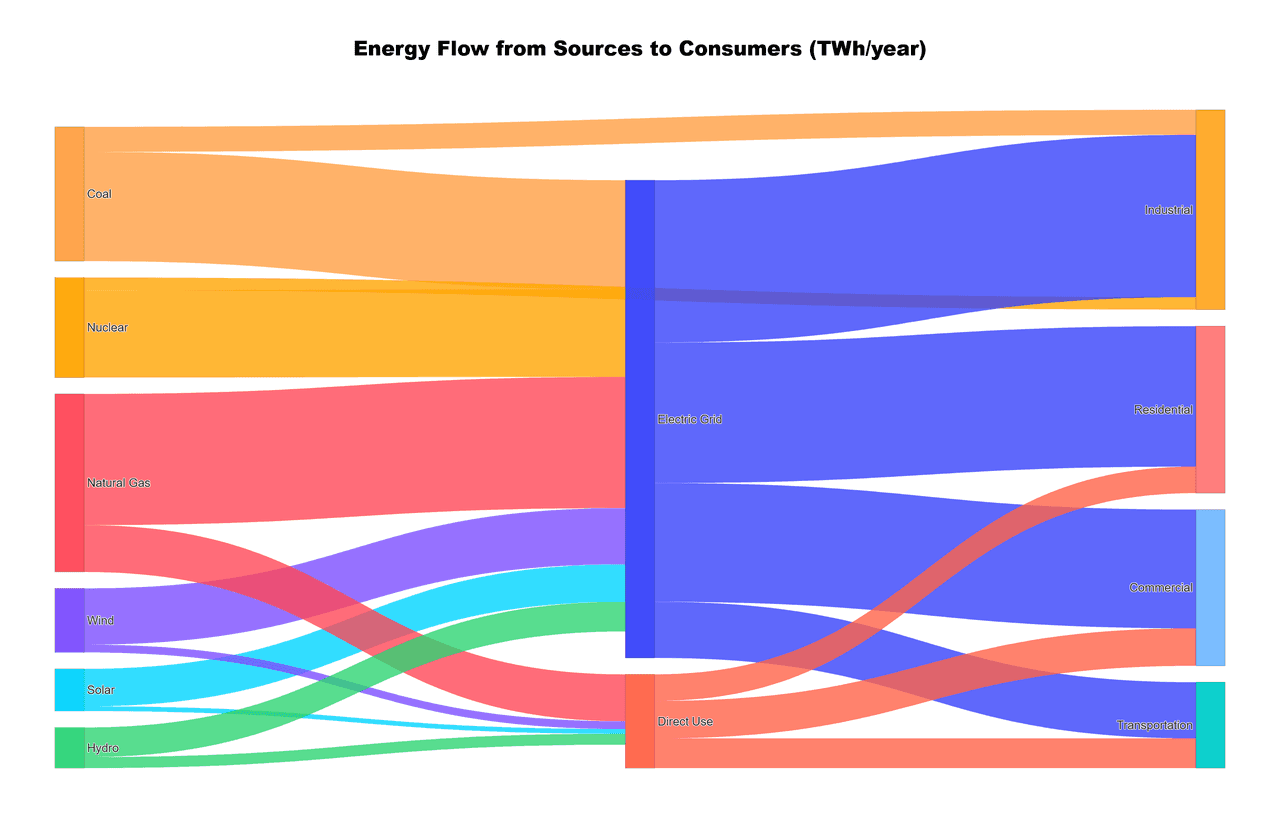
This example traces national energy from primary sources (gas, coal, nuclear, renewables) through conversion processes to end uses. Hover over any link to see the exact flow value.

Live Code Editor
Code EditorPython
Loading editor...
Live Preview

Preparing preview

Running once automatically on first load

Learn by Experimenting

This is a safe playground for learning! Try changing:

  • Colors: Modify color values to see different palettes
  • Numbers: Adjust sizes, positions, or data ranges
  • Labels: Update titles, axis names, or legends

Edit the code, run it, then open the full data visualization tool to continue with your own dataset.

Customization tips

  • Change values to use your own flow data
  • Adjust node.pad and node.thickness for spacing
  • Use arrangement="freeform" to enable drag-and-drop node positioning

When to Use a Sankey Diagram

Great For

  • - Energy balance and efficiency analysis
  • - Budget allocation and cost flow
  • - Material/waste stream tracking (LCA)
  • - Website user journey / funnel analysis
  • - Supply chain and logistics flows

Consider Alternatives When

  • - You have >20 nodes (diagram gets cluttered)
  • - Flows are cyclic - use chord diagrams instead
  • - You need exact values - use a table supplement
  • - Data is hierarchical - consider a sunburst chart

Budget Allocation Sankey

This second example shows how a university's revenue streams (tuition, grants, donations, state funding) flow through departments into specific program areas - perfect for annual reports.

Live Code Editor
Code EditorPython
Loading editor...
Live Preview

Preparing preview

Running once automatically on first load

Learn by Experimenting

This is a safe playground for learning! Try changing:

  • Colors: Modify color values to see different palettes
  • Numbers: Adjust sizes, positions, or data ranges
  • Labels: Update titles, axis names, or legends

Edit the code, run it, then open the full data visualization tool to continue with your own dataset.

Why Scientists Use Plotivy for Sankey Diagrams

Interactive Tooltips

Hover over any link to see exact flow values. Drag nodes to rearrange the layout interactively.

AI Data Structuring

Describe your flows in plain English - Plotivy automatically formats the source-target-value structure.

Publication Export

Download as SVG/PDF with clean fonts and colors ready for journal figures or presentations.

Custom Styling

Control node colors, link opacity, label positioning, and arrangement mode with full code access.

Chart gallery

Explore More Flow Visualizations

Interactive chart gallery with ready-to-run code

Browse all chart types →
Interactive Sankey diagram showing energy flow from sources to consumers
Diagramsplotly
From the chart galleryEnergy production and consumption flows

Sankey Diagram

Flow diagram where arrow widths are proportional to flow quantities.

Sample code / prompt

import plotly.graph_objects as go

# US Energy Flow Data (Quadrillion BTU)
sources = ['Coal', 'Natural Gas', 'Petroleum', 'Nuclear', 'Renewables']
source_values = [11, 32, 35, 8, 12]

transforms = ['Electricity Gen.', 'Direct Use', 'Rejected Energy']
end_uses = ['Residential', 'Commercial', 'Industrial', 'Transportation']

# Define flows: source -> transform/enduse


Correlation heatmap with diverging color scale and coefficient annotations
Statisticalseaborn, matplotlib
From the chart galleryCorrelation analysis between variables

Heatmap

Represents data values as colors in a two-dimensional matrix format.

Sample code / prompt

import matplotlib.pyplot as plt
import seaborn as sns
import pandas as pd
import numpy as np

# Create correlation matrix for financial metrics
metrics = ['Revenue', 'Profit', 'Expenses', 'ROI', 'Customers', 'AOV', 'Marketing', 'Employees']
correlation_data = np.array([
    [1.00, 0.85, -0.45, 0.72, 0.88, 0.65, 0.72, 0.55],
    [0.85, 1.00, -0.78, 0.92, 0.75, 0.58, 0.63, 0.48],
Violin plot comparing score distributions across 3 groups with inner box plots
Distributionseaborn, matplotlib
From the chart galleryComparing treatment effects across groups

Violin Plot

Combines box plots with kernel density to show distribution shape across groups.

Sample code / prompt

import matplotlib.pyplot as plt
import seaborn as sns
import pandas as pd
import numpy as np
from scipy.stats import f_oneway

# Generate exam score data for 3 groups
np.random.seed(42)
control = np.random.normal(72, 12, 50)
treatment_a = np.random.normal(78, 10, 50)

Ready to Build Your Sankey?

Describe your flow data in plain English and get an interactive Plotly Sankey diagram with full Python code in seconds.

Start Free - No Sign-Up