Menu

ENGINEERING & MATERIALS

Materials Science Visualizations

Stress-strain curves, XRD patterns, DSC thermograms, and microstructure analysis - create publication-ready materials science figures with AI-generated Python code.

Essential Materials Visualizations

Materials characterization generates diverse data types - mechanical testing, diffraction, thermal analysis, and microscopy. Each requires domain-specific annotations: yield points, Miller indices, phase transitions, and grain size distributions.

Stress-Strain

Engineering/true curves with yield, UTS, and fracture annotations

XRD Patterns

Diffraction peaks with Miller indices and phase identification

DSC/TGA

Thermograms with glass transition, melting, and decomposition markers

Hardness Maps

Vickers/Rockwell profiles across weld zones and heat-affected areas

Particle Size

SEM-derived size distributions with lognormal fits

Phase Diagrams

Binary/ternary equilibrium diagrams with tie lines and invariant points

Stress-Strain Curves with Property Comparison

Three materials (steel, aluminum, titanium) with annotated yield points, UTS, and fracture. A companion bar chart normalizes key properties for side-by-side comparison.

XRD Pattern with Phase Identification

Simulated powder XRD pattern for carbon steel showing two phases: alpha-Fe (BCC iron) and Fe3C (cementite). Peaks are labeled with Miller indices, and a residual plot validates the fit.

Why Materials Scientists Use Plotivy

Mechanical Testing

Automatic yield point detection (0.2% offset), UTS, elongation, and toughness calculations.

Diffraction Analysis

Peak fitting, d-spacing calculations, and automated Miller index labeling from crystal structure data.

Thermal Analysis

DSC peak integration, Tg/Tm extraction, and TGA decomposition temperature determination.

Multi-Panel Layouts

Combine stress-strain + property bars, XRD + residuals, or DSC + TGA in publication-ready figures.

Chart gallery

Explore Materials Chart Types

Interactive examples with ready-to-run code

Browse all chart types →
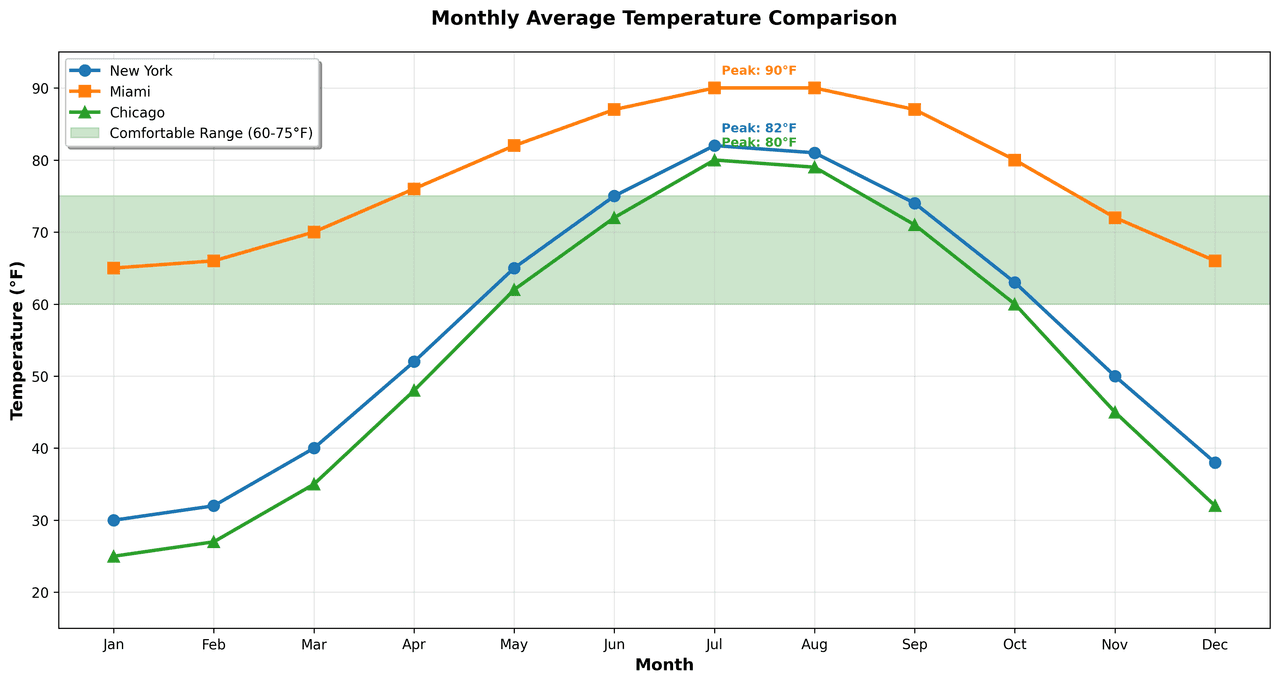
Multi-line graph showing temperature trends for 3 cities over a year
Time Series•matplotlib, seaborn
From the chart gallery•Stock price tracking over time

Line Graph

Create a line graph in Python to connect ordered data points, reveal time-series trends, and compare how multiple values change across a continuous scale.

Sample code / prompt

import matplotlib.pyplot as plt
import numpy as np

# Generate temperature data for 3 major US cities over 12 months
months = ['Jan', 'Feb', 'Mar', 'Apr', 'May', 'Jun', 'Jul', 'Aug', 'Sep', 'Oct', 'Nov', 'Dec']
nyc = [30, 32, 40, 52, 65, 75, 82, 81, 74, 63, 50, 38]
miami = [65, 66, 70, 76, 82, 87, 90, 90, 87, 80, 72, 66]
chicago = [25, 27, 35, 48, 62, 72, 80, 79, 71, 60, 45, 32]

# Create figure with enhanced styling
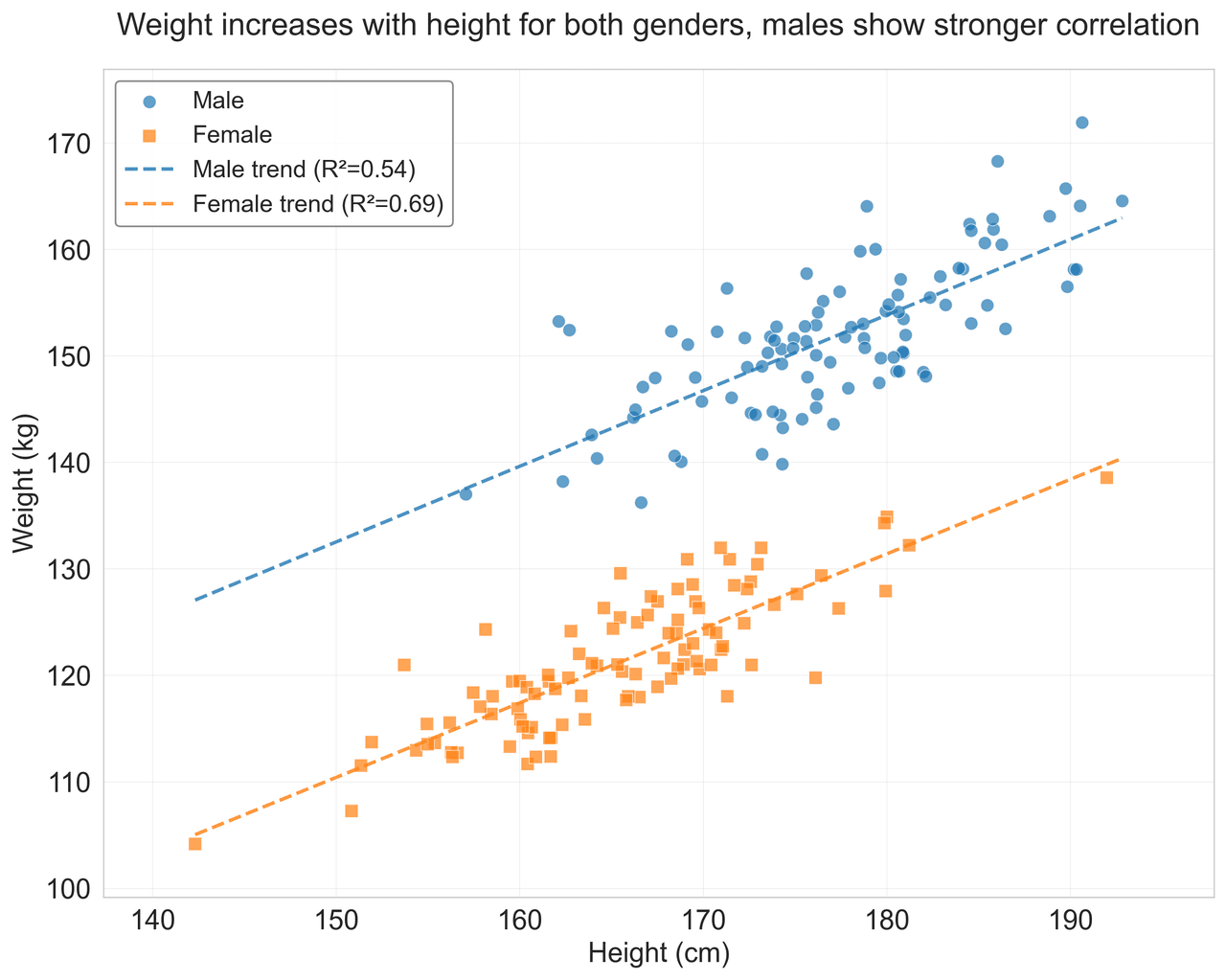
Scatter plot of height vs weight colored by gender with regression line
Statistical•matplotlib, seaborn
From the chart gallery•Correlation analysis between metrics

Scatterplot

A scatter plot displays two quantitative variables as points, helping you examine relationships, clusters, outliers, and regression trends.

Sample code / prompt

import matplotlib.pyplot as plt
import numpy as np
from scipy import stats
import pandas as pd

# Generate sample data
np.random.seed(42)
n_samples = 200
height = np.random.normal(170, 8, n_samples)
weight = height * 0.6 + np.random.normal(0, 8, n_samples) - 50
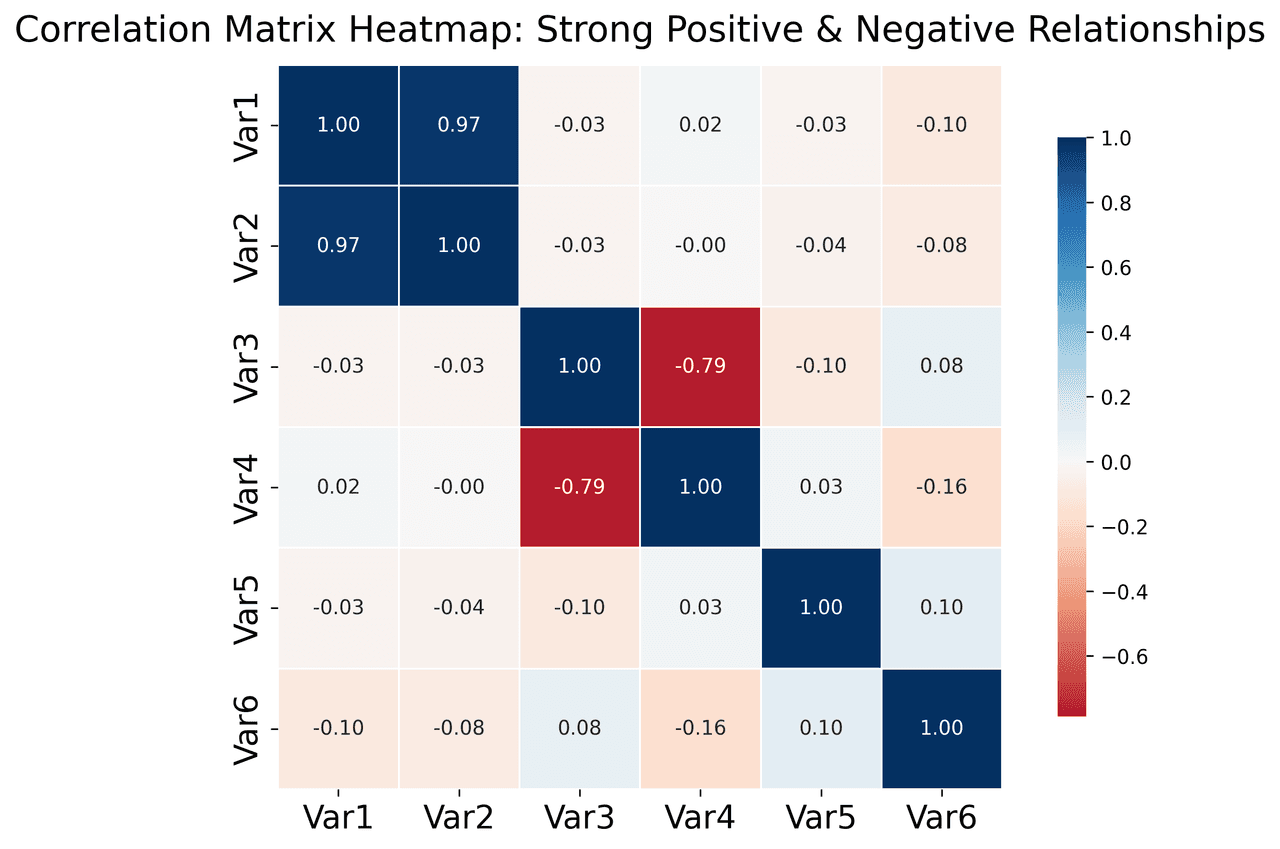
Correlation heatmap with diverging color scale and coefficient annotations
Statistical•seaborn, matplotlib
From the chart gallery•Correlation analysis between variables

Heatmap

Represents data values as colors in a two-dimensional matrix format.

Sample code / prompt

import matplotlib.pyplot as plt
import seaborn as sns
import pandas as pd
import numpy as np

# Create correlation matrix for financial metrics
metrics = ['Revenue', 'Profit', 'Expenses', 'ROI', 'Customers', 'AOV', 'Marketing', 'Employees']
correlation_data = np.array([
    [1.00, 0.85, -0.45, 0.72, 0.88, 0.65, 0.72, 0.55],
    [0.85, 1.00, -0.78, 0.92, 0.75, 0.58, 0.63, 0.48],
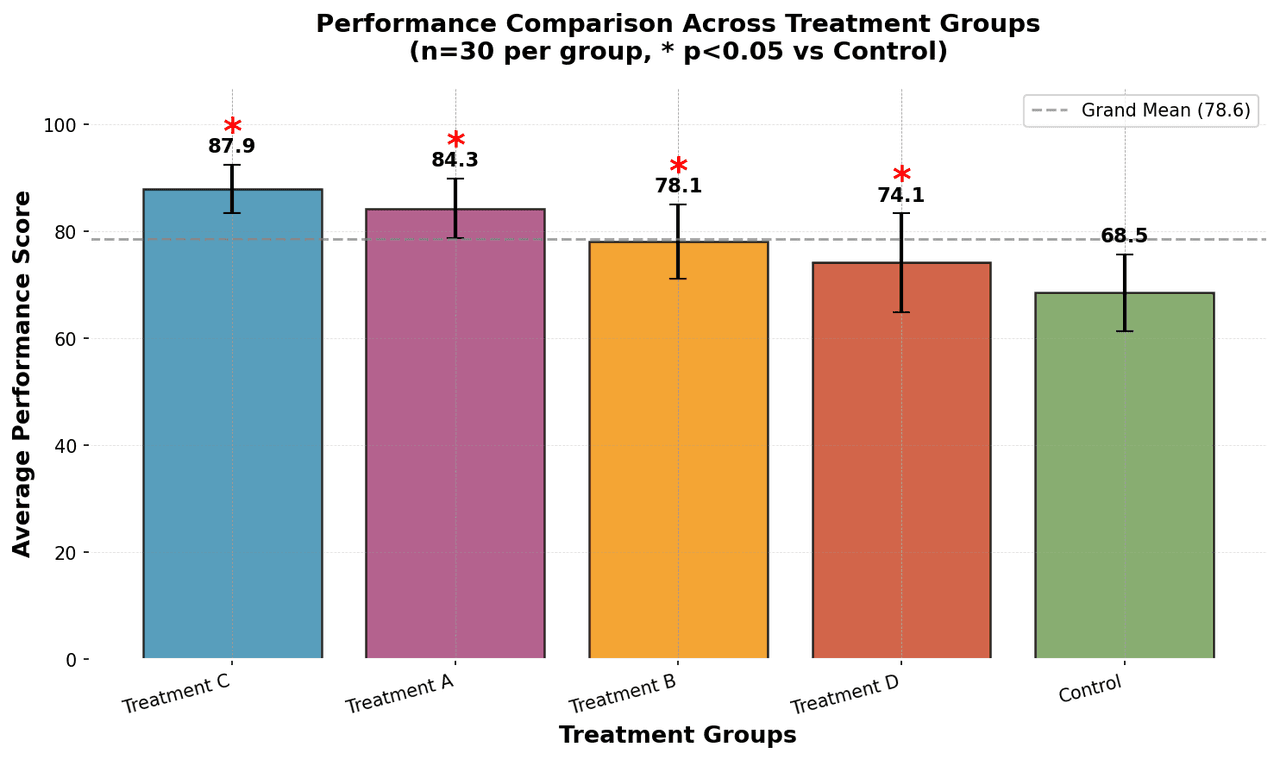
Bar chart comparing average scores across 5 groups with error bars
Comparison•matplotlib, seaborn
From the chart gallery•Comparing performance across categories

Bar Chart

Create a bar chart in Python to compare categorical values with proportional bars, error bars, clear labels, and grouped comparisons.

Sample code / prompt

import numpy as np
import pandas as pd
import matplotlib.pyplot as plt
import seaborn as sns
from scipy import stats

# Generate performance scores for 5 treatment groups
np.random.seed(42)
groups = ['Control', 'Treatment A', 'Treatment B', 'Treatment C', 'Treatment D']
n_samples = 30

Ready to Plot Your Materials Data?

Upload stress-strain, XRD, DSC, or SEM data. Plotivy extracts mechanical properties, identifies phases, and creates publication-ready figures automatically.

Start Free - No Sign-Up