Donut Chart
Chart overview
Donut charts are pie charts with a hollow center, which can display summary statistics or labels.
Key points
- The ring format emphasizes the proportions between segments while providing space for central annotations like totals or key metrics.
- Perception research (Cleveland & McGill's graphical-perception experiments) shows readers judge angles and areas less accurately than lengths, so donut charts work best when the message is a single dominant share — one segment near 50% or 75% — rather than precise comparisons between many similar segments.
- If your audience needs to rank five segments within a few percentage points of each other, a sorted horizontal bar chart communicates the same data with less error.
Practical guidance
In matplotlib a donut is a pie with wedgeprops=dict(width=0. 4); in Plotly set hole=0. 4 on go. Pie. Keep the hole between 0. 3 and 0. 5: larger holes leave too little arc to read, smaller ones just look like a pie. For publications, avoid 3D effects and exploded wedges beyond a single highlight, and check your palette against color-vision-deficiency simulators since adjacent wedges touch directly.
Create a Donut Chart with your data using AI — no coding required.
Further reading
How to Create a Bar Chart in Python
Matplotlib, seaborn, and plotly patterns for grouped bars, error bars, and publication-ready labels.
Read the guideExample Visualization
Create This Chart Now
Generate publication-ready donut charts with AI in seconds. No coding required – just describe your data and let AI do the work.
View example prompt
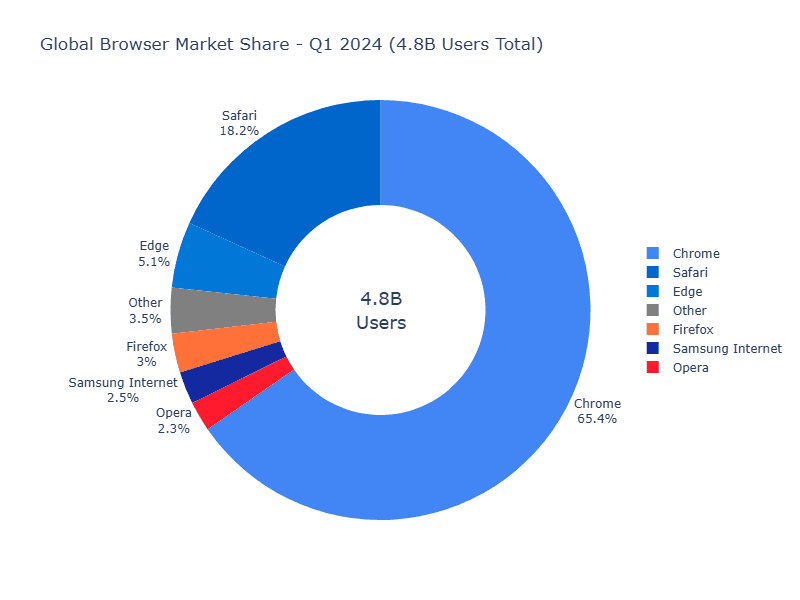
"Create an interactive donut chart showing 'Global Browser Market Share' for 2024. Generate realistic data: Chrome (65.4%), Safari (18.2%), Edge (5.1%), Firefox (3.0%), Samsung Internet (2.5%), Opera (2.3%), Other (3.5%). Use distinct brand colors: Chrome (green/red/yellow), Safari (blue), Edge (blue-green), Firefox (orange), others (grays). Display percentage labels on each segment (only for segments >3%). Add a center annotation showing 'Total: 4.8B Users' and the leading browser's logo/name. Include hover tooltips with exact user counts. Slight separation (explode) for the largest segment. Add a legend on the right. Title: 'Browser Market Share - Q1 2024'. Animate on load with a spin-in effect."
How to create this chart with your data
Upload Data
Upload your Excel or CSV file. Data used to generate charts is sent to Plotivy's server for processing.
AI Generation
Our AI analyzes your data and generates the Donut Chart code automatically.
Customize & Export
Tweak the design with natural language, then export as high-res PNG, SVG or PDF.
Newsletter
Get one weekly tip for better donut charts
Join researchers receiving concise Python plotting techniques to improve chart clarity and reduce revision cycles.
Python Code Example
# === IMPORTS ===
import pandas as pd
import numpy as np
import plotly.express as px

# === USER-EDITABLE PARAMETERS ===
title = "Global Browser Market Share - Q1 2024 (4.8B Users Total)"
figsize_width = 800
figsize_height = 600

# === EXAMPLE DATASET ===
data = {
    'Browser': ['Chrome', 'Safari', 'Edge', 'Firefox', 'Samsung Internet', 'Opera', 'Other'],
    'Market_Share': [65.4, 18.2, 5.1, 3.0, 2.5, 2.3, 3.5],
    'Users_M': [3139, 874, 245, 144, 120, 110, 168]  # Users in millions
}

# Brand colors
colors = {
    'Chrome': '#4285F4',
    'Safari': '#0066CC',
    'Edge': '#0078D7',
    'Firefox': '#FF7139',
    'Samsung Internet': '#1428A0',
    'Opera': '#FF1B2D',
    'Other': '#808080'
}

df = pd.DataFrame(data)
df['Color'] = df['Browser'].map(colors)

# Print summary
print("=== Browser Market Share Summary ===")
print(f"\nTotal Users: {df['Users_M'].sum():,}M")
print(f"\nMarket Share by Browser:")
for _, row in df.iterrows():
    print(f"  {row['Browser']}: {row['Market_Share']:.1f}% ({row['Users_M']:,}M users)")

# === CREATE DONUT CHART ===
fig = px.pie(
    df,
    values='Market_Share',
    names='Browser',
    title=title,
    hole=0.5,
    color='Browser',
    color_discrete_map=colors
)

fig.update_traces(
    textposition='outside',
    textinfo='label+percent',
    hovertemplate='<b>%{label}</b><br>%{value:.1f}%<br>~%{customdata[0]:,}M users<extra></extra>',
    customdata=df[['Users_M']].values
)

fig.update_layout(
    width=figsize_width,
    height=figsize_height,
    annotations=[
        dict(text='4.8B<br>Users', x=0.5, y=0.5, font_size=18, showarrow=False)
    ],
    showlegend=True,
    legend=dict(orientation='v', yanchor='middle', y=0.5, xanchor='left', x=1.02)
)

fig.show()
# END-OF-CODE
Opens the Analyze page with this code pre-loaded and ready to execute
Console Output
Leading Browser: Chrome (65.4%)
Total Users: 4.8 billion
Top 3 Combined: 88.7%
Common Use Cases
- 1Market share display
- 2Budget allocation
- 3Survey responses
- 4Portfolio composition
Pro Tips
Limit the chart to 5-7 segments so the proportions remain easy to scan
Use the center for a total, label, or key metric that supports the main message
Sort segments by size when the category order does not carry meaning
Start the largest segment at 12 o'clock (startangle=90) so it reads first
Aggregate small categories into an 'Other' segment instead of showing slivers
Prefer a sorted bar chart when segments differ by only a few percent
Frequently asked questions
When should you use a donut chart?
Donut charts are pie charts with a hollow center, which can display summary statistics or labels. The ring format emphasizes the proportions between segments while providing space for central annotations like totals or key metrics. Common applications include market share display, budget allocation, and survey responses.
Which Python libraries can create a donut chart?
A donut chart can be built in Python with matplotlib and plotly — matplotlib for precise control over axes, annotations, and journal styling and Plotly for interactive hover, zoom, and web sharing. In Plotivy you describe the figure and it writes the matplotlib code for you.
Can I make a donut chart without writing Python code?
Yes. Describe the donut chart you need in plain language and upload your dataset — Plotivy's AI writes the Python code and renders a publication-ready figure. You still get the full, editable matplotlib source, so nothing is locked in a black box.
What are best practices for a clear donut chart?
Limit the chart to 5-7 segments so the proportions remain easy to scan. Use the center for a total, label, or key metric that supports the main message.
Library comparison for this chart
matplotlib
Best when you need full control over axis formatting, annotation placement, and journal-specific styling for donut-chart.
plotly
Best for interactive hover, zoom, and web sharing when collaborators need to inspect values directly from donut-chart figures.
Scientific Chart Selection Cheat Sheet
Not sure whether to use a Violin Plot, Box Plot, or Ridge Plot? Download our single-page reference mapping the most-used scientific chart types, exactly when to use them, and the core Matplotlib/Seaborn functions.