Illustration Diagram
Chart overview
Illustration diagrams use basic shapes, lines, and text to create custom visualizations that explain concepts or structures.
Key points
- They are particularly valuable in education and science communication where standard chart types don't capture the subject matter — an experimental apparatus, a signalling pathway, a device cross-section, or the geometry behind an equation.
- Unlike a bar or scatter plot, there is no data-to-ink mapping to get right; the goal is a clear, labelled schematic.
- matplotlib is a surprisingly capable diagramming tool for this: patches (Rectangle, Circle, FancyArrow, FancyBboxPatch), annotate() with arrowprops for callouts, and ax.
Practical guidance
set_aspect('equal') to keep proportions honest all compose into reproducible figures that live in the same script as your data plots. That reproducibility is the real advantage over drawing in PowerPoint or Illustrator — the figure regenerates identically and version-controls cleanly. Keep a consistent visual language (one arrow style for flow, one for causation), label every element directly rather than in a separate key where possible, and export to SVG or PDF so the vector shapes stay crisp at any print size. For very complex node-and-edge structures, reach for a dedicated graph layout (networkx or graphviz) instead of hand-placing every shape.
Create a Illustration Diagram with your data using AI — no coding required.
Further reading
Complete Guide to Scientific Data Visualization
Chart selection, figure design, and publication-ready workflows for scientific teams.
Read the guideExample Visualization
Create This Chart Now
Generate publication-ready illustration diagrams with AI in seconds. No coding required – just describe your data and let AI do the work.
View example prompt
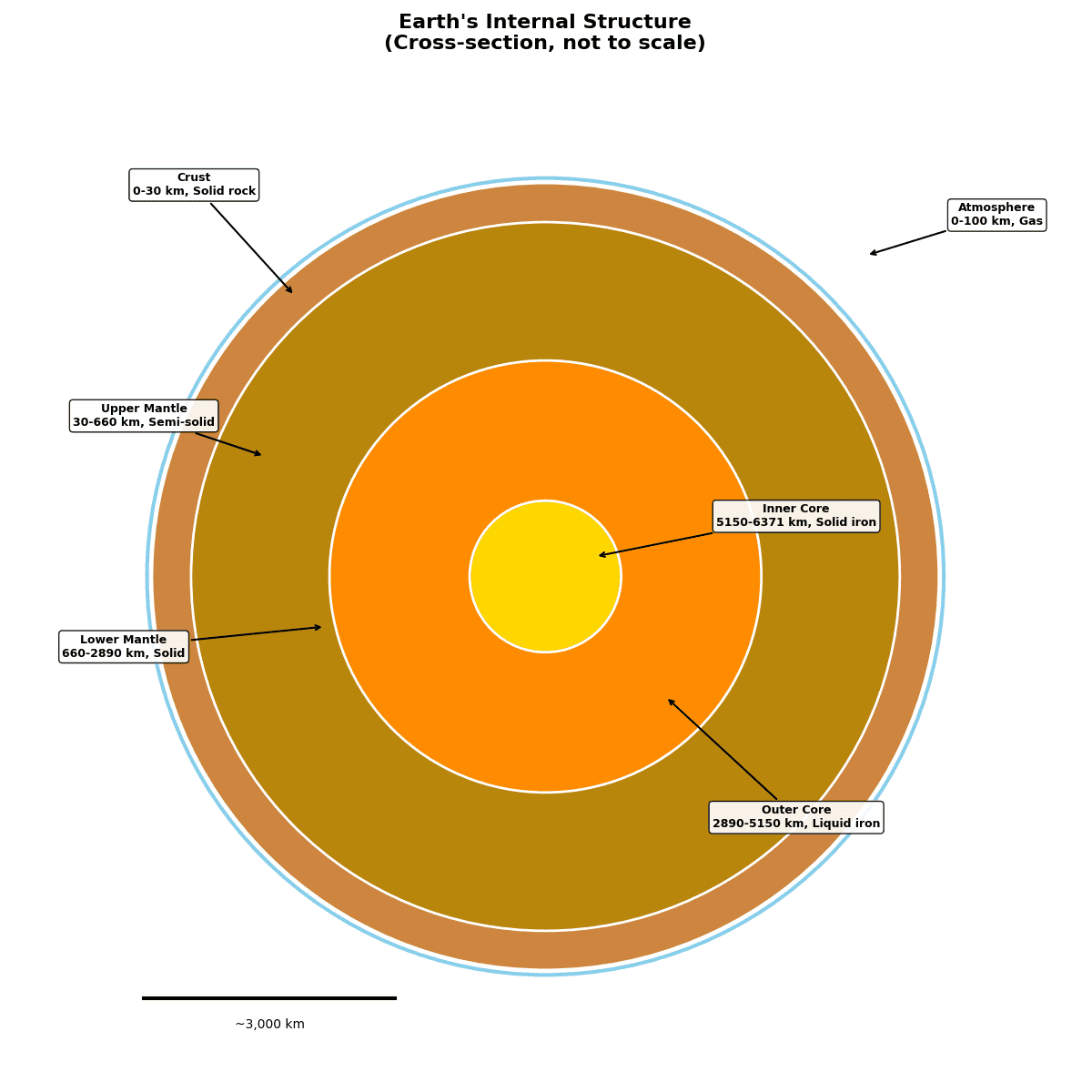
"Create a cross-sectional illustration diagram showing 'Earth's Internal Structure' with accurate proportions. Display 4 main layers as concentric circles: Inner Core (solid iron, radius 1,220 km, yellow/orange), Outer Core (liquid iron, to 3,400 km, orange/red), Mantle (silicate rock, to 2,900 km from surface, brown/tan gradient), Crust (5-70 km thick, gray). Add callout lines with labels for each layer including: composition, state (solid/liquid), temperature range, and approximate depth. Include a scale bar showing depths in km. Add the atmosphere as a thin blue rim. Mark the Moho discontinuity and core-mantle boundary. Use realistic Earth colors. Title: 'Internal Structure of Earth (Not to Scale)'."
How to create this chart with your data
Upload Data
Upload your Excel or CSV file. Data used to generate charts is sent to Plotivy's server for processing.
AI Generation
Our AI analyzes your data and generates the Illustration Diagram code automatically.
Customize & Export
Tweak the design with natural language, then export as high-res PNG, SVG or PDF.
Newsletter
Get one weekly tip for better illustration diagrams
Join researchers receiving concise Python plotting techniques to improve chart clarity and reduce revision cycles.
Python Code Example
# === IMPORTS ===
import pandas as pd
import numpy as np
import matplotlib.pyplot as plt

# === USER-EDITABLE PARAMETERS ===
title = "Earth's Internal Structure"
figsize = (12, 12)

# === LAYER DATA ===
# Layer: (name, outer_radius_km, inner_radius_km, color, properties)
layers = [
    ('Atmosphere', 6471, 6371, '#87CEEB', '0-100 km, Gas'),
    ('Crust', 6371, 6341, '#8B4513', '0-30 km, Solid rock'),
    ('Upper Mantle', 6341, 5711, '#CD853F', '30-660 km, Semi-solid'),
    ('Lower Mantle', 5711, 3481, '#B8860B', '660-2890 km, Solid'),
    ('Outer Core', 3481, 1221, '#FF8C00', '2890-5150 km, Liquid iron'),
    ('Inner Core', 1221, 0, '#FFD700', '5150-6371 km, Solid iron'),
]

# Print summary
print("=== Earth's Internal Structure ===")
print(f"\nTotal Earth Radius: 6,371 km")
print(f"\nLayer Details:")
for name, outer, inner, color, props in layers:
    thickness = outer - inner
    print(f"  {name}: {props} (thickness: {thickness} km)")

# === CREATE ILLUSTRATION ===
fig, ax = plt.subplots(figsize=figsize)

# Draw layers from outside to inside
for name, outer_r, inner_r, color, props in layers:
    # Normalize to plot coordinates (max radius = 1)
    outer_norm = outer_r / 6471
    circle = plt.Circle((0.5, 0.5), outer_norm * 0.4,
                         facecolor=color, edgecolor='white', linewidth=2)
    ax.add_patch(circle)

# Add labels with callouts
label_positions = [
    ('Atmosphere', 0.95, 0.85, 0.82, 0.82),
    ('Crust', 0.15, 0.88, 0.25, 0.78),
    ('Upper Mantle', 0.1, 0.65, 0.22, 0.62),
    ('Lower Mantle', 0.08, 0.42, 0.28, 0.45),
    ('Outer Core', 0.75, 0.25, 0.62, 0.38),
    ('Inner Core', 0.75, 0.55, 0.55, 0.52),
]

for name, lx, ly, px, py in label_positions:
    # Find layer info
    layer_info = next((l for l in layers if l[0] == name), None)
    if layer_info:
        ax.annotate(
            f'{name}\n{layer_info[4]}',
            xy=(px, py),
            xytext=(lx, ly),
            fontsize=9,
            fontweight='bold',
            ha='center',
            bbox=dict(boxstyle='round,pad=0.3', facecolor='white', alpha=0.9),
            arrowprops=dict(arrowstyle='->', color='black', lw=1.5)
        )

# Add scale bar
ax.plot([0.1, 0.35], [0.08, 0.08], 'k-', linewidth=3)
ax.text(0.225, 0.05, '~3,000 km', ha='center', fontsize=10)

# Title and labels
ax.set_title(title + '\n(Cross-section, not to scale)', fontsize=16, fontweight='bold', pad=20)

# Remove axes
ax.set_xlim(0, 1)
ax.set_ylim(0, 1)
ax.set_aspect('equal')
ax.axis('off')

plt.tight_layout()
plt.show()
# END-OF-CODE
Opens the Analyze page with this code pre-loaded and ready to execute
Console Output
=== Earth's Internal Structure ===

Total Earth Radius: 6,371 km

Layer Details:
  Atmosphere: 0-100 km, Gas (thickness: 100 km)
  Crust: 0-30 km, Solid rock (thickness: 30 km)
  Upper Mantle: 30-660 km, Semi-solid (thickness: 630 km)
  Lower Mantle: 660-2890 km, Solid (thickness: 2230 km)
  Outer Core: 2890-5150 km, Liquid iron (thickness: 2260 km)
  Inner Core: 5150-6371 km, Solid iron (thickness: 1221 km)
Common Use Cases
- 1Educational content
- 2Scientific explanations
- 3Concept visualization
- 4Technical documentation
Pro Tips
Use consistent visual language
Add clear labels and legends
Maintain proper proportions
Frequently asked questions
When should you use an illustration diagram?
Illustration diagrams use basic shapes, lines, and text to create custom visualizations that explain concepts or structures. They are particularly valuable in education and science communication where standard chart types don't capture the subject matter — an experimental apparatus, a signalling pathway, a device cross-section, or the geometry behind an equation. Common applications include educational content, scientific explanations, and concept visualization.
Which Python libraries can create an illustration diagram?
An illustration diagram can be built in Python with matplotlib — matplotlib for precise control over axes, annotations, and journal styling. In Plotivy you describe the figure and it writes the matplotlib code for you.
Can I make an illustration diagram without writing Python code?
Yes. Describe the illustration diagram you need in plain language and upload your dataset — Plotivy's AI writes the Python code and renders a publication-ready figure. You still get the full, editable matplotlib source, so nothing is locked in a black box.
What are best practices for a clear illustration diagram?
Use consistent visual language. Add clear labels and legends.
Library comparison for this chart
matplotlib
Best when you need full control over axis formatting, annotation placement, and journal-specific styling for illustration-diagram.
Scientific Chart Selection Cheat Sheet
Not sure whether to use a Violin Plot, Box Plot, or Ridge Plot? Download our single-page reference mapping the most-used scientific chart types, exactly when to use them, and the core Matplotlib/Seaborn functions.