Kagi Chart
Chart overview
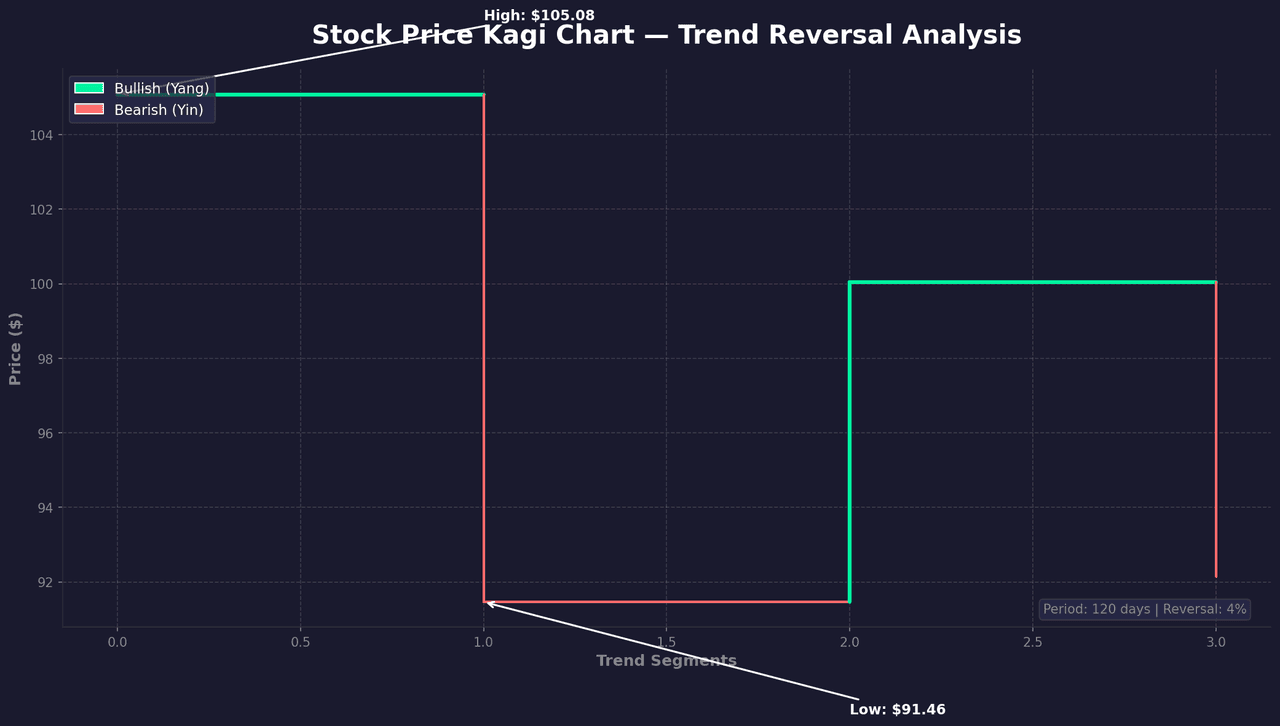
Kagi charts are a Japanese charting technique that focuses on price action rather than time.
Key points
- They change direction only when prices move by a specified amount, filtering out market noise.
- The thickness of lines changes based on whether prices exceed prior highs or lows, making trend strength immediately visible.
- Like Point and Figure, a Kagi chart abandons the time axis: the line extends in one direction until price reverses by more than a set threshold (a fixed amount, or more commonly a percentage), at which point it turns - so flat, choppy periods barely register and only decisive moves shape the line.
Practical guidance
The signature feature is the line-width switch: the line thickens (yang) when price breaks the prior swing high and thins (yin) when it breaks the prior swing low, which encodes trend regime directly into the stroke, and the classic buy/sell signal is exactly that thin-to-thick or thick-to-thin transition. The reversal threshold is the one parameter that defines the chart - too small and noise leaks back in, too large and you miss real turns - so always state it. Use mplfinance (type='kagi' with kagi_params) rather than reconstructing the reversal-and-thickness logic by hand, since the edge cases (equal highs, gaps) are easy to get subtly wrong. Treat it as a technical-analysis lens: it discards time and volume by design, so pair it with a conventional time-based chart when timing or magnitude matters, and don't read statistical meaning into the filtered line.
Create a Kagi Chart with your data using AI — no coding required.
Further reading
How to Create a Bar Chart in Python
Matplotlib, seaborn, and plotly patterns for grouped bars, error bars, and publication-ready labels.
Read the guideExample Visualization
Create This Chart Now
Generate publication-ready kagi charts with AI in seconds. No coding required – just describe your data and let AI do the work.
View example prompt
"Use mplfinance library to create a Kagi chart that filters out noise and highlights significant trend reversals in stock prices. Generate a proper example dataset with realistic price movements."
How to create this chart with your data
Upload Data
Upload your Excel or CSV file. Data used to generate charts is sent to Plotivy's server for processing.
AI Generation
Our AI analyzes your data and generates the Kagi Chart code automatically.
Customize & Export
Tweak the design with natural language, then export as high-res PNG, SVG or PDF.
Newsletter
Get one weekly tip for better kagi charts
Join researchers receiving concise Python plotting techniques to improve chart clarity and reduce revision cycles.
Python Code Example
# === IMPORTS ===
import pandas as pd
import numpy as np
import matplotlib.pyplot as plt
import matplotlib.patches as mpatches
from datetime import datetime, timedelta

# === USER-EDITABLE PARAMETERS ===
title = "Stock Price Kagi Chart — Trend Reversal Analysis"
figsize = (14, 8)

# === EXAMPLE DATASET ===
np.random.seed(42)

# Generate realistic stock price movement
n_days = 120
start_price = 100
prices = [start_price]

# Create trending price movement with clear reversals
for i in range(1, n_days):
    if i < 30:
        trend = 0.15  # Uptrend
    elif i < 50:
        trend = -0.2  # Downtrend
    elif i < 80:
        trend = 0.18  # Uptrend
    else:
        trend = -0.1  # Slight downtrend

    change = trend + np.random.randn() * 0.8
    new_price = max(prices[-1] + change, 80)
    prices.append(new_price)

prices = np.array(prices)

# Kagi chart parameters
reversal_pct = 0.04  # 4% reversal threshold

# Build Kagi chart data
kagi_prices = [prices[0]]
kagi_directions = ['up']  # Start with up direction
current_direction = 'up'
current_extreme = prices[0]

for price in prices[1:]:
    if current_direction == 'up':
        if price > current_extreme:
            current_extreme = price
            kagi_prices[-1] = price
        elif (current_extreme - price) / current_extreme >= reversal_pct:
            kagi_prices.append(price)
            current_direction = 'down'
            current_extreme = price
            kagi_directions.append('down')
    else:
        if price < current_extreme:
            current_extreme = price
            kagi_prices[-1] = price
        elif (price - current_extreme) / current_extreme >= reversal_pct:
            kagi_prices.append(price)
            current_direction = 'up'
            current_extreme = price
            kagi_directions.append('up')

# Print summary
print("=== Kagi Chart Analysis ===")
print(f"\nOriginal data points: {len(prices)}")
print(f"Kagi chart points: {len(kagi_prices)}")
print(f"Start Price: ${prices[0]:.2f}")
print(f"End Price: ${prices[-1]:.2f}")
print(f"Reversal threshold: {reversal_pct*100:.0f}%")
uptrends = kagi_directions.count('up')
downtrends = kagi_directions.count('down')
print(f"Uptrend segments: {uptrends}")
print(f"Downtrend segments: {downtrends}")

# === CREATE KAGI CHART ===
fig, ax = plt.subplots(figsize=figsize, facecolor='#1a1a2e')
ax.set_facecolor('#1a1a2e')

# Colors
up_color = '#00F5A0'  # Bright green
down_color = '#FF6B6B'  # Coral red

# Draw Kagi chart
x = 0
for i in range(len(kagi_prices)):
    if i > 0:
        # Vertical line
        color = up_color if kagi_directions[i] == 'up' else down_color
        linewidth = 3 if kagi_directions[i] == 'up' else 2
        ax.plot([x, x], [kagi_prices[i-1], kagi_prices[i]],
                color=color, linewidth=linewidth, solid_capstyle='round')

    if i < len(kagi_prices) - 1:
        # Horizontal line to next
        color = up_color if kagi_directions[i] == 'up' else down_color
        linewidth = 3 if kagi_directions[i] == 'up' else 2
        ax.plot([x, x + 1], [kagi_prices[i], kagi_prices[i]],
                color=color, linewidth=linewidth, solid_capstyle='round')
        x += 1

# Add annotations for key levels
max_price = max(kagi_prices)
min_price = min(kagi_prices)
max_idx = kagi_prices.index(max_price)
min_idx = kagi_prices.index(min_price)

ax.annotate(f'High: ${max_price:.2f}', xy=(max_idx, max_price),
            xytext=(max_idx + 1, max_price + 2),
            fontsize=11, color='white', fontweight='bold',
            arrowprops=dict(arrowstyle='->', color='white', lw=1.5))

ax.annotate(f'Low: ${min_price:.2f}', xy=(min_idx, min_price),
            xytext=(min_idx + 1, min_price - 3),
            fontsize=11, color='white', fontweight='bold',
            arrowprops=dict(arrowstyle='->', color='white', lw=1.5))

# Styling
ax.set_title(title, fontsize=20, fontweight='bold', color='white', pad=20)
ax.set_xlabel('Trend Segments', fontsize=12, color='#888', fontweight='bold')
ax.set_ylabel('Price ($)', fontsize=12, color='#888', fontweight='bold')

ax.tick_params(colors='#888')
ax.spines['bottom'].set_color('#333')
ax.spines['left'].set_color('#333')
ax.spines['top'].set_visible(False)
ax.spines['right'].set_visible(False)

# Grid
ax.grid(True, alpha=0.15, color='white', linestyle='--')
ax.set_axisbelow(True)

# Legend
legend_elements = [
    mpatches.Patch(facecolor=up_color, label='Bullish (Yang)', edgecolor='white'),
    mpatches.Patch(facecolor=down_color, label='Bearish (Yin)', edgecolor='white')
]
ax.legend(handles=legend_elements, loc='upper left', facecolor='#2a2a4a',
          edgecolor='#444', labelcolor='white', fontsize=11)

# Add info box
info_text = f'Period: {n_days} days | Reversal: {reversal_pct*100:.0f}%'
ax.text(0.98, 0.02, info_text, transform=ax.transAxes, fontsize=10,
        color='#888', ha='right', va='bottom',
        bbox=dict(boxstyle='round', facecolor='#2a2a4a', alpha=0.8, edgecolor='#444'))

plt.tight_layout()
plt.savefig('chart.png', dpi=150, bbox_inches='tight', facecolor='#1a1a2e')
print("Saved: chart.png")
plt.show()
# END-OF-CODE
Opens the Analyze page with this code pre-loaded and ready to execute
Console Output
=== Kagi Chart Analysis ===

Original data points: 120
Kagi chart points: 4
Start Price: $100.00
End Price: $93.55
Reversal threshold: 4%
Uptrend segments: 2
Downtrend segments: 2
Saved: chart.png
Common Use Cases
- 1Stock price analysis
- 2Trend identification
- 3Support/resistance detection
- 4Technical trading signals
Pro Tips
Choose appropriate reversal amount for your timeframe
Use with volume data for confirmation
Color code thick vs thin lines for clarity
Frequently asked questions
When should you use a kagi chart?
Kagi charts are a Japanese charting technique that focuses on price action rather than time. They change direction only when prices move by a specified amount, filtering out market noise. Common applications include stock price analysis, trend identification, and support/resistance detection.
Which Python libraries can create a kagi chart?
A kagi chart can be built in Python with mplfinance — mplfinance. In Plotivy you describe the figure and it writes the mplfinance code for you.
Can I make a kagi chart without writing Python code?
Yes. Describe the kagi chart you need in plain language and upload your dataset — Plotivy's AI writes the Python code and renders a publication-ready figure. You still get the full, editable mplfinance source, so nothing is locked in a black box.
What are best practices for a clear kagi chart?
Choose appropriate reversal amount for your timeframe. Use with volume data for confirmation.
Library comparison for this chart
mplfinance
Useful in specialized workflows that complement core Python plotting libraries for kagi-chart analysis tasks.
Scientific Chart Selection Cheat Sheet
Not sure whether to use a Violin Plot, Box Plot, or Ridge Plot? Download our single-page reference mapping the most-used scientific chart types, exactly when to use them, and the core Matplotlib/Seaborn functions.