Pair Plot
Chart overview
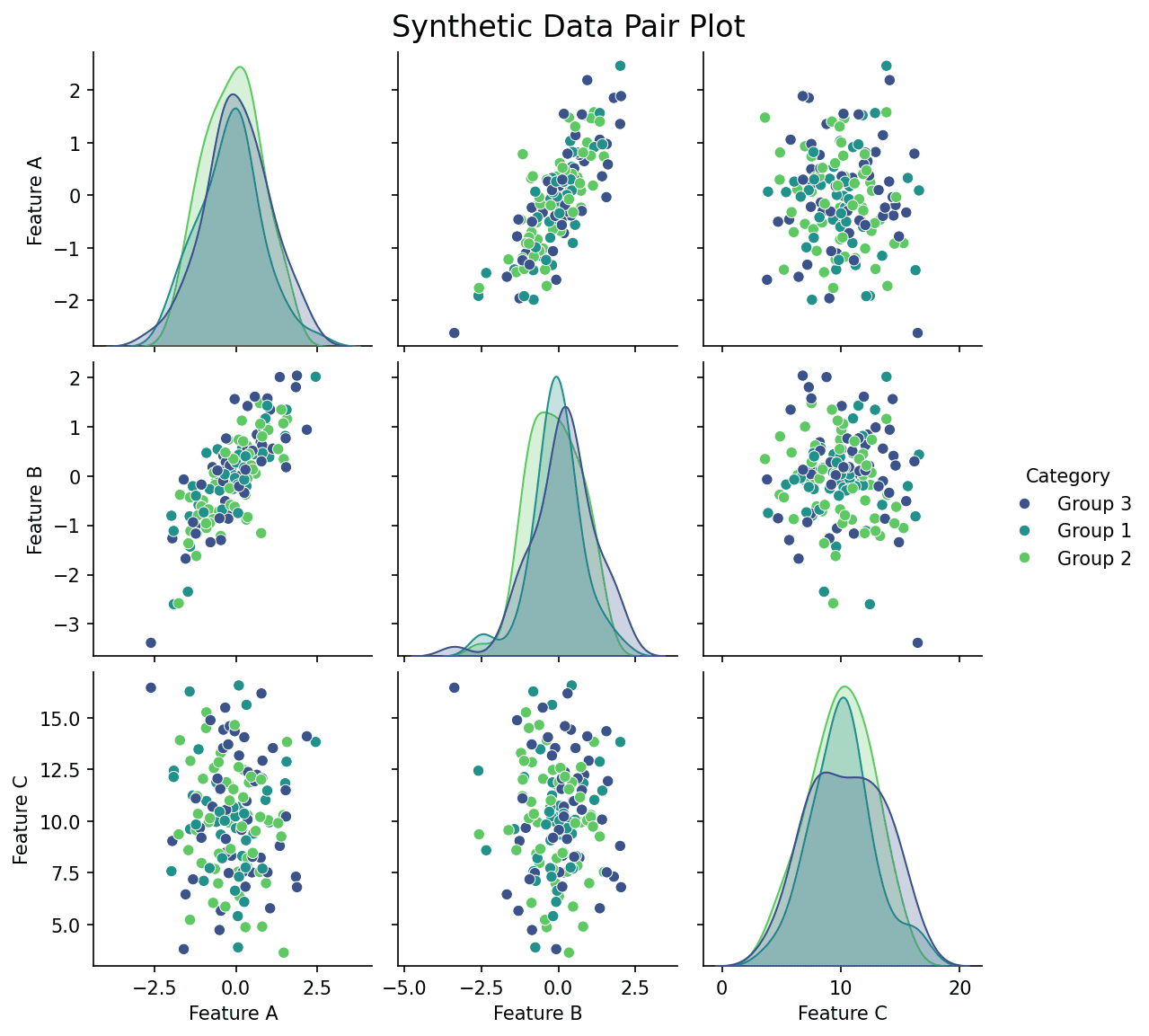
A Pair Plot (or Scatterplot Matrix) allows you to visualize pairwise relationships in a dataset.
Key points
- It creates a grid of axes such that each numeric variable in data is shared across rows and columns.
- The diagonal axes typically show the univariate distribution (histogram or KDE) of the data for that variable.
- seaborn's pairplot(df, hue='group') is the one-liner: it colors every panel by a grouping column and overlays per-group densities on the diagonal, often the fastest way to spot which variable pair separates experimental groups.
Practical guidance
Use corner=True to drop the redundant upper triangle, and pass plot_kws with alpha around 0. 4 and a small marker size the moment you exceed a few hundred points. Practical limits: beyond about 8 variables the panels become unreadable thumbnails, so subset to the variables you actually care about; a correlation heatmap scales better when you only need strength of association, and seaborn's PairGrid gives full control when you want different plots above and below the diagonal (scatter below, 2D KDE above). Pair plots show only bivariate structure - a clean pairwise picture can still hide three-variable interactions, so treat them as a screening step before modeling, not a conclusion.
Create a Pair Plot with your data using AI — no coding required.
Further reading
Python Scatter Plot Tutorial
Build scatter plots with regression overlays, color encodings, and uncertainty bars.
Read the guideExample Visualization
Create This Chart Now
Generate publication-ready pair plots with AI in seconds. No coding required – just describe your data and let AI do the work.
View example prompt
"Create a pair plot (scatterplot matrix) for the numerical columns in the dataset. Color the points by a categorical variable if available ('species', 'category', etc.). On the diagonal, show the distribution (KDE or histogram) of each variable. Use a clean style."
How to create this chart with your data
Upload Data
Upload your Excel or CSV file. Data used to generate charts is sent to Plotivy's server for processing.
AI Generation
Our AI analyzes your data and generates the Pair Plot code automatically.
Customize & Export
Tweak the design with natural language, then export as high-res PNG, SVG or PDF.
Newsletter
Get one weekly tip for better pair plots
Join researchers receiving concise Python plotting techniques to improve chart clarity and reduce revision cycles.
Python Code Example
Console Output
Grid of scatter plots showing relationships between Feature A, Feature B, and Feature C.
Common Use Cases
- 1Exploratory Data Analysis (EDA)
- 2Identifying patterns between multiple variables
- 3Detecting clusters
Pro Tips
Use Seaborn's hue parameter to compare categories across every panel
Limit the grid to the variables that answer your question so panels remain readable
Use corner=True to remove the redundant upper triangle in larger pair plots
Frequently asked questions
When should you use a pair plot?
A Pair Plot (or Scatterplot Matrix) allows you to visualize pairwise relationships in a dataset. It creates a grid of axes such that each numeric variable in data is shared across rows and columns. Common applications include exploratory Data Analysis (EDA), identifying patterns between multiple variables, and detecting clusters.
Which Python libraries can create a pair plot?
A pair plot can be built in Python with seaborn and matplotlib — seaborn for statistically-aware defaults on tidy data and matplotlib for precise control over axes, annotations, and journal styling. In Plotivy you describe the figure and it writes the seaborn code for you.
Can I make a pair plot without writing Python code?
Yes. Describe the pair plot you need in plain language and upload your dataset — Plotivy's AI writes the Python code and renders a publication-ready figure. You still get the full, editable seaborn source, so nothing is locked in a black box.
What are best practices for a clear pair plot?
Use Seaborn's hue parameter to compare categories across every panel. Limit the grid to the variables that answer your question so panels remain readable.
Library comparison for this chart
seaborn
Fastest path to statistically-aware defaults and tidy-data workflows, especially for grouped and distribution-focused pair-plot views.
matplotlib
Best when you need full control over axis formatting, annotation placement, and journal-specific styling for pair-plot.
Scientific Chart Selection Cheat Sheet
Not sure whether to use a Violin Plot, Box Plot, or Ridge Plot? Download our single-page reference mapping the most-used scientific chart types, exactly when to use them, and the core Matplotlib/Seaborn functions.