Q-Q Plot
Chart overview
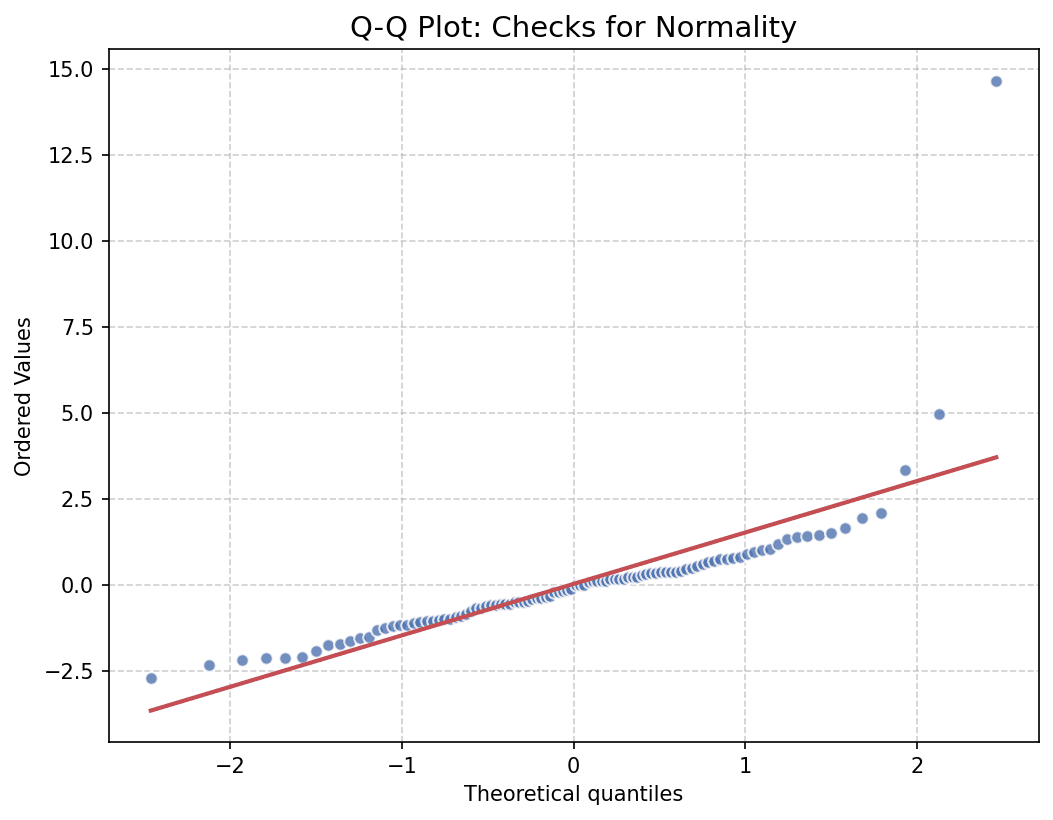
A Q-Q (Quantile-Quantile) Plot is a probability plot, which is a graphical method for comparing two probability distributions by plotting their quantiles against each other.
Key points
- It is primarily used to check if data follows a normal distribution.
- If the data is normally distributed, the points will fall approximately along a straight reference line.
- scipy.
Practical guidance
stats. probplot(data, dist='norm', plot=ax) is the standard recipe; statsmodels' qqplot(data, line='45', fit=True) adds standardized variants. Read the shape of the deviation, not just on/off the line: both ends curving away means heavy tails, an S-shape means skew, and steps or plateaus reveal rounded or discretized measurements. The extremes always wobble - tail quantiles have high variance even for truly normal samples - so judge the middle 90% more strictly than the last few points, or add a pointwise confidence envelope. For small n a Q-Q plot is far more informative than a normality-test p-value: Shapiro-Wilk passes almost anything at n=10 and flags trivial deviations at n=10,000. The same mechanics compare any two samples - plot the sorted quantiles of one condition against another to see exactly where two distributions diverge, which is often the real scientific question.
Create a Q-Q Plot with your data using AI — no coding required.
Further reading
Python Scatter Plot Tutorial
Build scatter plots with regression overlays, color encodings, and uncertainty bars.
Read the guideExample Visualization
Create This Chart Now
Generate publication-ready q-q plots with AI in seconds. No coding required – just describe your data and let AI do the work.
View example prompt
"Create a Q-Q plot to check if the 'Residuals' of my regression model follow a normal distribution. Generate synthetic residuals (n=100) that are mostly normal but with heavier tails (t-distribution). Plot observed quantiles vs theoretical normal quantiles. Add a red reference line (45 degrees). Title: 'Q-Q Plot of Regression Residuals'. Label axes 'Theoretical Quantiles' and 'Ordered Values'."
How to create this chart with your data
Upload Data
Upload your Excel or CSV file. Data used to generate charts is sent to Plotivy's server for processing.
AI Generation
Our AI analyzes your data and generates the Q-Q Plot code automatically.
Customize & Export
Tweak the design with natural language, then export as high-res PNG, SVG or PDF.
Newsletter
Get one weekly tip for better q-q plots
Join researchers receiving concise Python plotting techniques to improve chart clarity and reduce revision cycles.
Python Code Example
Console Output
Plot displayed. R-squared value typically shown in title or console.
Common Use Cases
- 1Testing for normality
- 2Comparing two distributions
- 3Identifying outliers
- 4Model residual analysis
Pro Tips
Compare the points with the reference line to assess approximate normality
Inspect the shape of deviations rather than treating every off-line point as a failed check
Examine extreme points carefully when checking tails or possible outliers
Frequently asked questions
When should you use a q-q plot?
A Q-Q (Quantile-Quantile) Plot is a probability plot, which is a graphical method for comparing two probability distributions by plotting their quantiles against each other. It is primarily used to check if data follows a normal distribution. Common applications include testing for normality, comparing two distributions, and identifying outliers.
Which Python libraries can create a q-q plot?
A q-q plot can be built in Python with scipy and matplotlib — scipy and matplotlib for precise control over axes, annotations, and journal styling. In Plotivy you describe the figure and it writes the scipy code for you.
Can I make a q-q plot without writing Python code?
Yes. Describe the q-q plot you need in plain language and upload your dataset — Plotivy's AI writes the Python code and renders a publication-ready figure. You still get the full, editable scipy source, so nothing is locked in a black box.
What are best practices for a clear q-q plot?
Compare the points with the reference line to assess approximate normality. Inspect the shape of deviations rather than treating every off-line point as a failed check.
Library comparison for this chart
scipy
Useful in specialized workflows that complement core Python plotting libraries for qq-plot analysis tasks.
matplotlib
Best when you need full control over axis formatting, annotation placement, and journal-specific styling for qq-plot.
Scientific Chart Selection Cheat Sheet
Not sure whether to use a Violin Plot, Box Plot, or Ridge Plot? Download our single-page reference mapping the most-used scientific chart types, exactly when to use them, and the core Matplotlib/Seaborn functions.