Scatter Matrix
Chart overview
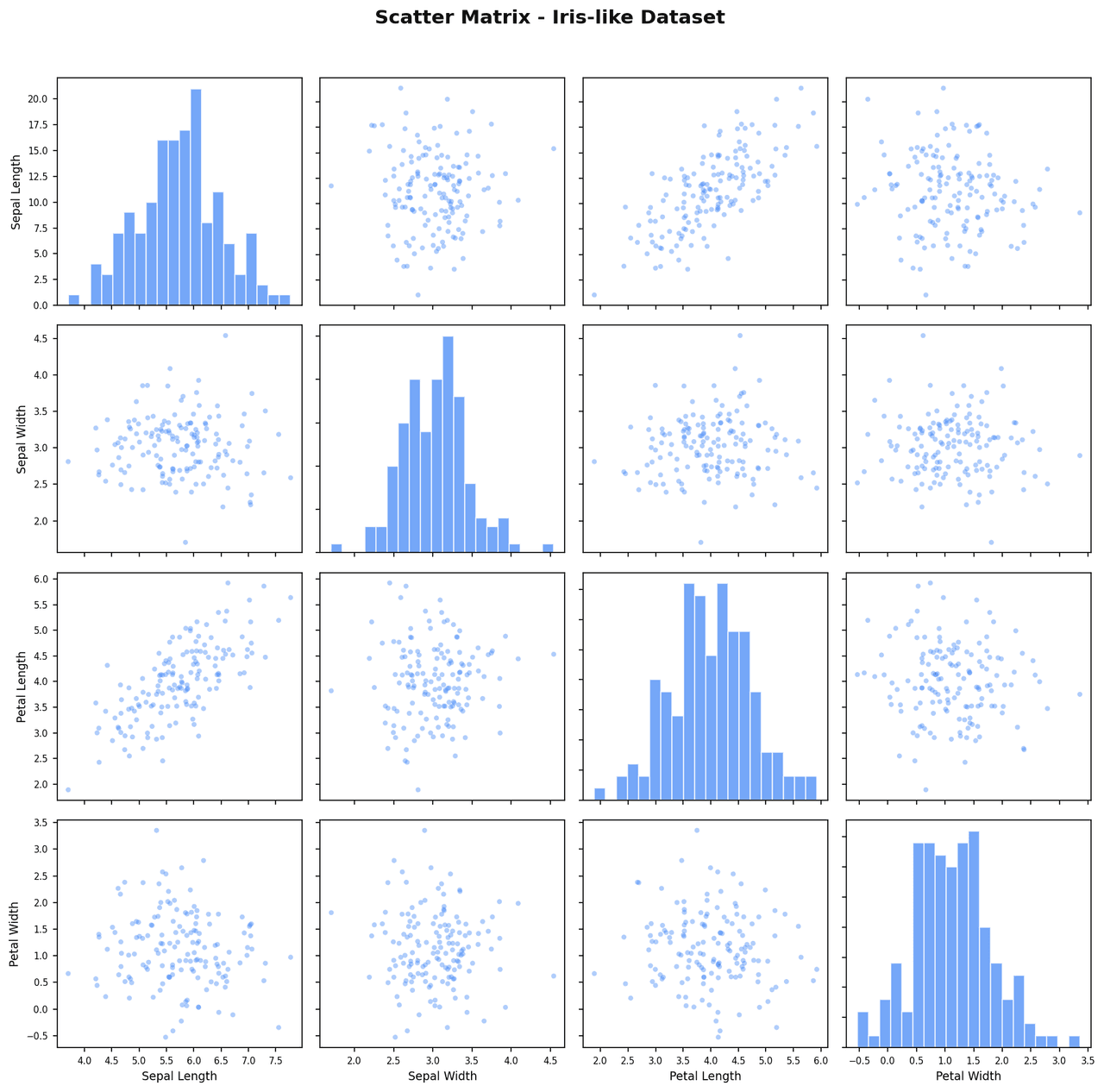
A scatter matrix (also called a pairs plot) arranges every combination of two variables from a multivariate dataset in a grid of scatter plots, placing univariate histograms or KDE curves on the diagonal.
Key points
- Scientists use it during exploratory data analysis to detect correlations, clusters, outliers, and non-linear relationships across all variable pairs simultaneously.
- It is an indispensable first step before fitting multivariate statistical models.
- Its unique value over a correlation heatmap is showing the shape of each relationship, not just its strength - a curved trend, a single high-leverage outlier, and a genuine linear association can all produce r = 0.
Practical guidance
7, and only the scatter panel tells you which you have (Anscombe's quartet is the canonical warning). That is why the scatter matrix belongs before the heatmap in a workflow: screen shapes first, quantify later. Practical construction: pandas. plotting. scatter_matrix(df) is the quick version, seaborn's pairplot(df, hue='group', corner=True) adds per-group coloring and drops the redundant upper triangle, and the moment panels exceed a few hundred points set alpha and marker size down or the panels turn into ink blots. The grid grows quadratically - 8 variables means 28 distinct pairs and panels shrink into thumbnails - so subset to the variables that matter or cluster variables into groups and examine each group separately. Watch the diagonal as much as the off-diagonal: skewed marginals suggest log-transforming before modeling, and a bimodal marginal often signals a lurking grouping variable, which the hue= coloring will confirm. The closing caveat is the same as for any pairwise view: it shows two-variable structure only, so interactions and confounding involving three or more variables stay invisible - treat a clean scatter matrix as clearance to proceed with modeling, not as evidence of no structure.
Create a Scatter Matrix with your data using AI — no coding required.
Further reading
Python Scatter Plot Tutorial
Build scatter plots with regression overlays, color encodings, and uncertainty bars.
Read the guideExample Visualization
Create This Chart Now
Generate publication-ready scatter matrixs with AI in seconds. No coding required – just describe your data and let AI do the work.
View example prompt
"Create a scatter matrix from my multivariate data. Show pairwise scatter plots in off-diagonal cells, plot KDE or histogram distributions on the diagonal, colour-code points by group or class, add a Pearson correlation coefficient annotation, and format as a publication-quality figure."
How to create this chart with your data
Upload Data
Upload your Excel or CSV file. Data used to generate charts is sent to Plotivy's server for processing.
AI Generation
Our AI analyzes your data and generates the Scatter Matrix code automatically.
Customize & Export
Tweak the design with natural language, then export as high-res PNG, SVG or PDF.
Newsletter
Get one weekly tip for better scatter matrixs
Join researchers receiving concise Python plotting techniques to improve chart clarity and reduce revision cycles.
Python Code Example
Console Output
Figure saved: plotivy-scatter-matrix.png
Common Use Cases
- 1Exploring correlations among morphological measurements in ecology datasets
- 2Screening multicollinearity in metabolomics or proteomics feature sets
- 3Identifying cluster separation before running dimensionality-reduction methods
- 4Detecting non-Gaussian distributions and outliers in clinical trial continuous endpoints
Pro Tips
Colour-code points by experimental group to reveal cluster structure across all panels
Annotate off-diagonal panels with Pearson r values when a correlation summary supports the analysis
Reduce marker size and opacity when dense panels hide overlapping observations
Limit the matrix to 6-8 relevant variables so every panel remains readable at figure size
Frequently asked questions
When should you use a scatter matrix?
A scatter matrix (also called a pairs plot) arranges every combination of two variables from a multivariate dataset in a grid of scatter plots, placing univariate histograms or KDE curves on the diagonal. Scientists use it during exploratory data analysis to detect correlations, clusters, outliers, and non-linear relationships across all variable pairs simultaneously. Common applications include exploring correlations among morphological measurements in ecology datasets, screening multicollinearity in metabolomics or proteomics feature sets, and identifying cluster separation before running dimensionality-reduction methods.
Which Python libraries can create a scatter matrix?
A scatter matrix can be built in Python with matplotlib, seaborn, and numpy — matplotlib for precise control over axes, annotations, and journal styling, seaborn for statistically-aware defaults on tidy data, and numpy. In Plotivy you describe the figure and it writes the matplotlib code for you.
Can I make a scatter matrix without writing Python code?
Yes. Describe the scatter matrix you need in plain language and upload your dataset — Plotivy's AI writes the Python code and renders a publication-ready figure. You still get the full, editable matplotlib source, so nothing is locked in a black box.
What are best practices for a clear scatter matrix?
Colour-code points by experimental group to reveal cluster structure across all panels. Annotate off-diagonal panels with Pearson r values when a correlation summary supports the analysis.
Library comparison for this chart
matplotlib
Best when you need full control over axis formatting, annotation placement, and journal-specific styling for scatter-matrix.
seaborn
Fastest path to statistically-aware defaults and tidy-data workflows, especially for grouped and distribution-focused scatter-matrix views.
numpy
Useful in specialized workflows that complement core Python plotting libraries for scatter-matrix analysis tasks.
Scientific Chart Selection Cheat Sheet
Not sure whether to use a Violin Plot, Box Plot, or Ridge Plot? Download our single-page reference mapping the most-used scientific chart types, exactly when to use them, and the core Matplotlib/Seaborn functions.