Strip Plot
Chart overview
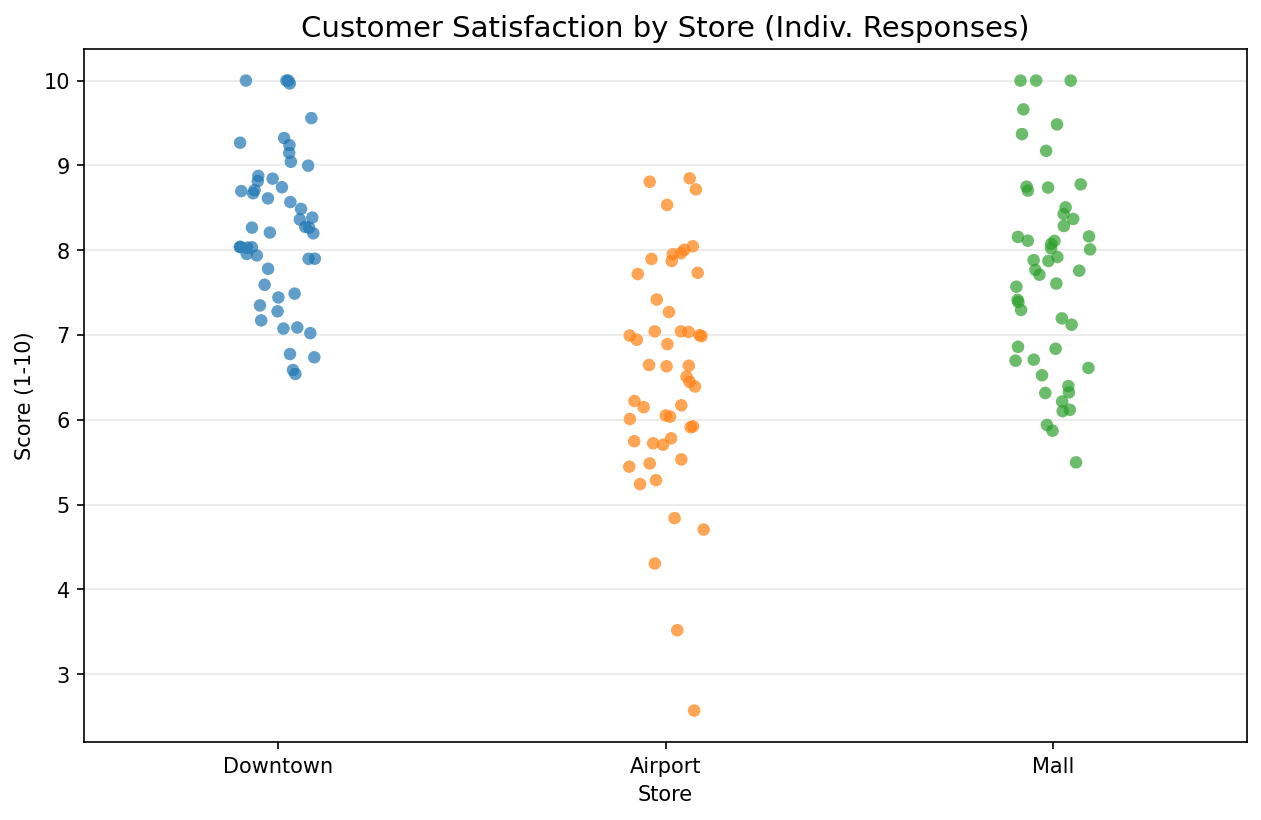
A Strip Plot helps visualize the distribution of a single variable or comparing distributions across categories by plotting each individual data point.
Key points
- 'Jitter' is often added to separate overlapping points, revealing densities.
- It is essentially a scatter plot where one axis is categorical.
- Strip plots are great for small to medium datasets where box plots might hide important details like sample size or underlying clusters.
Practical guidance
Showing every point is increasingly a journal expectation, not a stylistic choice - summary-only bar or box plots have been repeatedly shown to hide fabricated-looking patterns, unequal sample sizes, and outliers that drive the statistics, and a strip plot is the cheapest defense. The jitter is random noise added purely for legibility: keep it narrow enough that categories stay visually separate, and remember the horizontal position within a strip means nothing - readers sometimes over-interpret it. seaborn's stripplot(x='group', y='value', jitter=0. 2, alpha=0. 5) covers most cases; when you want jitter that reflects local density instead of randomness, swarmplot arranges points deterministically with no overlap, but it stops scaling around a thousand points per category, at which point return to a jittered strip with lower alpha or subsample. The strongest pattern in practice is the overlay: a strip plot on top of a de-emphasized box plot (draw the box first, light gray, showfliers=False so outliers aren't drawn twice) gives readers both the individual observations and the quartile summary in one panel. For paired or repeated measures, connect each subject's points across categories with thin lines - the within-subject trend that a plain strip plot destroys is often the entire finding.
Create a Strip Plot with your data using AI — no coding required.
Further reading
Python Scatter Plot Tutorial
Build scatter plots with regression overlays, color encodings, and uncertainty bars.
Read the guideExample Visualization
Create This Chart Now
Generate publication-ready strip plots with AI in seconds. No coding required – just describe your data and let AI do the work.
View example prompt
"Create a strip plot showing 'Customer Satisfaction Scores' (1-10) across 3 'Store Locations'. Generate 50 points per store. Apply jitter to avoid overlap. Color points by Store. Overlay a Box Plot with high transparency (alpha=0.3) to show summary stats. Title: 'Satisfaction Scores by Store'."
How to create this chart with your data
Upload Data
Upload your Excel or CSV file. Data used to generate charts is sent to Plotivy's server for processing.
AI Generation
Our AI analyzes your data and generates the Strip Plot code automatically.
Customize & Export
Tweak the design with natural language, then export as high-res PNG, SVG or PDF.
Newsletter
Get one weekly tip for better strip plots
Join researchers receiving concise Python plotting techniques to improve chart clarity and reduce revision cycles.
Python Code Example
Console Output
Combined Box and Strip plot showing distribution and summary stats.
Common Use Cases
- 1Showing raw data distribution
- 2Comparing small sample sizes
- 3Complementing box/violin plots
Pro Tips
Use narrow jitter when points overlap, keeping each observation visually tied to its category
Overlay a light box plot when readers need both individual observations and a quartile summary
Reduce marker size and opacity as the number of observations increases
Connect observations across categories when the data uses paired or repeated measurements
Frequently asked questions
When should you use a strip plot?
A Strip Plot helps visualize the distribution of a single variable or comparing distributions across categories by plotting each individual data point. 'Jitter' is often added to separate overlapping points, revealing densities. Common applications include showing raw data distribution, comparing small sample sizes, and complementing box/violin plots.
Which Python libraries can create a strip plot?
A strip plot can be built in Python with seaborn and matplotlib — seaborn for statistically-aware defaults on tidy data and matplotlib for precise control over axes, annotations, and journal styling. In Plotivy you describe the figure and it writes the seaborn code for you.
Can I make a strip plot without writing Python code?
Yes. Describe the strip plot you need in plain language and upload your dataset — Plotivy's AI writes the Python code and renders a publication-ready figure. You still get the full, editable seaborn source, so nothing is locked in a black box.
What are best practices for a clear strip plot?
Use narrow jitter when points overlap, keeping each observation visually tied to its category. Overlay a light box plot when readers need both individual observations and a quartile summary.
Library comparison for this chart
seaborn
Fastest path to statistically-aware defaults and tidy-data workflows, especially for grouped and distribution-focused strip-plot views.
matplotlib
Best when you need full control over axis formatting, annotation placement, and journal-specific styling for strip-plot.
Scientific Chart Selection Cheat Sheet
Not sure whether to use a Violin Plot, Box Plot, or Ridge Plot? Download our single-page reference mapping the most-used scientific chart types, exactly when to use them, and the core Matplotlib/Seaborn functions.