t-SNE Plot
Chart overview
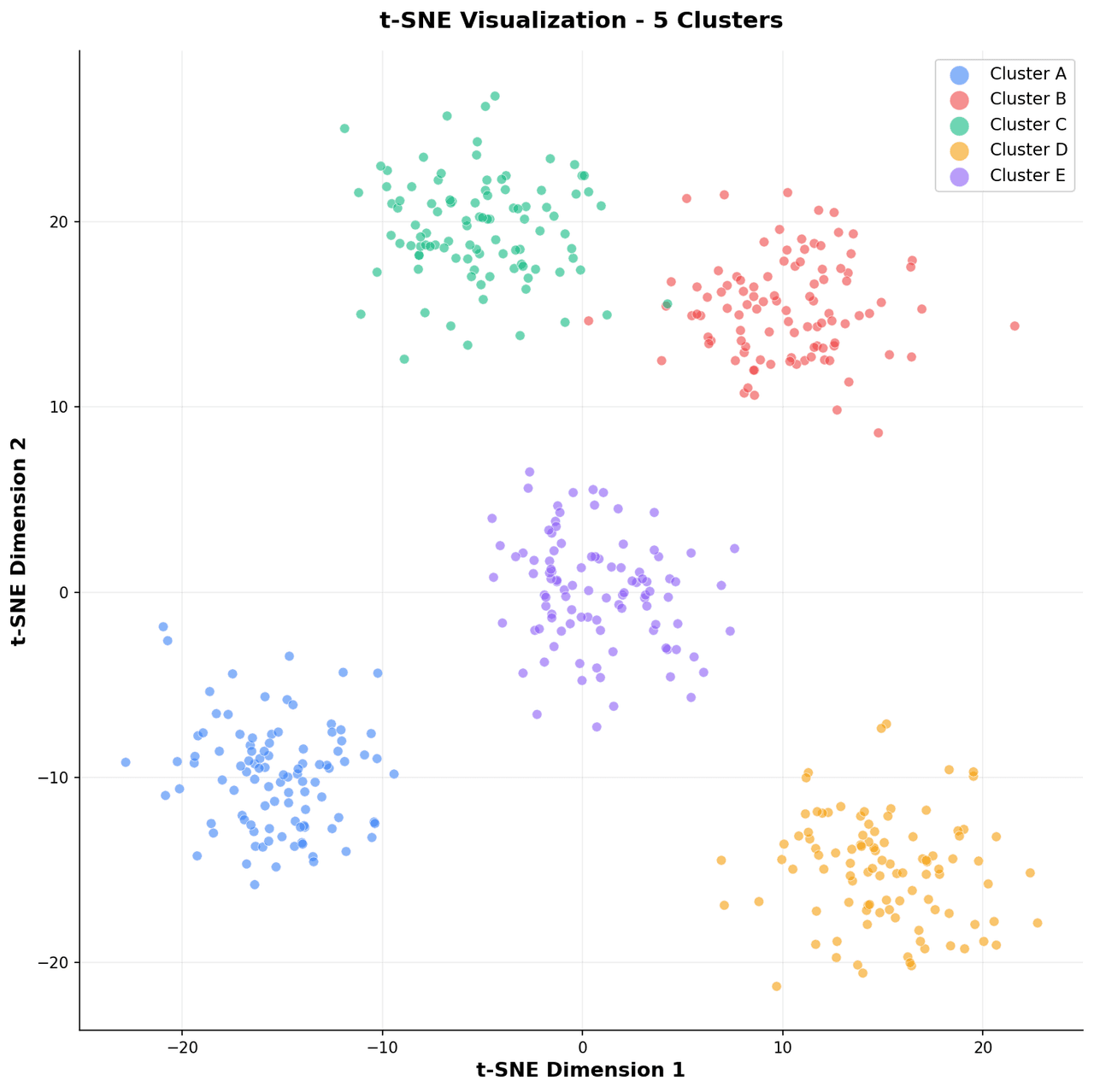
t-SNE maps high-dimensional data into 2D by preserving local neighborhood structure, making clusters visible that are otherwise hidden.
Key points
- It is a standard exploratory visualization in single-cell genomics, NLP embedding analysis, and computer vision feature space inspection.
- The resulting scatter plots help researchers confirm whether learned representations separate meaningful biological, linguistic, or visual categories.
- Reading a t-SNE plot honestly requires knowing what it does not preserve: cluster sizes are meaningless (t-SNE expands dense clusters and shrinks sparse ones), distances between clusters are meaningless (two islands far apart are not necessarily more different than two nearby), and density within a cluster is an artifact of the optimization - the only trustworthy signal is which points ended up neighbors.
Practical guidance
Perplexity is the knob that changes the picture: low values (5-10) fragment data into spurious micro-clusters, high values (50+) merge real structure, and the honest workflow is to run several perplexities and only believe clusters that survive all of them. Reproducibility needs care too - the default random initialization gives a different layout every run, so set init='pca' and a fixed random_state, and for datasets beyond a few thousand points reduce to ~50 principal components first (standard in single-cell pipelines) before handing off to sklearn. manifold. TSNE. Never cluster on the 2D coordinates - run the clustering algorithm in the original or PCA space and use t-SNE only to display the labels. UMAP is the pragmatic alternative when you need speed on large datasets or the ability to project new points into an existing embedding, but it shares the same core caveat: both are neighborhood-faithful, geometry-distorting maps, and any claim of the form 'cluster A is closer to B than to C' needs to be verified in the original feature space.
Create a t-SNE Plot with your data using AI — no coding required.
Further reading
Python Scatter Plot Tutorial
Build scatter plots with regression overlays, color encodings, and uncertainty bars.
Read the guideExample Visualization
Create This Chart Now
Generate publication-ready t-sne plots with AI in seconds. No coding required – just describe your data and let AI do the work.
View example prompt
"Create a t-SNE scatter plot from my high-dimensional data. Color points by class label using a qualitative colormap, add a legend, set perplexity and random seed in the title, and remove axis ticks since the axes have no physical meaning."
How to create this chart with your data
Upload Data
Upload your Excel or CSV file. Data used to generate charts is sent to Plotivy's server for processing.
AI Generation
Our AI analyzes your data and generates the t-SNE Plot code automatically.
Customize & Export
Tweak the design with natural language, then export as high-res PNG, SVG or PDF.
Newsletter
Get one weekly tip for better t-sne plots
Join researchers receiving concise Python plotting techniques to improve chart clarity and reduce revision cycles.
Python Code Example
Console Output
Figure saved: plotivy-t-sne-plot.png
Common Use Cases
- 1Exploring cell type clusters in single-cell RNA-seq data
- 2Visualizing word or sentence embedding spaces from language models
- 3Inspecting feature separation in the final layer of a trained image classifier
- 4Comparing cluster compactness across different data preprocessing pipelines
Pro Tips
Run multiple perplexity values (5, 30, 50) and compare before choosing one for publication
Use the same random seed for reproducibility and include it in the figure caption
Do not interpret distances between clusters as meaningful; only local structure is preserved
Pre-reduce to 50 PCA components before t-SNE to speed up computation on large datasets
Frequently asked questions
When should you use a t-sne plot?
t-SNE maps high-dimensional data into 2D by preserving local neighborhood structure, making clusters visible that are otherwise hidden. It is a standard exploratory visualization in single-cell genomics, NLP embedding analysis, and computer vision feature space inspection. Common applications include exploring cell type clusters in single-cell RNA-seq data, visualizing word or sentence embedding spaces from language models, and inspecting feature separation in the final layer of a trained image classifier.
Which Python libraries can create a t-sne plot?
A t-sne plot can be built in Python with matplotlib, numpy, and sklearn — matplotlib for precise control over axes, annotations, and journal styling, numpy, and sklearn. In Plotivy you describe the figure and it writes the matplotlib code for you.
Can I make a t-sne plot without writing Python code?
Yes. Describe the t-sne plot you need in plain language and upload your dataset — Plotivy's AI writes the Python code and renders a publication-ready figure. You still get the full, editable matplotlib source, so nothing is locked in a black box.
What are best practices for a clear t-sne plot?
Run multiple perplexity values (5, 30, 50) and compare before choosing one for publication. Use the same random seed for reproducibility and include it in the figure caption.
Library comparison for this chart
matplotlib
Best when you need full control over axis formatting, annotation placement, and journal-specific styling for t-sne-plot.
numpy
Useful in specialized workflows that complement core Python plotting libraries for t-sne-plot analysis tasks.
sklearn
Useful in specialized workflows that complement core Python plotting libraries for t-sne-plot analysis tasks.
Scientific Chart Selection Cheat Sheet
Not sure whether to use a Violin Plot, Box Plot, or Ridge Plot? Download our single-page reference mapping the most-used scientific chart types, exactly when to use them, and the core Matplotlib/Seaborn functions.