Menu

Classifier Evaluation and Error Analysis

Confusion Matrix Generator for Classifier Evaluation in Python

A confusion matrix shows exactly where a classifier is right and where it confuses one class for another. Plotivy turns true and predicted labels into a publication-ready Python figure with annotated counts, a readable color scale, and clearly labeled axes.

When a Confusion Matrix Is the Right Choice

Use a confusion matrix when a single accuracy number hides the story and you need to see which classes get mixed up. It is the standard way to report classification errors because each cell counts how often a true label was predicted as every possible class, exposing systematic confusions a summary metric would miss.

Error analysis

See which class pairs the model confuses, not just the overall accuracy.

Class imbalance

Spot a dominant class that inflates accuracy while minority classes fail.

Per-class recall

Read sensitivity for each class straight off the diagonal versus its row.

Model comparison

Contrast two classifiers cell by cell to choose the better error profile.

What Plotivy Adds to the Workflow

Annotated cell counts

Every cell carries its count with contrast-aware text so the matrix is readable at a glance.

Clear true vs predicted axes

Rows and columns are labeled so reviewers never have to guess the orientation.

Diagonal that pops

A sequential color scale makes correct predictions on the diagonal stand out from errors.

Reproducible Python output

Every figure is editable code, so collaborators can swap labels or normalize by row.

Live Code Lab: Confusion Matrix

This example simulates true and predicted labels for a three-class problem, tallies them into a matrix, and renders annotated counts with a color scale and labeled axes. Swap in your own labels to evaluate a real classifier.

Chart gallery

Related Chart Types

Other chart templates for classifier evaluation and error analysis

Browse all chart types →
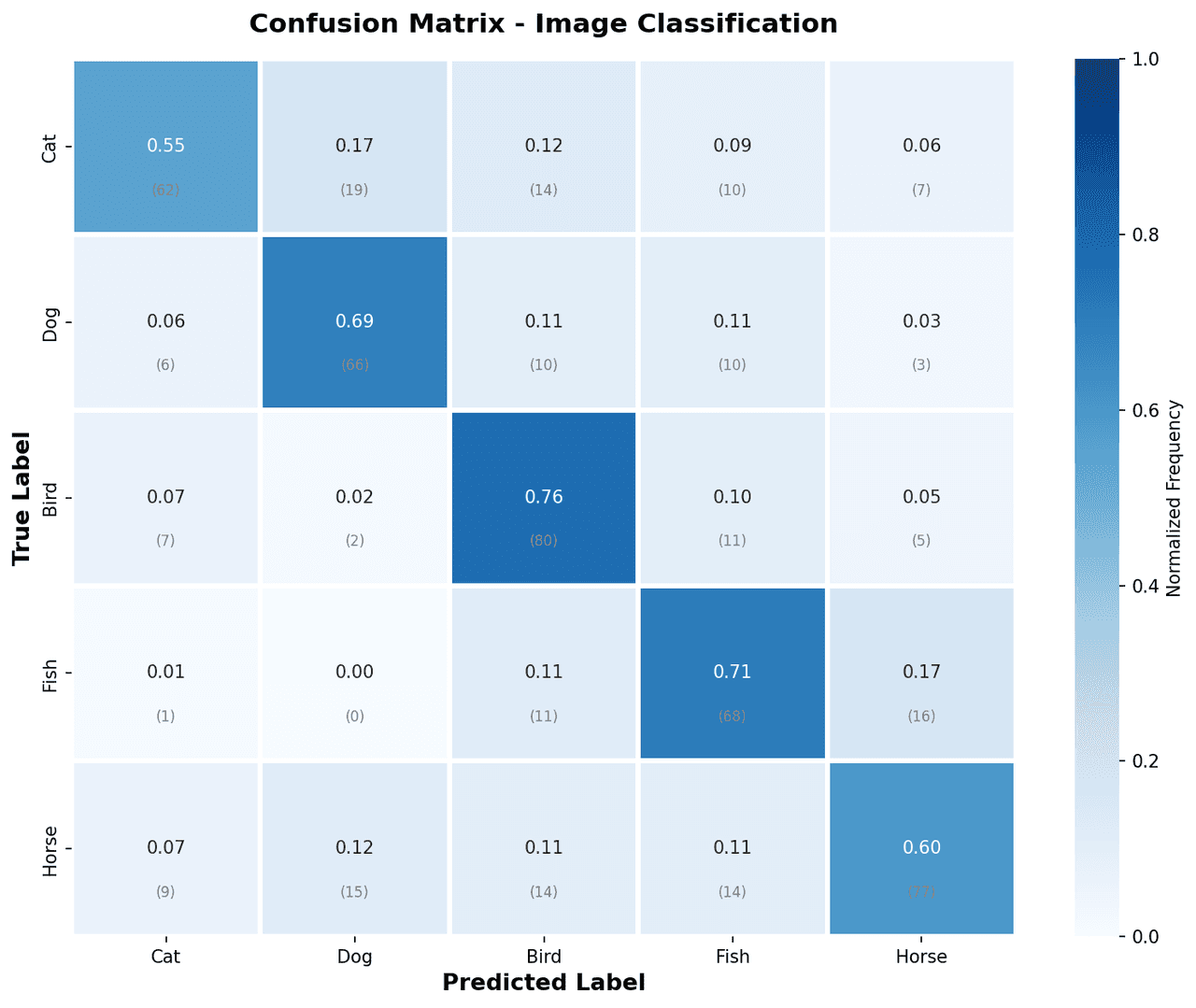
Confusion matrix heatmap with color-coded cells showing true vs predicted class counts
Statistical•matplotlib, numpy
From the chart gallery•Evaluating multi-class image classification model performance

Confusion Matrix

A heatmap showing true vs. predicted class labels to evaluate classification model accuracy.

Sample code / prompt

import matplotlib.pyplot as plt
import numpy as np
import seaborn as sns

np.random.seed(42)
classes = ['Cat', 'Dog', 'Bird', 'Fish', 'Horse']
n = len(classes)
cm = np.random.randint(0, 20, (n, n))
np.fill_diagonal(cm, np.random.randint(60, 95, n))
cm_normalized = cm.astype('float') / cm.sum(axis=1)[:, np.newaxis]
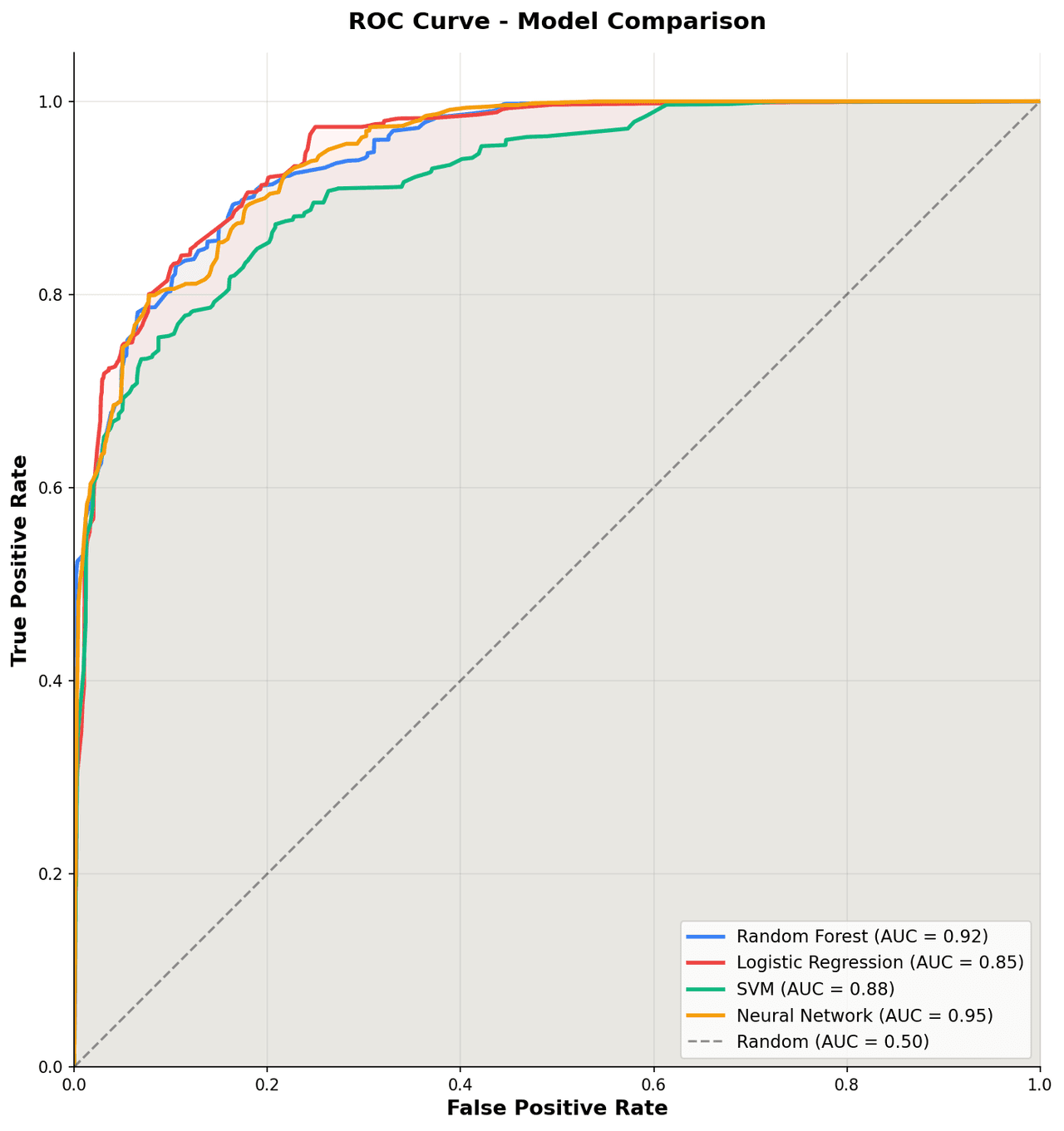
ROC curve showing sensitivity on y-axis versus 1-specificity on x-axis with AUC annotation and diagonal no-skill reference line
Statistical•matplotlib, numpy
From the chart gallery•Evaluating and comparing diagnostic biomarkers for disease detection in case-control studies

ROC Curve

Plot true positive rate against false positive rate across all decision thresholds with AUC annotation for model and diagnostic test evaluation.

Sample code / prompt

import matplotlib.pyplot as plt
import numpy as np

np.random.seed(42)
def generate_roc(auc_target, n_points=100):
    fpr = np.sort(np.concatenate([[0], np.random.beta(1, auc_target * 5, n_points - 2), [1]]))
    tpr = np.sort(np.concatenate([[0], np.random.beta(auc_target * 5, 1, n_points - 2), [1]]))
    return fpr, tpr

fig, ax = plt.subplots(figsize=(10, 10))
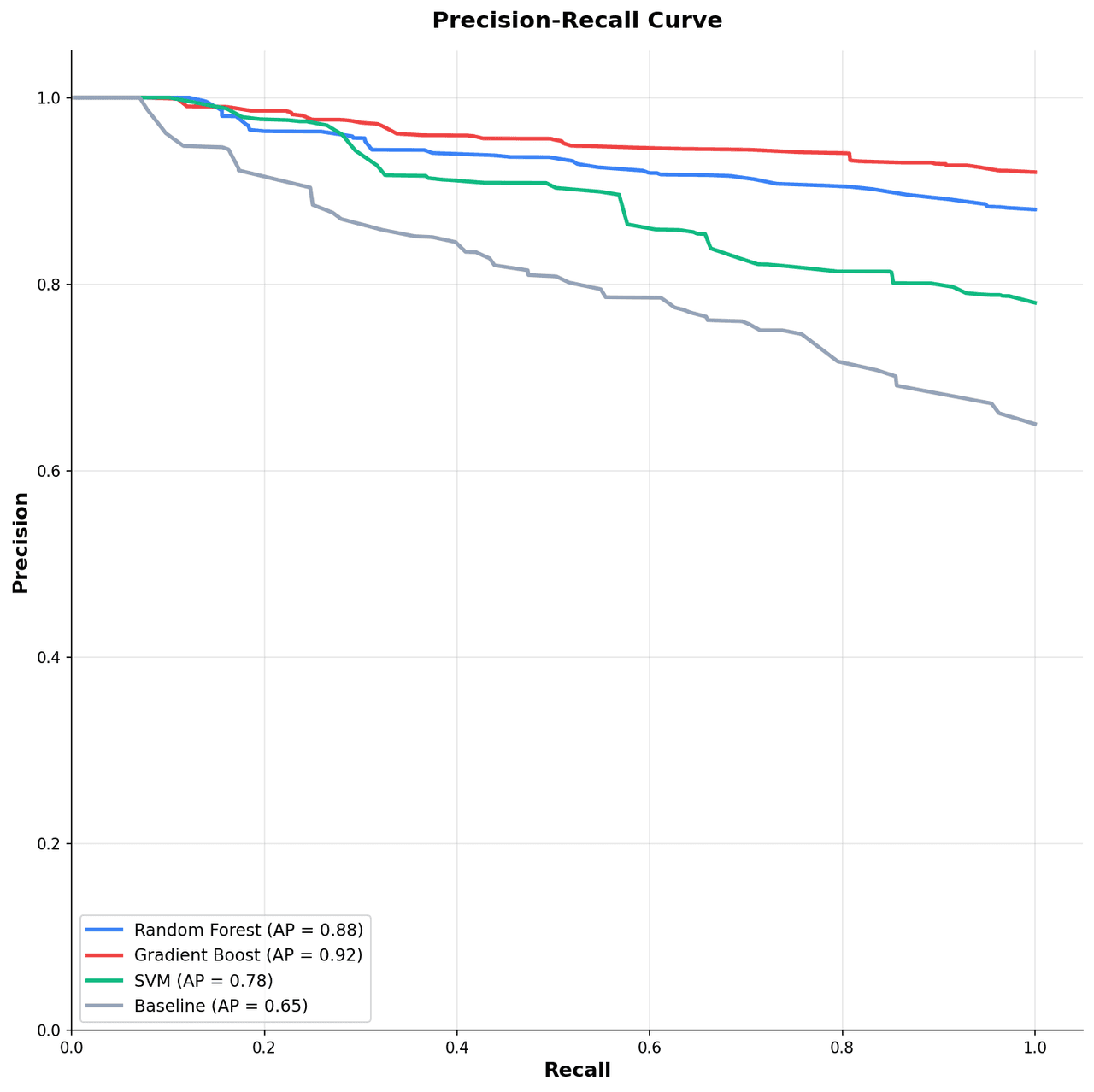
Precision-recall curve showing precision on y-axis versus recall on x-axis with average precision annotation and F1 iso-curves
Statistical•matplotlib, numpy
From the chart gallery•Evaluating rare disease detection models where positive class prevalence is below 5%

Precision-Recall Curve

Plot precision against recall across thresholds to evaluate classifier performance on imbalanced datasets with average precision annotation.

Sample code / prompt

import matplotlib.pyplot as plt
import numpy as np

np.random.seed(42)
fig, ax = plt.subplots(figsize=(10, 10))
models = [('Random Forest', 0.88, '#3b82f6'), ('Gradient Boost', 0.92, '#ef4444'),
          ('SVM', 0.78, '#10b981'), ('Baseline', 0.65, '#94a3b8')]
for name, ap, color in models:
    recall = np.sort(np.concatenate([[0], np.random.uniform(0, 1, 50), [1]]))
    precision = ap + (1 - recall) * (1 - ap) * np.random.uniform(0.5, 1.5, len(recall))
Correlation heatmap with diverging color scale and coefficient annotations
Statistical•seaborn, matplotlib
From the chart gallery•Correlation analysis between variables

Heatmap

Represents data values as colors in a two-dimensional matrix format.

Sample code / prompt

import matplotlib.pyplot as plt
import seaborn as sns
import pandas as pd
import numpy as np

# Create correlation matrix for financial metrics
metrics = ['Revenue', 'Profit', 'Expenses', 'ROI', 'Customers', 'AOV', 'Marketing', 'Employees']
correlation_data = np.array([
    [1.00, 0.85, -0.45, 0.72, 0.88, 0.65, 0.72, 0.55],
    [0.85, 1.00, -0.78, 0.92, 0.75, 0.58, 0.63, 0.48],
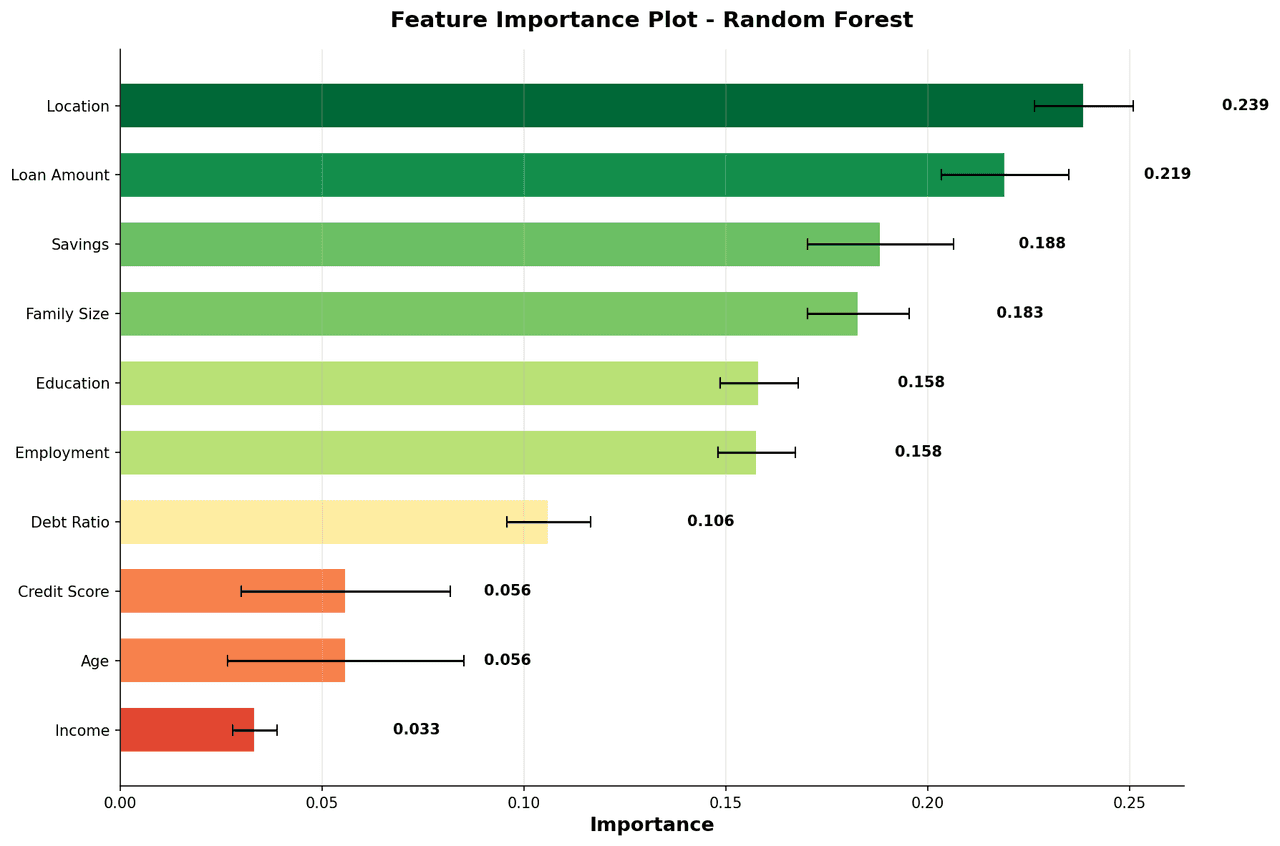
Horizontal bar chart ranking features by importance score from highest to lowest
Comparison•matplotlib, numpy
From the chart gallery•Identifying key molecular descriptors driving drug activity predictions

Feature Importance Plot

A ranked horizontal bar chart displaying the relative importance of input features from a trained tree-based model.

Sample code / prompt

import matplotlib.pyplot as plt
import numpy as np

np.random.seed(42)
features = ['Income', 'Age', 'Credit Score', 'Debt Ratio', 'Employment',
            'Education', 'Family Size', 'Savings', 'Loan Amount', 'Location']
importance = np.sort(np.random.uniform(0.02, 0.25, len(features)))
std = np.random.uniform(0.005, 0.03, len(features))
colors = plt.cm.RdYlGn(importance / importance.max())

Turn Predictions into a Clear Error Picture

Build a confusion matrix from your own labels, see exactly where the model trips, and export a figure that is ready for a paper, model card, or report.