Confusion Matrix
Chart overview
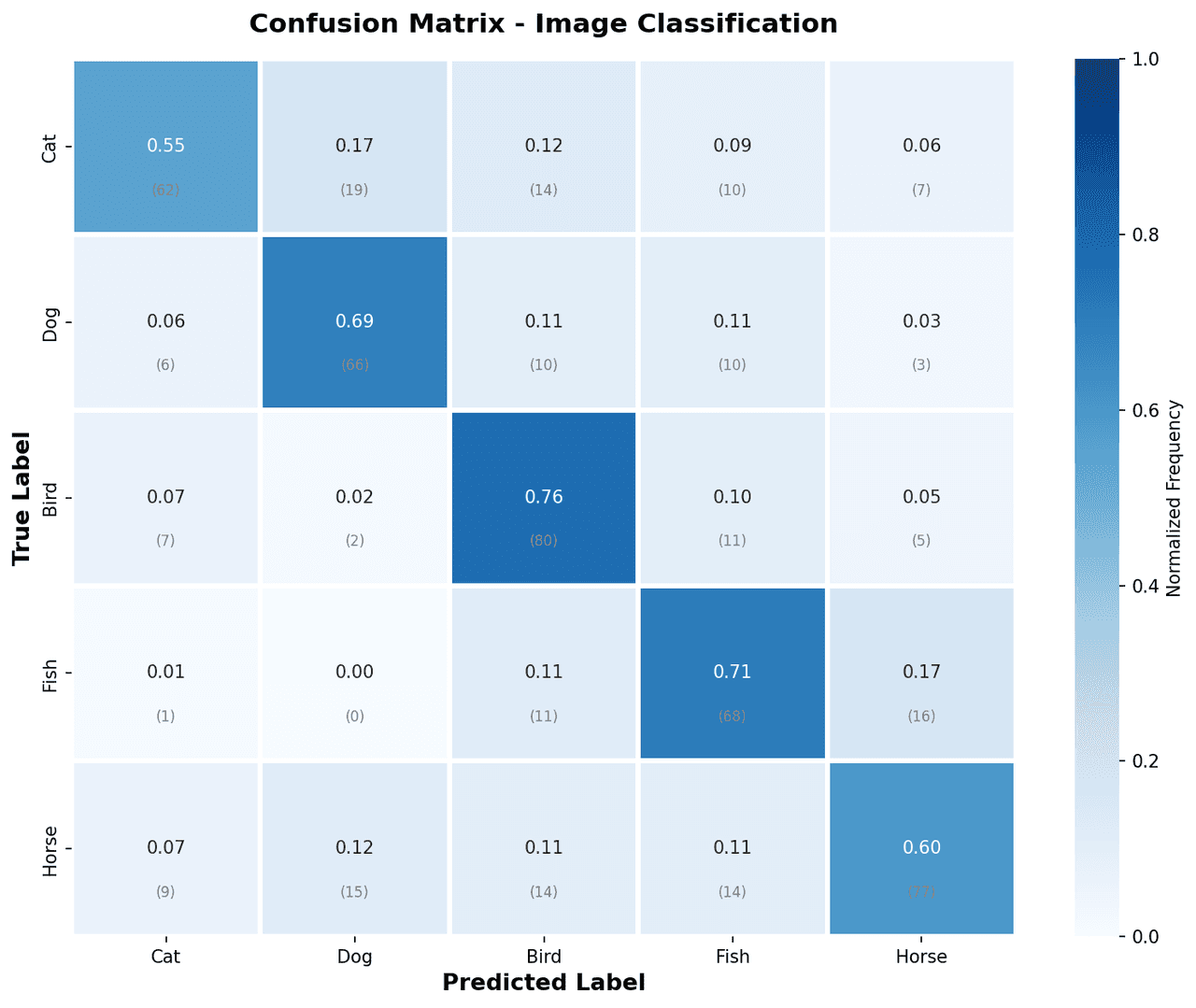
A confusion matrix displays the counts of correct and incorrect predictions for each class in a classification model, arranged as a square grid.
Key points
- Researchers in machine learning use it to identify which classes a model confuses with one another, revealing precision, recall, and F1-score trade-offs at a glance.
- It is the starting point for diagnosing and improving any supervised classification system.
- Normalization is the first decision and it changes the story: normalize='true' (per actual class row) shows recall per class and is the default diagnostic view, normalize='pred' shows precision, and raw counts are what you need when class imbalance itself is the point - with a 95/5 split, an all-majority classifier produces a matrix that looks nearly perfect in raw counts, which is exactly why accuracy alone misleads.
Practical guidance
In scikit-learn, ConfusionMatrixDisplay. from_estimator(clf, X_test, y_test, normalize='true') handles computation and rendering in one call; print the numbers in each cell (it does by default), because a heatmap color alone lets readers rank cells but not quote them. Read the off-diagonal structure, not just the diagonal: asymmetric confusion (A misclassified as B far more than B as A) points at decision-threshold or class-prior issues, while a symmetric block of mutual confusion usually means the classes genuinely overlap in feature space and no threshold change will fix it - that block is often the argument for merging labels or collecting a distinguishing feature. For many classes, sort the label order so related classes sit adjacent; confusion then shows up as visible blocks near the diagonal instead of scattered noise, and always state which axis is truth - conventions differ across papers and a transposed reading inverts precision and recall.
Create a Confusion Matrix with your data using AI — no coding required.
Further reading
How to Plot a Confusion Matrix in Python
Scikit-learn and seaborn confusion matrices with counts, percentages, normalization, and multi-class support.
Read the guideExample Visualization
Create This Chart Now
Generate publication-ready confusion matrixs with AI in seconds. No coding required – just describe your data and let AI do the work.
View example prompt
"Create a confusion matrix heatmap from my classification results. Use a diverging colormap, annotate each cell with counts and percentages, label axes with class names, and add a colorbar. Normalize rows to show recall per class when requested."
How to create this chart with your data
Upload Data
Upload your Excel or CSV file. Data used to generate charts is sent to Plotivy's server for processing.
AI Generation
Our AI analyzes your data and generates the Confusion Matrix code automatically.
Customize & Export
Tweak the design with natural language, then export as high-res PNG, SVG or PDF.
Newsletter
Get one weekly tip for better confusion matrixs
Join researchers receiving concise Python plotting techniques to improve chart clarity and reduce revision cycles.
Python Code Example
Console Output
Figure saved: plotivy-confusion-matrix.png
Common Use Cases
- 1Evaluating multi-class image classification model performance
- 2Diagnosing which disease classes are confused in a medical AI system
- 3Comparing model performance before and after hyperparameter tuning
- 4Reporting per-class accuracy in NLP text classification tasks
Pro Tips
Normalize rows to show recall per class when class sizes are imbalanced
Use a sequential colormap (Blues) for normalized matrices to avoid misleading divergence
Rotate x-axis labels 45 degrees when class names are long to prevent overlap
Add a classification report table below the matrix for precision and F1 scores
Frequently asked questions
When should you use a confusion matrix?
A confusion matrix displays the counts of correct and incorrect predictions for each class in a classification model, arranged as a square grid. Researchers in machine learning use it to identify which classes a model confuses with one another, revealing precision, recall, and F1-score trade-offs at a glance. Common applications include evaluating multi-class image classification model performance, diagnosing which disease classes are confused in a medical AI system, and comparing model performance before and after hyperparameter tuning.
Which Python libraries can create a confusion matrix?
A confusion matrix can be built in Python with matplotlib, numpy, and sklearn — matplotlib for precise control over axes, annotations, and journal styling, numpy, and sklearn. In Plotivy you describe the figure and it writes the matplotlib code for you.
Can I make a confusion matrix without writing Python code?
Yes. Describe the confusion matrix you need in plain language and upload your dataset — Plotivy's AI writes the Python code and renders a publication-ready figure. You still get the full, editable matplotlib source, so nothing is locked in a black box.
What are best practices for a clear confusion matrix?
Normalize rows to show recall per class when class sizes are imbalanced. Use a sequential colormap (Blues) for normalized matrices to avoid misleading divergence.
Library comparison for this chart
matplotlib
Best when you need full control over axis formatting, annotation placement, and journal-specific styling for confusion-matrix.
numpy
Useful in specialized workflows that complement core Python plotting libraries for confusion-matrix analysis tasks.
sklearn
Useful in specialized workflows that complement core Python plotting libraries for confusion-matrix analysis tasks.
Scientific Chart Selection Cheat Sheet
Not sure whether to use a Violin Plot, Box Plot, or Ridge Plot? Download our single-page reference mapping the most-used scientific chart types, exactly when to use them, and the core Matplotlib/Seaborn functions.