Menu

FINANCE & QUANT

Finance Visualizations

From waterfall P&L breakdowns and portfolio optimization to risk-return analysis, candlestick patterns, and Monte Carlo simulations - create presentation-ready finance figures with AI-generated Python code.

or browse all example datasets

Essential Finance Visualizations

Financial data spans revenue breakdowns, asset price histories, portfolio allocations, and risk models. Each demands specialized chart types with precise annotations, statistical overlays, and presentation-grade formatting.

Waterfall Charts

Revenue-to-profit cascade with positive, negative, and subtotal bars

Candlestick / OHLC

Price action with volume, moving averages, and pattern recognition

Risk-Return Scatter

Portfolio optimization with efficient frontier and Sharpe ratios

Drawdown Analysis

Maximum drawdown periods and recovery visualization

Correlation Matrices

Asset return correlation heatmaps with hierarchical clustering

Monte Carlo Simulation

Projected portfolio value paths with percentile confidence bands

Why Finance Teams Use Plotivy

Portfolio Analytics

Efficient frontier, Sharpe ratios, and risk decomposition visualized automatically.

Time Series

OHLC, candlestick, and technical indicator overlays from raw price data.

Publication Formats

Export to SVG/PDF for Journal of Finance, RFS, or client presentations.

Scenario Analysis

Monte Carlo paths, stress testing, and VaR visualizations.

Waterfall Chart - P&L Breakdown

Revenue-to-net-profit waterfall showing the cumulative effect of revenue items and cost deductions. Green bars indicate increases, red bars show deductions, and blue bars mark subtotals.

Live Code Editor
Code EditorPython
Loading editor...
Live Preview

Preparing preview

Running once automatically on first load

Learn by Experimenting

This is a safe playground for learning! Try changing:

  • • Colors: Modify color values to see different palettes
  • • Numbers: Adjust sizes, positions, or data ranges
  • • Labels: Update titles, axis names, or legends

Edit the code, run it, then open the full data visualization tool to continue with your own dataset.

Portfolio Risk-Return Scatter

Eight asset classes plotted by annualized return vs volatility with a simulated efficient frontier. The best Sharpe ratio asset is annotated automatically. Resize bubbles represent allocation weight.

Live Code Editor
Code EditorPython
Loading editor...
Live Preview

Preparing preview

Running once automatically on first load

Learn by Experimenting

This is a safe playground for learning! Try changing:

  • • Colors: Modify color values to see different palettes
  • • Numbers: Adjust sizes, positions, or data ranges
  • • Labels: Update titles, axis names, or legends

Edit the code, run it, then open the full data visualization tool to continue with your own dataset.

Chart gallery

Explore Finance Chart Types

Interactive examples with ready-to-run code

Browse all chart types →
Bar chart comparing average scores across 5 groups with error bars
Comparison•matplotlib, seaborn
From the chart gallery•Comparing performance across categories

Bar Chart

Compares categorical data using rectangular bars with heights proportional to values.

Sample code / prompt

import numpy as np
import pandas as pd
import matplotlib.pyplot as plt
import seaborn as sns
from scipy import stats

# Generate performance scores for 5 treatment groups
np.random.seed(42)
groups = ['Control', 'Treatment A', 'Treatment B', 'Treatment C', 'Treatment D']
n_samples = 30


Multi-line graph showing temperature trends for 3 cities over a year
Time Series•matplotlib, seaborn
From the chart gallery•Stock price tracking over time

Line Graph

Displays data points connected by straight line segments to show trends over time.

Sample code / prompt

import matplotlib.pyplot as plt
import numpy as np

# Generate temperature data for 3 major US cities over 12 months
months = ['Jan', 'Feb', 'Mar', 'Apr', 'May', 'Jun', 'Jul', 'Aug', 'Sep', 'Oct', 'Nov', 'Dec']
nyc = [30, 32, 40, 52, 65, 75, 82, 81, 74, 63, 50, 38]
miami = [65, 66, 70, 76, 82, 87, 90, 90, 87, 80, 72, 66]
chicago = [25, 27, 35, 48, 62, 72, 80, 79, 71, 60, 45, 32]

# Create figure with enhanced styling
Scatter plot of height vs weight colored by gender with regression line
Statistical•matplotlib, seaborn
From the chart gallery•Correlation analysis between metrics

Scatterplot

Displays values for two variables as points on a Cartesian coordinate system.

Sample code / prompt

import matplotlib.pyplot as plt
import numpy as np
from scipy import stats
import pandas as pd

# Generate sample data
np.random.seed(42)
n_samples = 200
height = np.random.normal(170, 8, n_samples)
weight = height * 0.6 + np.random.normal(0, 8, n_samples) - 50
Correlation heatmap with diverging color scale and coefficient annotations
Statistical•seaborn, matplotlib
From the chart gallery•Correlation analysis between variables

Heatmap

Represents data values as colors in a two-dimensional matrix format.

Sample code / prompt

import matplotlib.pyplot as plt
import seaborn as sns
import pandas as pd
import numpy as np

# Create correlation matrix for financial metrics
metrics = ['Revenue', 'Profit', 'Expenses', 'ROI', 'Customers', 'AOV', 'Marketing', 'Employees']
correlation_data = np.array([
    [1.00, 0.85, -0.45, 0.72, 0.88, 0.65, 0.72, 0.55],
    [0.85, 1.00, -0.78, 0.92, 0.75, 0.58, 0.63, 0.48],
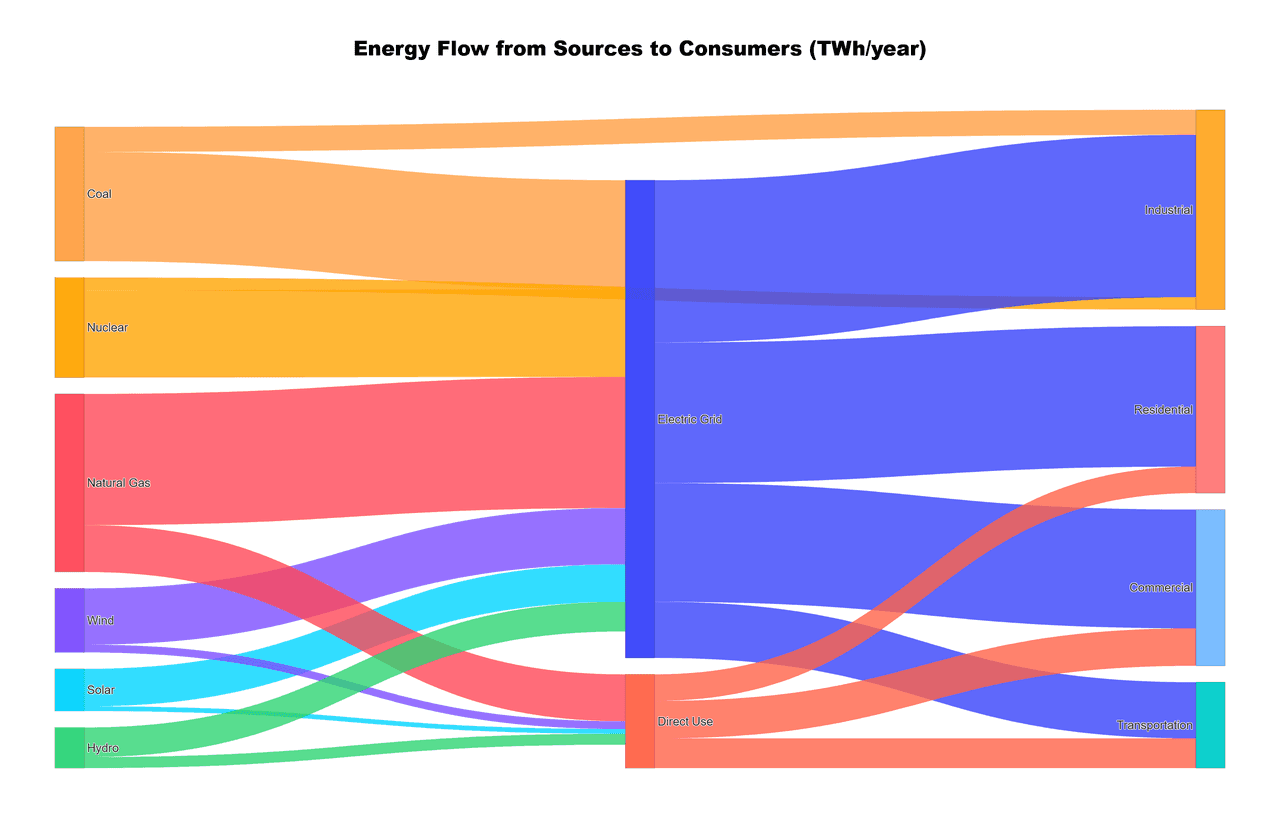
Interactive Sankey diagram showing energy flow from sources to consumers
Diagrams•plotly
From the chart gallery•Energy production and consumption flows

Sankey Diagram

Flow diagram where arrow widths are proportional to flow quantities.

Sample code / prompt

import plotly.graph_objects as go

# US Energy Flow Data (Quadrillion BTU)
sources = ['Coal', 'Natural Gas', 'Petroleum', 'Nuclear', 'Renewables']
source_values = [11, 32, 35, 8, 12]

transforms = ['Electricity Gen.', 'Direct Use', 'Rejected Energy']
end_uses = ['Residential', 'Commercial', 'Industrial', 'Transportation']

# Define flows: source -> transform/enduse

Ready to Visualize Your Financial Data?

Upload your CSV, describe the chart you need, and get presentation-ready figures with full Python code in seconds.

Start Free - No Sign-Up