Menu

FLUID DYNAMICS

Fluid Dynamics Visualizations

From velocity vector fields and streamline plots to boundary layer profiles and turbulence spectra - create publication-ready CFD figures with AI-generated Python code.

or browse all example datasets

Essential CFD Visualizations

Computational fluid dynamics generates massive datasets - velocity fields, pressure distributions, vorticity maps, and turbulence statistics. Each requires specialized visualization techniques to communicate flow physics clearly in publications and reports.

Vector Fields

2D/3D quiver plots showing velocity direction and magnitude across grids

Streamlines

Particle path visualization revealing flow patterns and recirculation zones

Velocity Profiles

Boundary layer comparisons - Blasius, power law, and Poiseuille solutions

Contour / Pressure Maps

Pressure and temperature distribution fields with colormaps

Vorticity Plots

Vortex identification and strength visualization with colormapped contours

Turbulence Spectra

Energy spectrum density versus wavenumber in log-log scaling

Why CFD Researchers Use Plotivy

Flow Visualization

Quiver, streamline, and contour plots from simulation or experimental PIV data.

Multi-Panel Layouts

Side-by-side comparison of different Reynolds numbers or mesh refinements.

Publication Formats

Export to SVG/PDF sized for Journal of Fluid Mechanics or Physics of Fluids.

Parametric Sweeps

Overlay profiles across conditions with automated legends and annotations.

2D Vector Field (Quiver Plot)

Potential flow around a cylinder with velocity magnitude contours, quiver arrows, and streamlines. The doublet solution produces the characteristic flow separation pattern used in introductory CFD.

Live Code Editor
Code EditorPython
Loading editor...
Live Preview

Preparing preview

Running once automatically on first load

Learn by Experimenting

This is a safe playground for learning! Try changing:

  • • Colors: Modify color values to see different palettes
  • • Numbers: Adjust sizes, positions, or data ranges
  • • Labels: Update titles, axis names, or legends

Edit the code, run it, then open the full data visualization tool to continue with your own dataset.

Velocity Profile Comparison

Three canonical boundary layer profiles compared side by side - Blasius laminar solution, the turbulent 1/7th power law, and Poiseuille parabolic pipe flow. Essential for any CFD validation study.

Live Code Editor
Code EditorPython
Loading editor...
Live Preview

Preparing preview

Running once automatically on first load

Learn by Experimenting

This is a safe playground for learning! Try changing:

  • • Colors: Modify color values to see different palettes
  • • Numbers: Adjust sizes, positions, or data ranges
  • • Labels: Update titles, axis names, or legends

Edit the code, run it, then open the full data visualization tool to continue with your own dataset.

Chart gallery

Explore CFD Chart Types

Interactive examples with ready-to-run code

Browse all chart types →
Scatter plot of height vs weight colored by gender with regression line
Statistical•matplotlib, seaborn
From the chart gallery•Correlation analysis between metrics

Scatterplot

Displays values for two variables as points on a Cartesian coordinate system.

Sample code / prompt

import matplotlib.pyplot as plt
import numpy as np
from scipy import stats
import pandas as pd

# Generate sample data
np.random.seed(42)
n_samples = 200
height = np.random.normal(170, 8, n_samples)
weight = height * 0.6 + np.random.normal(0, 8, n_samples) - 50


Multi-line graph showing temperature trends for 3 cities over a year
Time Series•matplotlib, seaborn
From the chart gallery•Stock price tracking over time

Line Graph

Displays data points connected by straight line segments to show trends over time.

Sample code / prompt

import matplotlib.pyplot as plt
import numpy as np

# Generate temperature data for 3 major US cities over 12 months
months = ['Jan', 'Feb', 'Mar', 'Apr', 'May', 'Jun', 'Jul', 'Aug', 'Sep', 'Oct', 'Nov', 'Dec']
nyc = [30, 32, 40, 52, 65, 75, 82, 81, 74, 63, 50, 38]
miami = [65, 66, 70, 76, 82, 87, 90, 90, 87, 80, 72, 66]
chicago = [25, 27, 35, 48, 62, 72, 80, 79, 71, 60, 45, 32]

# Create figure with enhanced styling
Correlation heatmap with diverging color scale and coefficient annotations
Statistical•seaborn, matplotlib
From the chart gallery•Correlation analysis between variables

Heatmap

Represents data values as colors in a two-dimensional matrix format.

Sample code / prompt

import matplotlib.pyplot as plt
import seaborn as sns
import pandas as pd
import numpy as np

# Create correlation matrix for financial metrics
metrics = ['Revenue', 'Profit', 'Expenses', 'ROI', 'Customers', 'AOV', 'Marketing', 'Employees']
correlation_data = np.array([
    [1.00, 0.85, -0.45, 0.72, 0.88, 0.65, 0.72, 0.55],
    [0.85, 1.00, -0.78, 0.92, 0.75, 0.58, 0.63, 0.48],
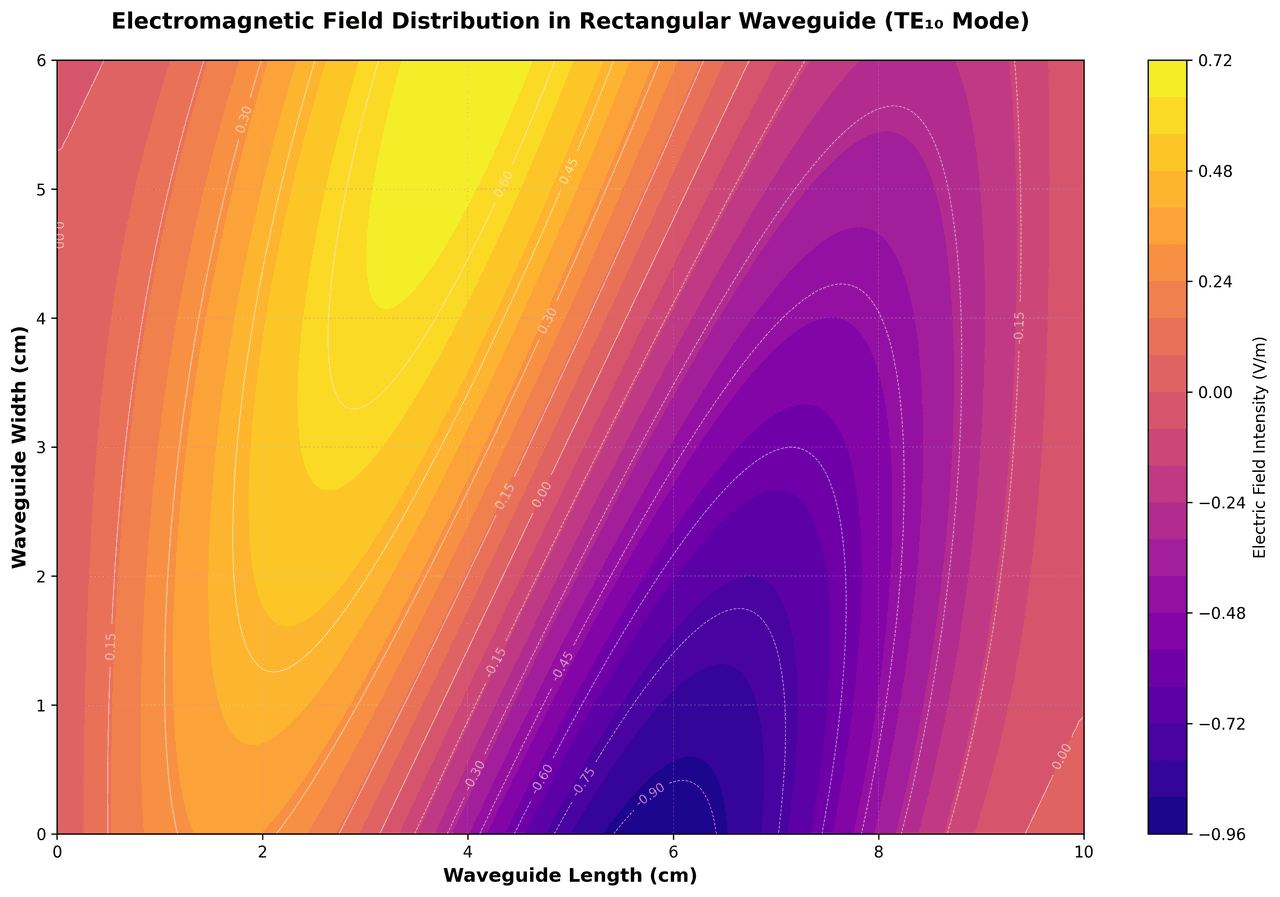
Contour map showing electromagnetic field distribution in a waveguide with color gradient
Statistical•matplotlib, plotly
From the chart gallery•Electromagnetic field analysis in waveguides and antennas

Contour Map

Displays three-dimensional data in two dimensions using contour lines connecting points of equal value.

Sample code / prompt

import matplotlib.pyplot as plt
import numpy as np

# Create electromagnetic field distribution in a rectangular waveguide
x = np.linspace(0, 10, 200)
y = np.linspace(0, 6, 120)
X, Y = np.meshgrid(x, y)

# TE10 mode in rectangular waveguide - dominant mode
# Electric field pattern
Bar chart comparing average scores across 5 groups with error bars
Comparison•matplotlib, seaborn
From the chart gallery•Comparing performance across categories

Bar Chart

Compares categorical data using rectangular bars with heights proportional to values.

Sample code / prompt

import numpy as np
import pandas as pd
import matplotlib.pyplot as plt
import seaborn as sns
from scipy import stats

# Generate performance scores for 5 treatment groups
np.random.seed(42)
groups = ['Control', 'Treatment A', 'Treatment B', 'Treatment C', 'Treatment D']
n_samples = 30

Ready to Visualize Your CFD Data?

Upload your CSV, describe the plot you need, and get publication-ready figures with full Python code in seconds.

Start Free - No Sign-Up