Bee Colony Chart
Chart overview
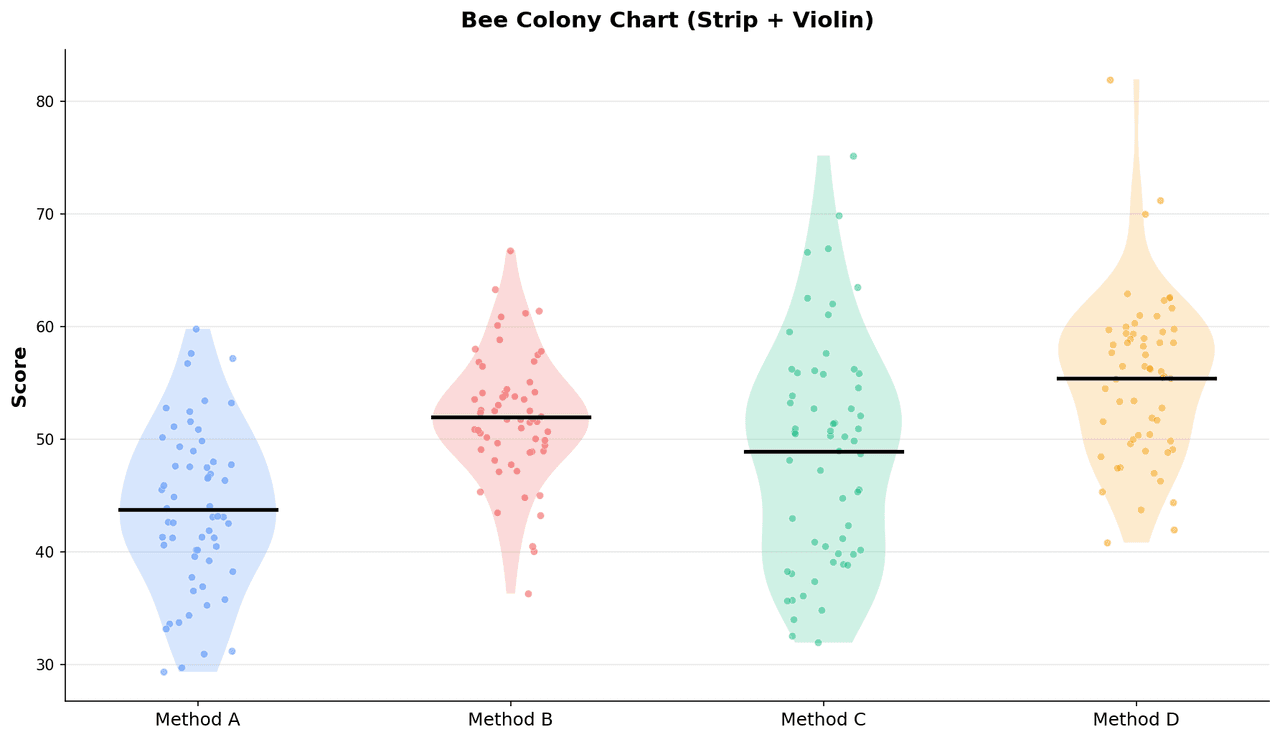
A bee colony chart is a jittered categorical scatter plot specifically designed for small-to-medium sample sizes in biology (n = 3-50 per group).
Key points
- Each data point is plotted at the correct y-value for its measurement while being horizontally jittered by a small random offset within the column width to prevent exact overlap.
- Unlike the beeswarm algorithm which produces deterministic placement, jitter-based approaches are simpler to implement and more familiar in biological literature.
- The result resembles bees hovering around a colony center.
Practical guidance
This plot type is advocated by statisticians and journals as a more honest representation of data than bar charts with error bars alone, because it shows the actual distribution shape, identifies outliers, and makes the sample size immediately apparent from the number of visible points. Mean or median lines with standard error or confidence interval whiskers are typically superimposed. Bee colony charts are standard in immunology, pharmacology, and cell biology publications where in vitro or in vivo experiments have small numbers of biological replicates.
Create a Bee Colony Chart with your data using AI — no coding required.
Further reading
How to Create a Bar Chart in Python
Matplotlib, seaborn, and plotly patterns for grouped bars, error bars, and publication-ready labels.
Read the guideExample Visualization
Create This Chart Now
Generate publication-ready bee colony charts with AI in seconds. No coding required – just describe your data and let AI do the work.
View example prompt
"Create a bee colony chart from my in vivo experimental data with treatment groups on the x-axis and measured outcome on the y-axis. Jitter individual data points horizontally within each group column. Overlay group mean as a horizontal line and standard error bars. Color points by treatment group. Add pairwise significance brackets with p-values for each comparison. Show N per group below x-axis labels. Use a clean white background and format for a Journal of Experimental Medicine figure at 300 DPI."
How to create this chart with your data
Upload Data
Upload your Excel or CSV file. Data used to generate charts is sent to Plotivy's server for processing.
AI Generation
Our AI analyzes your data and generates the Bee Colony Chart code automatically.
Customize & Export
Tweak the design with natural language, then export as high-res PNG, SVG or PDF.
Newsletter
Get one weekly tip for better bee colony charts
Join researchers receiving concise Python plotting techniques to improve chart clarity and reduce revision cycles.
Python Code Example
Console Output
Figure saved: plotivy-bee-colony-chart.png
Common Use Cases
- 1In vivo pharmacology: individual animal tumor volume or body weight measurements per drug treatment group
- 2Immunology: per-well or per-mouse cytokine concentrations from ELISA or multiplex immunoassay
- 3Cell biology: individual cell viability or proliferation index values per siRNA knockdown condition
- 4Neuroscience: behavioral assay outcomes (open field distance, latency, rotarod time) per genotype or condition
Pro Tips
Set jitter width to 20-30% of the column spacing so points cluster visibly within their group
Use a fixed random seed for reproducible jitter positions between figure revisions
Add the mean +/- SEM as a crosshair overlay so summary statistics are available alongside individual points
For paired data (e.g., same animal before and after), connect paired points with thin lines to show individual changes
Frequently asked questions
When should you use a bee colony chart?
A bee colony chart is a jittered categorical scatter plot specifically designed for small-to-medium sample sizes in biology (n = 3-50 per group). Each data point is plotted at the correct y-value for its measurement while being horizontally jittered by a small random offset within the column width to prevent exact overlap. Common applications include in vivo pharmacology: individual animal tumor volume or body weight measurements per drug treatment group, immunology: per-well or per-mouse cytokine concentrations from ELISA or multiplex immunoassay, and cell biology: individual cell viability or proliferation index values per siRNA knockdown condition.
Which Python libraries can create a bee colony chart?
A bee colony chart can be built in Python with matplotlib, numpy, and pandas — matplotlib for precise control over axes, annotations, and journal styling, numpy, and pandas for quick plots straight from a DataFrame. In Plotivy you describe the figure and it writes the matplotlib code for you.
Can I make a bee colony chart without writing Python code?
Yes. Describe the bee colony chart you need in plain language and upload your dataset — Plotivy's AI writes the Python code and renders a publication-ready figure. You still get the full, editable matplotlib source, so nothing is locked in a black box.
What are best practices for a clear bee colony chart?
Set jitter width to 20-30% of the column spacing so points cluster visibly within their group. Use a fixed random seed for reproducible jitter positions between figure revisions.
Library comparison for this chart
matplotlib
Best when you need full control over axis formatting, annotation placement, and journal-specific styling for bee-colony-chart.
numpy
Useful in specialized workflows that complement core Python plotting libraries for bee-colony-chart analysis tasks.
pandas
Good for quick exploratory drafts directly from DataFrame operations before polishing in matplotlib or plotly.
Scientific Chart Selection Cheat Sheet
Not sure whether to use a Violin Plot, Box Plot, or Ridge Plot? Download our single-page reference mapping the most-used scientific chart types, exactly when to use them, and the core Matplotlib/Seaborn functions.