Gantt Chart
Chart overview
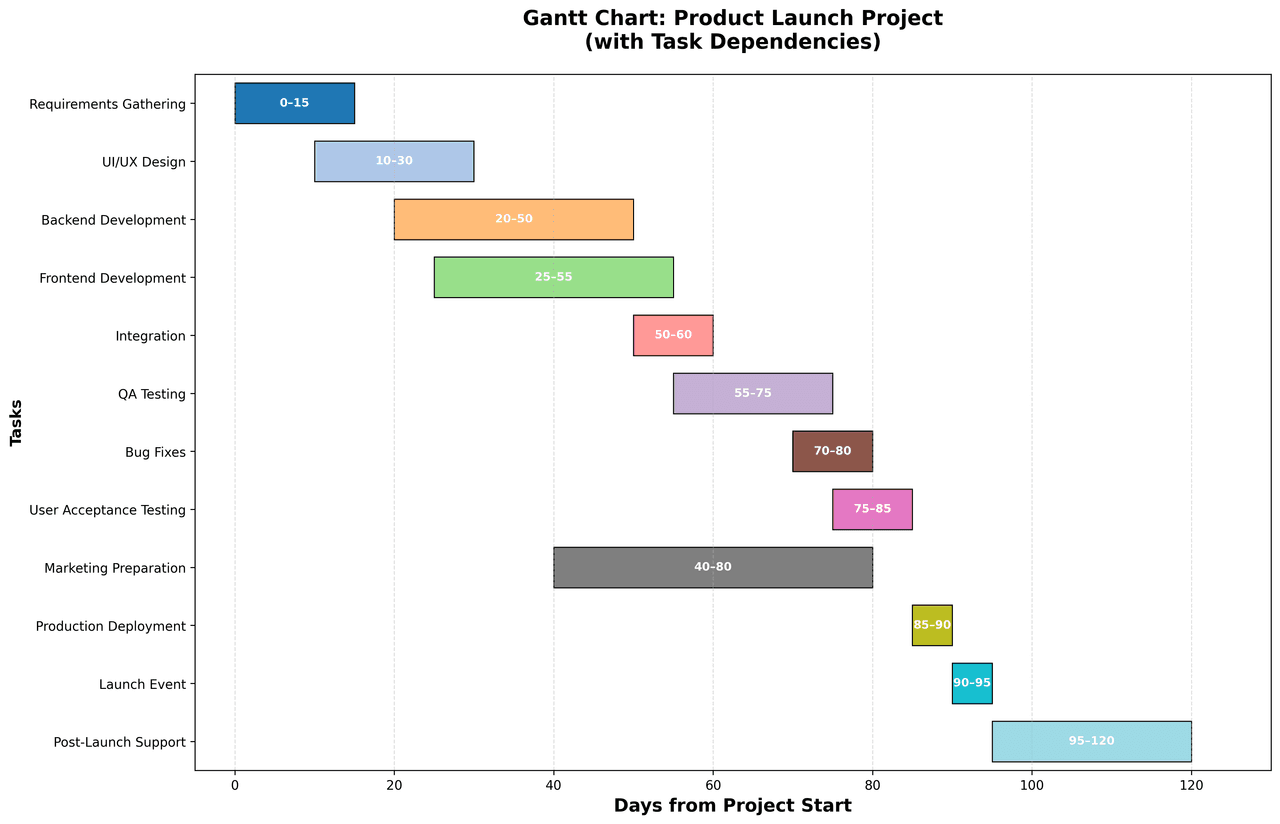
Gantt charts display project schedules by showing tasks as horizontal bars positioned along a timeline.
Key points
- Each bar spans from the task's start date to its end date, making it easy to visualize task durations, overlaps, and project milestones.
- In Python there are two common approaches: Matplotlib's barh with the left parameter offsetting each bar to its start date (full styling control, ideal for publication-quality static figures), and Plotly's px.
- timeline, which takes a DataFrame with Task, Start, and Finish columns and produces an interactive chart with hover labels and zooming in three lines of code.
Practical guidance
Named after engineer Henry Gantt, who popularized them for factory scheduling in the 1910s, Gantt charts remain the standard for communicating who does what, when. Modern variants add dependency arrows between tasks, percent-complete shading inside bars, milestone markers, and a today line, and color-code bars by team, phase, or critical-path status so bottlenecks stand out at a glance.
Create a Gantt Chart with your data using AI — no coding required.
Further reading
How to Create a Bar Chart in Python
Matplotlib, seaborn, and plotly patterns for grouped bars, error bars, and publication-ready labels.
Read the guideExample Visualization
Create This Chart Now
Generate publication-ready gantt charts with AI in seconds. No coding required – just describe your data and let AI do the work.
View example prompt
"Create a clear and detailed Gantt chart for a Product Launch project. Show all major tasks, their start and end dates. Generate a complete and realistic example dataset to demonstrate this visualization."
How to create this chart with your data
Upload Data
Upload your Excel or CSV file. Data used to generate charts is sent to Plotivy's server for processing.
AI Generation
Our AI analyzes your data and generates the Gantt Chart code automatically.
Customize & Export
Tweak the design with natural language, then export as high-res PNG, SVG or PDF.
Newsletter
Get one weekly tip for better gantt charts
Join researchers receiving concise Python plotting techniques to improve chart clarity and reduce revision cycles.
Python Code Example
import matplotlib.pyplot as plt
import numpy as np

# Realistic dataset for Product Launch project
tasks = np.array([
    'Requirements Gathering',
    'UI/UX Design',
    'Backend Development',
    'Frontend Development',
    'Integration',
    'QA Testing',
    'Bug Fixes',
    'User Acceptance Testing',
    'Marketing Preparation',
    'Production Deployment',
    'Launch Event',
    'Post-Launch Support'
])

starts = np.array([0, 10, 20, 25, 50, 55, 70, 75, 40, 85, 90, 95])
durations = np.array([15, 20, 30, 30, 10, 20, 10, 10, 40, 5, 5, 25])
ends = starts + durations

# Task dependencies (predecessor -> successor indices)
dependencies = [
    (0, 1), (0, 2), (1, 3), (2, 4), (3, 4),
    (4, 5), (5, 6), (5, 7), (1, 8),
    (6, 9), (7, 9), (8, 10), (9, 10), (10, 11)
]

# Create figure and axis
fig, ax = plt.subplots(figsize=(14, 9))

# Colors for tasks
colors = plt.cm.tab20(np.linspace(0, 1, len(tasks)))

# Plot horizontal bars
bars = ax.barh(tasks, durations, left=starts, height=0.7, color=colors, edgecolor='black', linewidth=0.8)

# Add date labels on bars
for i, (start, duration, end) in enumerate(zip(starts, durations, ends)):
    ax.text(start + duration / 2, i, f'{int(start)}–{int(end)}', ha='center', va='center',
            fontweight='bold', color='white', fontsize=9)

# Labels and styling
ax.set_xlabel('Days from Project Start', fontsize=14, fontweight='bold')
ax.set_title('Gantt Chart: Product Launch Project\n(with Task Dependencies)', fontsize=16, fontweight='bold', pad=20)
ax.set_ylabel('Tasks', fontsize=12, fontweight='bold')

# Grid and limits
ax.grid(True, axis='x', linestyle='--', alpha=0.4)
ax.set_xlim(-5, max(ends) + 10)
ax.set_ylim(-0.5, len(tasks) - 0.5)

# Invert y-axis to show tasks top-to-bottom
ax.invert_yaxis()

# Remove dependency arrows (no arrows added)

# Legend for dependencies (optional, remains for reference)


plt.tight_layout()
plt.show()
# END-OF-CODEOpens the Analyze page with this code pre-loaded and ready to execute
Console Output
Project Duration: 70 days
Total Tasks: 7
Teams Involved: Research, Design, Engineering, QA, Marketing, Operations
Critical Path: Days 0 → 70
Common Use Cases
- 1Project schedule visualization
- 2Product development roadmaps
- 3Event planning timelines
- 4Resource allocation planning
- 5Research grant and thesis timelines
- 6Construction and engineering phase tracking
Pro Tips
Color-code tasks by team or phase
Show critical path in a distinct color
Add milestones as diamond markers
Invert the y-axis so the first task reads from the top
Use Plotly's px.timeline with real dates for interactive hover detail
Draw a vertical 'today' line so current progress is obvious
Frequently asked questions
When should you use a gantt chart?
Gantt charts display project schedules by showing tasks as horizontal bars positioned along a timeline. Each bar spans from the task's start date to its end date, making it easy to visualize task durations, overlaps, and project milestones. Common applications include project schedule visualization, product development roadmaps, and event planning timelines.
Which Python libraries can create a gantt chart?
A gantt chart can be built in Python with matplotlib and plotly — matplotlib for precise control over axes, annotations, and journal styling and Plotly for interactive hover, zoom, and web sharing. In Plotivy you describe the figure and it writes the matplotlib code for you.
Can I make a gantt chart without writing Python code?
Yes. Describe the gantt chart you need in plain language and upload your dataset — Plotivy's AI writes the Python code and renders a publication-ready figure. You still get the full, editable matplotlib source, so nothing is locked in a black box.
What are best practices for a clear gantt chart?
Color-code tasks by team or phase. Show critical path in a distinct color.
Library comparison for this chart
matplotlib
Best when you need full control over axis formatting, annotation placement, and journal-specific styling for gantt-chart.
plotly
Best for interactive hover, zoom, and web sharing when collaborators need to inspect values directly from gantt-chart figures.
Scientific Chart Selection Cheat Sheet
Not sure whether to use a Violin Plot, Box Plot, or Ridge Plot? Download our single-page reference mapping the most-used scientific chart types, exactly when to use them, and the core Matplotlib/Seaborn functions.