Timeline
Chart overview
Timelines display events or milestones arranged chronologically along a horizontal or vertical axis.
Key points
- They help visualize sequences, durations, and the relative timing of events, making them essential for project planning, historical analysis, and storytelling.
- A timeline is the right visualization when the reader's question is 'in what order, and how far apart' — the value is a single time coordinate per event, and the axis does the work of showing spacing and clustering.
- If each item has a start and an end (a phase, a task, a tenure) rather than a single instant, you want a Gantt chart or a horizontal range/bar timeline where length encodes duration; if you only have an ordered list with no meaningful spacing, a simple numbered list or flow chart is clearer than a timeline that implies false intervals.
Practical guidance
The classic pitfall is a real time axis with events crammed into one period: labels collide. Fix it by alternating labels above and below the line (matplotlib's stem plot is a clean base for this), rotating or staggering text, or breaking a long span with an axis break. Keep the time scale linear and honest — do not compress empty stretches without signalling it — use icons or color to distinguish event types, and for print export to vector (SVG/PDF) so thin connector lines and small labels stay sharp.
Create a Timeline with your data using AI — no coding required.
Further reading
Complete Guide to Scientific Data Visualization
Chart selection, figure design, and publication-ready workflows for scientific teams.
Read the guideExample Visualization
Create This Chart Now
Generate publication-ready timelines with AI in seconds. No coding required – just describe your data and let AI do the work.
View example prompt
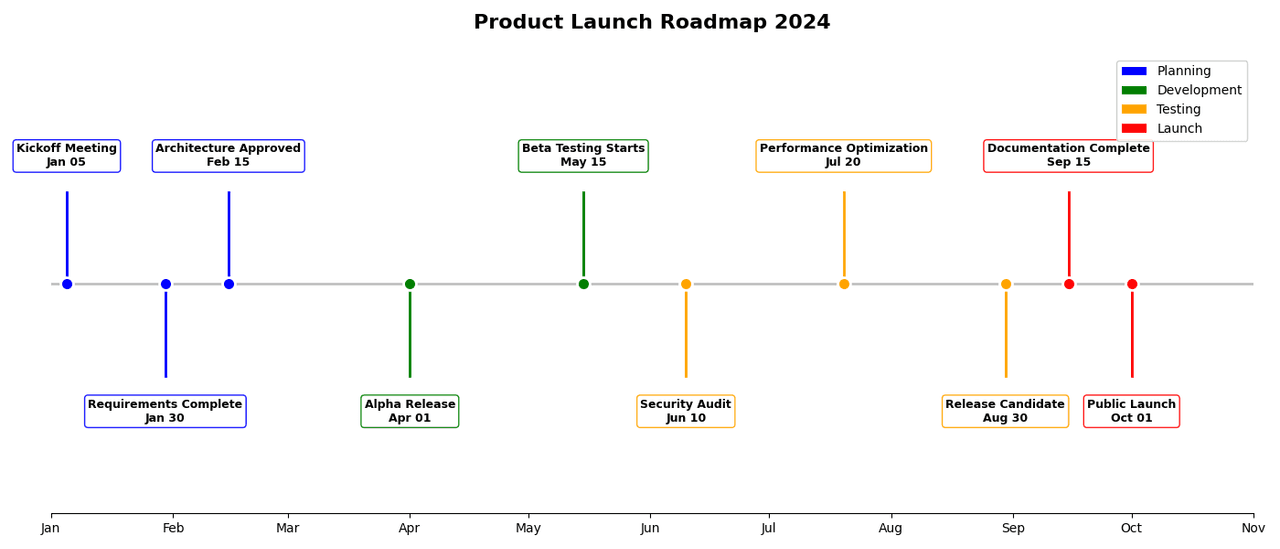
"Create a horizontal timeline showing 'Key Milestones' for a software product launch spanning 12 months. Generate 10 milestone events: 'Kickoff Meeting' (Jan 5), 'Requirements Complete' (Jan 30), 'Architecture Approved' (Feb 15), 'Alpha Release' (Apr 1), 'Beta Testing Starts' (May 15), 'Security Audit' (Jun 10), 'Performance Optimization' (Jul 20), 'Release Candidate' (Aug 30), 'Documentation Complete' (Sep 15), 'Public Launch' (Oct 1). Alternate milestone labels above and below the timeline to prevent overlap. Color-code by phase: Planning (blue), Development (green), Testing (orange), Launch (red). Add vertical connectors from timeline to labels. Mark today's date with a vertical dashed line. Include month labels on the axis. Title: 'Product Launch Roadmap 2024'."
How to create this chart with your data
Upload Data
Upload your Excel or CSV file. Data used to generate charts is sent to Plotivy's server for processing.
AI Generation
Our AI analyzes your data and generates the Timeline code automatically.
Customize & Export
Tweak the design with natural language, then export as high-res PNG, SVG or PDF.
Newsletter
Get one weekly tip for better timelines
Join researchers receiving concise Python plotting techniques to improve chart clarity and reduce revision cycles.
Python Code Example
# === IMPORTS ===
import pandas as pd
import numpy as np
import matplotlib.pyplot as plt
import matplotlib.dates as mdates
from datetime import datetime

# === USER-EDITABLE PARAMETERS ===
title = "Product Launch Roadmap 2024"
figsize = (14, 6)

# === EXAMPLE DATASET ===
milestones = [
    ('Kickoff Meeting', '2024-01-05', 'Planning', 'blue'),
    ('Requirements Complete', '2024-01-30', 'Planning', 'blue'),
    ('Architecture Approved', '2024-02-15', 'Planning', 'blue'),
    ('Alpha Release', '2024-04-01', 'Development', 'green'),
    ('Beta Testing Starts', '2024-05-15', 'Development', 'green'),
    ('Security Audit', '2024-06-10', 'Testing', 'orange'),
    ('Performance Optimization', '2024-07-20', 'Testing', 'orange'),
    ('Release Candidate', '2024-08-30', 'Testing', 'orange'),
    ('Documentation Complete', '2024-09-15', 'Launch', 'red'),
    ('Public Launch', '2024-10-01', 'Launch', 'red'),
]

df = pd.DataFrame(milestones, columns=['Event', 'Date', 'Phase', 'Color'])
df['Date'] = pd.to_datetime(df['Date'])

# Print summary
print("=== Product Launch Timeline ===")
print(f"\nTotal Milestones: {len(df)}")
print(f"Duration: {df['Date'].min().strftime('%b %d, %Y')} to {df['Date'].max().strftime('%b %d, %Y')}")
print(f"\nMilestones by Phase:")
for phase in df['Phase'].unique():
    count = len(df[df['Phase'] == phase])
    print(f"  {phase}: {count} milestones")

# === CREATE TIMELINE ===
fig, ax = plt.subplots(figsize=figsize)

# Create the timeline axis
ax.axhline(y=0, color='gray', linewidth=2, alpha=0.5)

# Alternate label positions above/below
positions = [1 if i % 2 == 0 else -1 for i in range(len(df))]

# Plot milestones
for idx, (_, row) in enumerate(df.iterrows()):
    pos = positions[idx]

    # Marker on timeline
    ax.scatter(row['Date'], 0, s=100, c=row['Color'], zorder=5, edgecolors='white', linewidth=2)

    # Vertical connector
    ax.plot([row['Date'], row['Date']], [0, pos * 0.4], color=row['Color'], linewidth=2)

    # Label box
    ax.annotate(
        f"{row['Event']}\n{row['Date'].strftime('%b %d')}",
        xy=(row['Date'], 0),
        xytext=(row['Date'], pos * 0.5),
        ha='center',
        va='bottom' if pos > 0 else 'top',
        fontsize=9,
        fontweight='bold',
        bbox=dict(boxstyle='round,pad=0.3', facecolor='white', edgecolor=row['Color'], alpha=0.9)
    )

# Format x-axis
ax.xaxis.set_major_locator(mdates.MonthLocator())
ax.xaxis.set_major_formatter(mdates.DateFormatter('%b'))
ax.set_xlim(datetime(2024, 1, 1), datetime(2024, 11, 1))

# Remove y-axis
ax.set_ylim(-1, 1)
ax.set_yticks([])
ax.spines['left'].set_visible(False)
ax.spines['right'].set_visible(False)
ax.spines['top'].set_visible(False)

# Add legend
from matplotlib.patches import Patch
legend_elements = [
    Patch(facecolor='blue', label='Planning'),
    Patch(facecolor='green', label='Development'),
    Patch(facecolor='orange', label='Testing'),
    Patch(facecolor='red', label='Launch')
]
ax.legend(handles=legend_elements, loc='upper right', framealpha=0.9)

plt.title(title, fontsize=16, fontweight='bold', pad=20)
plt.tight_layout()
plt.show()
# END-OF-CODE
Opens the Analyze page with this code pre-loaded and ready to execute
Console Output
=== Product Launch Timeline ===

Total Milestones: 10
Duration: Jan 05, 2024 to Oct 01, 2024

Milestones by Phase:
  Planning: 3 milestones
  Development: 2 milestones
  Testing: 3 milestones
  Launch: 2 milestones
Common Use Cases
- 1Project milestone tracking
- 2Historical events visualization
- 3Product roadmaps
- 4Biography timelines
Pro Tips
Alternate label positions for density
Use icons for event types
Add connecting lines for related events
Frequently asked questions
When should you use a timeline?
Timelines display events or milestones arranged chronologically along a horizontal or vertical axis. They help visualize sequences, durations, and the relative timing of events, making them essential for project planning, historical analysis, and storytelling. Common applications include project milestone tracking, historical events visualization, and product roadmaps.
Which Python libraries can create a timeline?
A timeline can be built in Python with matplotlib — matplotlib for precise control over axes, annotations, and journal styling. In Plotivy you describe the figure and it writes the matplotlib code for you.
Can I make a timeline without writing Python code?
Yes. Describe the timeline you need in plain language and upload your dataset — Plotivy's AI writes the Python code and renders a publication-ready figure. You still get the full, editable matplotlib source, so nothing is locked in a black box.
What are best practices for a clear timeline?
Alternate label positions for density. Use icons for event types.
Library comparison for this chart
matplotlib
Best when you need full control over axis formatting, annotation placement, and journal-specific styling for timeline.
Scientific Chart Selection Cheat Sheet
Not sure whether to use a Violin Plot, Box Plot, or Ridge Plot? Download our single-page reference mapping the most-used scientific chart types, exactly when to use them, and the core Matplotlib/Seaborn functions.