Kaplan-Meier Plot
Chart overview
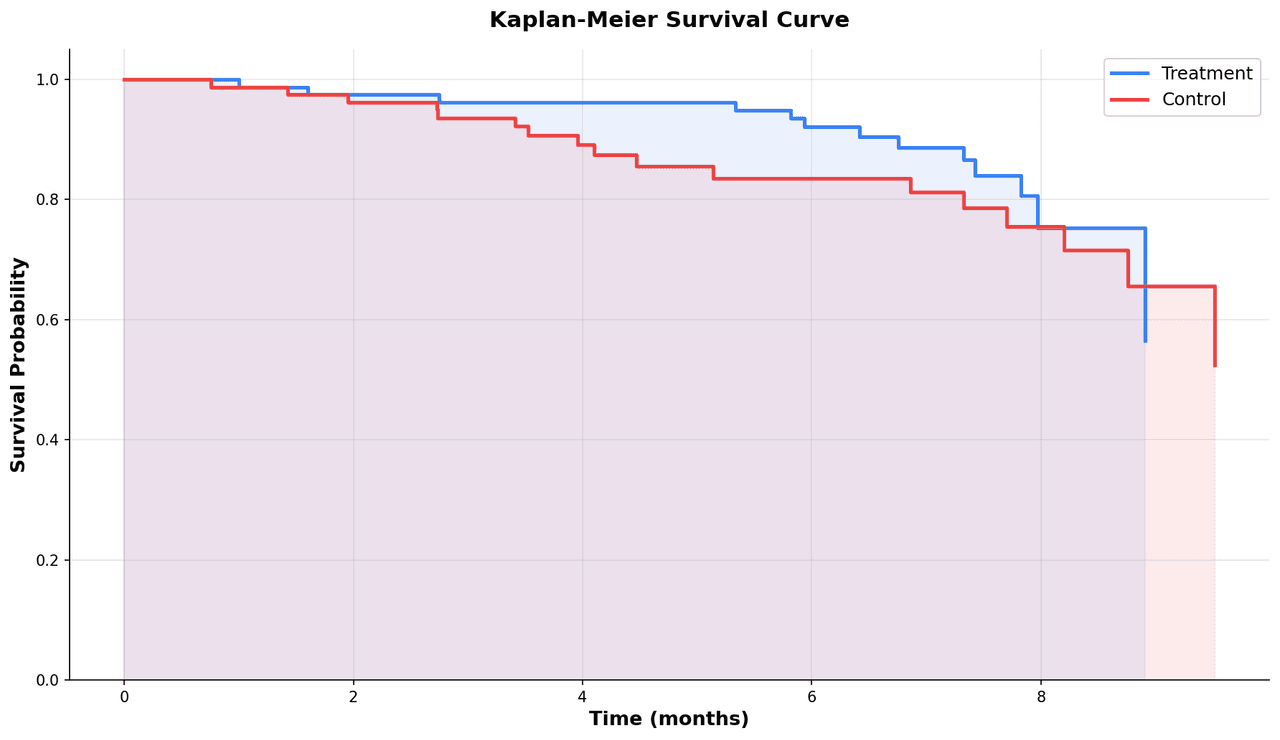
The Kaplan-Meier estimator is the cornerstone of survival analysis in clinical research, epidemiology, and preclinical oncology studies.
Key points
- Each step-down in the curve represents one or more events (death, relapse, failure) occurring at that time point.
- Tick marks on the curve indicate censored observations - patients who left the study or had not yet experienced the event at last follow-up.
- Multiple groups can be compared on the same plot, and a log-rank test p-value is typically reported to assess whether survival distributions differ significantly.
Practical guidance
Confidence intervals computed by Greenwood's formula are shaded around each curve. The median survival time - where the curve crosses 0. 5 - is a key summary statistic reported in oncology trials.
Create a Kaplan-Meier Plot with your data using AI — no coding required.
Further reading
Python Scatter Plot Tutorial
Build scatter plots with regression overlays, color encodings, and uncertainty bars.
Read the guideExample Visualization
Create This Chart Now
Generate publication-ready kaplan-meier plots with AI in seconds. No coding required – just describe your data and let AI do the work.
View example prompt
"Create a Kaplan-Meier survival plot comparing treatment vs. control groups from my clinical data. Show step-function curves with 95% confidence interval shading. Add tick marks for censored observations. Compute and display the log-rank test p-value. Mark median survival times with dashed lines. Label axes as 'Time (months)' and 'Survival Probability'. Format for publication at 300 DPI."
How to create this chart with your data
Upload Data
Upload your Excel or CSV file. Data used to generate charts is sent to Plotivy's server for processing.
AI Generation
Our AI analyzes your data and generates the Kaplan-Meier Plot code automatically.
Customize & Export
Tweak the design with natural language, then export as high-res PNG, SVG or PDF.
Newsletter
Get one weekly tip for better kaplan-meier plots
Join researchers receiving concise Python plotting techniques to improve chart clarity and reduce revision cycles.
Python Code Example
Console Output
Figure saved: plotivy-kaplan-meier-plot.png
Common Use Cases
- 1Overall survival and progression-free survival in oncology clinical trials
- 2Device or implant failure analysis in biomedical engineering studies
- 3Time-to-relapse curves in psychiatric or infectious disease cohort studies
- 4Preclinical tumor growth delay studies comparing treatment arms in mice
Pro Tips
Always display the number at risk table below the x-axis for clinical transparency
Use the log-rank test for group comparisons but report hazard ratios from Cox regression for effect size
Separate curves that cross each other are better analyzed with restricted mean survival time
Confidence intervals widen toward the tail when few patients remain - truncate at a meaningful follow-up horizon
Frequently asked questions
When should you use a kaplan-meier plot?
The Kaplan-Meier estimator is the cornerstone of survival analysis in clinical research, epidemiology, and preclinical oncology studies. Each step-down in the curve represents one or more events (death, relapse, failure) occurring at that time point. Common applications include overall survival and progression-free survival in oncology clinical trials, device or implant failure analysis in biomedical engineering studies, and time-to-relapse curves in psychiatric or infectious disease cohort studies.
Which Python libraries can create a kaplan-meier plot?
A kaplan-meier plot can be built in Python with matplotlib, numpy, pandas, and lifelines — matplotlib for precise control over axes, annotations, and journal styling, numpy, pandas for quick plots straight from a DataFrame, and lifelines. In Plotivy you describe the figure and it writes the matplotlib code for you.
Can I make a kaplan-meier plot without writing Python code?
Yes. Describe the kaplan-meier plot you need in plain language and upload your dataset — Plotivy's AI writes the Python code and renders a publication-ready figure. You still get the full, editable matplotlib source, so nothing is locked in a black box.
What are best practices for a clear kaplan-meier plot?
Always display the number at risk table below the x-axis for clinical transparency. Use the log-rank test for group comparisons but report hazard ratios from Cox regression for effect size.
Library comparison for this chart
matplotlib
Best when you need full control over axis formatting, annotation placement, and journal-specific styling for kaplan-meier-plot.
numpy
Useful in specialized workflows that complement core Python plotting libraries for kaplan-meier-plot analysis tasks.
pandas
Good for quick exploratory drafts directly from DataFrame operations before polishing in matplotlib or plotly.
lifelines
Useful in specialized workflows that complement core Python plotting libraries for kaplan-meier-plot analysis tasks.
Scientific Chart Selection Cheat Sheet
Not sure whether to use a Violin Plot, Box Plot, or Ridge Plot? Download our single-page reference mapping the most-used scientific chart types, exactly when to use them, and the core Matplotlib/Seaborn functions.