Marimekko Chart
Chart overview
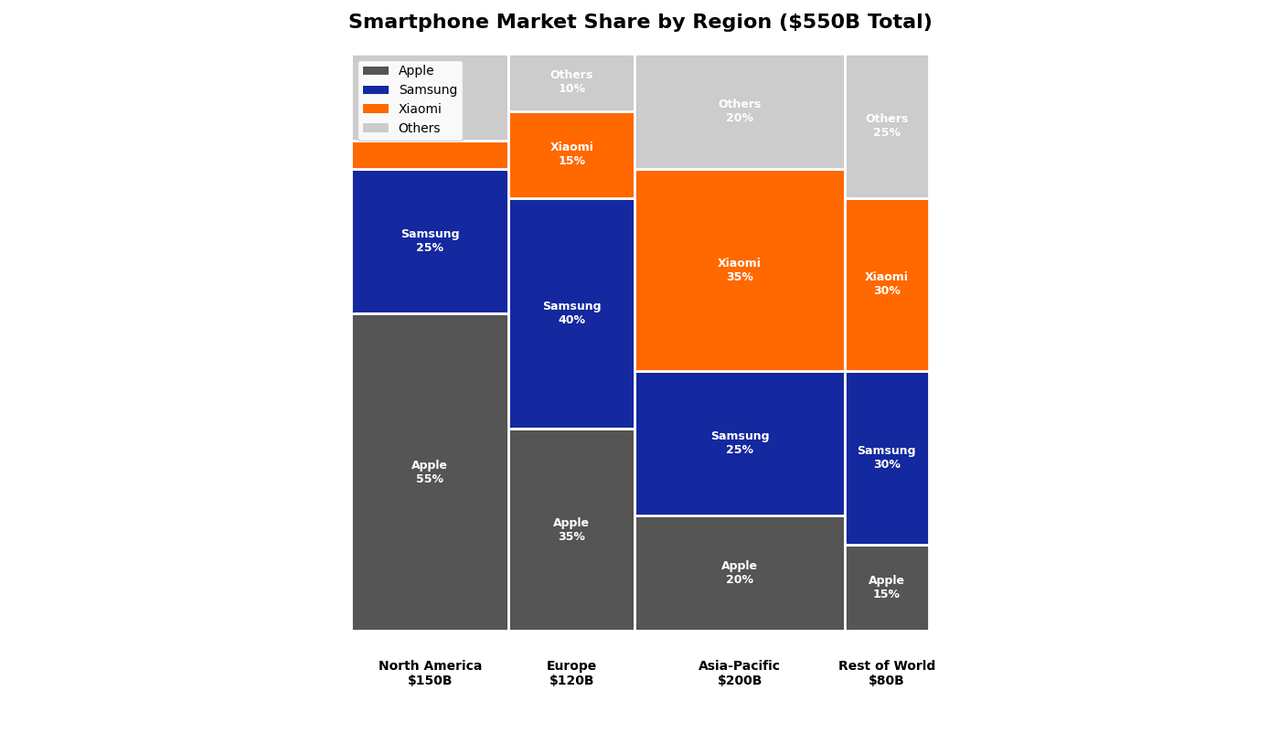
Marimekko charts (also called Mekko or Mosaic plots) display two categorical variables simultaneously.
Key points
- The width of each column represents one variable's proportion, while the height of segments within each column represents another.
- This makes them ideal for market share analysis across different segments.
- The whole plot is a unit square partitioned twice: column widths encode the marginal distribution of the first variable, and within each column the stacked heights encode the conditional distribution of the second - so the area of every tile is a joint proportion, and unequal column heights across the chart immediately signal that the two variables are associated (in a mosaic/statistician's framing, that is a visual chi-square).
Practical guidance
That dual encoding is also the weakness: area and the varying baselines make precise comparison hard - readers accurately compare only the bottom segments and the column widths, and a mid-stack tile in a narrow column is nearly impossible to size by eye. So label tiles with their actual percentages, cap it at a handful of categories per axis, and order categories meaningfully (by size or a natural sequence). In Python, statsmodels. graphics. mosaicplot. mosaic builds the statistician's mosaic (with optional Pearson-residual shading to highlight over/under-represented cells), while a plotly version can be assembled for the business Marimekko look. If only one categorical split matters, a plain stacked or grouped bar is easier to read; reach for Marimekko when both the marginal sizes and the internal composition must be shown together.
Create a Marimekko Chart with your data using AI — no coding required.
Further reading
How to Create a Bar Chart in Python
Matplotlib, seaborn, and plotly patterns for grouped bars, error bars, and publication-ready labels.
Read the guideExample Visualization
Create This Chart Now
Generate publication-ready marimekko charts with AI in seconds. No coding required – just describe your data and let AI do the work.
View example prompt
"Create a Marimekko chart (mosaic plot) showing 'Market Share by Company and Region' for the smartphone industry. Generate data for 4 companies (Apple, Samsung, Xiaomi, Others) across 4 regions with different total market sizes: North America ($150B: Apple 55%, Samsung 25%, Xiaomi 5%, Others 15%), Europe ($120B: Apple 35%, Samsung 40%, Xiaomi 15%, Others 10%), Asia-Pacific ($200B: Apple 20%, Samsung 25%, Xiaomi 35%, Others 20%), Rest of World ($80B: Apple 15%, Samsung 30%, Xiaomi 30%, Others 25%). Column widths proportional to regional market size. Use consistent company colors across regions. Add percentage labels inside cells >5%. Include total market size ($550B) in title. Add a legend for companies."
How to create this chart with your data
Upload Data
Upload your Excel or CSV file. Data used to generate charts is sent to Plotivy's server for processing.
AI Generation
Our AI analyzes your data and generates the Marimekko Chart code automatically.
Customize & Export
Tweak the design with natural language, then export as high-res PNG, SVG or PDF.
Newsletter
Get one weekly tip for better marimekko charts
Join researchers receiving concise Python plotting techniques to improve chart clarity and reduce revision cycles.
Python Code Example
# === IMPORTS ===
import pandas as pd
import numpy as np
import matplotlib.pyplot as plt
from matplotlib.patches import Rectangle

# === USER-EDITABLE PARAMETERS ===
title = "Smartphone Market Share by Region ($550B Total)"
figsize = (14, 8)

# === EXAMPLE DATASET ===
# Regions and their market sizes (in billions)
regions = ['North America', 'Europe', 'Asia-Pacific', 'Rest of World']
market_sizes = [150, 120, 200, 80]

# Companies and their shares in each region
companies = ['Apple', 'Samsung', 'Xiaomi', 'Others']
company_colors = {'Apple': '#555555', 'Samsung': '#1428A0', 'Xiaomi': '#FF6900', 'Others': '#CCCCCC'}

# Market share percentages by region
shares = {
    'North America': [55, 25, 5, 15],
    'Europe': [35, 40, 15, 10],
    'Asia-Pacific': [20, 25, 35, 20],
    'Rest of World': [15, 30, 30, 25]
}

# Print summary
print("=== Smartphone Market Share ===")
print(f"\nTotal Market: ${sum(market_sizes)}B")
print(f"\nBy Region:")
for reg, size in zip(regions, market_sizes):
    print(f"  {reg}: ${size}B ({size/sum(market_sizes)*100:.0f}%)")

print(f"\nCompany shares by region:")
for reg in regions:
    print(f"\n  {reg}:")
    for comp, share in zip(companies, shares[reg]):
        print(f"    {comp}: {share}%")

# === CREATE MARIMEKKO CHART ===
fig, ax = plt.subplots(figsize=figsize)

# Normalize widths
total_market = sum(market_sizes)
widths = [size / total_market for size in market_sizes]

# Draw rectangles
x_pos = 0
for i, (region, width) in enumerate(zip(regions, widths)):
    y_pos = 0
    for j, (company, share) in enumerate(zip(companies, shares[region])):
        height = share / 100
        rect = Rectangle(
            (x_pos, y_pos), width, height,
            facecolor=company_colors[company],
            edgecolor='white',
            linewidth=2
        )
        ax.add_patch(rect)

        # Add label if segment is large enough
        if share >= 10:
            ax.text(
                x_pos + width/2, y_pos + height/2,
                f'{company}\n{share}%',
                ha='center', va='center',
                fontsize=9, fontweight='bold',
                color='white'
            )

        y_pos += height

    # Region label at bottom
    ax.text(x_pos + width/2, -0.05, f'{region}\n${market_sizes[i]}B',
            ha='center', va='top', fontsize=10, fontweight='bold')

    x_pos += width

# Styling
ax.set_xlim(0, 1)
ax.set_ylim(-0.15, 1)
ax.set_aspect('equal')
ax.axis('off')

# Legend
from matplotlib.patches import Patch
legend_elements = [Patch(facecolor=color, label=comp)
                   for comp, color in company_colors.items()]
ax.legend(handles=legend_elements, loc='upper left', framealpha=0.9)

ax.set_title(title, fontsize=16, fontweight='bold', pad=20)

plt.tight_layout()
plt.show()
# END-OF-CODE
Opens the Analyze page with this code pre-loaded and ready to execute
Console Output
=== Smartphone Market Share ===

Total Market: $550B

By Region:
  North America: $150B (27%)
  Europe: $120B (22%)
  Asia-Pacific: $200B (36%)
  Rest of World: $80B (15%)

Company shares by region:

  North America:
    Apple: 55%
    Samsung: 25%
    Xiaomi: 5%
    Others: 15%

  Europe:
    Apple: 35%
    Samsung: 40%
    Xiaomi: 15%
    Others: 10%

  Asia-Pacific:
    Apple: 20%
    Samsung: 25%
    Xiaomi: 35%
    Others: 20%

  Rest of World:
    Apple: 15%
    Samsung: 30%
    Xiaomi: 30%
    Others: 25%
Common Use Cases
- 1Market share analysis
- 2Segment comparison
- 3Product portfolio visualization
- 4Survey response breakdown
Pro Tips
Limit to 5-7 categories per axis
Use consistent color coding
Add percentage labels for clarity
Frequently asked questions
When should you use a marimekko chart?
Marimekko charts (also called Mekko or Mosaic plots) display two categorical variables simultaneously. The width of each column represents one variable's proportion, while the height of segments within each column represents another. Common applications include market share analysis, segment comparison, and product portfolio visualization.
Which Python libraries can create a marimekko chart?
A marimekko chart can be built in Python with statsmodels and plotly — statsmodels and Plotly for interactive hover, zoom, and web sharing. In Plotivy you describe the figure and it writes the statsmodels code for you.
Can I make a marimekko chart without writing Python code?
Yes. Describe the marimekko chart you need in plain language and upload your dataset — Plotivy's AI writes the Python code and renders a publication-ready figure. You still get the full, editable statsmodels source, so nothing is locked in a black box.
What are best practices for a clear marimekko chart?
Limit to 5-7 categories per axis. Use consistent color coding.
Library comparison for this chart
statsmodels
Useful in specialized workflows that complement core Python plotting libraries for marimekko-chart analysis tasks.
plotly
Best for interactive hover, zoom, and web sharing when collaborators need to inspect values directly from marimekko-chart figures.
Scientific Chart Selection Cheat Sheet
Not sure whether to use a Violin Plot, Box Plot, or Ridge Plot? Download our single-page reference mapping the most-used scientific chart types, exactly when to use them, and the core Matplotlib/Seaborn functions.