OHLC Chart
Chart overview
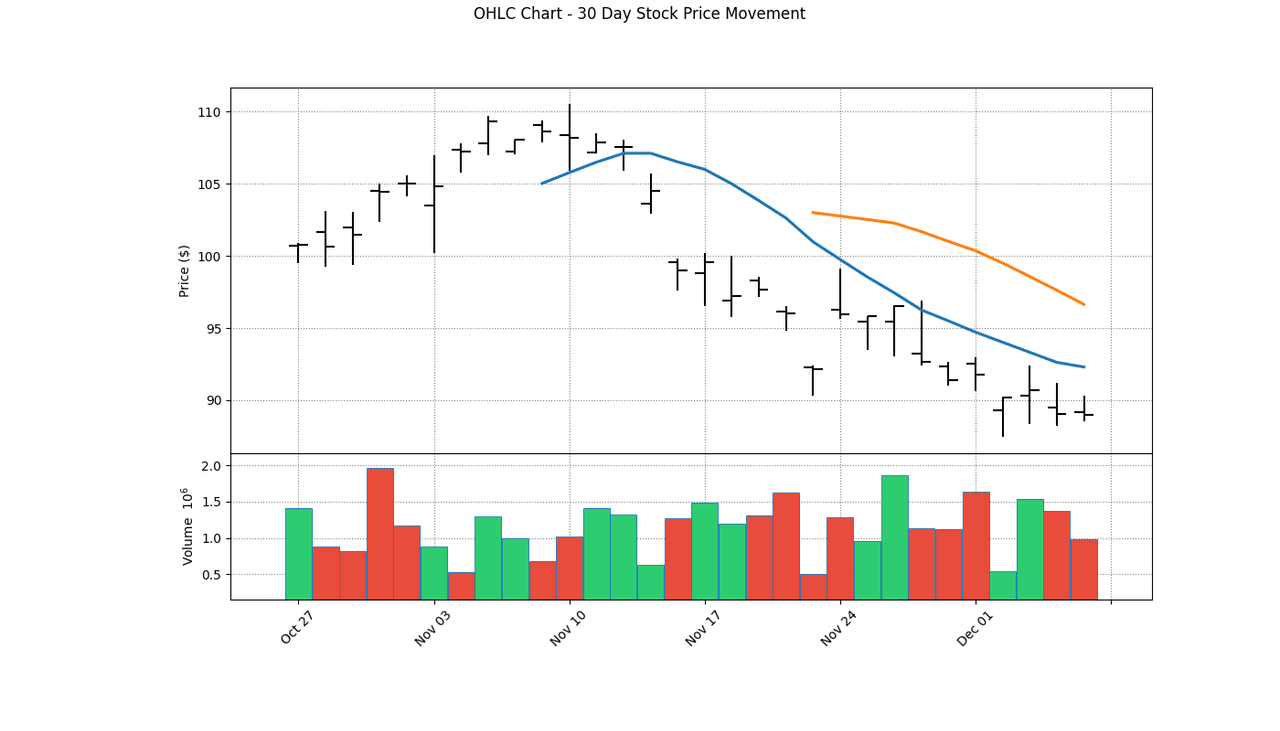
OHLC charts display four key price points for each time period: Open, High, Low, and Close.
Key points
- Vertical lines show the trading range (high to low), while horizontal ticks indicate opening and closing prices.
- They provide comprehensive price action information in a compact format.
- Each bar packs four numbers into one glyph: the vertical line spans low to high, the left tick is the open, the right tick is the close - so a single glance reads both volatility (bar height) and direction (close above or below open, usually reinforced with color).
Practical guidance
OHLC and candlestick charts encode identical data; OHLC bars are thinner and less prone to the optical dominance a fat candle body can create, so they stay readable at high bar counts, while candlesticks make the open-close body more immediately obvious. Do not build these by hand - use mplfinance (mpf. plot(df, type='ohlc')) or plotly's Ohlc trace, which handle the tick geometry, weekend/holiday gaps, and volume subpanels correctly; a naive matplotlib version almost always mis-scales or renders phantom bars on non-trading days. Keep the y-axis honest and unbroken (price charts live and die on truthful scale), and if you span a wide price range consider a log axis so equal percentage moves look equal. When you only need the trend line, a plain close-price line is cleaner; use OHLC when the within-period range and open/close relationship are the actual subject.
Create a OHLC Chart with your data using AI — no coding required.
Further reading
How to Create a Bar Chart in Python
Matplotlib, seaborn, and plotly patterns for grouped bars, error bars, and publication-ready labels.
Read the guideExample Visualization
Create This Chart Now
Generate publication-ready ohlc charts with AI in seconds. No coding required – just describe your data and let AI do the work.
View example prompt
"Use mplfinance library to create an OHLC chart for daily trading data. Color the bars green for price increases and red for decreases. Generate a proper example dataset with realistic trading patterns."
How to create this chart with your data
Upload Data
Upload your Excel or CSV file. Data used to generate charts is sent to Plotivy's server for processing.
AI Generation
Our AI analyzes your data and generates the OHLC Chart code automatically.
Customize & Export
Tweak the design with natural language, then export as high-res PNG, SVG or PDF.
Newsletter
Get one weekly tip for better ohlc charts
Join researchers receiving concise Python plotting techniques to improve chart clarity and reduce revision cycles.
Python Code Example
# === IMPORTS ===
import pandas as pd
import numpy as np
import mplfinance as mpf
from datetime import datetime, timedelta

# === USER-EDITABLE PARAMETERS ===
title = "OHLC Chart - 30 Day Stock Price Movement"

# === EXAMPLE DATASET ===
np.random.seed(42)

# Generate 30 days of OHLC data
n_days = 30
dates = pd.date_range(end=datetime.today(), periods=n_days, freq='B')

# Random walk for price
price = 100 + np.cumsum(np.random.randn(n_days) * 2)

# Generate OHLC from price
opens = price + np.random.randn(n_days) * 0.5
closes = price + np.random.randn(n_days) * 0.5
highs = np.maximum(opens, closes) + np.abs(np.random.randn(n_days) * 1.5)
lows = np.minimum(opens, closes) - np.abs(np.random.randn(n_days) * 1.5)

# Volume
volume = np.random.randint(500000, 2000000, n_days)

df = pd.DataFrame({
    'Open': opens,
    'High': highs,
    'Low': lows,
    'Close': closes,
    'Volume': volume
}, index=dates)

# Print summary
print("=== OHLC Chart Data Summary ===")
print(f"\nPeriod: {df.index[0].strftime('%Y-%m-%d')} to {df.index[-1].strftime('%Y-%m-%d')}")
print(f"Trading Days: {n_days}")
print(f"\nPrice Statistics:")
print(f"  Open Range: ${df['Open'].min():.2f} - ${df['Open'].max():.2f}")
print(f"  Close Range: ${df['Close'].min():.2f} - ${df['Close'].max():.2f}")
print(f"  High: ${df['High'].max():.2f}")
print(f"  Low: ${df['Low'].min():.2f}")
print(f"\nUp Days: {len(df[df['Close'] > df['Open']])}")
print(f"Down Days: {len(df[df['Close'] < df['Open']])}")
print(f"Average Volume: {df['Volume'].mean():,.0f}")

# === CREATE OHLC CHART ===
# Custom style
mc = mpf.make_marketcolors(
    up='#2ecc71',      # Green for up days
    down='#e74c3c',    # Red for down days
    edge='inherit',
    wick='inherit',
    volume='in'
)

style = mpf.make_mpf_style(
    marketcolors=mc,
    gridstyle=':',
    gridcolor='gray'
)

# Plot OHLC chart with volume
mpf.plot(
    df,
    type='ohlc',
    style=style,
    title=title,
    ylabel='Price ($)',
    volume=True,
    figsize=(14, 8),
    mav=(10, 20)  # Add moving averages
)
# END-OF-CODE
Opens the Analyze page with this code pre-loaded and ready to execute
Console Output
Period: 2025-12-19 to 2026-01-28
Starting Price: $149.85
Ending Price: $151.32
Price Change: +0.98%
Highest Price: $156.44
Lowest Price: $144.27
Common Use Cases
- 1Stock price analysis
- 2Commodity trading
- 3Forex market visualization
- 4Cryptocurrency tracking
Pro Tips
Use green/red coloring for up/down days
Add volume bars below for context
Include moving averages for trend analysis
Frequently asked questions
When should you use an OHLC chart?
OHLC charts display four key price points for each time period: Open, High, Low, and Close. Vertical lines show the trading range (high to low), while horizontal ticks indicate opening and closing prices. Common applications include stock price analysis, commodity trading, and forex market visualization.
Which Python libraries can create an OHLC chart?
An OHLC chart can be built in Python with mplfinance and plotly — mplfinance and Plotly for interactive hover, zoom, and web sharing. In Plotivy you describe the figure and it writes the mplfinance code for you.
Can I make an OHLC chart without writing Python code?
Yes. Describe the OHLC chart you need in plain language and upload your dataset — Plotivy's AI writes the Python code and renders a publication-ready figure. You still get the full, editable mplfinance source, so nothing is locked in a black box.
What are best practices for a clear OHLC chart?
Use green/red coloring for up/down days. Add volume bars below for context.
Library comparison for this chart
mplfinance
Useful in specialized workflows that complement core Python plotting libraries for ohlc-chart analysis tasks.
plotly
Best for interactive hover, zoom, and web sharing when collaborators need to inspect values directly from ohlc-chart figures.
Scientific Chart Selection Cheat Sheet
Not sure whether to use a Violin Plot, Box Plot, or Ridge Plot? Download our single-page reference mapping the most-used scientific chart types, exactly when to use them, and the core Matplotlib/Seaborn functions.