Parallel Coordinates Plot
Chart overview
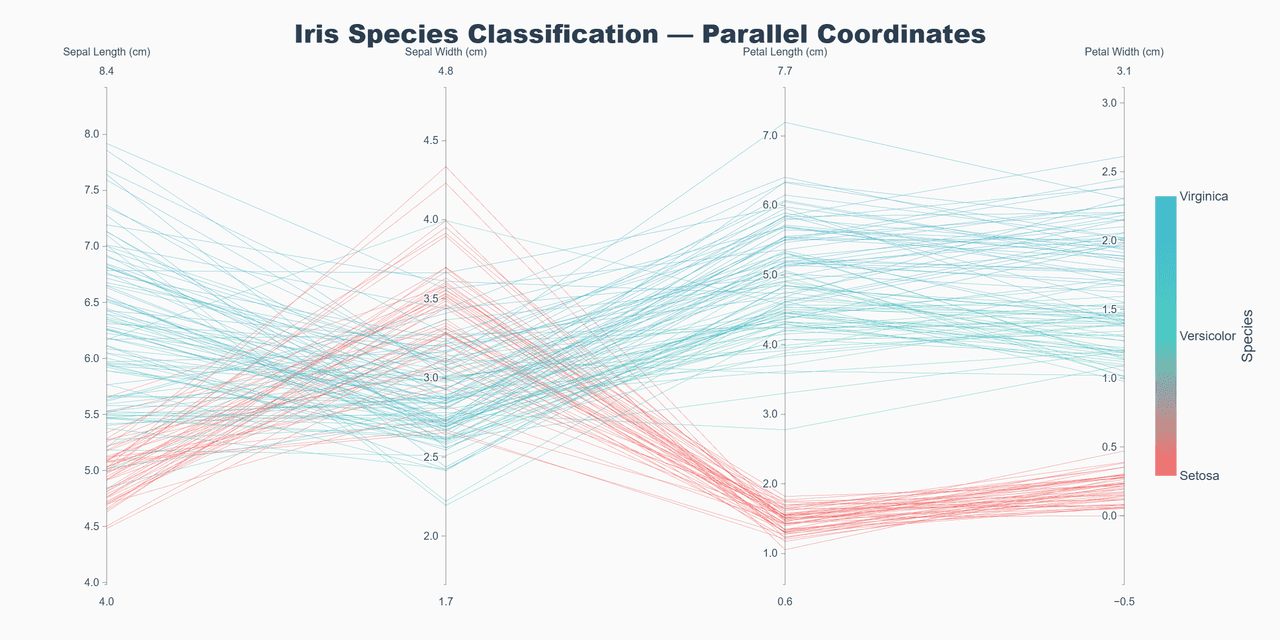
Parallel coordinates plots display multivariate data by representing each variable as a vertical axis and connecting data points across axes with lines.
Key points
- This technique reveals patterns, clusters, and outliers in high-dimensional datasets, making it invaluable for exploratory data analysis.
- It is the right tool for roughly 4-10 numeric variables and up to a few hundred rows - enough lines to show structure, few enough to avoid a hairball.
- Normalize each axis first (min-max or z-score): pandas' plotting.
Practical guidance
parallel_coordinates draws raw values, so one wide-range column flattens every other axis into a line. plotly. express. parallel_coordinates scales per axis and adds interactive brushing - dragging along an axis filters lines, which is how the chart is actually meant to be used; a static version loses most of its value. Axis order matters more than any styling choice, because relationships are only visible between adjacent axes: put correlated variables next to each other, and try a couple of orderings before settling. For thousands of rows, cut alpha hard, pre-cluster and color by cluster label, or aggregate to per-group medians - and consider whether a scatter-plot matrix or PCA answers the question more directly.
Create a Parallel Coordinates Plot with your data using AI — no coding required.
Further reading
Python Scatter Plot Tutorial
Build scatter plots with regression overlays, color encodings, and uncertainty bars.
Read the guideExample Visualization
Create This Chart Now
Generate publication-ready parallel coordinates plots with AI in seconds. No coding required – just describe your data and let AI do the work.
View example prompt
"Use plotly.express to create a parallel coordinates plot comparing multiple features across different categories. Color the lines by category. Generate a proper example dataset similar to the Iris dataset."
How to create this chart with your data
Upload Data
Upload your Excel or CSV file. Data used to generate charts is sent to Plotivy's server for processing.
AI Generation
Our AI analyzes your data and generates the Parallel Coordinates Plot code automatically.
Customize & Export
Tweak the design with natural language, then export as high-res PNG, SVG or PDF.
Newsletter
Get one weekly tip for better parallel coordinates plots
Join researchers receiving concise Python plotting techniques to improve chart clarity and reduce revision cycles.
Python Code Example
# === IMPORTS ===
import pandas as pd
import numpy as np
import plotly.express as px
import plotly.graph_objects as go

# === USER-EDITABLE PARAMETERS ===
title = "Iris Species Classification — Parallel Coordinates"
figsize_width = 1200
figsize_height = 600

# === EXAMPLE DATASET ===
np.random.seed(42)

n_per_class = 50
species = ['setosa', 'versicolor', 'virginica']

data = []
# Setosa - small petals, medium sepals
for _ in range(n_per_class):
    data.append({
        'Sepal Length': np.random.normal(5.0, 0.35),
        'Sepal Width': np.random.normal(3.4, 0.38),
        'Petal Length': np.random.normal(1.5, 0.17),
        'Petal Width': np.random.normal(0.2, 0.1),
        'Species': 'setosa',
        'species_id': 0
    })

# Versicolor - medium everything
for _ in range(n_per_class):
    data.append({
        'Sepal Length': np.random.normal(5.9, 0.52),
        'Sepal Width': np.random.normal(2.8, 0.31),
        'Petal Length': np.random.normal(4.3, 0.47),
        'Petal Width': np.random.normal(1.3, 0.2),
        'Species': 'versicolor',
        'species_id': 1
    })

# Virginica - large petals, large sepals
for _ in range(n_per_class):
    data.append({
        'Sepal Length': np.random.normal(6.6, 0.64),
        'Sepal Width': np.random.normal(3.0, 0.32),
        'Petal Length': np.random.normal(5.5, 0.55),
        'Petal Width': np.random.normal(2.0, 0.27),
        'Species': 'virginica',
        'species_id': 2
    })

df = pd.DataFrame(data)

# Print summary
print("=== Iris Dataset Summary ===")
print(f"\nTotal samples: {len(df)}")
print(f"Samples per species: {n_per_class}")

# === CREATE PARALLEL COORDINATES PLOT ===
fig = go.Figure(data=
    go.Parcoords(
        line = dict(
            color = df['species_id'],
            colorscale = [[0, '#FF6B6B'], [0.5, '#4ECDC4'], [1, '#45B7D1']],
            showscale = True,
            colorbar = dict(
                title = dict(text='Species', side='right'),
                tickvals = [0, 1, 2],
                ticktext = ['Setosa', 'Versicolor', 'Virginica'],
                thickness = 20,
                len = 0.6
            )
        ),
        dimensions = [
            dict(
                range = [df['Sepal Length'].min() - 0.5, df['Sepal Length'].max() + 0.5],
                label = 'Sepal Length (cm)',
                values = df['Sepal Length'],
                tickformat = '.1f'
            ),
            dict(
                range = [df['Sepal Width'].min() - 0.5, df['Sepal Width'].max() + 0.5],
                label = 'Sepal Width (cm)',
                values = df['Sepal Width'],
                tickformat = '.1f'
            ),
            dict(
                range = [df['Petal Length'].min() - 0.5, df['Petal Length'].max() + 0.5],
                label = 'Petal Length (cm)',
                values = df['Petal Length'],
                tickformat = '.1f'
            ),
            dict(
                range = [df['Petal Width'].min() - 0.5, df['Petal Width'].max() + 0.5],
                label = 'Petal Width (cm)',
                values = df['Petal Width'],
                tickformat = '.1f'
            )
        ]
    )
)

fig.update_layout(
    title=dict(
        text=title,
        font=dict(size=24, color='#2C3E50', family='Arial Black'),
        x=0.5,
        xanchor='center'
    ),
    width=figsize_width,
    height=figsize_height,
    margin=dict(l=100, r=100, t=80, b=50),
    paper_bgcolor='#FAFAFA',
    plot_bgcolor='#FAFAFA',
    font=dict(family='Arial', size=12, color='#34495E')
)

fig.write_image('chart.png', scale=2)
print("Saved: chart.png")
fig.show()
# END-OF-CODE
Opens the Analyze page with this code pre-loaded and ready to execute
Console Output
=== Iris Dataset Summary ===

Total samples: 150
Samples per species: 50
Saved: chart.png
Common Use Cases
- 1Feature comparison in ML
- 2Multi-criteria decision analysis
- 3Process parameter optimization
- 4Customer segmentation analysis
Pro Tips
Normalize scales for fair comparison
Use color to highlight patterns
Allow axis reordering for pattern discovery
Frequently asked questions
When should you use a parallel coordinates plot?
Parallel coordinates plots display multivariate data by representing each variable as a vertical axis and connecting data points across axes with lines. This technique reveals patterns, clusters, and outliers in high-dimensional datasets, making it invaluable for exploratory data analysis. Common applications include feature comparison in ML, multi-criteria decision analysis, and process parameter optimization.
Which Python libraries can create a parallel coordinates plot?
A parallel coordinates plot can be built in Python with pandas and plotly — pandas for quick plots straight from a DataFrame and Plotly for interactive hover, zoom, and web sharing. In Plotivy you describe the figure and it writes the pandas code for you.
Can I make a parallel coordinates plot without writing Python code?
Yes. Describe the parallel coordinates plot you need in plain language and upload your dataset — Plotivy's AI writes the Python code and renders a publication-ready figure. You still get the full, editable pandas source, so nothing is locked in a black box.
What are best practices for a clear parallel coordinates plot?
Normalize scales for fair comparison. Use color to highlight patterns.
Library comparison for this chart
pandas
Good for quick exploratory drafts directly from DataFrame operations before polishing in matplotlib or plotly.
plotly
Best for interactive hover, zoom, and web sharing when collaborators need to inspect values directly from parallel-coordinates-plot figures.
Scientific Chart Selection Cheat Sheet
Not sure whether to use a Violin Plot, Box Plot, or Ridge Plot? Download our single-page reference mapping the most-used scientific chart types, exactly when to use them, and the core Matplotlib/Seaborn functions.