Point & Figure Chart
Chart overview
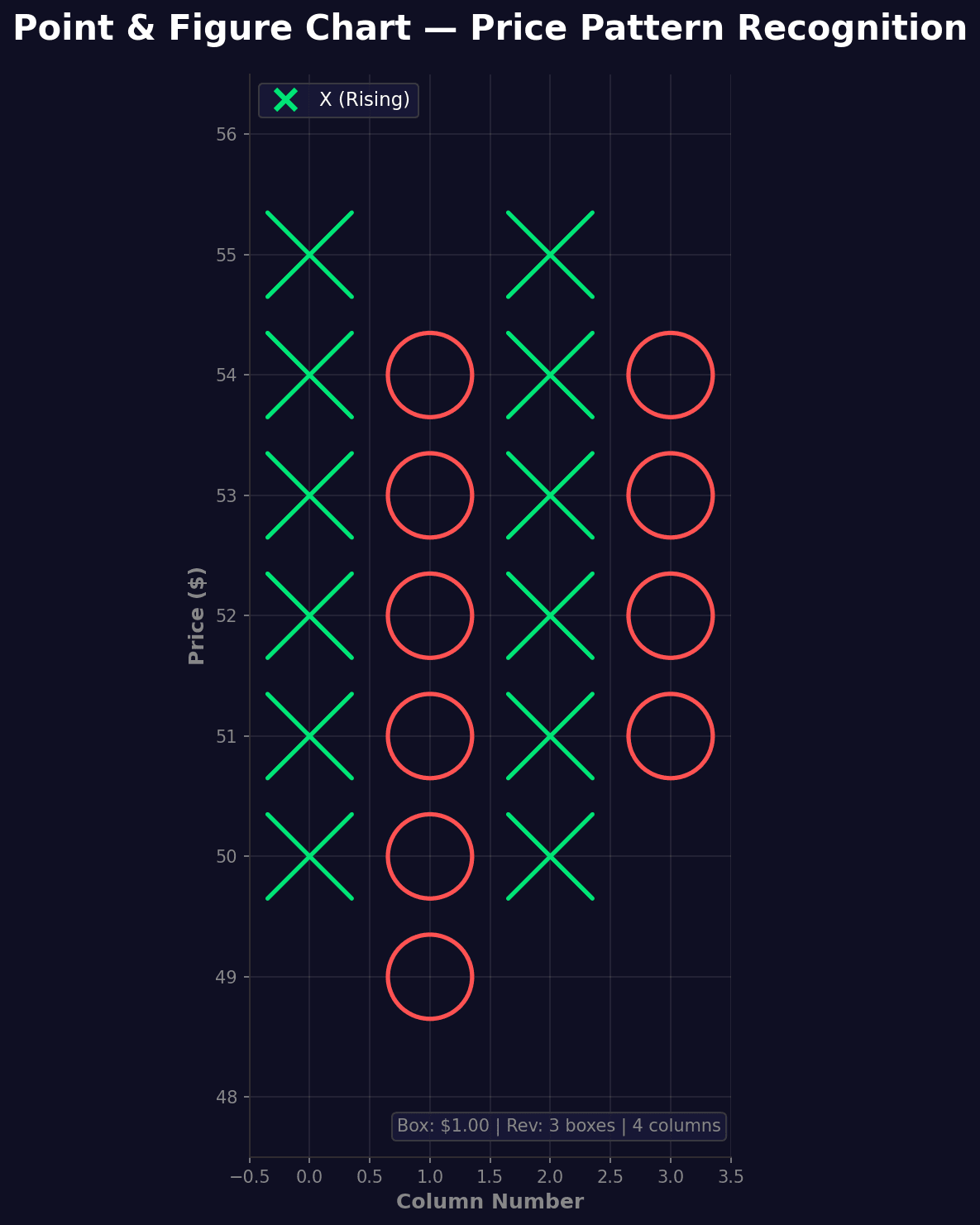
Point and Figure charts use X's and O's to represent price movements, ignoring time entirely.
Key points
- X columns represent rising prices, O columns represent falling prices.
- This technique filters out noise and highlights significant price movements, support, and resistance levels.
- The defining choice is that the x-axis is not time - a new column appears only when price reverses by a set amount, so long quiet stretches collapse to nothing and only meaningful moves consume horizontal space, which is exactly what makes horizontal support/resistance lines pop.
Practical guidance
Two parameters define the chart and change it completely: the box size (the price increment one X or O represents) and the reversal amount (how many boxes against the trend before a new column starts, classically 3). Larger boxes filter more noise but hide detail; state both parameters on the chart because the same data looks different under different settings. In Python, mplfinance renders Point and Figure directly (type='pnf' with a pointnfigure_params dict for box size and reversal), which is far safer than hand-rolling the box logic. Interpretation is pattern-based (double-top breakouts, bullish support lines drawn at 45 degrees) and inherently technical-analysis flavored - present it as a trader's lens, not a statistical claim, since it discards both time and volume. When timing, gaps, or volume matter, a candlestick or OHLC chart carries information P&F deliberately throws away.
Create a Point & Figure Chart with your data using AI — no coding required.
Further reading
How to Create a Bar Chart in Python
Matplotlib, seaborn, and plotly patterns for grouped bars, error bars, and publication-ready labels.
Read the guideExample Visualization
Create This Chart Now
Generate publication-ready point & figure charts with AI in seconds. No coding required – just describe your data and let AI do the work.
View example prompt
"Use mplfinance library to create a Point and Figure chart for asset prices using a box size of 1 and a reversal amount of 3. Generate a proper example dataset with realistic price movements."
How to create this chart with your data
Upload Data
Upload your Excel or CSV file. Data used to generate charts is sent to Plotivy's server for processing.
AI Generation
Our AI analyzes your data and generates the Point & Figure Chart code automatically.
Customize & Export
Tweak the design with natural language, then export as high-res PNG, SVG or PDF.
Newsletter
Get one weekly tip for better point & figure charts
Join researchers receiving concise Python plotting techniques to improve chart clarity and reduce revision cycles.
Python Code Example
# === IMPORTS ===
import pandas as pd
import numpy as np
import matplotlib.pyplot as plt
import matplotlib.patches as mpatches

# === USER-EDITABLE PARAMETERS ===
title = "Point & Figure Chart — Price Pattern Recognition"
figsize = (14, 10)

# === EXAMPLE DATASET ===
np.random.seed(42)

# Generate price data with clear trends
n_days = 120
start_price = 50
prices = [start_price]

for i in range(1, n_days):
    if i < 30:
        trend = 0.25  # Strong uptrend
    elif i < 55:
        trend = -0.18  # Downtrend
    elif i < 85:
        trend = 0.2  # Uptrend
    else:
        trend = -0.12  # Mild downtrend

    change = trend + np.random.randn() * 0.4
    new_price = max(prices[-1] + change, 40)
    prices.append(new_price)

prices = np.array(prices)

# P&F chart parameters
box_size = 1.0
reversal = 3

# Build P&F chart
columns = []
current_column = {'type': 'X', 'boxes': []}
current_high = prices[0]
current_low = prices[0]
box_start = int(prices[0] / box_size) * box_size

# Initialize first column
current_column['bottom'] = box_start
current_column['top'] = box_start
current_column['boxes'].append(box_start)

for price in prices[1:]:
    box_price = int(price / box_size) * box_size

    if current_column['type'] == 'X':  # Rising column
        if price >= current_column['top'] + box_size:
            # Continue rising
            new_boxes = int((price - current_column['top']) / box_size)
            for i in range(1, new_boxes + 1):
                current_column['boxes'].append(current_column['top'] + i * box_size)
            current_column['top'] = current_column['boxes'][-1]
        elif price <= current_column['top'] - reversal * box_size:
            # Reversal to O
            columns.append(current_column)
            new_bottom = current_column['top'] - box_size
            current_column = {'type': 'O', 'boxes': [new_bottom],
                            'top': new_bottom, 'bottom': new_bottom}
            while current_column['bottom'] > box_price:
                current_column['bottom'] -= box_size
                current_column['boxes'].append(current_column['bottom'])
    else:  # Falling column
        if price <= current_column['bottom'] - box_size:
            # Continue falling
            new_boxes = int((current_column['bottom'] - price) / box_size)
            for i in range(1, new_boxes + 1):
                current_column['boxes'].append(current_column['bottom'] - i * box_size)
            current_column['bottom'] = current_column['boxes'][-1]
        elif price >= current_column['bottom'] + reversal * box_size:
            # Reversal to X
            columns.append(current_column)
            new_top = current_column['bottom'] + box_size
            current_column = {'type': 'X', 'boxes': [new_top],
                            'top': new_top, 'bottom': new_top}
            while current_column['top'] < box_price:
                current_column['top'] += box_size
                current_column['boxes'].append(current_column['top'])

columns.append(current_column)

# Print summary
print("=== Point & Figure Chart ===")
print(f"\nOriginal data points: {len(prices)}")
print(f"P&F columns: {len(columns)}")
print(f"Box size: ${box_size:.2f}")
print(f"Reversal: {reversal} boxes")
x_columns = sum(1 for c in columns if c['type'] == 'X')
o_columns = sum(1 for c in columns if c['type'] == 'O')
print(f"X columns (bullish): {x_columns}")
print(f"O columns (bearish): {o_columns}")

# === CREATE P&F CHART ===
fig, ax = plt.subplots(figsize=figsize, facecolor='#0f0f23')
ax.set_facecolor('#0f0f23')

# Colors
x_color = '#00E676'  # Bright green
o_color = '#FF5252'  # Bright red

# Draw P&F chart
for col_idx, column in enumerate(columns):
    symbol_type = column['type']
    for box_price in column['boxes']:
        if symbol_type == 'X':
            # Draw X
            ax.plot([col_idx - 0.35, col_idx + 0.35],
                   [box_price - 0.35, box_price + 0.35],
                   color=x_color, linewidth=2.5, solid_capstyle='round')
            ax.plot([col_idx - 0.35, col_idx + 0.35],
                   [box_price + 0.35, box_price - 0.35],
                   color=x_color, linewidth=2.5, solid_capstyle='round')
        else:
            # Draw O
            circle = plt.Circle((col_idx, box_price), 0.35,
                               fill=False, color=o_color, linewidth=2.5)
            ax.add_patch(circle)

# Add trend lines
# Find highest X column for resistance line
highest_tops = [(i, c['top']) for i, c in enumerate(columns) if c['type'] == 'X']
if len(highest_tops) > 2:
    highest_tops.sort(key=lambda x: x[1], reverse=True)
    top1, top2 = highest_tops[0], highest_tops[1]
    ax.axhline(y=top1[1], color='#FFD700', linestyle='--', linewidth=1.5,
               alpha=0.7, label='Resistance')

# Find lowest O column for support line
lowest_bottoms = [(i, c['bottom']) for i, c in enumerate(columns) if c['type'] == 'O']
if len(lowest_bottoms) > 2:
    lowest_bottoms.sort(key=lambda x: x[1])
    bot1 = lowest_bottoms[0]
    ax.axhline(y=bot1[1], color='#00BCD4', linestyle='--', linewidth=1.5,
               alpha=0.7, label='Support')

# Styling
ax.set_title(title, fontsize=20, fontweight='bold', color='white', pad=20)
ax.set_xlabel('Column Number', fontsize=12, color='#888', fontweight='bold')
ax.set_ylabel('Price ($)', fontsize=12, color='#888', fontweight='bold')

ax.tick_params(colors='#888')
ax.spines['bottom'].set_color('#333')
ax.spines['left'].set_color('#333')
ax.spines['top'].set_visible(False)
ax.spines['right'].set_visible(False)

# Grid
all_boxes = []
for col in columns:
    all_boxes.extend(col['boxes'])
min_box = min(all_boxes) - box_size
max_box = max(all_boxes) + box_size
ax.set_yticks(np.arange(min_box, max_box + box_size, box_size))
ax.grid(True, alpha=0.1, color='white')
ax.set_axisbelow(True)

ax.set_xlim(-0.5, len(columns) - 0.5)
ax.set_ylim(min_box - 0.5, max_box + 0.5)
ax.set_aspect('equal')

# Legend
legend_elements = [
    plt.Line2D([0], [0], marker='x', color=x_color, markersize=12,
               label='X (Rising)', linestyle='None', markeredgewidth=3),
    plt.Circle((0, 0), 0.1, fill=False, color=o_color, label='O (Falling)'),
]
ax.legend(handles=legend_elements[:1], loc='upper left', facecolor='#1a1a3a',
          edgecolor='#444', labelcolor='white', fontsize=11)

# Info box
info_text = f'Box: ${box_size:.2f} | Rev: {reversal} boxes | {len(columns)} columns'
ax.text(0.98, 0.02, info_text, transform=ax.transAxes, fontsize=10,
        color='#888', ha='right', va='bottom',
        bbox=dict(boxstyle='round', facecolor='#1a1a3a', alpha=0.8, edgecolor='#444'))

plt.tight_layout()
plt.savefig('chart.png', dpi=150, bbox_inches='tight', facecolor='#0f0f23')
print("Saved: chart.png")
plt.show()
# END-OF-CODE
Opens the Analyze page with this code pre-loaded and ready to execute
Console Output
=== Point & Figure Chart ===

Original data points: 120
P&F columns: 4
Box size: $1.00
Reversal: 3 boxes
X columns (bullish): 2
O columns (bearish): 2
Saved: chart.png
Common Use Cases
- 1Long-term trend analysis
- 2Support/resistance identification
- 3Price target calculation
- 4Pattern recognition trading
Pro Tips
Choose box size based on price volatility
Use 3-box reversal for cleaner signals
Look for double-top and double-bottom patterns
Frequently asked questions
When should you use a point & figure chart?
Point and Figure charts use X's and O's to represent price movements, ignoring time entirely. X columns represent rising prices, O columns represent falling prices. Common applications include long-term trend analysis, support/resistance identification, and price target calculation.
Which Python libraries can create a point & figure chart?
A point & figure chart can be built in Python with mplfinance — mplfinance. In Plotivy you describe the figure and it writes the mplfinance code for you.
Can I make a point & figure chart without writing Python code?
Yes. Describe the point & figure chart you need in plain language and upload your dataset — Plotivy's AI writes the Python code and renders a publication-ready figure. You still get the full, editable mplfinance source, so nothing is locked in a black box.
What are best practices for a clear point & figure chart?
Choose box size based on price volatility. Use 3-box reversal for cleaner signals.
Library comparison for this chart
mplfinance
Useful in specialized workflows that complement core Python plotting libraries for point-and-figure-chart analysis tasks.
Scientific Chart Selection Cheat Sheet
Not sure whether to use a Violin Plot, Box Plot, or Ridge Plot? Download our single-page reference mapping the most-used scientific chart types, exactly when to use them, and the core Matplotlib/Seaborn functions.