Quiver Plot
Chart overview
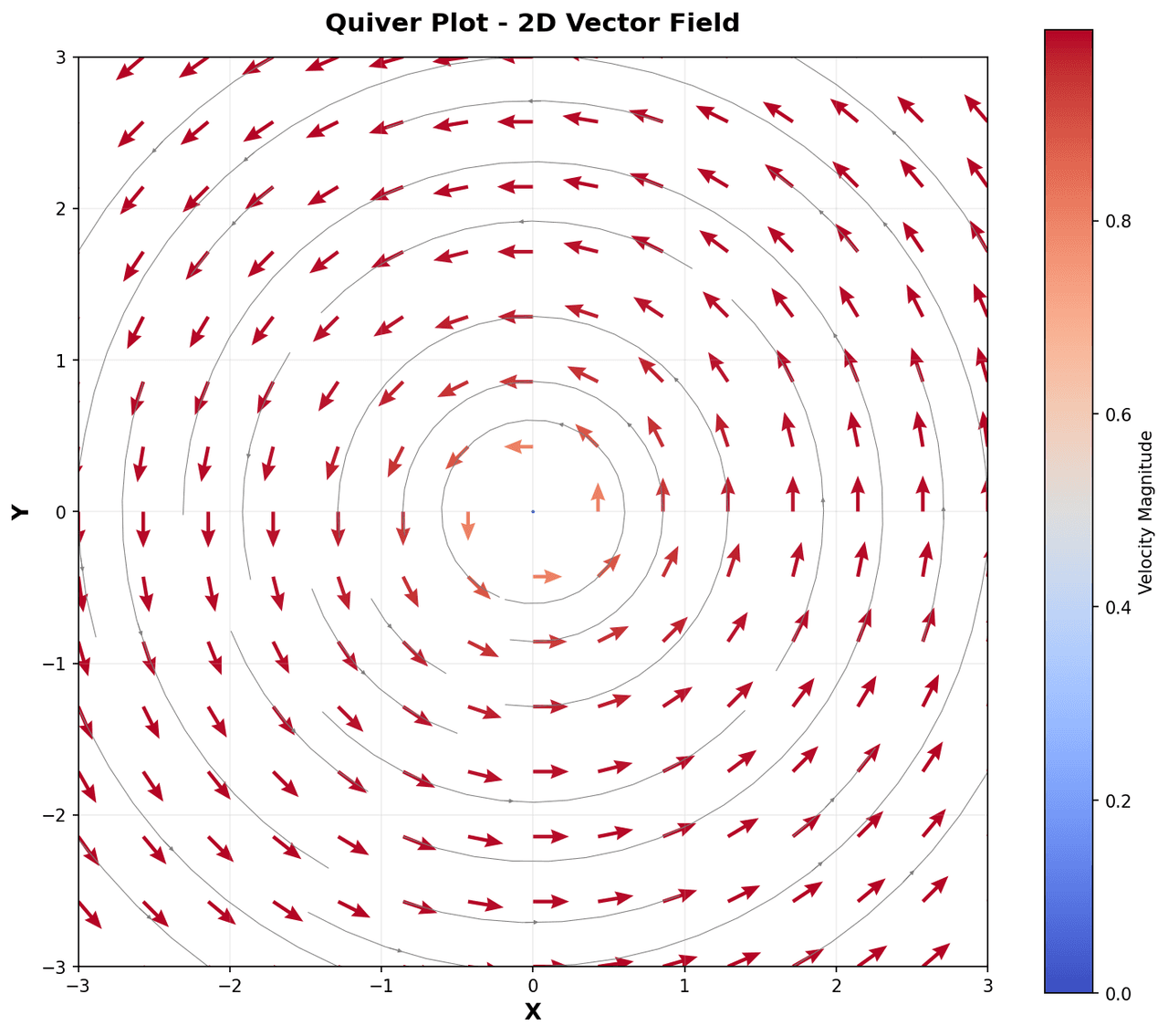
Quiver plots visualize two-dimensional vector fields by drawing arrows at each grid point, with direction encoding the field orientation and arrow length or color encoding its magnitude.
Key points
- They are essential in physics and engineering for depicting electromagnetic fields, fluid velocity and pressure gradients, magnetic flux distributions, and stress tensors.
- Overlaying a quiver plot on a contour or heatmap of the scalar potential or pressure field simultaneously conveys both the source distribution and the resulting force, making it a powerful tool for field theory visualization.
Create a Quiver Plot with your data using AI — no coding required.
Further reading
Python Scatter Plot Tutorial
Build scatter plots with regression overlays, color encodings, and uncertainty bars.
Read the guideExample Visualization
Create This Chart Now
Generate publication-ready quiver plots with AI in seconds. No coding required – just describe your data and let AI do the work.
View example prompt
"Create a publication-quality quiver plot from my vector field data. Plot the 2D vector field on a regular grid with arrows scaled by or colored by magnitude. Overlay the corresponding scalar potential or streamlines as a background contour map or heatmap. Normalize arrow lengths for clarity if the magnitude range is large. Add axis labels with units, a colorbar for arrow magnitude, and a descriptive title. Use a white or light background. Optionally add streamlines to complement the quiver arrows."
How to create this chart with your data
Upload Data
Upload your Excel or CSV file. Data used to generate charts is sent to Plotivy's server for processing.
AI Generation
Our AI analyzes your data and generates the Quiver Plot code automatically.
Customize & Export
Tweak the design with natural language, then export as high-res PNG, SVG or PDF.
Newsletter
Get one weekly tip for better quiver plots
Join researchers receiving concise Python plotting techniques to improve chart clarity and reduce revision cycles.
Python Code Example
Console Output
Figure saved: plotivy-quiver-plot.png
Common Use Cases
- 1Visualizing electric field distributions around charged conductors or dipoles
- 2Displaying wind or ocean current velocity fields in atmospheric modeling
- 3Mapping local strain and displacement vectors from finite element analysis
- 4Showing magnetic flux density around permanent magnets or solenoids
Pro Tips
Use scale and scale_units parameters in matplotlib to control arrow size consistently
Reduce grid density for dense fields to avoid overlapping arrows obscuring the pattern
Color arrows by magnitude using a colormap and add a colorbar for quantitative reading
Add streamlines with plt.streamplot as a complement to quiver arrows for flow visualization
Frequently asked questions
When should you use a quiver plot?
Quiver plots visualize two-dimensional vector fields by drawing arrows at each grid point, with direction encoding the field orientation and arrow length or color encoding its magnitude. They are essential in physics and engineering for depicting electromagnetic fields, fluid velocity and pressure gradients, magnetic flux distributions, and stress tensors. Common applications include visualizing electric field distributions around charged conductors or dipoles, displaying wind or ocean current velocity fields in atmospheric modeling, and mapping local strain and displacement vectors from finite element analysis.
Which Python libraries can create a quiver plot?
A quiver plot can be built in Python with matplotlib and numpy — matplotlib for precise control over axes, annotations, and journal styling and numpy. In Plotivy you describe the figure and it writes the matplotlib code for you.
Can I make a quiver plot without writing Python code?
Yes. Describe the quiver plot you need in plain language and upload your dataset — Plotivy's AI writes the Python code and renders a publication-ready figure. You still get the full, editable matplotlib source, so nothing is locked in a black box.
What are best practices for a clear quiver plot?
Use scale and scale_units parameters in matplotlib to control arrow size consistently. Reduce grid density for dense fields to avoid overlapping arrows obscuring the pattern.
Library comparison for this chart
matplotlib
Best when you need full control over axis formatting, annotation placement, and journal-specific styling for quiver-plot.
numpy
Useful in specialized workflows that complement core Python plotting libraries for quiver-plot analysis tasks.
Scientific Chart Selection Cheat Sheet
Not sure whether to use a Violin Plot, Box Plot, or Ridge Plot? Download our single-page reference mapping the most-used scientific chart types, exactly when to use them, and the core Matplotlib/Seaborn functions.