Raman Spectrum
Chart overview
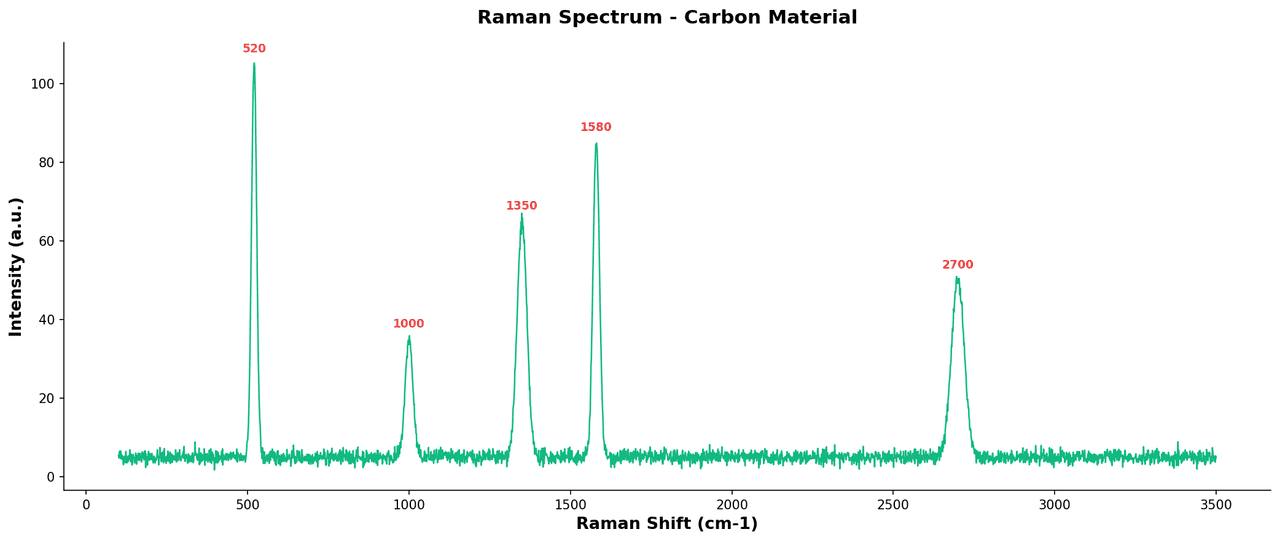
Raman spectra display inelastic scattering intensity as a function of wavenumber shift, providing a molecular fingerprint for chemical identification and structural analysis.
Key points
- Materials scientists and chemists annotate characteristic vibrational modes such as G-band and D-band in carbon nanomaterials, or C-H and C=C stretches in organic compounds.
- Baseline-corrected, normalized spectra are essential for comparing samples across different experimental conditions.
Create a Raman Spectrum with your data using AI — no coding required.
Further reading
Complete Guide to Scientific Data Visualization
Chart selection, figure design, and publication-ready workflows for scientific teams.
Read the guideExample Visualization
Create This Chart Now
Generate publication-ready raman spectrums with AI in seconds. No coding required – just describe your data and let AI do the work.
View example prompt
"Create a Raman spectrum from my data. Plot Raman shift (cm-1) on the x-axis and intensity on the y-axis. Subtract a polynomial baseline and normalize the spectrum to its maximum peak. Annotate the top characteristic peaks with their wavenumber positions. Use journal formatting with Arial font and no top or right spines."
How to create this chart with your data
Upload Data
Upload your Excel or CSV file. Data used to generate charts is sent to Plotivy's server for processing.
AI Generation
Our AI analyzes your data and generates the Raman Spectrum code automatically.
Customize & Export
Tweak the design with natural language, then export as high-res PNG, SVG or PDF.
Newsletter
Get one weekly tip for better raman spectrums
Join researchers receiving concise Python plotting techniques to improve chart clarity and reduce revision cycles.
Python Code Example
Console Output
Figure saved: plotivy-raman-spectrum.png
Common Use Cases
- 1Identifying carbon allotropes (graphene, CNT, diamond) via D-band and G-band ratio analysis
- 2Pharmaceutical polymorphism screening and solid-state form identification
- 3In situ monitoring of chemical reactions and intermediates under operando conditions
- 4Quality control and authentication of geological minerals and gemstones
Pro Tips
Perform asymmetric least-squares baseline subtraction before plotting to remove fluorescence background
Normalize spectra to the most intense peak when comparing across different samples or instruments
Annotate D/G band ratios directly on the figure for graphitic carbon material characterizations
Use scipy.signal.find_peaks with a minimum prominence threshold to automate peak detection
Frequently asked questions
When should you use a raman spectrum?
Raman spectra display inelastic scattering intensity as a function of wavenumber shift, providing a molecular fingerprint for chemical identification and structural analysis. Materials scientists and chemists annotate characteristic vibrational modes such as G-band and D-band in carbon nanomaterials, or C-H and C=C stretches in organic compounds. Common applications include identifying carbon allotropes (graphene, CNT, diamond) via D-band and G-band ratio analysis, pharmaceutical polymorphism screening and solid-state form identification, and in situ monitoring of chemical reactions and intermediates under operando conditions.
Which Python libraries can create a raman spectrum?
A raman spectrum can be built in Python with matplotlib, numpy, and scipy — matplotlib for precise control over axes, annotations, and journal styling, numpy, and scipy. In Plotivy you describe the figure and it writes the matplotlib code for you.
Can I make a raman spectrum without writing Python code?
Yes. Describe the raman spectrum you need in plain language and upload your dataset — Plotivy's AI writes the Python code and renders a publication-ready figure. You still get the full, editable matplotlib source, so nothing is locked in a black box.
What are best practices for a clear raman spectrum?
Perform asymmetric least-squares baseline subtraction before plotting to remove fluorescence background. Normalize spectra to the most intense peak when comparing across different samples or instruments.
Library comparison for this chart
matplotlib
Best when you need full control over axis formatting, annotation placement, and journal-specific styling for raman-spectrum.
numpy
Useful in specialized workflows that complement core Python plotting libraries for raman-spectrum analysis tasks.
scipy
Useful in specialized workflows that complement core Python plotting libraries for raman-spectrum analysis tasks.
Scientific Chart Selection Cheat Sheet
Not sure whether to use a Violin Plot, Box Plot, or Ridge Plot? Download our single-page reference mapping the most-used scientific chart types, exactly when to use them, and the core Matplotlib/Seaborn functions.