Ridgeline Plot
Chart overview
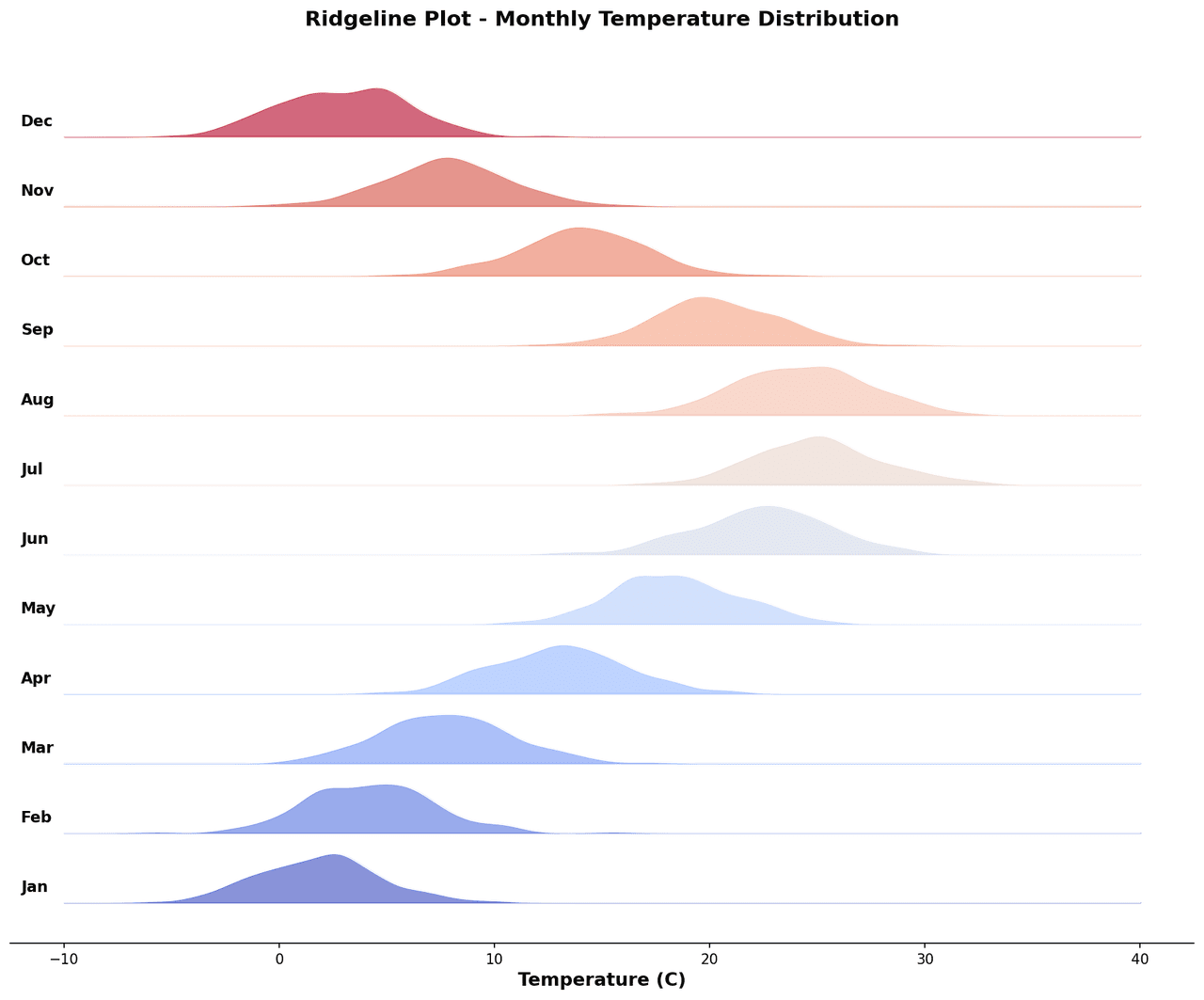
A ridgeline plot (popularized as a joy plot) arranges kernel density estimates (KDE) for multiple groups in a vertically stacked layout with controlled overlap.
Key points
- Each row represents one group, and distributions are offset upward so adjacent rows partially overlap, creating a mountain-range silhouette that conveys both individual distribution shape and overall trends across groups.
- This visualization excels when comparing distributions across a large number of categories - for example, gene expression distributions across cell types from single-cell RNA-seq data, seasonal temperature distributions across decades for climate change illustration, or peak ChIP-seq read depth distributions across samples.
- The overlap parameter controls how aggressively rows overlap; a moderate overlap (0.
Practical guidance
5-0. 8) creates a more aesthetic and informative display than fully separated rows. Color gradients are often applied along the y-axis to encode an ordinal or continuous grouping variable such as time or condition severity.
Create a Ridgeline Plot with your data using AI — no coding required.
Further reading
Python Scatter Plot Tutorial
Build scatter plots with regression overlays, color encodings, and uncertainty bars.
Read the guideExample Visualization
Create This Chart Now
Generate publication-ready ridgeline plots with AI in seconds. No coding required – just describe your data and let AI do the work.
View example prompt
"Create a ridgeline plot from my gene expression data with cell types as groups. Plot a kernel density estimate for each cell type, stacked vertically with 60% overlap. Apply a color gradient from light to dark encoding expression level. Sort cell types by median expression. Add a vertical reference line at zero. Label each ridge on the left y-axis. Use a publication white background and 300 DPI resolution."
How to create this chart with your data
Upload Data
Upload your Excel or CSV file. Data used to generate charts is sent to Plotivy's server for processing.
AI Generation
Our AI analyzes your data and generates the Ridgeline Plot code automatically.
Customize & Export
Tweak the design with natural language, then export as high-res PNG, SVG or PDF.
Newsletter
Get one weekly tip for better ridgeline plots
Join researchers receiving concise Python plotting techniques to improve chart clarity and reduce revision cycles.
Python Code Example
Console Output
Figure saved: plotivy-ridgeline-plot.png
Common Use Cases
- 1Single-cell RNA-seq: comparing gene expression distributions across dozens of cell type clusters
- 2Climate science: displaying temperature or precipitation distributions across months or decades
- 3ChIP-seq or ATAC-seq: comparing chromatin accessibility signal distributions across cell states
- 4Ecology: visualizing trait distributions (body size, leaf area) across many species simultaneously
Pro Tips
Tune the KDE bandwidth carefully - too narrow produces spiky curves, too wide loses multimodal detail
Sort groups by median or mean value to reveal monotonic trends across the ridgeline stack
Use a controlled overlap (0.5-0.8) for aesthetics without obscuring lower distributions entirely
Limit to 20-30 groups maximum before the plot becomes too compressed to read individual distributions
Frequently asked questions
When should you use a ridgeline plot?
A ridgeline plot (popularized as a joy plot) arranges kernel density estimates (KDE) for multiple groups in a vertically stacked layout with controlled overlap. Each row represents one group, and distributions are offset upward so adjacent rows partially overlap, creating a mountain-range silhouette that conveys both individual distribution shape and overall trends across groups. Common applications include single-cell RNA-seq: comparing gene expression distributions across dozens of cell type clusters, climate science: displaying temperature or precipitation distributions across months or decades, and chIP-seq or ATAC-seq: comparing chromatin accessibility signal distributions across cell states.
Which Python libraries can create a ridgeline plot?
A ridgeline plot can be built in Python with matplotlib, numpy, and pandas — matplotlib for precise control over axes, annotations, and journal styling, numpy, and pandas for quick plots straight from a DataFrame. In Plotivy you describe the figure and it writes the matplotlib code for you.
Can I make a ridgeline plot without writing Python code?
Yes. Describe the ridgeline plot you need in plain language and upload your dataset — Plotivy's AI writes the Python code and renders a publication-ready figure. You still get the full, editable matplotlib source, so nothing is locked in a black box.
What are best practices for a clear ridgeline plot?
Tune the KDE bandwidth carefully - too narrow produces spiky curves, too wide loses multimodal detail. Sort groups by median or mean value to reveal monotonic trends across the ridgeline stack.
Library comparison for this chart
matplotlib
Best when you need full control over axis formatting, annotation placement, and journal-specific styling for ridgeline-plot.
numpy
Useful in specialized workflows that complement core Python plotting libraries for ridgeline-plot analysis tasks.
pandas
Good for quick exploratory drafts directly from DataFrame operations before polishing in matplotlib or plotly.
Scientific Chart Selection Cheat Sheet
Not sure whether to use a Violin Plot, Box Plot, or Ridge Plot? Download our single-page reference mapping the most-used scientific chart types, exactly when to use them, and the core Matplotlib/Seaborn functions.