Span Chart
Chart overview
Span charts (floating bar charts) show the range between two values for each category.
Key points
- They effectively visualize temperature ranges, price fluctuations, or any data with meaningful upper and lower bounds, making it easy to compare ranges across categories.
- The bar encodes two things at once - the position of each end and the length between them - and readers judge the endpoints accurately (they sit on a common axis) but the span length less so, so if the gap itself is the message, sort categories by span and consider labeling the widths.
- Build one in matplotlib with barh using left=low and width=high-low (or the bottom/height pair for vertical bars); it is essentially a bar that does not start at zero, which means the usual truncated-axis warning is inverted here - a zero baseline is meaningless, and the axis should span just beyond the data range.
Practical guidance
Order categories meaningfully (by lower bound, upper bound, or midpoint depending on the question) rather than alphabetically, since the eye compares neighbors. Watch the failure modes: a span chart shows only the extremes and says nothing about the distribution between them, so a category with two clustered values and one with a uniform spread look identical - if within-range structure matters, a box plot or a dot-strip is more honest. For a single before/after pair per category a dumbbell/connected-dot plot reads more clearly than a solid bar; reserve the span bar for true continuous ranges (min-max, CI bounds, hi-lo).
Create a Span Chart with your data using AI — no coding required.
Further reading
How to Create a Bar Chart in Python
Matplotlib, seaborn, and plotly patterns for grouped bars, error bars, and publication-ready labels.
Read the guideExample Visualization
Create This Chart Now
Generate publication-ready span charts with AI in seconds. No coding required – just describe your data and let AI do the work.
View example prompt
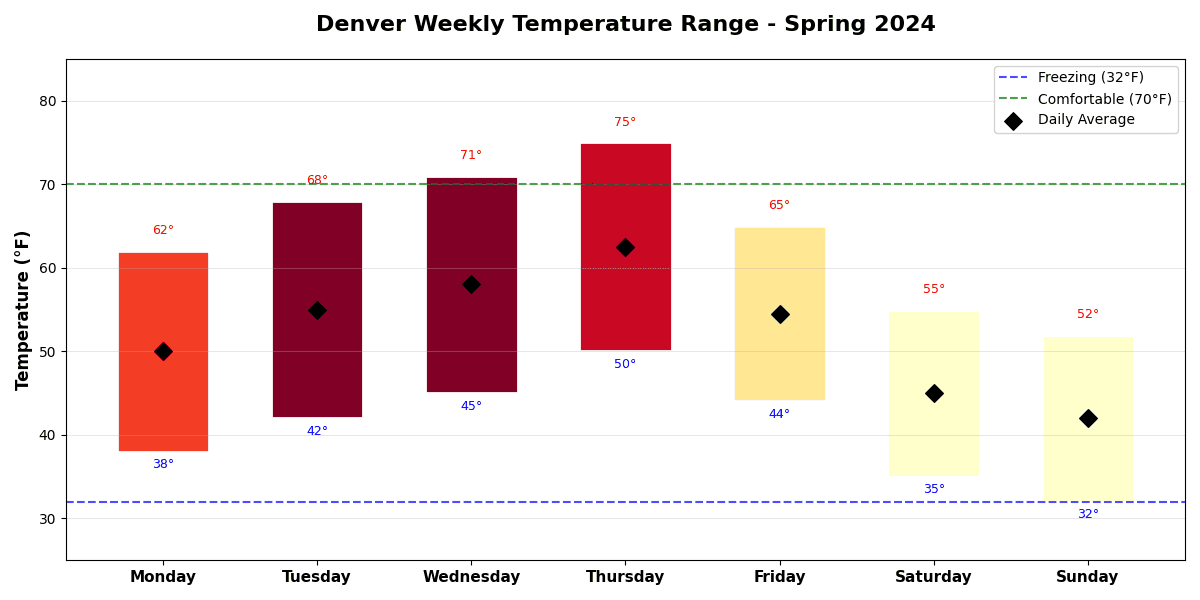
"Create a span chart (floating bar chart) showing 'Daily Temperature Ranges' for a week in Denver, Colorado. Generate realistic spring weather data: Monday (min: 38°F, max: 62°F), Tuesday (42°F, 68°F), Wednesday (45°F, 71°F), Thursday (50°F, 75°F - warmest), Friday (44°F, 65°F), Saturday (35°F, 55°F - cold front), Sunday (32°F, 52°F). Each bar spans from min to max temperature. Color bars by range size using a gradient (narrow range: blue, wide range: orange). Add horizontal reference lines for freezing (32°F) and comfortable (70°F). Mark the daily average with a diamond marker. Include gridlines, format Y-axis in °F. Title: 'Denver Weekly Temperature Range - Spring 2024'."
How to create this chart with your data
Upload Data
Upload your Excel or CSV file. Data used to generate charts is sent to Plotivy's server for processing.
AI Generation
Our AI analyzes your data and generates the Span Chart code automatically.
Customize & Export
Tweak the design with natural language, then export as high-res PNG, SVG or PDF.
Newsletter
Get one weekly tip for better span charts
Join researchers receiving concise Python plotting techniques to improve chart clarity and reduce revision cycles.
Python Code Example
# === IMPORTS ===
import pandas as pd
import numpy as np
import matplotlib.pyplot as plt

# === USER-EDITABLE PARAMETERS ===
title = "Denver Weekly Temperature Range - Spring 2024"
figsize = (12, 6)

# === EXAMPLE DATASET ===
days = ['Monday', 'Tuesday', 'Wednesday', 'Thursday', 'Friday', 'Saturday', 'Sunday']
min_temps = [38, 42, 45, 50, 44, 35, 32]
max_temps = [62, 68, 71, 75, 65, 55, 52]

df = pd.DataFrame({
    'Day': days,
    'Min': min_temps,
    'Max': max_temps
})
df['Range'] = df['Max'] - df['Min']
df['Avg'] = (df['Min'] + df['Max']) / 2

# Print summary
print("=== Denver Weekly Temperature Summary ===")
print(f"\nDay        | Min (°F) | Max (°F) | Range")
print("-" * 45)
for _, row in df.iterrows():
    print(f"{row['Day']:10} | {row['Min']:8} | {row['Max']:8} | {row['Range']:5}°")
print(f"\nWeekly Average High: {np.mean(max_temps):.1f}°F")
print(f"Weekly Average Low: {np.mean(min_temps):.1f}°F")
print(f"Warmest Day: {days[np.argmax(max_temps)]} ({max(max_temps)}°F)")
print(f"Coldest Day: {days[np.argmin(min_temps)]} ({min(min_temps)}°F)")

# === CREATE SPAN CHART ===
fig, ax = plt.subplots(figsize=figsize)

x = np.arange(len(days))

# Color bars by range size
colors = plt.cm.RdYlBu_r(np.linspace(0.2, 0.8, len(df)))
range_normalized = (df['Range'] - df['Range'].min()) / (df['Range'].max() - df['Range'].min())
bar_colors = plt.cm.YlOrRd(range_normalized)

# Create floating bars
for i, (_, row) in enumerate(df.iterrows()):
    ax.bar(i, row['Range'], bottom=row['Min'], color=bar_colors[i],
           edgecolor='white', linewidth=2, width=0.6)
    # Add average marker
    ax.scatter(i, row['Avg'], color='black', s=80, marker='D', zorder=5)

# Reference lines
ax.axhline(y=32, color='blue', linestyle='--', alpha=0.7, linewidth=1.5, label='Freezing (32°F)')
ax.axhline(y=70, color='green', linestyle='--', alpha=0.7, linewidth=1.5, label='Comfortable (70°F)')

# Add min/max labels
for i, (_, row) in enumerate(df.iterrows()):
    ax.text(i, row['Min'] - 2, f"{row['Min']}°", ha='center', fontsize=9, color='blue')
    ax.text(i, row['Max'] + 2, f"{row['Max']}°", ha='center', fontsize=9, color='red')

# Styling
ax.set_xticks(x)
ax.set_xticklabels(days, fontsize=11, fontweight='bold')
ax.set_ylabel('Temperature (°F)', fontsize=12, fontweight='bold')
ax.set_title(title, fontsize=16, fontweight='bold', pad=20)
ax.set_ylim(25, 85)
ax.legend(loc='upper right', framealpha=0.9)
ax.grid(True, alpha=0.3, axis='y')

# Add diamond legend annotation
ax.scatter([], [], color='black', s=80, marker='D', label='Daily Average')
ax.legend(loc='upper right', framealpha=0.9)

plt.tight_layout()
plt.show()
# END-OF-CODE
Opens the Analyze page with this code pre-loaded and ready to execute
Console Output
=== Denver Weekly Temperature Summary ===

Day        | Min (°F) | Max (°F) | Range
---------------------------------------------
Monday     |       38 |       62 |    24°
Tuesday    |       42 |       68 |    26°
Wednesday  |       45 |       71 |    26°
Thursday   |       50 |       75 |    25°
Friday     |       44 |       65 |    21°
Saturday   |       35 |       55 |    20°
Sunday     |       32 |       52 |    20°

Weekly Average High: 64.0°F
Weekly Average Low: 40.9°F
Warmest Day: Thursday (75°F)
Coldest Day: Sunday (32°F)
Common Use Cases
- 1Temperature range visualization
- 2Price range comparison
- 3Scheduling time windows
- 4Measurement tolerance display
Pro Tips
Color code by range size
Add mean markers within spans
Sort by midpoint or range size
Frequently asked questions
When should you use a span chart?
Span charts (floating bar charts) show the range between two values for each category. They effectively visualize temperature ranges, price fluctuations, or any data with meaningful upper and lower bounds, making it easy to compare ranges across categories. Common applications include temperature range visualization, price range comparison, and scheduling time windows.
Which Python libraries can create a span chart?
A span chart can be built in Python with matplotlib — matplotlib for precise control over axes, annotations, and journal styling. In Plotivy you describe the figure and it writes the matplotlib code for you.
Can I make a span chart without writing Python code?
Yes. Describe the span chart you need in plain language and upload your dataset — Plotivy's AI writes the Python code and renders a publication-ready figure. You still get the full, editable matplotlib source, so nothing is locked in a black box.
What are best practices for a clear span chart?
Color code by range size. Add mean markers within spans.
Library comparison for this chart
matplotlib
Best when you need full control over axis formatting, annotation placement, and journal-specific styling for span-chart.
Scientific Chart Selection Cheat Sheet
Not sure whether to use a Violin Plot, Box Plot, or Ridge Plot? Download our single-page reference mapping the most-used scientific chart types, exactly when to use them, and the core Matplotlib/Seaborn functions.