Waterfall Chart
Chart overview
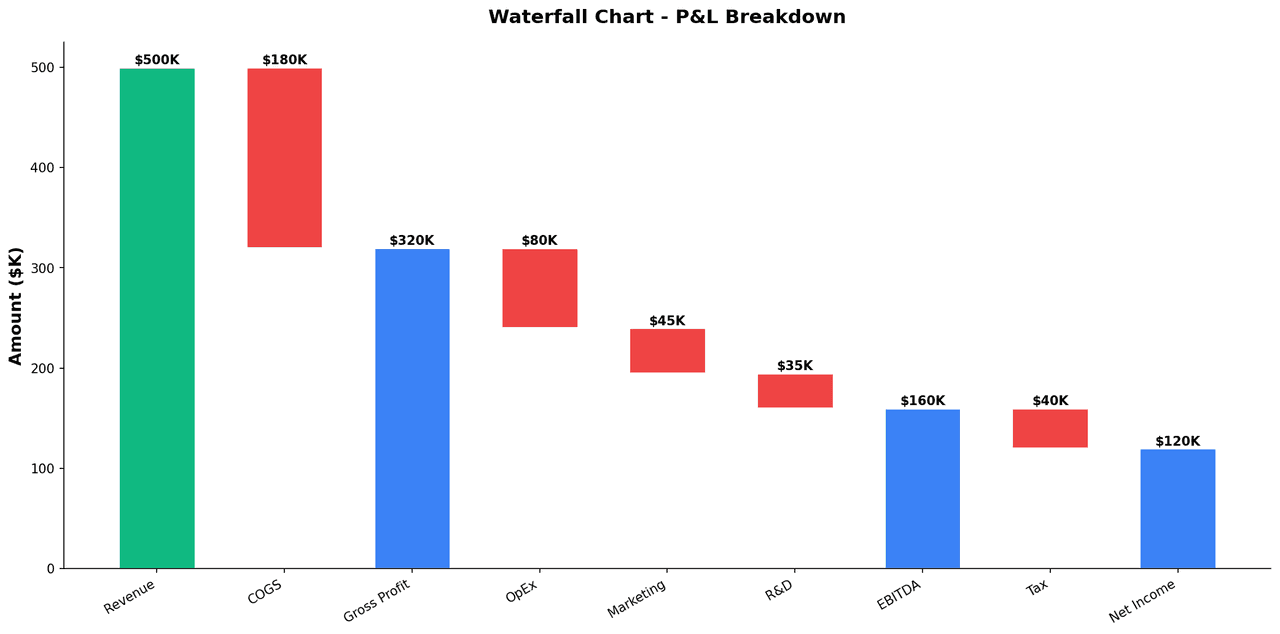
In oncology clinical trials, a waterfall chart displays each patient as a vertical bar representing their best percentage change in tumor burden from baseline, sorted from largest reduction (left) to largest progression (right), creating a characteristic waterfall shape.
Key points
- Horizontal reference lines at -30% (partial response threshold per RECIST 1.
- 1) and +20% (progressive disease threshold) divide patients into response categories.
- Bars are colored by response category - complete response (CR), partial response (PR), stable disease (SD), and progressive disease (PD) - enabling rapid visual assessment of drug activity across the cohort.
Practical guidance
Swimmer plots that add time dimension are a related complement. Waterfall charts are required figures in phase I and II oncology trial publications and regulatory submissions. Beyond oncology, the same format is useful for any before-after percent change analysis where individual subject trajectories need to be displayed simultaneously.
Create a Waterfall Chart with your data using AI — no coding required.
Further reading
How to Create a Bar Chart in Python
Matplotlib, seaborn, and plotly patterns for grouped bars, error bars, and publication-ready labels.
Read the guideExample Visualization
Create This Chart Now
Generate publication-ready waterfall charts with AI in seconds. No coding required – just describe your data and let AI do the work.
View example prompt
"Create an oncology waterfall chart from my clinical trial data with patient IDs and best percent change from baseline. Sort patients from largest decrease to largest increase. Color bars by RECIST response: complete response dark green, partial response green, stable disease grey, progressive disease red. Add horizontal dashed reference lines at -30% and +20%. Label the y-axis as 'Best Change from Baseline (%)'. Include a response category legend and annotate the number and percentage of responders. Format for New England Journal of Medicine standards at 300 DPI."
How to create this chart with your data
Upload Data
Upload your Excel or CSV file. Data used to generate charts is sent to Plotivy's server for processing.
AI Generation
Our AI analyzes your data and generates the Waterfall Chart code automatically.
Customize & Export
Tweak the design with natural language, then export as high-res PNG, SVG or PDF.
Newsletter
Get one weekly tip for better waterfall charts
Join researchers receiving concise Python plotting techniques to improve chart clarity and reduce revision cycles.
Python Code Example
Console Output
Figure saved: plotivy-waterfall-chart.png
Common Use Cases
- 1Phase I/II oncology clinical trial efficacy reporting: best overall tumor response per patient
- 2Immunotherapy response monitoring: percent change in total tumor burden over treatment course
- 3Hematology: displaying M-protein reduction in multiple myeloma patients on novel agents
- 4Combination therapy studies: comparing waterfall distributions between treatment arms
Pro Tips
Sort bars from the largest decrease to the largest increase to create the characteristic waterfall shape
Use the response thresholds specified by the study protocol and label each reference line clearly
Keep response-category colors consistent between the bars and legend
Annotate confirmed and unconfirmed responses differently when the protocol requires a confirmation scan
Use the related bar chart, scatter plot, and error-bar pages when readers need alternative comparison views
Frequently asked questions
When should you use a waterfall chart?
In oncology clinical trials, a waterfall chart displays each patient as a vertical bar representing their best percentage change in tumor burden from baseline, sorted from largest reduction (left) to largest progression (right), creating a characteristic waterfall shape. Horizontal reference lines at -30% (partial response threshold per RECIST 1. Common applications include phase I/II oncology clinical trial efficacy reporting: best overall tumor response per patient, immunotherapy response monitoring: percent change in total tumor burden over treatment course, and hematology: displaying M-protein reduction in multiple myeloma patients on novel agents.
Which Python libraries can create a waterfall chart?
A waterfall chart can be built in Python with matplotlib, pandas, and numpy — matplotlib for precise control over axes, annotations, and journal styling, pandas for quick plots straight from a DataFrame, and numpy. In Plotivy you describe the figure and it writes the matplotlib code for you.
Can I make a waterfall chart without writing Python code?
Yes. Describe the waterfall chart you need in plain language and upload your dataset — Plotivy's AI writes the Python code and renders a publication-ready figure. You still get the full, editable matplotlib source, so nothing is locked in a black box.
What are best practices for a clear waterfall chart?
Sort bars from the largest decrease to the largest increase to create the characteristic waterfall shape. Use the response thresholds specified by the study protocol and label each reference line clearly.
Library comparison for this chart
matplotlib
Best when you need full control over axis formatting, annotation placement, and journal-specific styling for waterfall-chart.
pandas
Good for quick exploratory drafts directly from DataFrame operations before polishing in matplotlib or plotly.
numpy
Useful in specialized workflows that complement core Python plotting libraries for waterfall-chart analysis tasks.
Scientific Chart Selection Cheat Sheet
Not sure whether to use a Violin Plot, Box Plot, or Ridge Plot? Download our single-page reference mapping the most-used scientific chart types, exactly when to use them, and the core Matplotlib/Seaborn functions.