Menu

Classifier Evaluation on Imbalanced Data

Precision-Recall Curve Generator with Average Precision

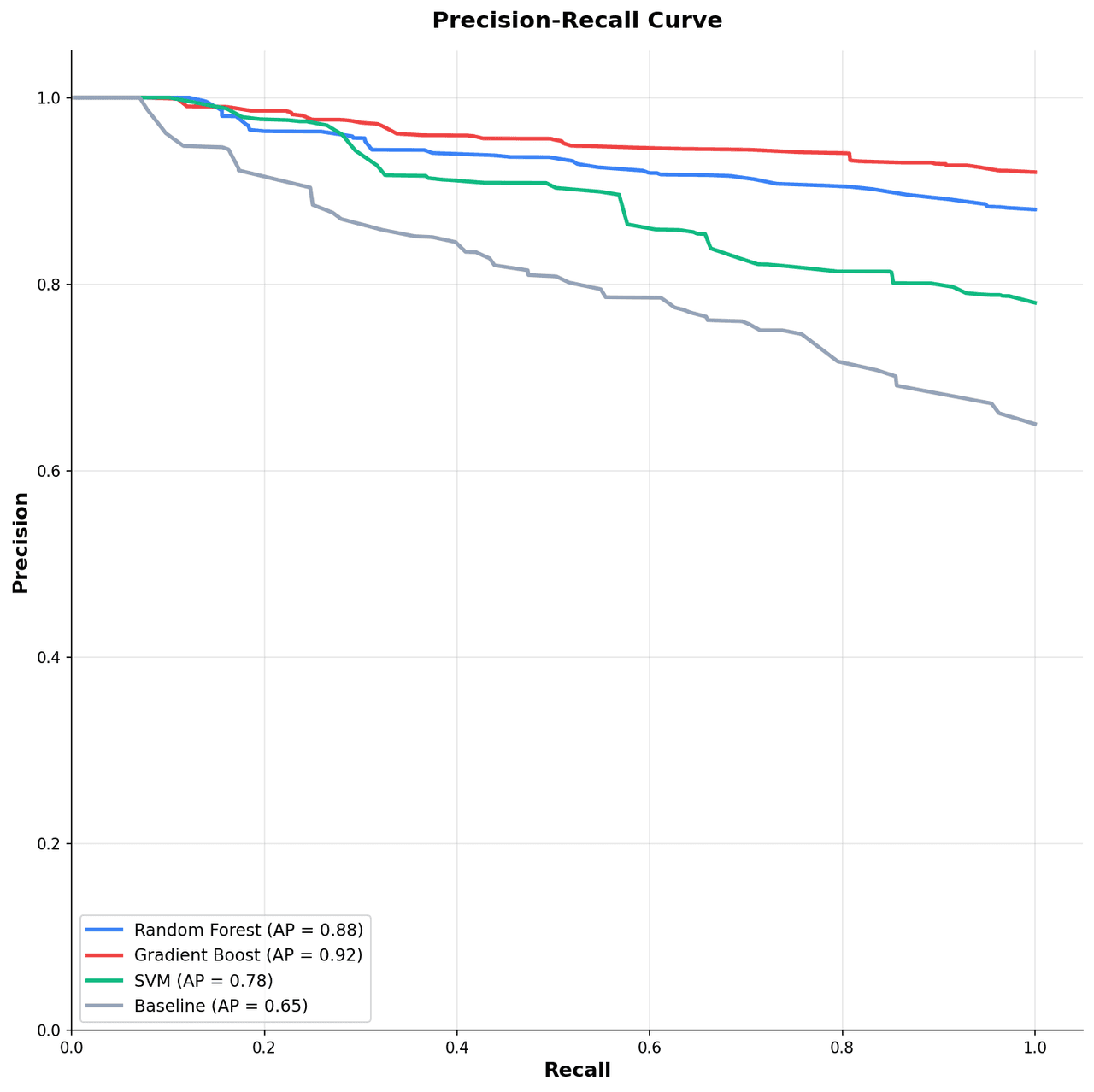
When the positive class is rare, a precision-recall curve tells a clearer story than ROC. Plotivy turns prediction scores and labels into a publication-ready Python figure with average precision and a no-skill baseline set by the positive rate.

When a Precision-Recall Curve Is the Right Choice

Use a precision-recall curve when positives are scarce and false positives are costly, such as fraud detection, rare-disease screening, or information retrieval. Because precision reacts to the abundance of negatives, this curve exposes weaknesses that a ROC curve can mask on heavily imbalanced data.

Rare positives

Stay informative when only a small fraction of cases are positive.

Average precision

Summarize the whole curve in one threshold-independent number.

Honest baseline

The no-skill line equals the positive rate, not a fixed 0.5 diagonal.

Operating point

Pick a threshold that meets a precision or recall target for deployment.

What Plotivy Adds to the Workflow

Average precision in code

The area under the curve is computed from your scores, not estimated by eye.

Threshold-aware sweep

Precision and recall are traced across every score so the trade-off is explicit.

Prevalence-aware baseline

The no-skill line is pinned to your positive rate, the honest reference for imbalance.

Reproducible Python output

Every figure is editable code, so reviewers can trace the exact scoring and thresholds.

Live Code Lab: Precision-Recall Curve

This example simulates an imbalanced problem with about 20% positives, sweeps every score as a threshold, and plots precision against recall with average precision in the legend and the prevalence baseline. Swap in your own scores and labels to evaluate a real model.

Chart gallery

Related Chart Types

Other chart templates for model evaluation and ranking quality

Browse all chart types →
Precision-recall curve showing precision on y-axis versus recall on x-axis with average precision annotation and F1 iso-curves
Statistical•matplotlib, numpy
From the chart gallery•Evaluating rare disease detection models where positive class prevalence is below 5%

Precision-Recall Curve

Plot precision against recall across thresholds to evaluate classifier performance on imbalanced datasets with average precision annotation.

Sample code / prompt

import matplotlib.pyplot as plt
import numpy as np

np.random.seed(42)
fig, ax = plt.subplots(figsize=(10, 10))
models = [('Random Forest', 0.88, '#3b82f6'), ('Gradient Boost', 0.92, '#ef4444'),
          ('SVM', 0.78, '#10b981'), ('Baseline', 0.65, '#94a3b8')]
for name, ap, color in models:
    recall = np.sort(np.concatenate([[0], np.random.uniform(0, 1, 50), [1]]))
    precision = ap + (1 - recall) * (1 - ap) * np.random.uniform(0.5, 1.5, len(recall))
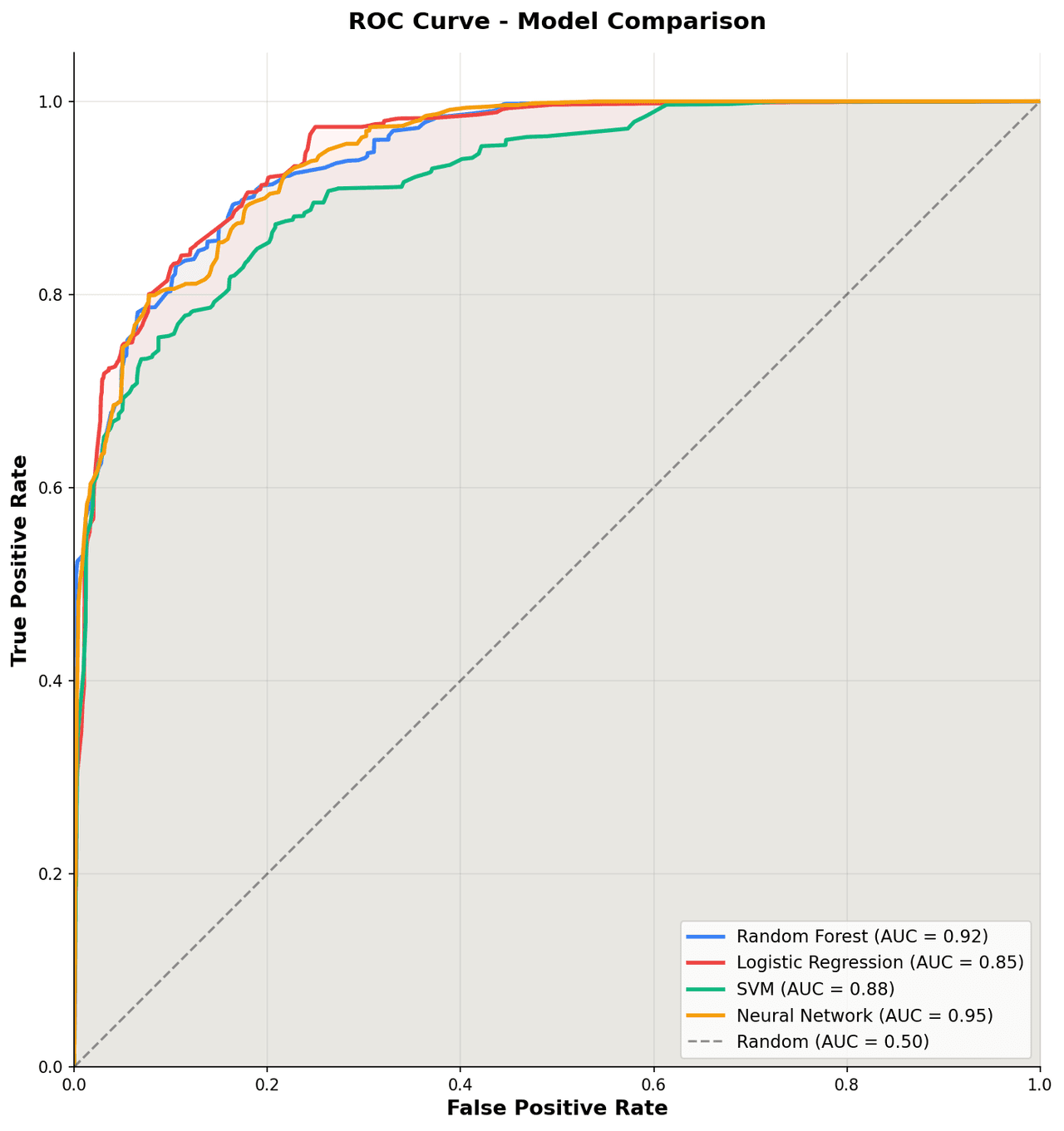
ROC curve showing sensitivity on y-axis versus 1-specificity on x-axis with AUC annotation and diagonal no-skill reference line
Statistical•matplotlib, numpy
From the chart gallery•Evaluating and comparing diagnostic biomarkers for disease detection in case-control studies

ROC Curve

Plot true positive rate against false positive rate across all decision thresholds with AUC annotation for model and diagnostic test evaluation.

Sample code / prompt

import matplotlib.pyplot as plt
import numpy as np

np.random.seed(42)
def generate_roc(auc_target, n_points=100):
    fpr = np.sort(np.concatenate([[0], np.random.beta(1, auc_target * 5, n_points - 2), [1]]))
    tpr = np.sort(np.concatenate([[0], np.random.beta(auc_target * 5, 1, n_points - 2), [1]]))
    return fpr, tpr

fig, ax = plt.subplots(figsize=(10, 10))
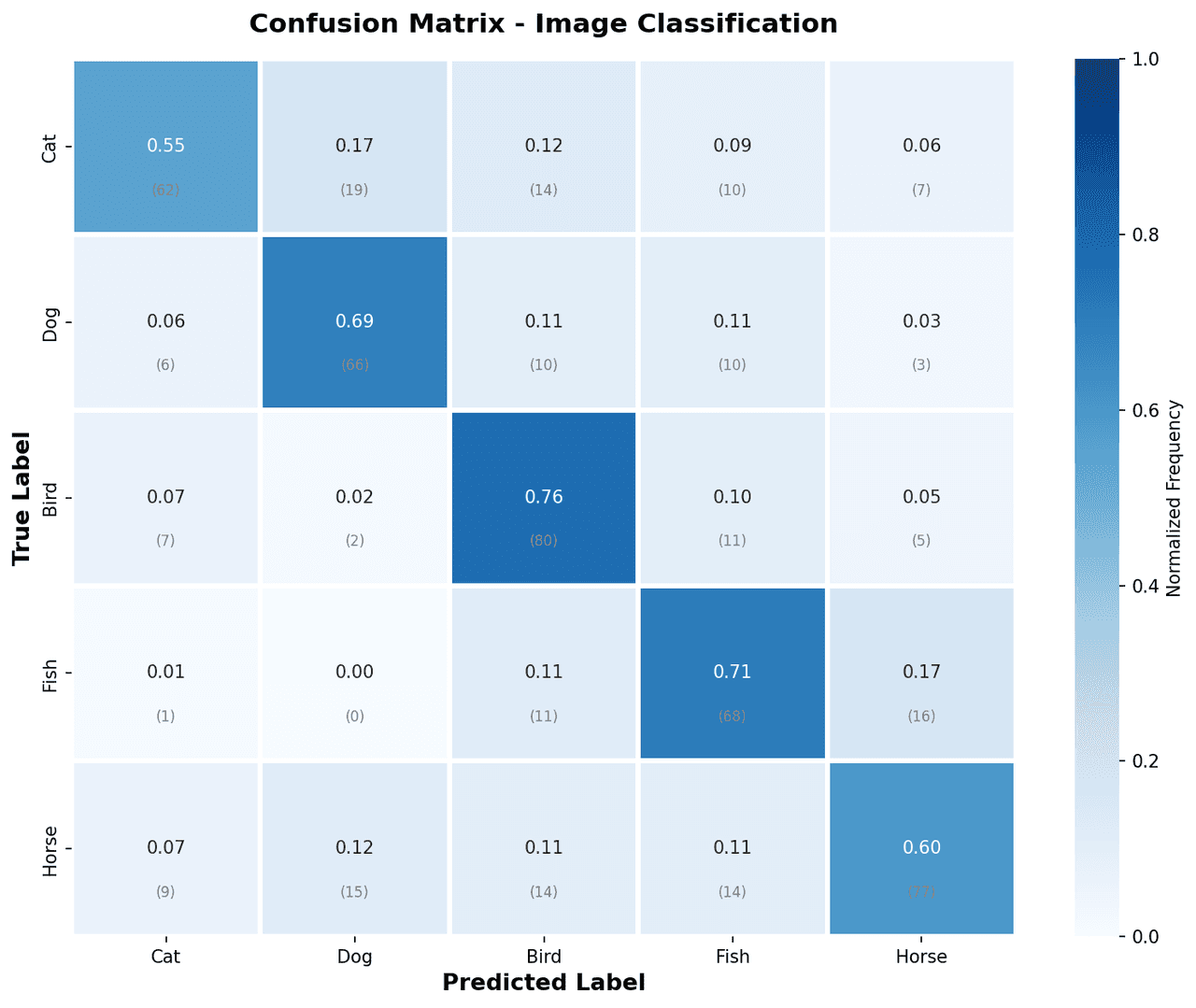
Confusion matrix heatmap with color-coded cells showing true vs predicted class counts
Statistical•matplotlib, numpy
From the chart gallery•Evaluating multi-class image classification model performance

Confusion Matrix

A heatmap showing true vs. predicted class labels to evaluate classification model accuracy.

Sample code / prompt

import matplotlib.pyplot as plt
import numpy as np
import seaborn as sns

np.random.seed(42)
classes = ['Cat', 'Dog', 'Bird', 'Fish', 'Horse']
n = len(classes)
cm = np.random.randint(0, 20, (n, n))
np.fill_diagonal(cm, np.random.randint(60, 95, n))
cm_normalized = cm.astype('float') / cm.sum(axis=1)[:, np.newaxis]
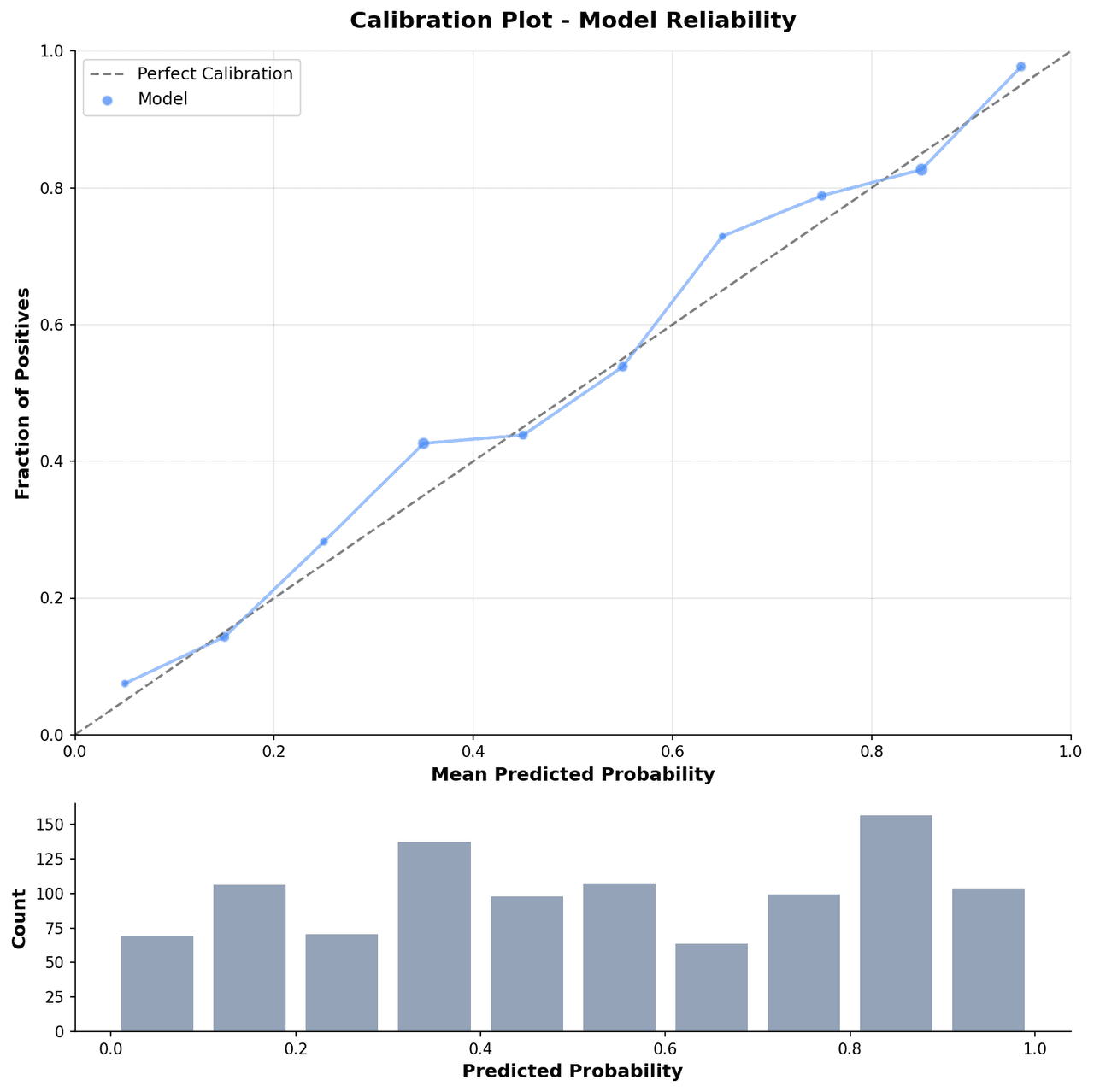
Calibration plot showing predicted probability on x-axis and observed fraction of positives on y-axis with ideal diagonal reference line
Statistical•matplotlib, numpy
From the chart gallery•Validating clinical prediction models for mortality, readmission, or disease probability

Calibration Plot

Plot predicted probabilities against observed event frequencies to assess calibration of diagnostic or prognostic models.

Sample code / prompt

import matplotlib.pyplot as plt
import numpy as np

np.random.seed(42)
n_bins = 10
predicted_probs = np.linspace(0.05, 0.95, n_bins)
observed_probs = predicted_probs + np.random.normal(0, 0.05, n_bins)
observed_probs = np.clip(observed_probs, 0, 1)
counts = np.random.randint(50, 200, n_bins)
Multi-line graph showing temperature trends for 3 cities over a year
Time Series•matplotlib, seaborn
From the chart gallery•Stock price tracking over time

Line Graph

Displays data points connected by straight line segments to show trends over time.

Sample code / prompt

import matplotlib.pyplot as plt
import numpy as np

# Generate temperature data for 3 major US cities over 12 months
months = ['Jan', 'Feb', 'Mar', 'Apr', 'May', 'Jun', 'Jul', 'Aug', 'Sep', 'Oct', 'Nov', 'Dec']
nyc = [30, 32, 40, 52, 65, 75, 82, 81, 74, 63, 50, 38]
miami = [65, 66, 70, 76, 82, 87, 90, 90, 87, 80, 72, 66]
chicago = [25, 27, 35, 48, 62, 72, 80, 79, 71, 60, 45, 32]

# Create figure with enhanced styling

Evaluate Rare-Event Models Honestly

Build a precision-recall curve from your own scores and labels, report average precision, and export a figure that holds up on imbalanced data.