Menu

Oncology Trials and Tumor Response

Waterfall Plot Generator for Tumor Response and Oncology Trials

A waterfall plot ranks every patient by their best change from baseline, so the spread of responders and non-responders is visible at a glance. Plotivy turns per-patient response data into a publication-ready Python figure with RECIST thresholds and consistent color coding.

When a Waterfall Plot Is the Right Choice

Use a waterfall plot when each subject has a single best-change value and you want to show the full distribution of responses rather than a mean. It is the standard figure for early-phase oncology trials because one bar per patient, sorted from best to worst, makes response rates and outliers immediately obvious.

Tumor response

Show best percentage change in tumor size for every patient in the trial.

RECIST thresholds

Mark the -30% response and +20% progression lines for quick interpretation.

Response rate

Count bars crossing the response line to read the objective response rate.

Outlier visibility

Exceptional responders and progressors stand out at the ends of the plot.

What Plotivy Adds to the Workflow

RECIST color coding

Bars are colored by response category so partial responses and progression read instantly.

Sorted, one bar per patient

Ranking from best to worst change keeps the response distribution easy to scan.

Reference thresholds

Dashed lines at -30% and +20% anchor the figure to standard response criteria.

Reproducible Python output

Every figure is editable code, so the trial team can trace thresholds and color rules.

Live Code Lab: Waterfall Plot

This example simulates best-change values for 40 patients, sorts them from best to worst, and colors each bar by RECIST response category with reference lines at -30% and +20%. Swap in your own per-patient changes to chart a real cohort.

Chart gallery

Related Chart Types

Other chart templates for clinical trial and response reporting

Browse all chart types →
Oncology waterfall chart showing best percent change from baseline tumor size per patient colored by RECIST response category
Comparison•matplotlib, pandas
From the chart gallery•Phase I/II oncology clinical trial efficacy reporting: best overall tumor response per patient

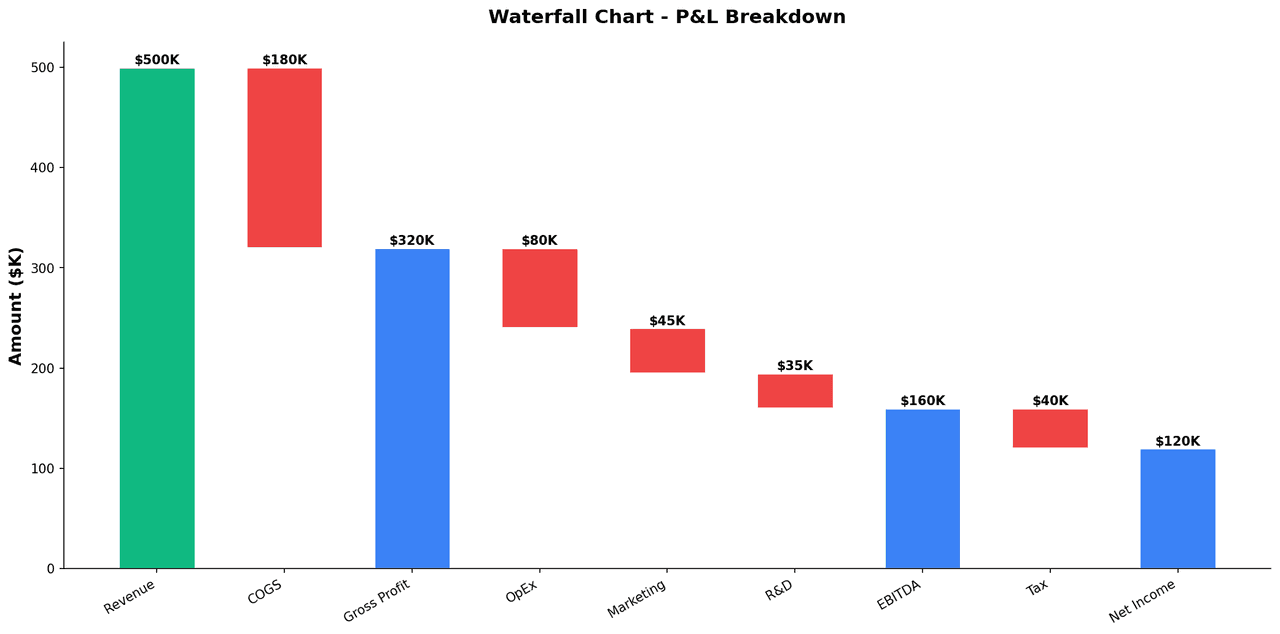
Waterfall Chart

Waterfall bar chart displaying the best percentage change in tumor size from baseline for each patient, a standard oncology clinical trial visualization.

Sample code / prompt

import matplotlib.pyplot as plt
import numpy as np

np.random.seed(42)
categories = ['Revenue', 'COGS', 'Gross Profit', 'OpEx', 'Marketing', 'R&D', 'EBITDA', 'Tax', 'Net Income']
values = [500, -180, 320, -80, -45, -35, 160, -40, 120]

fig, ax = plt.subplots(figsize=(14, 7))
cumulative = 0
bottoms = []
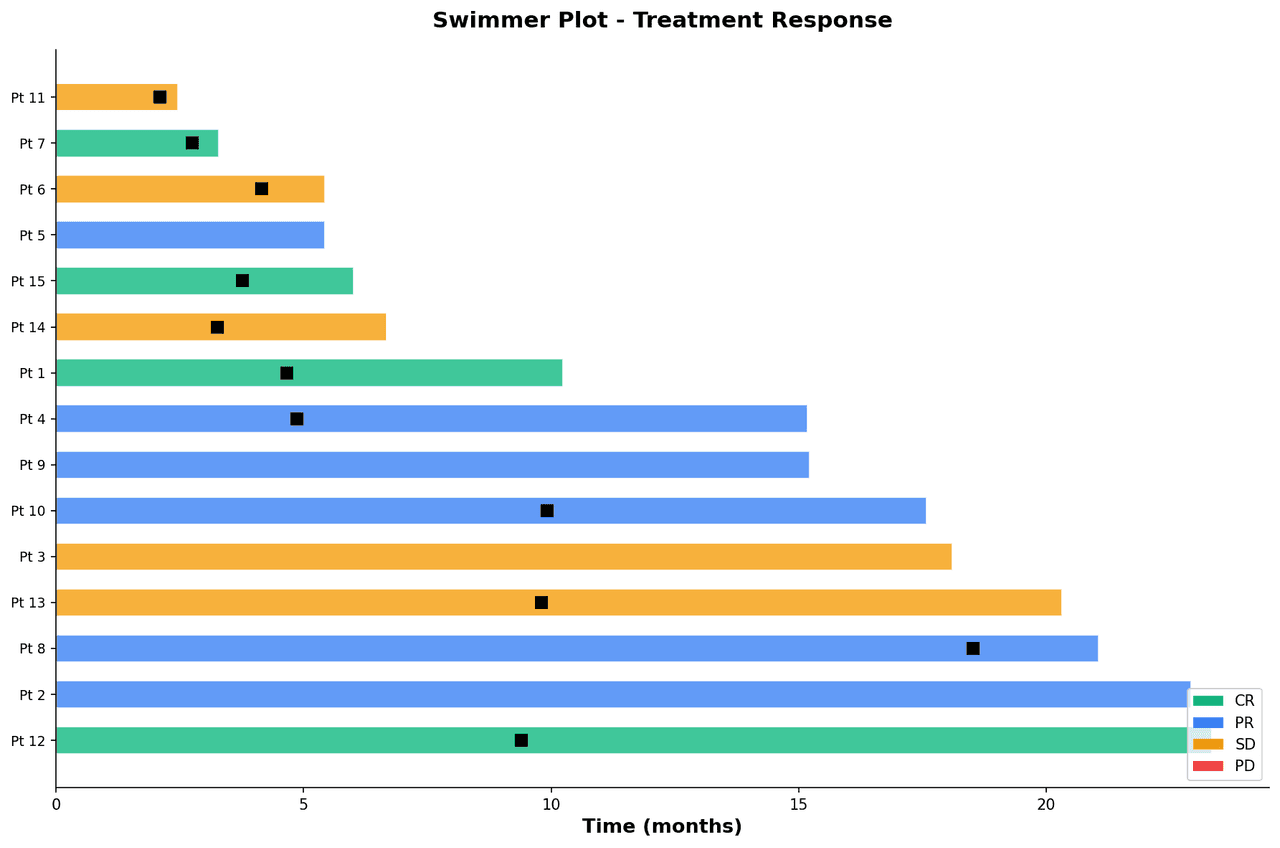

Swimmer plot with each patient as a horizontal bar representing time on treatment with overlaid symbols for response and progression events
Comparison•matplotlib, numpy
From the chart gallery•Displaying individual patient response duration in phase I/II oncology trials

Swimmer Plot

Visualize individual patient treatment duration, tumor response, and clinical events as horizontal bars sorted by duration.

Sample code / prompt

import matplotlib.pyplot as plt
import numpy as np
np.random.seed(42)
n_patients = 15
durations = np.random.uniform(2, 24, n_patients)
responses = np.random.choice(['CR', 'PR', 'SD', 'PD'], n_patients, p=[0.2, 0.3, 0.3, 0.2])
colors = {'CR': '#10b981', 'PR': '#3b82f6', 'SD': '#f59e0b', 'PD': '#ef4444'}
sorted_idx = np.argsort(durations)[::-1]
fig, ax = plt.subplots(figsize=(12, 8))
for i, idx in enumerate(sorted_idx):
Bar chart comparing average scores across 5 groups with error bars
Comparison•matplotlib, seaborn
From the chart gallery•Comparing performance across categories

Bar Chart

Compares categorical data using rectangular bars with heights proportional to values.

Sample code / prompt

import numpy as np
import pandas as pd
import matplotlib.pyplot as plt
import seaborn as sns
from scipy import stats

# Generate performance scores for 5 treatment groups
np.random.seed(42)
groups = ['Control', 'Treatment A', 'Treatment B', 'Treatment C', 'Treatment D']
n_samples = 30
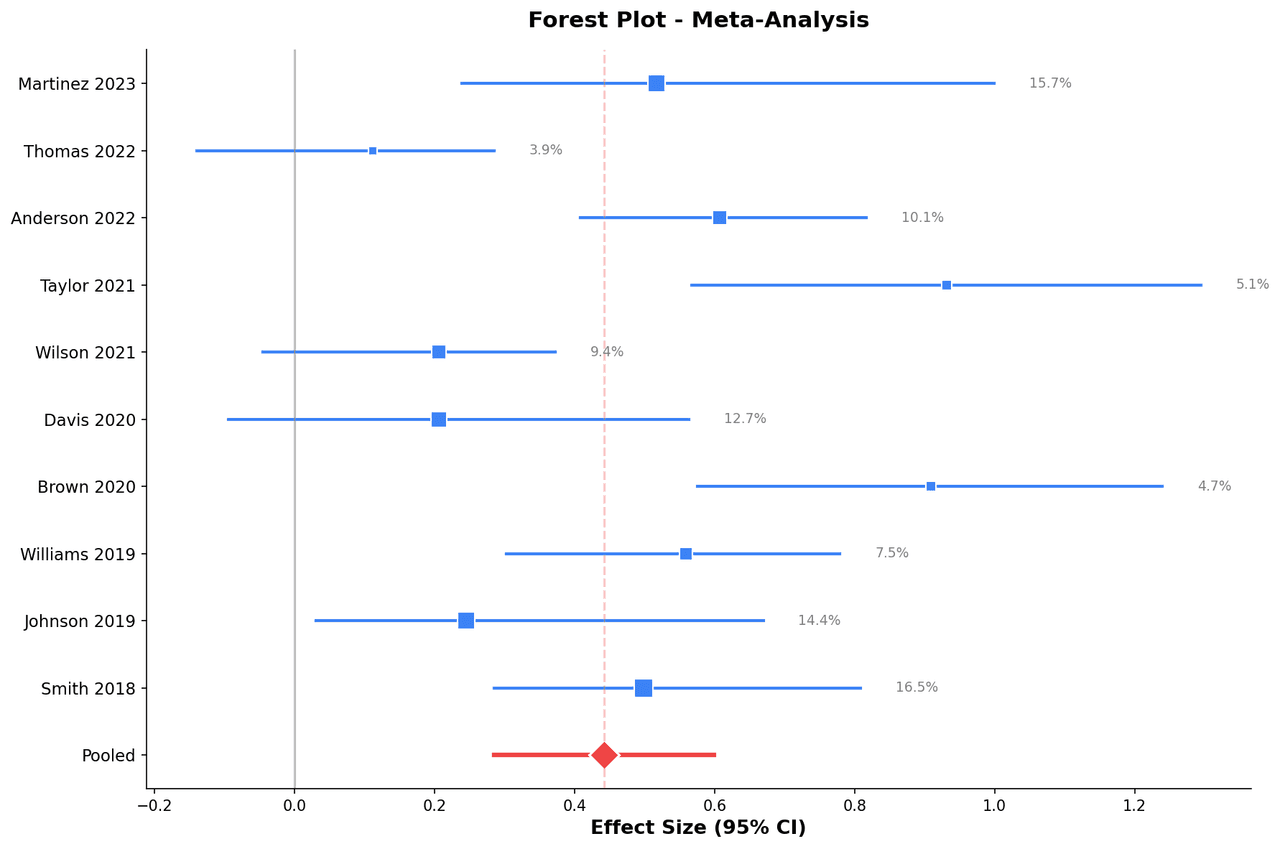
Forest plot showing effect sizes and 95% confidence intervals from individual studies with pooled estimate diamond at the bottom
Statistical•matplotlib, numpy
From the chart gallery•Cochrane systematic reviews pooling randomized controlled trial results for clinical interventions

Forest Plot

Horizontal confidence interval plot displaying effect sizes from multiple studies alongside a pooled estimate diamond, the hallmark visualization of systematic reviews.

Sample code / prompt

import matplotlib.pyplot as plt
import numpy as np

np.random.seed(42)
studies = ['Smith 2018', 'Johnson 2019', 'Williams 2019', 'Brown 2020',
           'Davis 2020', 'Wilson 2021', 'Taylor 2021', 'Anderson 2022',
           'Thomas 2022', 'Martinez 2023']
effects = np.random.normal(0.3, 0.4, len(studies))
ci_lower = effects - np.random.uniform(0.15, 0.5, len(studies))
ci_upper = effects + np.random.uniform(0.15, 0.5, len(studies))
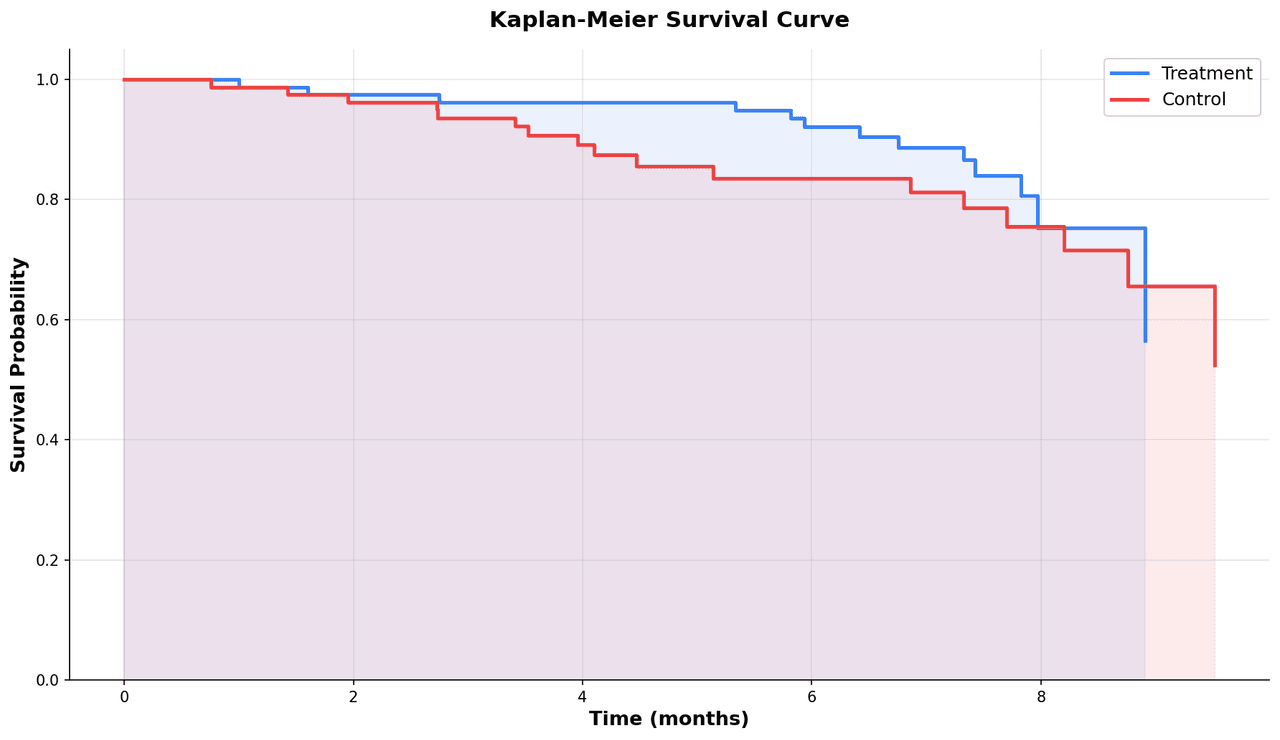
Kaplan-Meier survival curves comparing two treatment groups with shaded confidence intervals and censoring marks
Statistical•matplotlib, numpy
From the chart gallery•Overall survival and progression-free survival in oncology clinical trials

Kaplan-Meier Plot

Step-function survival curves showing the probability of event-free survival over time, with censoring marks and confidence interval bands.

Sample code / prompt

import matplotlib.pyplot as plt
import numpy as np

np.random.seed(42)
def kaplan_meier(times, events):
    sorted_idx = np.argsort(times)
    times = times[sorted_idx]
    events = events[sorted_idx]
    unique_times = np.unique(times[events == 1])
    n_at_risk = len(times)

Turn Response Data into a Clear Trial Figure

Build a waterfall plot from your own best-change values, mark the RECIST thresholds, and export a figure that is ready for a paper, poster, or trial report.