Forest Plot
Chart overview
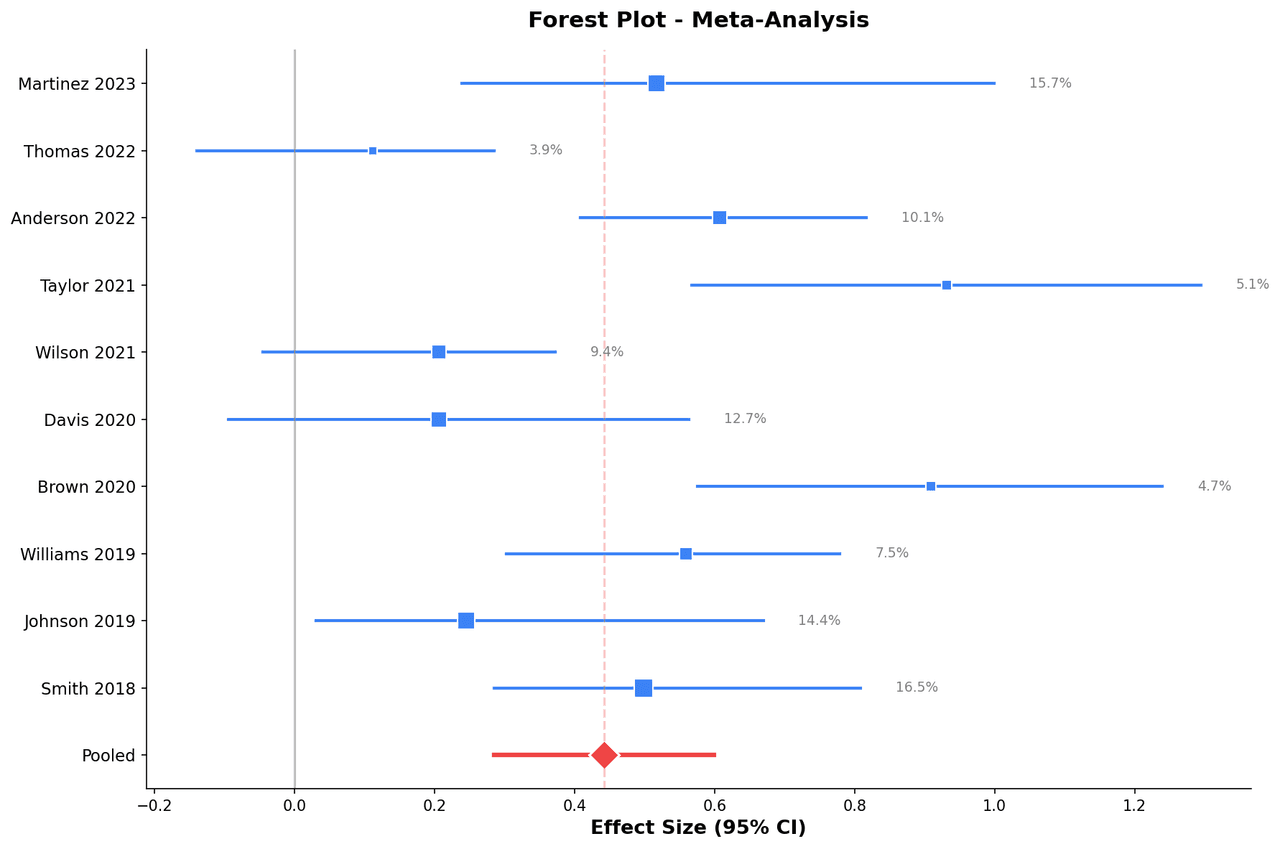
A forest plot (also called a blobbogram) is the standard display for presenting the results of a systematic review and meta-analysis.
Key points
- Each row represents an individual study, showing the study identifier, sample size, effect estimate (odds ratio, hazard ratio, standardized mean difference, or risk ratio), and its 95% confidence interval as a horizontal line with a central square.
- The size of the square is proportional to the study's weight in the meta-analysis, reflecting sample size or precision.
- The vertical line of no effect (OR = 1 or SMD = 0) serves as the reference.
Practical guidance
A diamond at the bottom represents the pooled effect from the random- or fixed-effects model, where the width of the diamond encodes the confidence interval of the pooled estimate. Heterogeneity statistics (I-squared, tau-squared, Q-test p-value) are reported below. Forest plots are required in Cochrane Reviews and most major clinical meta-analyses.
Create a Forest Plot with your data using AI — no coding required.
Further reading
Python Scatter Plot Tutorial
Build scatter plots with regression overlays, color encodings, and uncertainty bars.
Read the guideExample Visualization
Create This Chart Now
Generate publication-ready forest plots with AI in seconds. No coding required – just describe your data and let AI do the work.
View example prompt
"Create a forest plot for my meta-analysis data with columns: study, n_treatment, n_control, effect_size, ci_lower, ci_upper, weight. Plot each study as a square (sized by weight) with horizontal CI lines. Add a vertical line at null effect. Draw the pooled estimate as a diamond. Report I-squared and heterogeneity p-value below. Sort studies by effect size. Format for Lancet or BMJ publication standards."
How to create this chart with your data
Upload Data
Upload your Excel or CSV file. Data used to generate charts is sent to Plotivy's server for processing.
AI Generation
Our AI analyzes your data and generates the Forest Plot code automatically.
Customize & Export
Tweak the design with natural language, then export as high-res PNG, SVG or PDF.
Newsletter
Get one weekly tip for better forest plots
Join researchers receiving concise Python plotting techniques to improve chart clarity and reduce revision cycles.
Python Code Example
Console Output
Figure saved: plotivy-forest-plot.png
Common Use Cases
- 1Cochrane systematic reviews pooling randomized controlled trial results for clinical interventions
- 2Epidemiology: summarizing relative risk estimates from cohort and case-control studies
- 3Pharmacology: combining dose-response data across independent experiments for drug efficacy
- 4Diagnostic accuracy meta-analysis: pooling sensitivity and specificity across test evaluation studies
Pro Tips
Scale the square size by inverse-variance weight, not raw sample size, for accurate representation
Report both fixed-effects and random-effects pooled estimates when heterogeneity is substantial (I-squared > 50%)
Use a logarithmic x-axis when displaying ratio measures (OR, HR, RR) so confidence intervals are symmetric
Conduct a subgroup analysis and display separate subtotal diamonds to explore sources of heterogeneity
Frequently asked questions
When should you use a forest plot?
A forest plot (also called a blobbogram) is the standard display for presenting the results of a systematic review and meta-analysis. Each row represents an individual study, showing the study identifier, sample size, effect estimate (odds ratio, hazard ratio, standardized mean difference, or risk ratio), and its 95% confidence interval as a horizontal line with a central square. Common applications include cochrane systematic reviews pooling randomized controlled trial results for clinical interventions, epidemiology: summarizing relative risk estimates from cohort and case-control studies, and pharmacology: combining dose-response data across independent experiments for drug efficacy.
Which Python libraries can create a forest plot?
A forest plot can be built in Python with matplotlib, numpy, and pandas — matplotlib for precise control over axes, annotations, and journal styling, numpy, and pandas for quick plots straight from a DataFrame. In Plotivy you describe the figure and it writes the matplotlib code for you.
Can I make a forest plot without writing Python code?
Yes. Describe the forest plot you need in plain language and upload your dataset — Plotivy's AI writes the Python code and renders a publication-ready figure. You still get the full, editable matplotlib source, so nothing is locked in a black box.
What are best practices for a clear forest plot?
Scale the square size by inverse-variance weight, not raw sample size, for accurate representation. Report both fixed-effects and random-effects pooled estimates when heterogeneity is substantial (I-squared > 50%).
Library comparison for this chart
matplotlib
Best when you need full control over axis formatting, annotation placement, and journal-specific styling for forest-plot.
numpy
Useful in specialized workflows that complement core Python plotting libraries for forest-plot analysis tasks.
pandas
Good for quick exploratory drafts directly from DataFrame operations before polishing in matplotlib or plotly.
Scientific Chart Selection Cheat Sheet
Not sure whether to use a Violin Plot, Box Plot, or Ridge Plot? Download our single-page reference mapping the most-used scientific chart types, exactly when to use them, and the core Matplotlib/Seaborn functions.