Climate Stripes
Chart overview
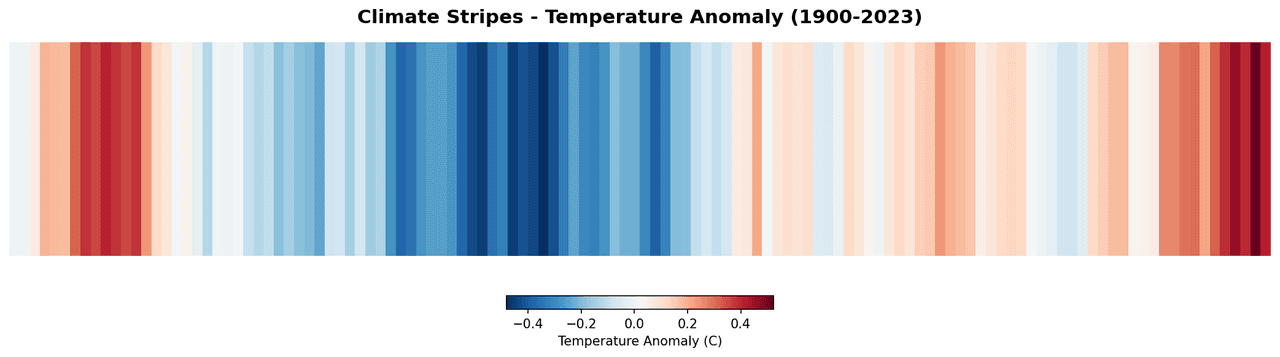
Climate stripes represent each year's temperature anomaly relative to a baseline average as a single colored vertical stripe, using a blue-to-red diverging colormap popularized by climate scientist Ed Hawkins.
Key points
- The design strips away all chart furniture to communicate the trend of global or regional warming with maximum visual impact and accessibility.
- Scientists and science communicators use it to convey climate change evidence to broad audiences and in peer-reviewed publications.
- The Matplotlib example below uses illustrative anomaly values to show the stripe layout and color mapping.
Create a Climate Stripes with your data using AI — no coding required.
Further reading
Complete Guide to Scientific Data Visualization
Chart selection, figure design, and publication-ready workflows for scientific teams.
Read the guideExample Visualization
Create This Chart Now
Generate publication-ready climate stripess with AI in seconds. No coding required – just describe your data and let AI do the work.
View example prompt
"Create a climate stripes visualization from my annual temperature anomaly data. Use a blue-white-red diverging colormap centered at zero anomaly, remove all axes and tick marks for a clean minimal design, add only a year range label at the bottom, and optionally overlay a smoothed trend line."
How to create this chart with your data
Upload Data
Upload your Excel or CSV file. Data used to generate charts is sent to Plotivy's server for processing.
AI Generation
Our AI analyzes your data and generates the Climate Stripes code automatically.
Customize & Export
Tweak the design with natural language, then export as high-res PNG, SVG or PDF.
Newsletter
Get one weekly tip for better climate stripess
Join researchers receiving concise Python plotting techniques to improve chart clarity and reduce revision cycles.
Python Code Example
Console Output
Figure saved: plotivy-climate-stripes.png
Common Use Cases
- 1Communicating regional warming trends to policy makers and the public
- 2Visualizing multi-decadal sea surface temperature records from oceanographic datasets
- 3Illustrating urban heat island intensification over the past century
- 4Comparing warming rates across different climate zones in a multi-panel figure
Pro Tips
Center the diverging colormap at the 1961 to 1990 climatological mean, not at zero Celsius
Use RdBu_r reversed so red represents warming and blue represents cooling
Remove all spines, ticks, and labels for the canonical minimal design, keeping only years
Scale color limits symmetrically (e.g., plus or minus 2 degrees C) so the midpoint white truly represents the baseline
Frequently asked questions
When should you use a climate stripes?
Climate stripes represent each year's temperature anomaly relative to a baseline average as a single colored vertical stripe, using a blue-to-red diverging colormap popularized by climate scientist Ed Hawkins. The design strips away all chart furniture to communicate the trend of global or regional warming with maximum visual impact and accessibility. Common applications include communicating regional warming trends to policy makers and the public, visualizing multi-decadal sea surface temperature records from oceanographic datasets, and illustrating urban heat island intensification over the past century.
Which Python libraries can create a climate stripes?
A climate stripes can be built in Python with matplotlib and numpy — matplotlib for precise control over axes, annotations, and journal styling and numpy. In Plotivy you describe the figure and it writes the matplotlib code for you.
Can I make a climate stripes without writing Python code?
Yes. Describe the climate stripes you need in plain language and upload your dataset — Plotivy's AI writes the Python code and renders a publication-ready figure. You still get the full, editable matplotlib source, so nothing is locked in a black box.
What are best practices for a clear climate stripes?
Center the diverging colormap at the 1961 to 1990 climatological mean, not at zero Celsius. Use RdBu_r reversed so red represents warming and blue represents cooling.
Library comparison for this chart
matplotlib
Best when you need full control over axis formatting, annotation placement, and journal-specific styling for climate-stripes.
numpy
Useful in specialized workflows that complement core Python plotting libraries for climate-stripes analysis tasks.
Scientific Chart Selection Cheat Sheet
Not sure whether to use a Violin Plot, Box Plot, or Ridge Plot? Download our single-page reference mapping the most-used scientific chart types, exactly when to use them, and the core Matplotlib/Seaborn functions.