Nightingale Rose Chart
Chart overview
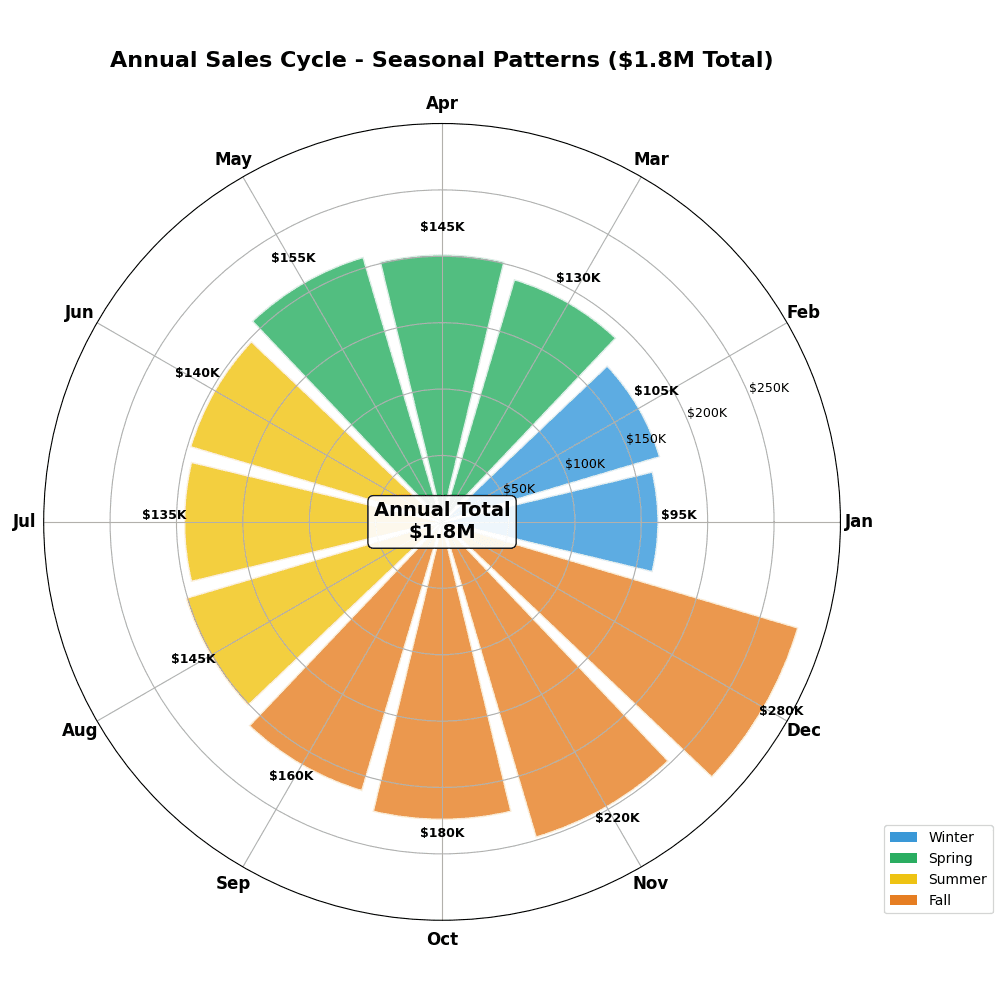
Nightingale rose charts (coxcomb charts) display data in sectors radiating from a center point, with sector radius proportional to value.
Key points
- Made famous by Florence Nightingale's 1858 diagram of Crimean War mortality, they suit cyclical categories — months, seasons, hours of the day, compass sectors — where the circular layout reinforces that the sequence wraps around.
- The critical design decision is whether to encode value as radius or as area.
- Because a sector's area grows with the square of its radius, mapping value linearly to radius visually exaggerates large values; for honest quantitative comparison, map value to area (radius proportional to the square root of the value).
Practical guidance
This is the single most common mistake in rose charts and worth stating explicitly in your caption. Even done correctly, humans compare radial extents less accurately than bar lengths, so if precise ranking across many categories matters, a plain bar chart or a small-multiple of bars is more truthful — reserve the rose for when the cyclical, wrap-around nature is itself the point. Give every sector equal angular width unless angle deliberately encodes a second variable, start at the 12 o'clock position and go clockwise to match clock/compass intuition, and label sectors with their values since the radial axis is hard to read precisely. matplotlib (polar projection with ax. bar) and plotly (barpolar) both build these directly.
Create a Nightingale Rose Chart with your data using AI — no coding required.
Further reading
How to Create a Bar Chart in Python
Matplotlib, seaborn, and plotly patterns for grouped bars, error bars, and publication-ready labels.
Read the guideExample Visualization
Create This Chart Now
Generate publication-ready nightingale rose charts with AI in seconds. No coding required – just describe your data and let AI do the work.
View example prompt
"Create a Nightingale rose chart (polar area diagram) showing 'Monthly Sales Revenue' for a retail business. Generate 12 months of data with seasonal patterns: strong Q4 (Oct: $180K, Nov: $220K, Dec: $280K holiday peak), moderate Q2/Q3 ($120-150K), weaker Q1 (Jan: $95K post-holiday low, Feb: $105K, Mar: $130K). Each petal's area (not just radius) should be proportional to sales value. Color petals by season: Winter (blue), Spring (green), Summer (yellow), Fall (orange). Add radial gridlines at $50K, $100K, $150K, $200K, $250K. Label each month on the outer edge. Annotate the peak (December) and trough (January). Center shows annual total ($1.8M). Title: 'Annual Sales Cycle - Seasonal Patterns'."
How to create this chart with your data
Upload Data
Upload your Excel or CSV file. Data used to generate charts is sent to Plotivy's server for processing.
AI Generation
Our AI analyzes your data and generates the Nightingale Rose Chart code automatically.
Customize & Export
Tweak the design with natural language, then export as high-res PNG, SVG or PDF.
Newsletter
Get one weekly tip for better nightingale rose charts
Join researchers receiving concise Python plotting techniques to improve chart clarity and reduce revision cycles.
Python Code Example
# === IMPORTS ===
import pandas as pd
import numpy as np
import matplotlib.pyplot as plt

# === USER-EDITABLE PARAMETERS ===
title = "Annual Sales Cycle - Seasonal Patterns ($1.8M Total)"
figsize = (10, 10)

# === EXAMPLE DATASET ===
months = ['Jan', 'Feb', 'Mar', 'Apr', 'May', 'Jun',
          'Jul', 'Aug', 'Sep', 'Oct', 'Nov', 'Dec']
sales = [95, 105, 130, 145, 155, 140,
         135, 145, 160, 180, 220, 280]  # In thousands

# Seasons colors
season_colors = ['#3498db'] * 2 + ['#27ae60'] * 3 + ['#f1c40f'] * 3 + ['#e67e22'] * 4
season_colors = ['#3498db', '#3498db', '#27ae60', '#27ae60', '#27ae60',
                 '#f1c40f', '#f1c40f', '#f1c40f', '#e67e22', '#e67e22', '#e67e22', '#e67e22']

df = pd.DataFrame({'Month': months, 'Sales': sales, 'Color': season_colors})

# Print summary
print("=== Monthly Sales Summary ===")
print(f"\nTotal Annual Sales: ${sum(sales):,}K")
print(f"Average Monthly: ${np.mean(sales):.0f}K")
print(f"Peak Month: {months[np.argmax(sales)]} (${max(sales)}K)")
print(f"Lowest Month: {months[np.argmin(sales)]} (${min(sales)}K)")

# === CREATE NIGHTINGALE ROSE CHART ===
fig, ax = plt.subplots(figsize=figsize, subplot_kw={'projection': 'polar'})

# Calculate angles
theta = np.linspace(0, 2 * np.pi, len(months), endpoint=False)
width = 2 * np.pi / len(months)

# Convert sales to area-proportional radius
max_sales = max(sales)
radii = [np.sqrt(s / max_sales) * max_sales for s in sales]

# Plot bars
bars = ax.bar(theta, radii, width=width * 0.9, alpha=0.8, color=season_colors, edgecolor='white', linewidth=2)

# Add labels
ax.set_xticks(theta)
ax.set_xticklabels(months, fontsize=12, fontweight='bold')

# Add gridlines
ax.set_yticks([50, 100, 150, 200, 250])
ax.set_yticklabels(['$50K', '$100K', '$150K', '$200K', '$250K'], fontsize=9)
ax.set_ylim(0, 300)

# Add value labels on each petal
for angle, radius, sale in zip(theta, radii, sales):
    ax.text(angle, radius + 15, f'${sale}K', ha='center', va='bottom', fontsize=9, fontweight='bold')

# Center annotation
ax.text(0, 0, f'Annual Total\n$1.8M', ha='center', va='center', fontsize=14, fontweight='bold',
        bbox=dict(boxstyle='round', facecolor='white', alpha=0.9))

# Title
plt.title(title, fontsize=16, fontweight='bold', pad=20)

# Legend for seasons
from matplotlib.patches import Patch
legend_elements = [
    Patch(facecolor='#3498db', label='Winter'),
    Patch(facecolor='#27ae60', label='Spring'),
    Patch(facecolor='#f1c40f', label='Summer'),
    Patch(facecolor='#e67e22', label='Fall')
]
ax.legend(handles=legend_elements, loc='lower right', bbox_to_anchor=(1.2, 0))

plt.tight_layout()
plt.show()
# END-OF-CODE
Opens the Analyze page with this code pre-loaded and ready to execute
Console Output
=== Monthly Sales Summary ===

Total Annual Sales: $1,890K
Average Monthly: $158K
Peak Month: Dec ($280K)
Lowest Month: Jan ($95K)
Common Use Cases
- 1Seasonal data comparison
- 2Cyclical pattern display
- 3Category magnitude comparison
- 4Historical data recreation
Pro Tips
Use for cyclical categories
Start at 12 o'clock position
Add value labels on sectors
Frequently asked questions
When should you use a nightingale rose chart?
Nightingale rose charts (coxcomb charts) display data in sectors radiating from a center point, with sector radius proportional to value. Made famous by Florence Nightingale's 1858 diagram of Crimean War mortality, they suit cyclical categories — months, seasons, hours of the day, compass sectors — where the circular layout reinforces that the sequence wraps around. Common applications include seasonal data comparison, cyclical pattern display, and category magnitude comparison.
Which Python libraries can create a nightingale rose chart?
A nightingale rose chart can be built in Python with matplotlib and plotly — matplotlib for precise control over axes, annotations, and journal styling and Plotly for interactive hover, zoom, and web sharing. In Plotivy you describe the figure and it writes the matplotlib code for you.
Can I make a nightingale rose chart without writing Python code?
Yes. Describe the nightingale rose chart you need in plain language and upload your dataset — Plotivy's AI writes the Python code and renders a publication-ready figure. You still get the full, editable matplotlib source, so nothing is locked in a black box.
What are best practices for a clear nightingale rose chart?
Use for cyclical categories. Start at 12 o'clock position.
Library comparison for this chart
matplotlib
Best when you need full control over axis formatting, annotation placement, and journal-specific styling for nightingale-rose-chart.
plotly
Best for interactive hover, zoom, and web sharing when collaborators need to inspect values directly from nightingale-rose-chart figures.
Scientific Chart Selection Cheat Sheet
Not sure whether to use a Violin Plot, Box Plot, or Ridge Plot? Download our single-page reference mapping the most-used scientific chart types, exactly when to use them, and the core Matplotlib/Seaborn functions.