Radial Bar Chart
Chart overview
Radial bar charts display categorical data in a circular format, with bars extending outward from the center.
Key points
- They create visually engaging displays for cyclical data like time-of-year patterns or progress metrics, though they can be harder to read precisely than standard bar charts.
- Two geometric distortions do the damage: bars at different radii sweep different arc lengths for the same value (an outer ring looks longer than an inner one), and readers judge angles and arcs worse than straight-line positions.
- So reserve the form for genuinely cyclical categories - months, hours of day, wind directions, circadian phases - where the wrap-around is meaningful and the visual metaphor buys engagement worth a mild accuracy cost.
Practical guidance
In matplotlib, create a polar axis (subplot_kw={'projection': 'polar'}) and call bar(theta, values, width=... ); set theta_offset and theta_direction so the cycle starts at 12 o'clock and runs clockwise, matching how readers scan. Keep the radial axis starting at zero - a nonzero inner hole exaggerates differences - add light labeled radial gridlines, and label bars directly. The concentric-rings variant (one bar per ring, like activity rings) suffers the arc-length distortion at its worst: cap it at 3-4 rings and print the values. If the data has no cycle, sorted horizontal bars beat the circle on every reading task.
Create a Radial Bar Chart with your data using AI — no coding required.
Further reading
How to Create a Bar Chart in Python
Matplotlib, seaborn, and plotly patterns for grouped bars, error bars, and publication-ready labels.
Read the guideExample Visualization
Create This Chart Now
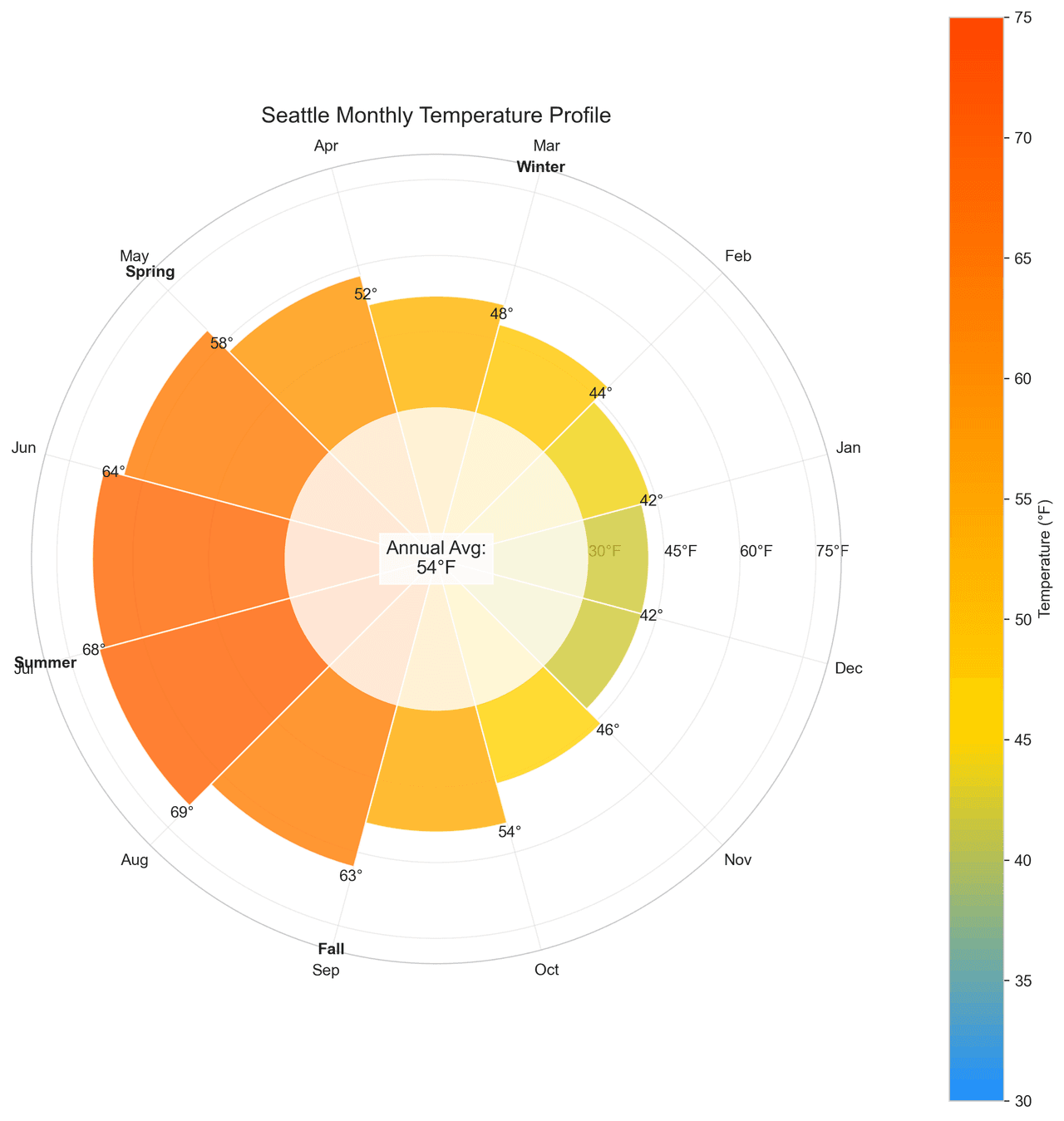
Generate publication-ready radial bar charts with AI in seconds. No coding required – just describe your data and let AI do the work.
View example prompt
"Create a radial bar chart showing 'Average Monthly Temperature' for Seattle across all 12 months. Generate realistic Pacific Northwest data in Fahrenheit: Jan (42), Feb (44), Mar (48), Apr (52), May (58), Jun (64), Jul (68), Aug (69), Sep (63), Oct (54), Nov (46), Dec (42). Arrange months clockwise starting from January at top. Color bars using a temperature gradient (blue for cold ≤50°F, yellow for mild 50-60°F, orange/red for warm ≥60°F). Add temperature labels at the end of each bar. Include concentric circular gridlines at 30°, 45°, 60°, 75°F. Add a center annotation showing annual average (54°F). Title: 'Seattle Monthly Temperature Profile'."
How to create this chart with your data
Upload Data
Upload your Excel or CSV file. Data used to generate charts is sent to Plotivy's server for processing.
AI Generation
Our AI analyzes your data and generates the Radial Bar Chart code automatically.
Customize & Export
Tweak the design with natural language, then export as high-res PNG, SVG or PDF.
Newsletter
Get one weekly tip for better radial bar charts
Join researchers receiving concise Python plotting techniques to improve chart clarity and reduce revision cycles.
Python Code Example
import numpy as np
import matplotlib.pyplot as plt
from matplotlib.cm import ScalarMappable
from matplotlib.colors import LinearSegmentedColormap

# Data
months = ['Jan', 'Feb', 'Mar', 'Apr', 'May', 'Jun', 'Jul', 'Aug', 'Sep', 'Oct', 'Nov', 'Dec']
temperatures = [42, 44, 48, 52, 58, 64, 68, 69, 63, 54, 46, 42]
annual_avg = 54

# Color mapping
colors = ['#1E90FF', '#FFD700', '#FF8C00', '#FF4500']
cmap = LinearSegmentedColormap.from_list('temp_gradient', colors, N=100)
norm = plt.Normalize(vmin=30, vmax=75)
sm = ScalarMappable(cmap=cmap, norm=norm)
sm.set_array([])

# Create figure
fig, ax = plt.subplots(figsize=(10, 10), subplot_kw={'projection': 'polar'})

# Calculate angles
theta = np.linspace(0, 2*np.pi, len(months), endpoint=False)
width = 2*np.pi / len(months)

# Plot bars
bars = ax.bar(theta, temperatures, width=width, alpha=0.8, edgecolor='white')
for i, (bar, temp) in enumerate(zip(bars, temperatures)):
    bar.set_facecolor(cmap(norm(temp)))
    angle = theta[i] + width/2
    ax.text(angle, temp + 2, f'{temp}°', ha='center', va='center')

# Set month labels
ax.set_xticks(theta + width/2)
ax.set_xticklabels(months)

# Grid lines
ax.set_yticks([30, 45, 60, 75])
ax.set_yticklabels(['30°F', '45°F', '60°F', '75°F'])
ax.grid(True, alpha=0.3)

# Center annotation
ax.text(0, 0, f'Annual Avg:\n{annual_avg}°F', ha='center', va='center',
        fontsize=12, bbox=dict(facecolor='white', alpha=0.8))

# Title
plt.title('Seattle Monthly Temperature Profile', pad=20, fontsize=14)

# Colorbar
cbar = plt.colorbar(sm, ax=ax, pad=0.1)
cbar.set_label('Temperature (°F)')

# Adjust layout
plt.tight_layout()
# Remove the radial axis labels for cleaner look
ax.set_rlabel_position(0)

# Add a circle at the center to cover the inner grid lines
center_circle = plt.Circle((0, 0), 30, transform=ax.transData._b,
                          facecolor='white', edgecolor='none', alpha=0.8)
ax.add_artist(center_circle)

# Add season indicators
season_angles = [np.pi/6, np.pi/2, 5*np.pi/6, 7*np.pi/6, 3*np.pi/2, 11*np.pi/6]
season_labels = ['Winter', 'Spring', 'Summer', 'Fall']
for i, season in enumerate(season_labels):
    angle = season_angles[i] + np.pi/4
    ax.text(angle, 80, season, ha='center', va='center',
            fontsize=10, fontweight='bold')

# Final adjustments
ax.set_ylim(0, 80)
plt.tight_layout()

# Show plot
plt.show()
# END-OF-CODEOpens the Analyze page with this code pre-loaded and ready to execute
Common Use Cases
- 1Seasonal pattern visualization
- 2Progress tracking
- 3Cyclical data display
- 4Dashboard widgets
Pro Tips
Use for cyclical data (months, hours)
Start at 12 o'clock for time-based data
Add value labels for precision
Frequently asked questions
When should you use a radial bar chart?
Radial bar charts display categorical data in a circular format, with bars extending outward from the center. They create visually engaging displays for cyclical data like time-of-year patterns or progress metrics, though they can be harder to read precisely than standard bar charts. Common applications include seasonal pattern visualization, progress tracking, and cyclical data display.
Which Python libraries can create a radial bar chart?
A radial bar chart can be built in Python with matplotlib — matplotlib for precise control over axes, annotations, and journal styling. In Plotivy you describe the figure and it writes the matplotlib code for you.
Can I make a radial bar chart without writing Python code?
Yes. Describe the radial bar chart you need in plain language and upload your dataset — Plotivy's AI writes the Python code and renders a publication-ready figure. You still get the full, editable matplotlib source, so nothing is locked in a black box.
What are best practices for a clear radial bar chart?
Use for cyclical data (months, hours). Start at 12 o'clock for time-based data.
Library comparison for this chart
matplotlib
Best when you need full control over axis formatting, annotation placement, and journal-specific styling for radial-bar-chart.
Scientific Chart Selection Cheat Sheet
Not sure whether to use a Violin Plot, Box Plot, or Ridge Plot? Download our single-page reference mapping the most-used scientific chart types, exactly when to use them, and the core Matplotlib/Seaborn functions.