Peristimulus Time Histogram
Chart overview
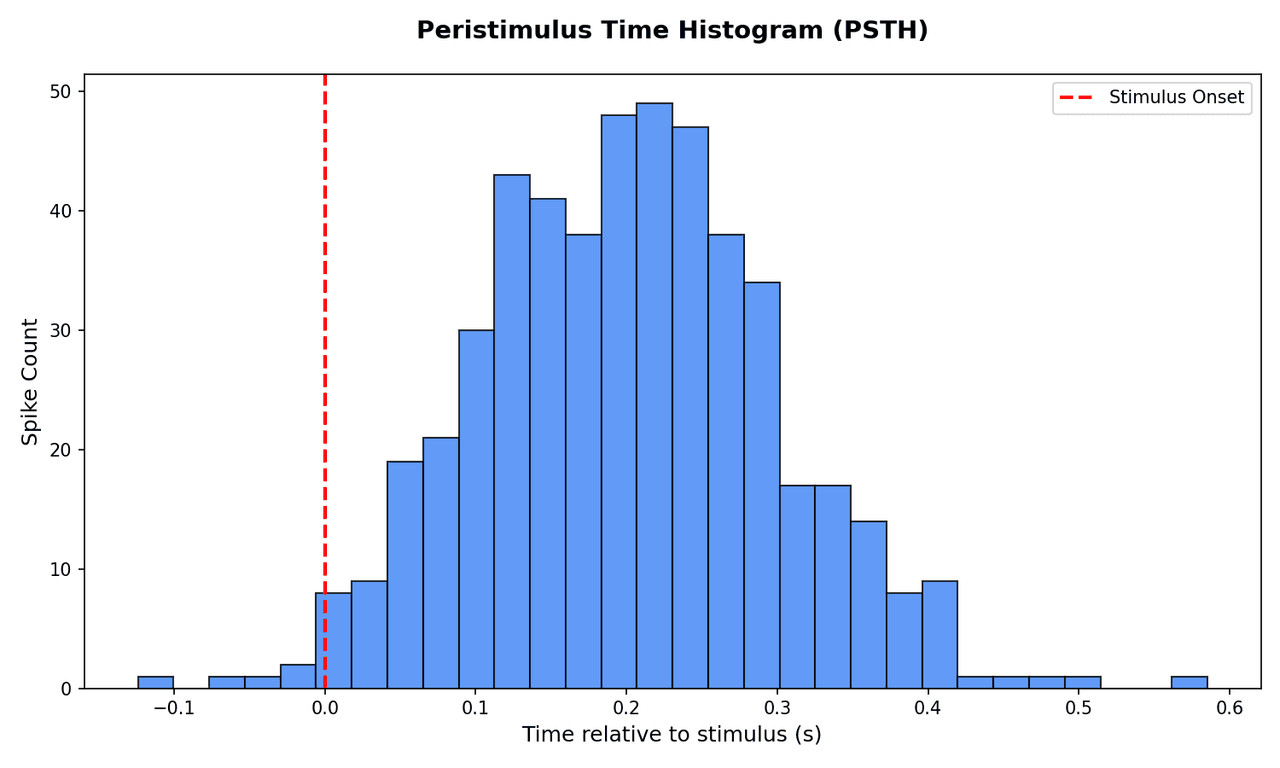
The peristimulus time histogram (PSTH) averages spike counts across trials in uniform time bins, converting discrete spike trains into a continuous firing-rate estimate.
Key points
- Neuroscientists use it to characterise the temporal profile of a neuron's response to a stimulus.
- It quantifies response latency, peak firing rate, and post-excitatory inhibition in a single compact plot.
Create a Peristimulus Time Histogram with your data using AI — no coding required.
Further reading
How to Plot a Histogram in Python
Bin selection, KDE overlays, normality checks, and publication formatting.
Read the guideExample Visualization
Create This Chart Now
Generate publication-ready peristimulus time histograms with AI in seconds. No coding required – just describe your data and let AI do the work.
View example prompt
"Create a peristimulus time histogram (PSTH) from my spike time data. Bin spikes into 10 ms windows, align to stimulus onset at t=0, normalise to spikes per second, shade the baseline period, and format for a journal-quality figure."
How to create this chart with your data
Upload Data
Upload your Excel or CSV file. Data used to generate charts is sent to Plotivy's server for processing.
AI Generation
Our AI analyzes your data and generates the Peristimulus Time Histogram code automatically.
Customize & Export
Tweak the design with natural language, then export as high-res PNG, SVG or PDF.
Newsletter
Get one weekly tip for better peristimulus time histograms
Join researchers receiving concise Python plotting techniques to improve chart clarity and reduce revision cycles.
Python Code Example
import numpy as np
import matplotlib.pyplot as plt

np.random.seed(42)
spikes = np.random.normal(0.2, 0.1, 500)
spikes = spikes[(spikes > -0.2) & (spikes < 0.6)]

plt.figure(figsize=(10, 6))
plt.hist(spikes, bins=30, color='#3b82f6', edgecolor='black', alpha=0.8)
plt.axvline(0, color='red', linestyle='--', linewidth=2, label='Stimulus Onset')
plt.title('Peristimulus Time Histogram (PSTH)', fontsize=14, fontweight='bold', pad=20)
plt.xlabel('Time relative to stimulus (s)', fontsize=12)
plt.ylabel('Spike Count', fontsize=12)
plt.legend()
plt.tight_layout()
plt.savefig('plotivy-peristimulus-time-histogram.png', dpi=150)
print("PSTH generated successfully.")
Opens the Analyze page with this code pre-loaded and ready to execute
Console Output
PSTH generated successfully.
Common Use Cases
- 1Characterising excitatory and inhibitory responses in sensory cortex
- 2Comparing response latency across brain areas or pharmacological conditions
- 3Detecting anticipatory activity before a behavioural cue
- 4Quantifying adaptation and habituation of neural responses
Pro Tips
Choose bin width carefully: too wide blurs temporal precision, too narrow inflates noise
Smooth with a Gaussian kernel after binning to produce a continuous firing-rate estimate
Always show the pre-stimulus baseline period to establish the spontaneous rate
Normalise by trial count and bin width to report firing rate in Hz, not raw counts
Frequently asked questions
When should you use a peristimulus time histogram?
The peristimulus time histogram (PSTH) averages spike counts across trials in uniform time bins, converting discrete spike trains into a continuous firing-rate estimate. Neuroscientists use it to characterise the temporal profile of a neuron's response to a stimulus. Common applications include characterising excitatory and inhibitory responses in sensory cortex, comparing response latency across brain areas or pharmacological conditions, and detecting anticipatory activity before a behavioural cue.
Which Python libraries can create a peristimulus time histogram?
A peristimulus time histogram can be built in Python with matplotlib and numpy — matplotlib for precise control over axes, annotations, and journal styling and numpy. In Plotivy you describe the figure and it writes the matplotlib code for you.
Can I make a peristimulus time histogram without writing Python code?
Yes. Describe the peristimulus time histogram you need in plain language and upload your dataset — Plotivy's AI writes the Python code and renders a publication-ready figure. You still get the full, editable matplotlib source, so nothing is locked in a black box.
What are best practices for a clear peristimulus time histogram?
Choose bin width carefully: too wide blurs temporal precision, too narrow inflates noise. Smooth with a Gaussian kernel after binning to produce a continuous firing-rate estimate.
Library comparison for this chart
matplotlib
Best when you need full control over axis formatting, annotation placement, and journal-specific styling for peristimulus-time-histogram.
numpy
Useful in specialized workflows that complement core Python plotting libraries for peristimulus-time-histogram analysis tasks.
Scientific Chart Selection Cheat Sheet
Not sure whether to use a Violin Plot, Box Plot, or Ridge Plot? Download our single-page reference mapping the most-used scientific chart types, exactly when to use them, and the core Matplotlib/Seaborn functions.