Slope Chart
Chart overview
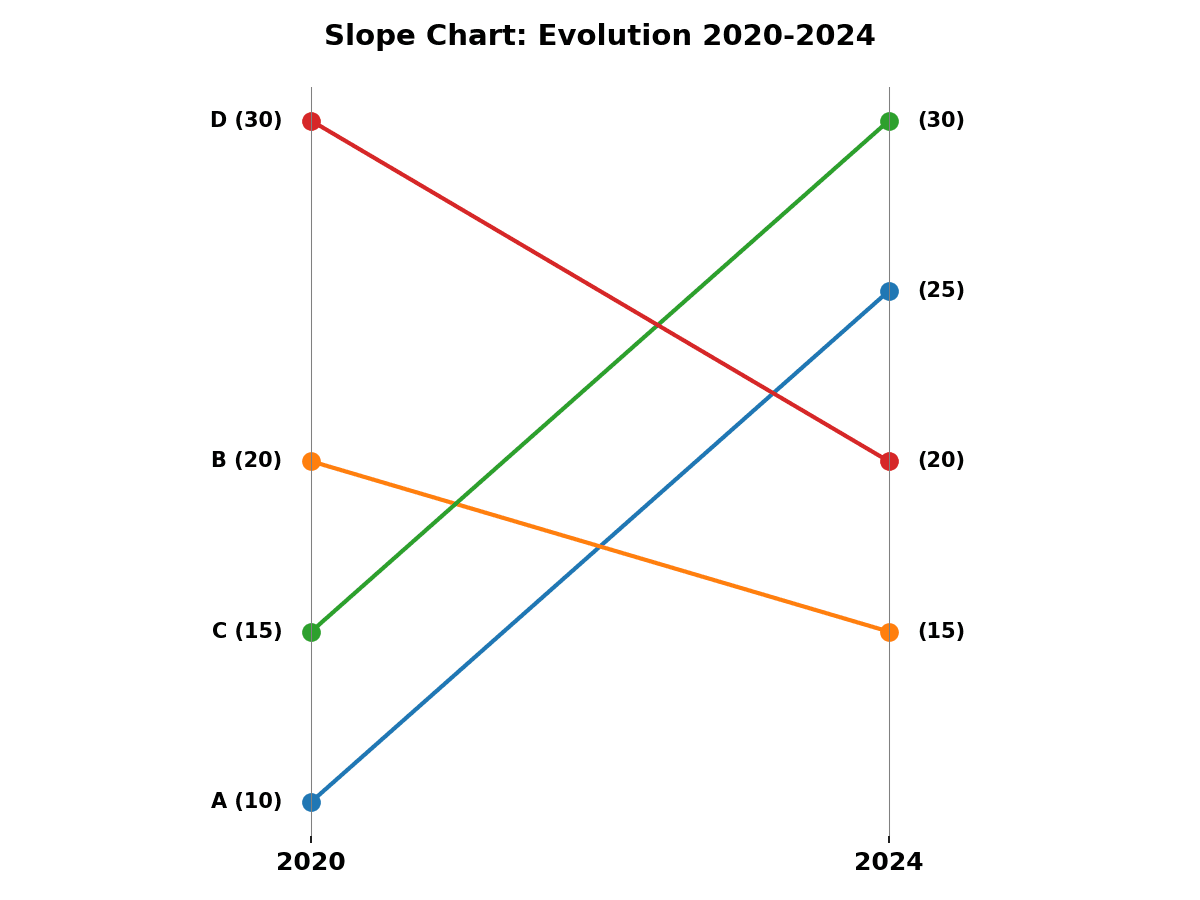
A slope chart (or slopegraph) places two vertical axes side by side representing two time points or conditions, connects each subject or group with a line, and lets the eye immediately read upward or downward trends and relative ranking changes.
Key points
- Scientists use it to compare paired pre-post measurements or treatment versus control outcomes.
- It is more space-efficient and perceptually clearer than a grouped bar chart for exactly two conditions.
Create a Slope Chart with your data using AI — no coding required.
Further reading
How to Create a Bar Chart in Python
Matplotlib, seaborn, and plotly patterns for grouped bars, error bars, and publication-ready labels.
Read the guideExample Visualization
Create This Chart Now
Generate publication-ready slope charts with AI in seconds. No coding required – just describe your data and let AI do the work.
View example prompt
"Create a slope chart from my data. Draw two vertical axes for the two conditions, connect each item with a labelled line, colour lines by increase or decrease, and format as a clean publication-quality figure with a minimal grid."
How to create this chart with your data
Upload Data
Upload your Excel or CSV file. Data used to generate charts is sent to Plotivy's server for processing.
AI Generation
Our AI analyzes your data and generates the Slope Chart code automatically.
Customize & Export
Tweak the design with natural language, then export as high-res PNG, SVG or PDF.
Newsletter
Get one weekly tip for better slope charts
Join researchers receiving concise Python plotting techniques to improve chart clarity and reduce revision cycles.
Python Code Example
import numpy as np
import matplotlib.pyplot as plt
import pandas as pd

data = {'Category': ['A', 'B', 'C', 'D'], '2020': [10, 20, 15, 30], '2024': [25, 15, 30, 20]}
df = pd.DataFrame(data)

plt.figure(figsize=(8, 6))
for i in range(len(df)):
    plt.plot([0, 1], [df['2020'][i], df['2024'][i]], marker='o', markersize=8, linewidth=2, label=df['Category'][i])
    plt.text(-0.05, df['2020'][i], f"{df['Category'][i]} ({df['2020'][i]})", ha='right', va='center', fontweight='bold')
    plt.text(1.05, df['2024'][i], f"({df['2024'][i]})", ha='left', va='center', fontweight='bold')

plt.xlim(-0.5, 1.5)
plt.xticks([0, 1], ['2020', '2024'], fontsize=12, fontweight='bold')
plt.yticks([])
plt.axvline(0, color='gray', linewidth=0.5)
plt.axvline(1, color='gray', linewidth=0.5)
plt.box(False)
plt.title('Slope Chart: Evolution 2020-2024', fontsize=14, fontweight='bold', pad=20)
plt.tight_layout()
plt.savefig('plotivy-slope-chart.png', dpi=150)
print("Slope chart generated successfully.")
Opens the Analyze page with this code pre-loaded and ready to execute
Console Output
Slope chart generated successfully.
Common Use Cases
- 1Comparing pre-treatment and post-treatment biomarker values across patient groups
- 2Showing ranking changes between two experimental sessions in cognitive testing
- 3Visualising gene expression fold-change between two conditions for selected genes
- 4Displaying country-level metric changes between two survey waves
Pro Tips
Label both endpoints of each slope line directly on the chart to avoid a separate legend
Colour lines by direction (e.g. green for increase, red for decrease) so changes are easy to scan
Sort items by the left-axis value to prevent excessive line crossings in the slopegraph
Use consistent y-axis scales and clearly label both time points or conditions with units
Frequently asked questions
When should you use a slope chart?
A slope chart (or slopegraph) places two vertical axes side by side representing two time points or conditions, connects each subject or group with a line, and lets the eye immediately read upward or downward trends and relative ranking changes. Scientists use it to compare paired pre-post measurements or treatment versus control outcomes. Common applications include comparing pre-treatment and post-treatment biomarker values across patient groups, showing ranking changes between two experimental sessions in cognitive testing, and visualising gene expression fold-change between two conditions for selected genes.
Which Python libraries can create a slope chart?
A slope chart can be built in Python with matplotlib and numpy — matplotlib for precise control over axes, annotations, and journal styling and numpy. In Plotivy you describe the figure and it writes the matplotlib code for you.
Can I make a slope chart without writing Python code?
Yes. Describe the slope chart you need in plain language and upload your dataset — Plotivy's AI writes the Python code and renders a publication-ready figure. You still get the full, editable matplotlib source, so nothing is locked in a black box.
What are best practices for a clear slope chart?
Label both endpoints of each slope line directly on the chart to avoid a separate legend. Colour lines by direction (e.g. green for increase, red for decrease) so changes are easy to scan.
Library comparison for this chart
matplotlib
Best when you need full control over axis formatting, annotation placement, and journal-specific styling for slope-chart.
numpy
Useful in specialized workflows that complement core Python plotting libraries for slope-chart analysis tasks.
Scientific Chart Selection Cheat Sheet
Not sure whether to use a Violin Plot, Box Plot, or Ridge Plot? Download our single-page reference mapping the most-used scientific chart types, exactly when to use them, and the core Matplotlib/Seaborn functions.