Stacked Area Graph
Chart overview
Stacked area graphs show how multiple series contribute to a total over time.
Key points
- Each series is stacked on top of the previous one, making it easy to see both individual contributions and the overall trend.
- They excel at showing composition changes and part-to-whole relationships.
- matplotlib's stackplot(x, *series, labels=...
Practical guidance
) or df. plot. area() both handle the stacking. The stacked-bar baseline caveat applies here, amplified by wiggly boundaries: only the bottom series and the total envelope are read accurately, middle series are judged by band thickness, and a bump in a lower series visually propagates upward through every band above it, creating apparent changes where none exist. So order deliberately - most stable series at the bottom, the one whose trend you discuss at the bottom or on top. Stacking requires non-negative values that meaningfully sum to a total: never stack rates, temperatures, or z-scores. When individual trajectories are the message, unstacked lines or small multiples are more accurate; when only shares matter, normalize each time step to 100%. Label bands directly at their right edge where possible - a legend forces color-matching across distant wiggly regions, which is exactly where these charts lose readers.
Create a Stacked Area Graph with your data using AI — no coding required.
Further reading
Complete Guide to Scientific Data Visualization
Chart selection, figure design, and publication-ready workflows for scientific teams.
Read the guideExample Visualization
Create This Chart Now
Generate publication-ready stacked area graphs with AI in seconds. No coding required – just describe your data and let AI do the work.
View example prompt
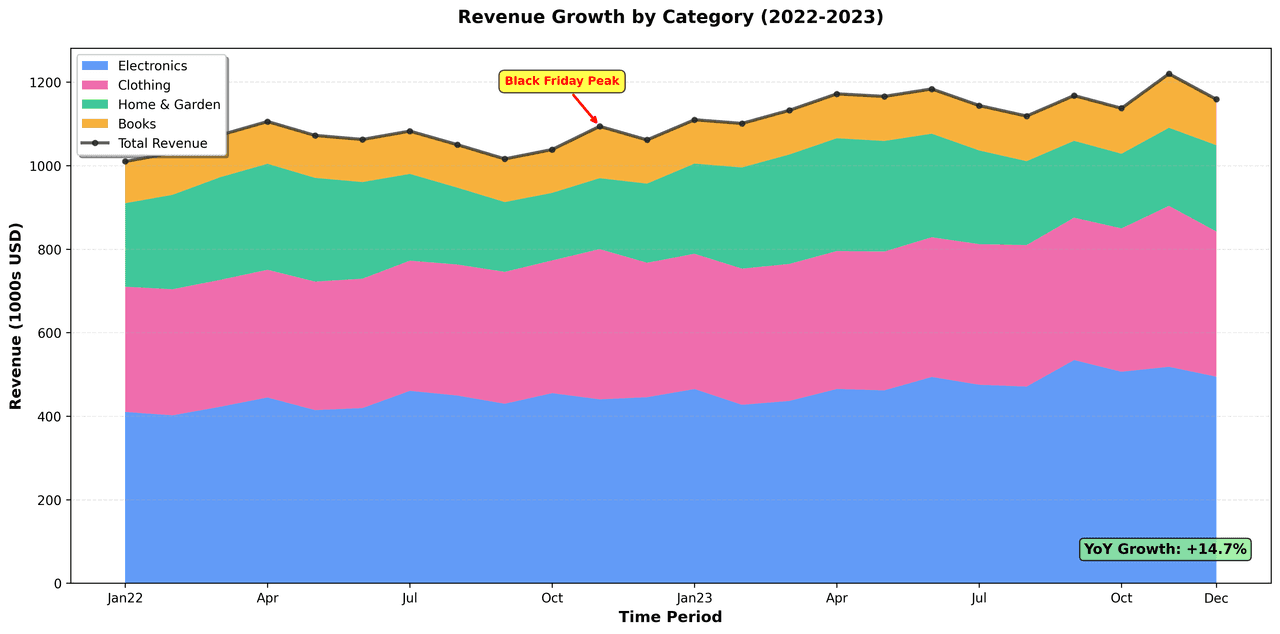
"Create a professional stacked area graph showing 'Revenue Growth by Product Category' over 24 months (2022-2023). Generate realistic e-commerce data with 4 product categories: Electronics (starting $400K, +15% annual growth), Clothing ($300K base, +8% growth with seasonal Nov-Dec peaks of +$60K), Home & Garden ($200K base, +8% growth with summer peaks), Books ($100K base, steady with holiday spikes of +$20K). Use a vibrant professional color palette (Electronics: blue, Clothing: pink, Home & Garden: green, Books: orange). Include subtle gridlines on Y-axis only. Add a bold black line showing total revenue on top with circular markers every 3 months. Annotate the Black Friday/Cyber Monday peak (November) with a red arrow and yellow highlight box. Include a legend ordered by average contribution. Format Y-axis in thousands with $ symbol. X-axis shows every 3rd month (Jan, Apr, Jul, Oct pattern). Add a growth annotation box in the bottom-right corner showing YoY growth percentage. Title: 'Revenue Growth by Category (2022-2023)'."
How to create this chart with your data
Upload Data
Upload your Excel or CSV file. Data used to generate charts is sent to Plotivy's server for processing.
AI Generation
Our AI analyzes your data and generates the Stacked Area Graph code automatically.
Customize & Export
Tweak the design with natural language, then export as high-res PNG, SVG or PDF.
Newsletter
Get one weekly tip for better stacked area graphs
Join researchers receiving concise Python plotting techniques to improve chart clarity and reduce revision cycles.
Python Code Example
# === IMPORTS ===
import pandas as pd
import numpy as np
import plotly.express as px
import plotly.graph_objects as go

# === USER-EDITABLE PARAMETERS ===
# Change: Customize data generation
np.random.seed(42)  # Change: Set to None for truly random data each run, or different int for reproducible variations
NUM_MONTHS = 24  # Change: Number of months (2 years = 24)
START_DATE = '2022-01-01'  # Change: Start date for time series
CATEGORIES = ['Electronics', 'Clothing', 'Home & Garden', 'Books']  # Change: Product category names
BASE_REVENUES = [400000, 300000, 200000, 100000]  # Change: Base monthly revenue ($) for each category
ANNUAL_GROWTH_RATES = [0.15, 0.08, 0.10, 0.03]  # Change: Annual growth rates for each category
NOISE_STD = 0.08  # Change: Standard deviation for monthly noise (as fraction of base)

# Seasonal peaks (multipliers) - Change: Adjust months and factors for peaks
SEASONAL_PEAKS = {
    'Clothing': {'months': [11, 12], 'factor': 1.5},
    'Home & Garden': {'months': [6, 7, 8], 'factor': 1.3},
    'Books': {'months': [11, 12], 'factor': 1.4},
    'Electronics': {'months': [], 'factor': 1.0}
}
BF_EXTRA_MONTHS = [11]  # Change: Months for Black Friday/Cyber Monday extra boost (25%)
BF_EXTRA_FACTOR = 1.25  # Change: Extra multiplier for BF/CM

# Visual styling - Change: Hex codes only for all colors
COLOR_DISCRETE_MAP = {
    'Electronics': '#4B9CD3',    # Change: Soft blue
    'Clothing': '#66C2A5',       # Change: Teal green
    'Home & Garden': '#8DD3C7',  # Change: Light green
    'Books': '#A6CEE3'           # Change: Light blue
}
TOTAL_LINE_COLOR = '#000000'  # Change: Total line color (black)
ANNOTATION_COLOR = '#FF0000'  # Change: Annotation arrow color (red)

# Plot styling
TITLE_FONT_SIZE = 18  # Change: Title font size
LABEL_FONT_SIZE = 14  # Change: Axis labels and legend font size
LINE_WIDTH = 4  # Change: Total line width
AREA_OPACITY = 0.85  # Change: Stacked area transparency (0.0-1.0)
SHOW_GRID = True  # Change: Toggle subtle gridlines
Y_SUFFIX = 'K'  # Change: Y-axis suffix (e.g., 'K' for thousands)
DATE_COLUMN = 'month'  # Change: Name of the date column used for x-axis

# === DATA GENERATION ===
# Create dates and month numbers
dates = pd.date_range(start=START_DATE, periods=NUM_MONTHS, freq='MS')
month_of_year = dates.month
df = pd.DataFrame({DATE_COLUMN: dates})

# Compute growth factors (monthly compounding)
growth_factors = {}
for i, cat in enumerate(CATEGORIES):
    r_annual = 1 + ANNUAL_GROWTH_RATES[i]
    r_monthly = r_annual ** (1 / 12)
    growth = np.cumprod(np.full(NUM_MONTHS, r_monthly))
    growth_factors[cat] = growth

# Seasonal and BF factors
seasonal = pd.DataFrame(1.0, index=df.index, columns=CATEGORIES)
bf_extra = pd.Series(1.0, index=df.index)
bf_extra[month_of_year.isin(BF_EXTRA_MONTHS)] = BF_EXTRA_FACTOR

for cat in CATEGORIES:
    peak_months = SEASONAL_PEAKS[cat]['months']
    factor = SEASONAL_PEAKS[cat]['factor']
    seasonal.loc[month_of_year.isin(peak_months), cat] = factor

# Generate revenues with growth, seasonal, BF, and noise
noise = np.random.normal(1, NOISE_STD, NUM_MONTHS)
for i, cat in enumerate(CATEGORIES):
    df[cat] = (BASE_REVENUES[i] * growth_factors[cat] *
               seasonal[cat] * bf_extra * noise)

df['Total'] = df[CATEGORIES].sum(axis=1)

# Scale to thousands for plotting
df_plot = df.copy()
df_plot[CATEGORIES + ['Total']] /= 1000

# Ensure date column always exists for plotting/annotations
if DATE_COLUMN not in df_plot.columns:
    df_plot[DATE_COLUMN] = dates[:len(df_plot)]

df_plot[DATE_COLUMN] = pd.to_datetime(df_plot[DATE_COLUMN], errors='coerce')

# Order categories by average revenue (descending) for legend/stacking
avgs = df_plot[CATEGORIES].mean().sort_values(ascending=False)
y_order = avgs.index.tolist()

# Compute insights for title and prints
avg_total_22 = df_plot['Total'].iloc[:12].mean()
avg_total_23 = df_plot['Total'].iloc[12:].mean()
growth_pct = ((avg_total_23 - avg_total_22) / avg_total_22) * 100
insight_title = f'Monthly Revenue Grew {growth_pct:.0f}% from 2022 (${avg_total_22:.0f}{Y_SUFFIX}) to 2023 (${avg_total_23:.0f}{Y_SUFFIX}) by Category'

# Print key statistics
print("=== KEY INSIGHTS ===")
print(f"Average monthly total revenue:")
print(f"  2022: ${avg_total_22:.0f}{Y_SUFFIX}")
print(f"  2023: ${avg_total_23:.0f}{Y_SUFFIX}")
print(f"  Growth: +{growth_pct:.1f}%")
print("\nAverage monthly revenue by category:")
for cat in y_order:
    print(f"  {cat}: ${df_plot[cat].mean():.0f}{Y_SUFFIX}")
peak_idx_for_print = int(df_plot['Total'].idxmax())
peak_date_for_print = df_plot[DATE_COLUMN].iloc[peak_idx_for_print]
if pd.isna(peak_date_for_print):
    peak_date_label = f"Month {peak_idx_for_print + 1}"
else:
    peak_date_label = peak_date_for_print.strftime('%b %Y')
print(f"\nPeak month: {peak_date_label} (${df_plot['Total'].max():.0f}{Y_SUFFIX})")

# === CREATE PLOT ===
# Stacked area chart
fig = px.area(df_plot, x=DATE_COLUMN, y=y_order, color_discrete_map=COLOR_DISCRETE_MAP)

# Add total revenue line overlay
fig.add_trace(go.Scatter(
    x=df_plot[DATE_COLUMN],
    y=df_plot['Total'],
    mode='lines',
    name='Total Revenue',
    line=dict(color=TOTAL_LINE_COLOR, width=LINE_WIDTH, dash='dash'),
    hovertemplate='<b>Total</b>: $%{y:,.0f}' + Y_SUFFIX + '<extra></extra>'
))

# Adjust area opacity for soft look
fig.update_traces(opacity=AREA_OPACITY, stackgroup='revenue')

# Black Friday/Cyber Monday annotation (latest Nov peak)
bf_months = df_plot[DATE_COLUMN][month_of_year == 11]
if len(bf_months) > 0:
    latest_bf_idx = df_plot[DATE_COLUMN][month_of_year == 11].index[-1]
    peak_x = df_plot[DATE_COLUMN].iloc[latest_bf_idx]
    peak_y = df_plot['Total'].iloc[latest_bf_idx]
    fig.add_annotation(
        x=peak_x, y=peak_y * 1.02,
        text='Black Friday /<br>Cyber Monday Peak',
        showarrow=True,
        arrowhead=2, arrowsize=1, arrowwidth=2, arrowcolor=ANNOTATION_COLOR,
        ax=0, ay=-40,
        bgcolor='rgba(255,255,255,1)', bordercolor=ANNOTATION_COLOR, borderwidth=1,
        font=dict(size=LABEL_FONT_SIZE)
    )

# === FINALIZE LAYOUT ===
fig.update_layout(
    title=dict(text=insight_title, x=0.5, font_size=TITLE_FONT_SIZE),
    xaxis_title='Month',
    yaxis_title=f'Revenue ({Y_SUFFIX}$)',
    margin=dict(t=130, b=90, l=90, r=100),
    font=dict(size=LABEL_FONT_SIZE),
    legend=dict(
        x=0.02, y=0.85,
        xanchor='left', yanchor='top',
        bgcolor='rgba(255,255,255,0.8)',
        bordercolor='rgba(128,128,128,0.3)', borderwidth=1
    ),
    xaxis=dict(
        showgrid=SHOW_GRID,
        gridcolor='rgba(128,128,128,0.3)', gridwidth=1,
        tickformat='%b<br>%y', tickangle=-45
    ),
    yaxis=dict(
        tickprefix='$', ticksuffix=Y_SUFFIX,
        showgrid=SHOW_GRID,
        gridcolor='rgba(128,128,128,0.3)', gridwidth=1
    ),
    hovermode='x unified'
)

fig.show()
# END-OF-CODEOpens the Analyze page with this code pre-loaded and ready to execute
Console Output
Revenue Statistics by Category (Year-over-Year):
Electronics          : 2022=$4432K, 2023=$5123K, Growth=+15.6%
Clothing             : 2022=$3542K, 2023=$3732K, Growth=+5.4%
Home & Garden        : 2022=$2389K, 2023=$2561K, Growth=+7.2%
Books                : 2022=$1205K, 2023=$1284K, Growth=+6.6%

Total 2-Year Revenue: $24471K
Monthly Average: $1019K
Common Use Cases
- 1Portfolio composition over time
- 2Market share evolution
- 3Resource allocation tracking
- 4Budget breakdown visualization
- 5Revenue contribution by business unit
Pro Tips
Order series by average contribution for better readability
Use distinct colors for each series for clear differentiation
Include a total line overlay to show overall trend
Consider 100% stacked version for proportion-only focus
Add seasonal annotations to highlight business events
Frequently asked questions
When should you use a stacked area graph?
Stacked area graphs show how multiple series contribute to a total over time. Each series is stacked on top of the previous one, making it easy to see both individual contributions and the overall trend. Common applications include portfolio composition over time, market share evolution, and resource allocation tracking.
Which Python libraries can create a stacked area graph?
A stacked area graph can be built in Python with matplotlib and pandas — matplotlib for precise control over axes, annotations, and journal styling and pandas for quick plots straight from a DataFrame. In Plotivy you describe the figure and it writes the matplotlib code for you.
Can I make a stacked area graph without writing Python code?
Yes. Describe the stacked area graph you need in plain language and upload your dataset — Plotivy's AI writes the Python code and renders a publication-ready figure. You still get the full, editable matplotlib source, so nothing is locked in a black box.
What are best practices for a clear stacked area graph?
Order series by average contribution for better readability. Use distinct colors for each series for clear differentiation.
Library comparison for this chart
matplotlib
Best when you need full control over axis formatting, annotation placement, and journal-specific styling for stacked-area-graph.
pandas
Good for quick exploratory drafts directly from DataFrame operations before polishing in matplotlib or plotly.
Scientific Chart Selection Cheat Sheet
Not sure whether to use a Violin Plot, Box Plot, or Ridge Plot? Download our single-page reference mapping the most-used scientific chart types, exactly when to use them, and the core Matplotlib/Seaborn functions.