Calibration Curve
Chart overview
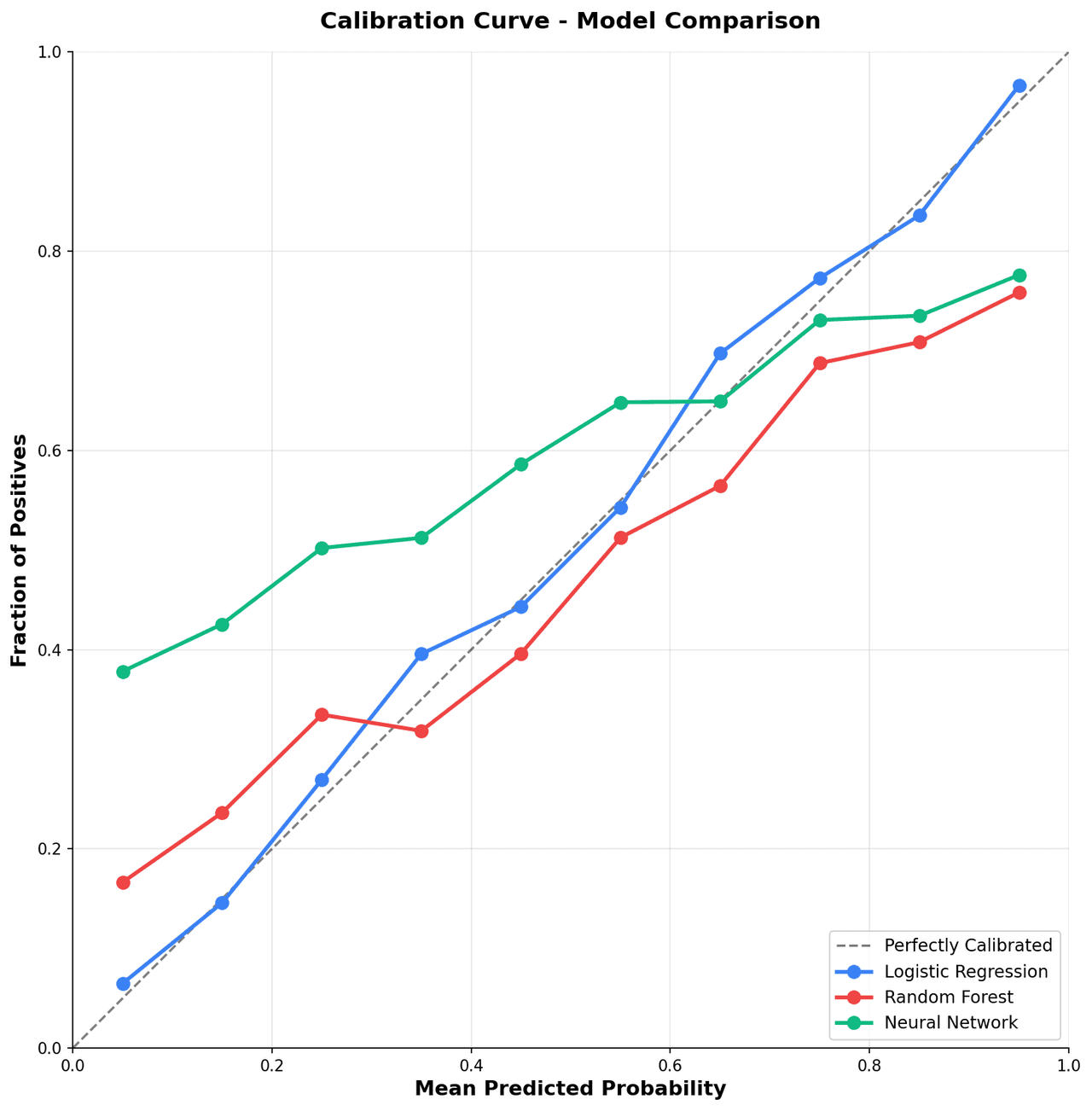
A calibration curve plots the mean predicted probability per bin against the actual fraction of positive outcomes, showing whether a model is over-confident, under-confident, or well-calibrated.
Key points
- It is an essential diagnostic in clinical risk prediction, weather forecasting, and any domain where probability estimates drive decisions.
- A perfectly calibrated model follows the diagonal, and deviations directly quantify the degree of miscalibration.
Create a Calibration Curve with your data using AI — no coding required.
Further reading
Complete Guide to Scientific Data Visualization
Chart selection, figure design, and publication-ready workflows for scientific teams.
Read the guideExample Visualization
Create This Chart Now
Generate publication-ready calibration curves with AI in seconds. No coding required – just describe your data and let AI do the work.
View example prompt
"Create a calibration curve from my predicted probabilities and true labels. Plot the reliability diagram with the perfect calibration diagonal as a dashed reference, add a histogram of predicted probability distribution below the main plot, and compare multiple models if provided."
How to create this chart with your data
Upload Data
Upload your Excel or CSV file. Data used to generate charts is sent to Plotivy's server for processing.
AI Generation
Our AI analyzes your data and generates the Calibration Curve code automatically.
Customize & Export
Tweak the design with natural language, then export as high-res PNG, SVG or PDF.
Newsletter
Get one weekly tip for better calibration curves
Join researchers receiving concise Python plotting techniques to improve chart clarity and reduce revision cycles.
Python Code Example
Console Output
Figure saved: plotivy-calibration-curve-ml.png
Common Use Cases
- 1Validating that a clinical risk score gives accurate event probabilities
- 2Comparing isotonic regression vs. Platt scaling recalibration methods
- 3Checking calibration of ensemble models before deploying to production
- 4Evaluating weather forecast probability skill across precipitation bins
Pro Tips
Use at least 10 equally spaced bins and report the number of samples per bin
Add confidence intervals around each calibration point using bootstrap resampling
Report the Expected Calibration Error (ECE) as a scalar summary in the title or caption
Plot the histogram on a secondary y-axis below the diagram to show sample density per bin
Frequently asked questions
When should you use a calibration curve?
A calibration curve plots the mean predicted probability per bin against the actual fraction of positive outcomes, showing whether a model is over-confident, under-confident, or well-calibrated. It is an essential diagnostic in clinical risk prediction, weather forecasting, and any domain where probability estimates drive decisions. Common applications include validating that a clinical risk score gives accurate event probabilities, comparing isotonic regression vs. Platt scaling recalibration methods, and checking calibration of ensemble models before deploying to production.
Which Python libraries can create a calibration curve?
A calibration curve can be built in Python with matplotlib, numpy, and sklearn — matplotlib for precise control over axes, annotations, and journal styling, numpy, and sklearn. In Plotivy you describe the figure and it writes the matplotlib code for you.
Can I make a calibration curve without writing Python code?
Yes. Describe the calibration curve you need in plain language and upload your dataset — Plotivy's AI writes the Python code and renders a publication-ready figure. You still get the full, editable matplotlib source, so nothing is locked in a black box.
What are best practices for a clear calibration curve?
Use at least 10 equally spaced bins and report the number of samples per bin. Add confidence intervals around each calibration point using bootstrap resampling.
Library comparison for this chart
matplotlib
Best when you need full control over axis formatting, annotation placement, and journal-specific styling for calibration-curve-ml.
numpy
Useful in specialized workflows that complement core Python plotting libraries for calibration-curve-ml analysis tasks.
sklearn
Useful in specialized workflows that complement core Python plotting libraries for calibration-curve-ml analysis tasks.
Scientific Chart Selection Cheat Sheet
Not sure whether to use a Violin Plot, Box Plot, or Ridge Plot? Download our single-page reference mapping the most-used scientific chart types, exactly when to use them, and the core Matplotlib/Seaborn functions.