Essential Productivity Tools Every PhD Student Should Know
TL;DR — The Toolkit
- PowerToys: Pin windows on top of your screen.
- Everything: Instant file search across all drives.
- Scholar PDF: Enhanced browser PDF reading.
- Zotero: Free reference management.
- Copilot Pro: Free student AI coding.
- Wispr Flow: Dictate drafts 3x faster.
- Focusmate: Virtual coworking sessions.
- Plotivy: Publication-ready figures.
PhD life is a marathon, not a sprint. Between endless reading, complex simulations, writing papers, and staying current with research, productivity tools are essential survival gear.
After years navigating the academic jungle, I've discovered some game-changing tools that have transformed how I work. Whether you're just starting your PhD or deep in the trenches, these tools can help you reclaim hours each week.
1. Screen Management & Organization
Microsoft PowerToys
A set of system utilities for power users. The 'Always on Top' feature is a game-changer for research.
Win + Ctrl + T2. File & Information Search
Everything
Locate files and folders by name instantly. It indexes your entire drive in seconds, making Windows Search look ancient.
thesis .pdf only shows PDFs.3. Browser Extensions for Academic Life
Acronym Expander
Automatically detects and expands acronyms on web pages. Essential for reading density-packed technical papers in new fields.
Scholar PDF Reader
A Chrome extension that transforms how you read PDFs in the browser. No more scrolling to the bottom to check a reference.
4. Literature Management
Try it
Try it now: turn this method into your next figure
Apply the same approach to your own dataset and generate clean, publication-ready code and plots in minutes.
Open in Plotivy Analyze →Newsletter
Get a weekly Python plotting tip
One concise tip each week for cleaner, faster scientific figures. Built for researchers who publish.
Zotero
Free & Open SourceThe gold standard for reference management. It collects, organizes, cites, and shares your research sources.
Citavi
License RequiredA comprehensive knowledge management suite. It goes beyond references to manage knowledge items, tasks, and outlines.
5. AI-Powered Coding & Writing
GitHub Copilot Pro
Free for StudentsYour AI pair programmer. If you code in Python, MATLAB, or LaTeX, this is non-negotiable.
Wispr Flow
Productivity BoosterDictate thoughts into structured text instantly. It's not just speech-to-text; it styles and formats your output.
6. Focus & Productivity
Focusmate
Virtual coworking. You are paired with a stranger for a 25, 50, or 75-minute video session to work silently.
7. Data Visualization & Analysis
Creating publication-ready figures often takes longer than the experiment itself. Plotivy bridges the gap between ease-of-use and professional control.
Plotivy
Describe your figure in natural language, stick your data in, and get editable Python code + Vector (SVG) exports instantly.
Chart gallery
Visualize Your Research Data
50+ chart types for every scientific discipline.

Scatterplot
A scatter plot displays two quantitative variables as points, helping you examine relationships, clusters, outliers, and regression trends.
Sample code / prompt
import matplotlib.pyplot as plt
import numpy as np
from scipy import stats
import pandas as pd

# Generate sample data
np.random.seed(42)
n_samples = 200
height = np.random.normal(170, 8, n_samples)
weight = height * 0.6 + np.random.normal(0, 8, n_samples) - 50
Bar Chart
Create a bar chart in Python to compare categorical values with proportional bars, error bars, clear labels, and grouped comparisons.
Sample code / prompt
import numpy as np
import pandas as pd
import matplotlib.pyplot as plt
import seaborn as sns
from scipy import stats

# Generate performance scores for 5 treatment groups
np.random.seed(42)
groups = ['Control', 'Treatment A', 'Treatment B', 'Treatment C', 'Treatment D']
n_samples = 30
Violin Plot
Combines box plots with kernel density to show distribution shape across groups.
Sample code / prompt
import matplotlib.pyplot as plt
import seaborn as sns
import pandas as pd
import numpy as np
from scipy.stats import f_oneway

# Generate exam score data for 3 groups
np.random.seed(42)
control = np.random.normal(72, 12, 50)
treatment_a = np.random.normal(78, 10, 50)
Heatmap
Represents data values as colors in a two-dimensional matrix format.
Sample code / prompt
import matplotlib.pyplot as plt
import seaborn as sns
import pandas as pd
import numpy as np

# Create correlation matrix for financial metrics
metrics = ['Revenue', 'Profit', 'Expenses', 'ROI', 'Customers', 'AOV', 'Marketing', 'Employees']
correlation_data = np.array([
    [1.00, 0.85, -0.45, 0.72, 0.88, 0.65, 0.72, 0.55],
    [0.85, 1.00, -0.78, 0.92, 0.75, 0.58, 0.63, 0.48],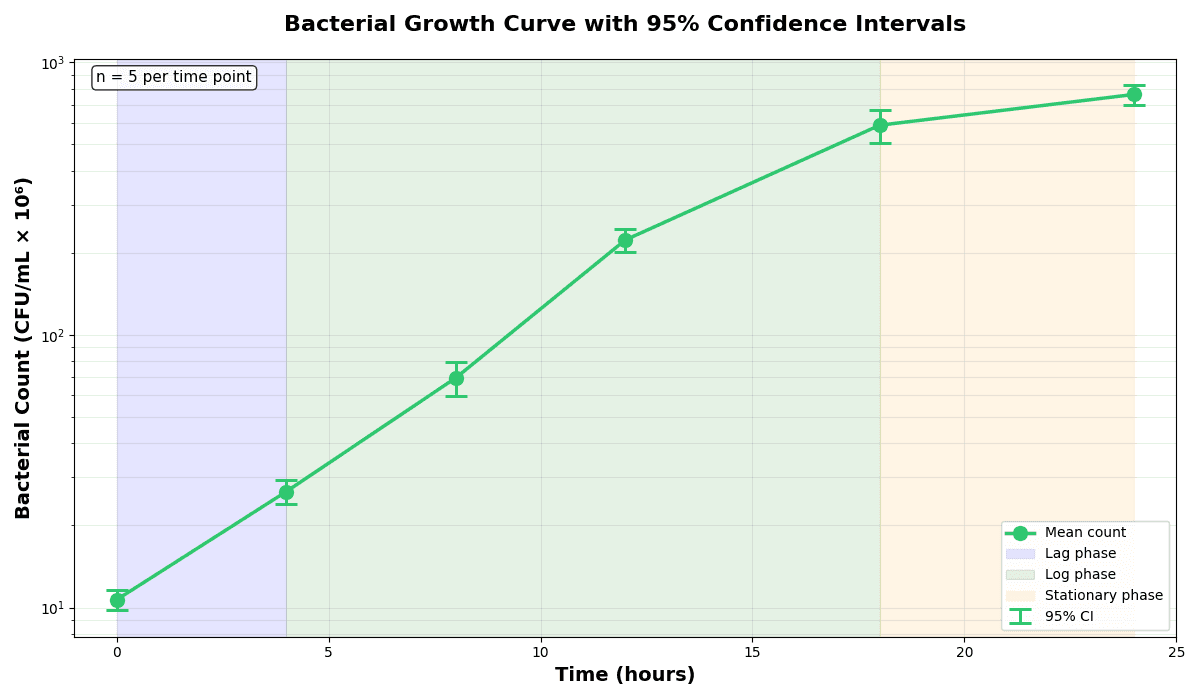
Error Bars
Create error bars in Python with Matplotlib to show standard deviation, standard error, confidence intervals, or other measurement uncertainty.
Sample code / prompt
import numpy as np
import matplotlib.pyplot as plt
from scipy import stats

# Generate bacterial growth data with replicates
np.random.seed(42)
time_points = np.array([0, 4, 8, 12, 18, 24])
mean_values = np.array([10, 25, 80, 250, 600, 800])

# Generate 5 replicates per time point with noise.png&w=1280&q=70)
Box and Whisker Plot
Create a box plot in Python to compare distributions using quartiles, medians, whiskers, and outliers.
Sample code / prompt
import numpy as np
import pandas as pd
import matplotlib.pyplot as plt
import seaborn as sns
from scipy import stats

# Generate gene expression data for 4 genotypes
np.random.seed(42)
genotypes = ['WT', 'KO1', 'KO2', 'Mutant']
n_per_group = 208. Staying Current
The Research Update System
Don't let the literature drown you. Set up a system to receive only what matters.
- Alerts: Google Scholar + Semantic Scholar
- Newsletters: Field-specific digests
Quick Start Checklist
Happy researching! 🎓📚
Technique guides scientists read next
scipy.signal.find_peaks guide
Tune prominence and width parameters for robust peak extraction.
Savitzky-Golay smoothing
Reduce noise while preserving peak shape and position.
PCA visualization workflow
Move from high-dimensional measurements to interpretable components.
ANOVA with post-hoc brackets
Add statistically correct pairwise significance annotations.
Found this helpful? Share it with your network.
Experimental Physicist & Photonics Researcher
Hands-on experience in silicon photonics, semiconductor fabrication (DRIE/ICP-RIE), optical simulation, and data-driven analysis. Built Plotivy to help researchers focus on discoveries instead of data struggles.
More about the authorVisualize your own data
Apply the techniques from this article to your own datasets. Upload CSV, Excel, or paste data directly.