GraphPad Prism vs Excel: Which is Better for Science?

GraphPad Prism costs $271/year. Excel you already have. But which one actually produces publication-ready figures faster? We break down every feature that matters for scientific data - and show where a modern AI-powered tool fits in.
In This Article
0.Live Code: Publication-Quality Demo
1.Feature-by-Feature Comparison
2.Where Excel Falls Short
3.Where Prism Excels
4.The Modern Alternative
5.Decision Framework
0. Live Code: Publication-Quality Demo
This is the kind of figure Prism users build daily - grouped bar chart with SEM bars, significance brackets, and journal-ready formatting. Edit the code live to see how fast you can customize it.
1. Feature-by-Feature Comparison
| Feature | Excel | GraphPad Prism | Plotivy |
|---|---|---|---|
| Price | Included/free | $271/yr | Free tier |
| Built-in Statistics | Basic (t-test, ANOVA) | Excellent (nonlinear, survival) | AI-assisted |
| Figure Quality | Low (default themes) | High (journal presets) | High (AI + code) |
| Error Bars | Manual setup | One-click SEM/SD/CI | Auto from data |
| Curve Fitting | Trendline only | 100+ models | AI-generated |
| Export DPI | 96 DPI default | 300-1200 DPI | 300-1200 DPI |
| Reproducibility | None (point-and-click) | Prism files only | Full Python code |
| Learning Curve | Low | Medium | Low (AI prompts) |
2. Where Excel Falls Short
96 DPI Default
Most journals require 300-600 DPI. Excel's default exports are rejected automatically.
No Real Statistics
No built-in nonlinear regression, survival analysis, or multiple comparisons.
Ugly Defaults
Gradient fills, 3D effects, and non-scientific color palettes out of the box.
No Reproducibility
Point-and-click formatting means no audit trail and no batch processing.
3. Where Prism Excels
Try it
Try it now: turn this method into your next figure
Apply the same approach to your own dataset and generate clean, publication-ready code and plots in minutes.
Open in Plotivy Analyze →Newsletter
Get a weekly Python plotting tip
One concise tip each week for cleaner, faster scientific figures. Built for researchers who publish.
One-Click Statistics
t-tests, ANOVA, nonlinear regression, Kaplan-Meier - all built in with guided workflows.
Journal Presets
Pre-configured templates for Nature, Science, PLOS ONE with correct dimensions and fonts.
Linked Data + Figures
Change the data, the figure updates. Great for iterative analysis.
Publication Track Record
Cited in millions of papers. Reviewers trust Prism output.
The Prism Catch
At $271/year per seat, Prism is expensive for students and small labs. Its proprietary file format also means your analysis is locked into one tool.
4. The Modern Alternative
Plotivy combines the ease of Excel with the quality of Prism - plus full Python code for reproducibility. Describe your figure in plain English, and the AI generates publication-ready code you can edit.
Free to Start
No credit card. Upload data and generate figures immediately.
AI-Powered
Describe what you want in plain English. No coding required.
Full Code Output
Every figure comes with editable Python code for reproducibility.
5. Decision Framework
Quick charts for presentations
Use Excel - Already installed, fast for non-publication work.
Complex biostatistics (dose-response, survival)
Use Prism - Built-in nonlinear models and guided workflows.
Publication figures with reproducible code
Use Plotivy - AI + Python = quality + transparency.
Multi-panel figures with custom styling
Use Plotivy - Full Matplotlib/Plotly control via natural-language prompts.
Budget-constrained lab
Use Plotivy - Free tier covers most needs. No $271/yr license.
Chart gallery
Scientific Chart Gallery
See what publication-quality figures look like in Plotivy.

Bar Chart
Create a bar chart in Python to compare categorical values with proportional bars, error bars, clear labels, and grouped comparisons.
Sample code / prompt
import numpy as np
import pandas as pd
import matplotlib.pyplot as plt
import seaborn as sns
from scipy import stats

# Generate performance scores for 5 treatment groups
np.random.seed(42)
groups = ['Control', 'Treatment A', 'Treatment B', 'Treatment C', 'Treatment D']
n_samples = 30
Scatterplot
A scatter plot displays two quantitative variables as points, helping you examine relationships, clusters, outliers, and regression trends.
Sample code / prompt
import matplotlib.pyplot as plt
import numpy as np
from scipy import stats
import pandas as pd

# Generate sample data
np.random.seed(42)
n_samples = 200
height = np.random.normal(170, 8, n_samples)
weight = height * 0.6 + np.random.normal(0, 8, n_samples) - 50.png&w=1280&q=70)
Box and Whisker Plot
Create a box plot in Python to compare distributions using quartiles, medians, whiskers, and outliers.
Sample code / prompt
import numpy as np
import pandas as pd
import matplotlib.pyplot as plt
import seaborn as sns
from scipy import stats

# Generate gene expression data for 4 genotypes
np.random.seed(42)
genotypes = ['WT', 'KO1', 'KO2', 'Mutant']
n_per_group = 20
Violin Plot
Combines box plots with kernel density to show distribution shape across groups.
Sample code / prompt
import matplotlib.pyplot as plt
import seaborn as sns
import pandas as pd
import numpy as np
from scipy.stats import f_oneway

# Generate exam score data for 3 groups
np.random.seed(42)
control = np.random.normal(72, 12, 50)
treatment_a = np.random.normal(78, 10, 50)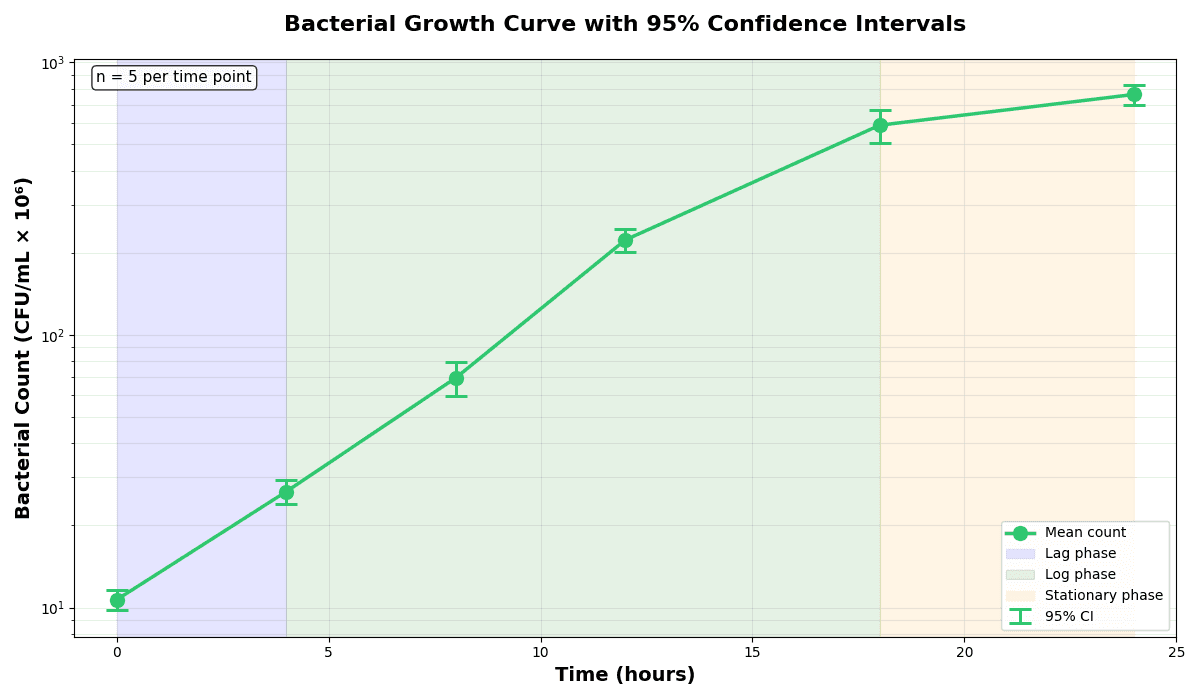
Error Bars
Create error bars in Python with Matplotlib to show standard deviation, standard error, confidence intervals, or other measurement uncertainty.
Sample code / prompt
import numpy as np
import matplotlib.pyplot as plt
from scipy import stats

# Generate bacterial growth data with replicates
np.random.seed(42)
time_points = np.array([0, 4, 8, 12, 18, 24])
mean_values = np.array([10, 25, 80, 250, 600, 800])

# Generate 5 replicates per time point with noise
Heatmap
Represents data values as colors in a two-dimensional matrix format.
Sample code / prompt
import matplotlib.pyplot as plt
import seaborn as sns
import pandas as pd
import numpy as np

# Create correlation matrix for financial metrics
metrics = ['Revenue', 'Profit', 'Expenses', 'ROI', 'Customers', 'AOV', 'Marketing', 'Employees']
correlation_data = np.array([
    [1.00, 0.85, -0.45, 0.72, 0.88, 0.65, 0.72, 0.55],
[0.85, 1.00, -0.78, 0.92, 0.75, 0.58, 0.63, 0.48],Frequently Asked Questions
Is GraphPad Prism really worth $271/year over free Excel?
Can I export publication-quality figures from Excel?
Does Excel have built-in statistical tests like Prism?
Can I do curve fitting in Excel?
What is the best free alternative to both Prism and Excel for scientific figures?
Try Plotivy Free
Upload your data and get a publication-ready figure in 30 seconds. No license key required.
Technique guides scientists read next
scipy.signal.find_peaks guide
Tune prominence and width parameters for robust peak extraction.
Savitzky-Golay smoothing
Reduce noise while preserving peak shape and position.
PCA visualization workflow
Move from high-dimensional measurements to interpretable components.
ANOVA with post-hoc brackets
Add statistically correct pairwise significance annotations.
Found this helpful? Share it with your network.
Experimental Physicist & Photonics Researcher
Hands-on experience in silicon photonics, semiconductor fabrication (DRIE/ICP-RIE), optical simulation, and data-driven analysis. Built Plotivy to help researchers focus on discoveries instead of data struggles.
More about the authorVisualize your own data
Apply the techniques from this article to your own datasets. Upload CSV, Excel, or paste data directly.