Factorial Design Explained: Full vs Fractional Factorial (With Free Tool)
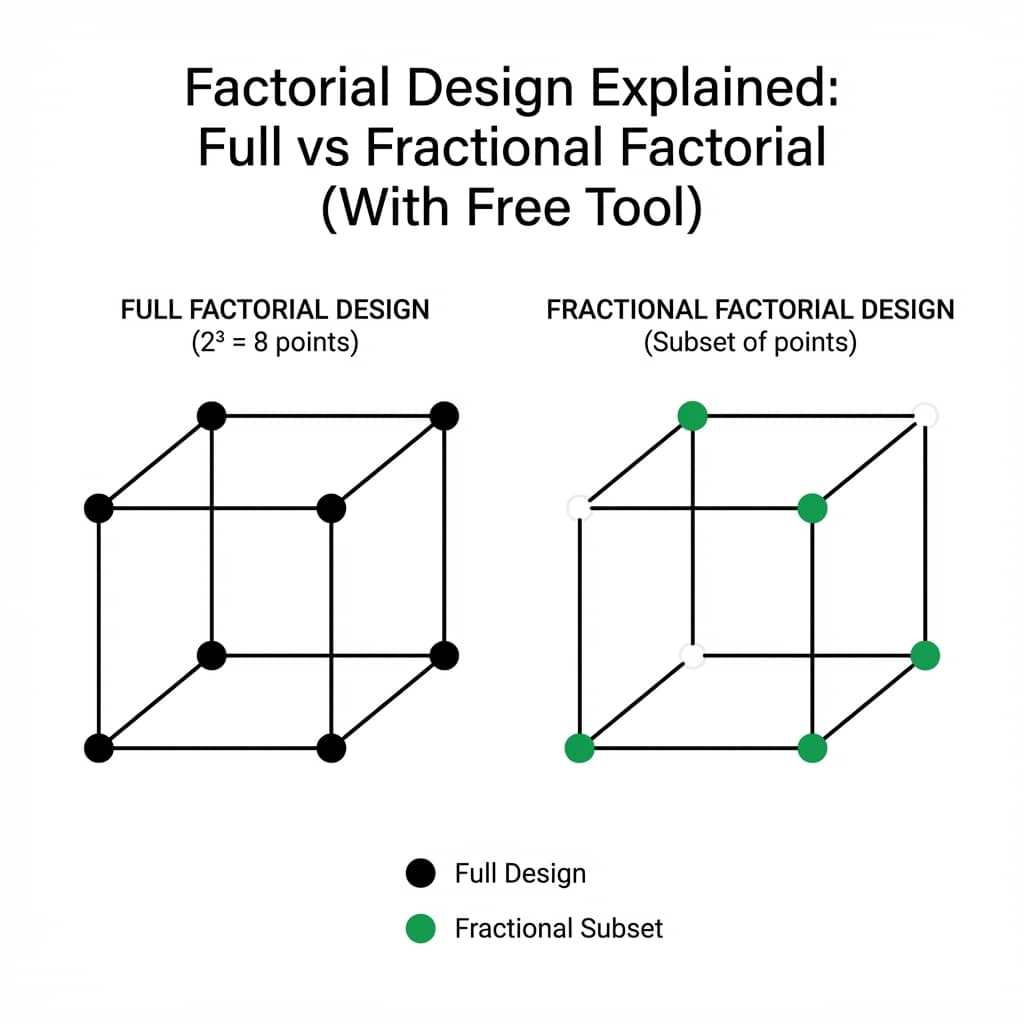
Factorial designs are the workhorses of experimental research. They let you study multiple factors simultaneously and discover interactions that single-factor experiments miss entirely.
This tutorial walks through full and fractional factorials with a live interaction plot you can modify and run.
What You Will Learn
0.Live Code: Interaction Plot
1.What is a Factorial Design?
2.Full Factorial (2^k)
3.Fractional Factorial
4.Interaction Effects
5.Visualizing Results
0. Live Code: Interaction Plot
A 2x2 factorial interaction plot - the key visualization for detecting factor interactions. Non-parallel lines mean the effect of one factor depends on the other.
1. What is a Factorial Design?
A factorial design investigates the effect of two or more factors by testing all possible combinations of their levels. Unlike one-factor-at-a-time (OFAT) experiments, factorial designs reveal interactions - when the effect of one factor depends on the level of another.
Why Not OFAT?
One-factor-at-a-time experiments require more runs to achieve the same precision and completely miss interactions. Factorial designs are statistically more efficient in every way.
2. Full Factorial Design (2^k)
In a 2^k design, you have k factors, each at 2 levels (typically "low" and "high"). The total number of experimental runs is 2^k.
| Run | Temp | Pressure | Catalyst |
|---|---|---|---|
| 1 | Low | Low | Low |
| 2 | High | Low | Low |
| 3 | Low | High | Low |
| 4 | High | High | Low |
| 5 | Low | Low | High |
| 6 | High | Low | High |
| 7 | Low | High | High |
| 8 | High | High | High |
Try it
Try it now: turn this method into your next figure
Apply the same approach to your own dataset and generate clean, publication-ready code and plots in minutes.
Open in Plotivy Analyze →Newsletter
Get a weekly Python plotting tip
One concise tip each week for cleaner, faster scientific figures. Built for researchers who publish.
3 factors x 2 levels = 2^3 = 8 runs. Each row is one experimental condition.
3. Fractional Factorial Design
When you have 5+ factors, full factorial becomes expensive (2^5 = 32 runs, 2^6 = 64 runs). Fractional factorial designs use a strategically selected subset of runs to estimate main effects and some interactions.
2^(5-1)
16 instead of 32
Loses some 3-way interactions
2^(6-2)
16 instead of 64
Loses 2-way confounding
2^(7-3)
16 instead of 128
Resolution III - screening only
Create Your Design Free
Use our Experiment Planner to generate factorial designs automatically. Get randomization, blocking, and export your design matrix.
4. Understanding Interaction Effects
The key advantage of factorial designs is detecting interactions. An interaction occurs when the effect of factor A depends on the level of factor B.
For example: Temperature might have a small effect at low pressure, but a large effect at high pressure. This is a Temperature x Pressure interaction. In the interaction plot above, you can see this as non-parallel lines.
Reading Interaction Plots
Parallel lines = no interaction (factors are independent). Non-parallel lines = interaction present. Crossing lines = strong interaction (factor effects reverse depending on other factor levels).
5. Visualizing Factorial Results
After running your experiment, upload results to Plotivy and ask for visualizations. Example prompt: "Create an interaction plot showing Temperature x Catalyst effect on Yield".
Bar Charts
Main effects comparison
Line Graphs
Interaction plots
Heatmaps
Response surfaces
Box Plots
Replicate variability
Chart gallery
Chart types for factorial analysis
Start from these chart types commonly used in DOE analysis.

Bar Chart
Create a bar chart in Python to compare categorical values with proportional bars, error bars, clear labels, and grouped comparisons.
Sample code / prompt
import numpy as np
import pandas as pd
import matplotlib.pyplot as plt
import seaborn as sns
from scipy import stats

# Generate performance scores for 5 treatment groups
np.random.seed(42)
groups = ['Control', 'Treatment A', 'Treatment B', 'Treatment C', 'Treatment D']
n_samples = 30
Line Graph
Create a line graph in Python to connect ordered data points, reveal time-series trends, and compare how multiple values change across a continuous scale.
Sample code / prompt
import matplotlib.pyplot as plt
import numpy as np

# Generate temperature data for 3 major US cities over 12 months
months = ['Jan', 'Feb', 'Mar', 'Apr', 'May', 'Jun', 'Jul', 'Aug', 'Sep', 'Oct', 'Nov', 'Dec']
nyc = [30, 32, 40, 52, 65, 75, 82, 81, 74, 63, 50, 38]
miami = [65, 66, 70, 76, 82, 87, 90, 90, 87, 80, 72, 66]
chicago = [25, 27, 35, 48, 62, 72, 80, 79, 71, 60, 45, 32]

# Create figure with enhanced styling
Heatmap
Represents data values as colors in a two-dimensional matrix format.
Sample code / prompt
import matplotlib.pyplot as plt
import seaborn as sns
import pandas as pd
import numpy as np

# Create correlation matrix for financial metrics
metrics = ['Revenue', 'Profit', 'Expenses', 'ROI', 'Customers', 'AOV', 'Marketing', 'Employees']
correlation_data = np.array([
    [1.00, 0.85, -0.45, 0.72, 0.88, 0.65, 0.72, 0.55],
[0.85, 1.00, -0.78, 0.92, 0.75, 0.58, 0.63, 0.48],.png&w=1280&q=70)
Box and Whisker Plot
Create a box plot in Python to compare distributions using quartiles, medians, whiskers, and outliers.
Sample code / prompt
import numpy as np
import pandas as pd
import matplotlib.pyplot as plt
import seaborn as sns
from scipy import stats

# Generate gene expression data for 4 genotypes
np.random.seed(42)
genotypes = ['WT', 'KO1', 'KO2', 'Mutant']
n_per_group = 20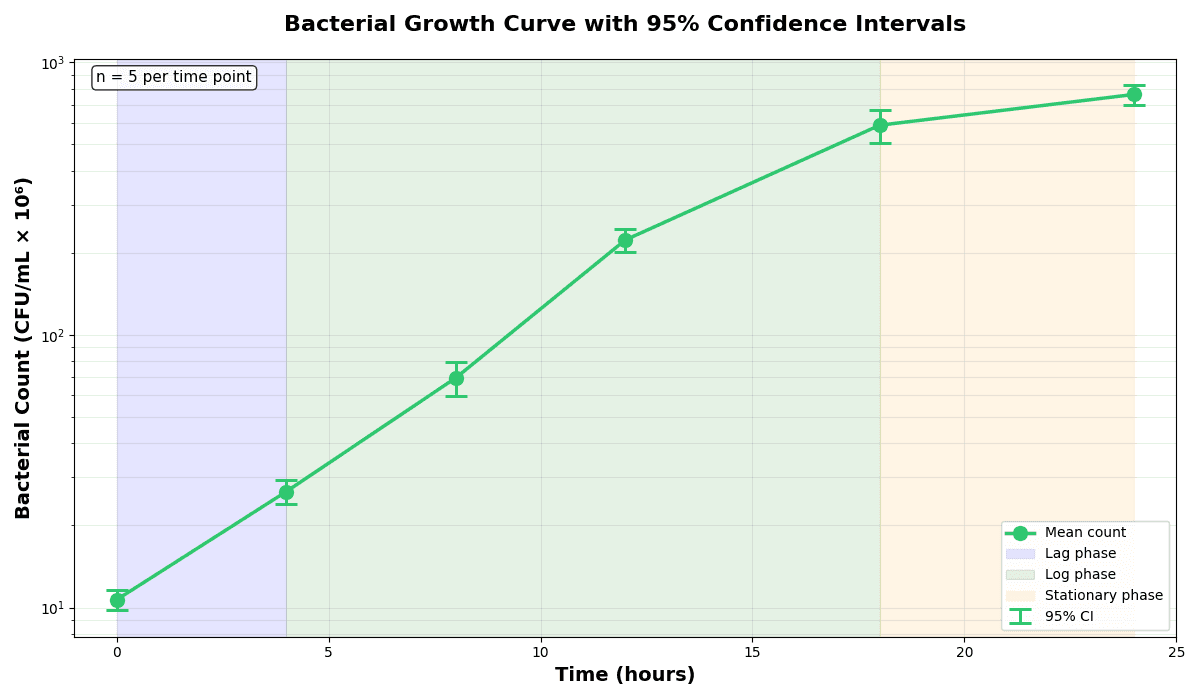
Error Bars
Create error bars in Python with Matplotlib to show standard deviation, standard error, confidence intervals, or other measurement uncertainty.
Sample code / prompt
import numpy as np
import matplotlib.pyplot as plt
from scipy import stats

# Generate bacterial growth data with replicates
np.random.seed(42)
time_points = np.array([0, 4, 8, 12, 18, 24])
mean_values = np.array([10, 25, 80, 250, 600, 800])

# Generate 5 replicates per time point with noiseFrom Design to Visualization
Design your experiment with the Planner, then upload results to create publication-ready interaction plots automatically.
Technique guides scientists read next
scipy.signal.find_peaks guide
Tune prominence and width parameters for robust peak extraction.
Savitzky-Golay smoothing
Reduce noise while preserving peak shape and position.
PCA visualization workflow
Move from high-dimensional measurements to interpretable components.
ANOVA with post-hoc brackets
Add statistically correct pairwise significance annotations.
Found this helpful? Share it with your network.
Experimental Physicist & Photonics Researcher
Hands-on experience in silicon photonics, semiconductor fabrication (DRIE/ICP-RIE), optical simulation, and data-driven analysis. Built Plotivy to help researchers focus on discoveries instead of data struggles.
More about the authorVisualize your own data
Apply the techniques from this article to your own datasets. Upload CSV, Excel, or paste data directly.