Journal Figure Requirements Cheat Sheet (2026 Edition)
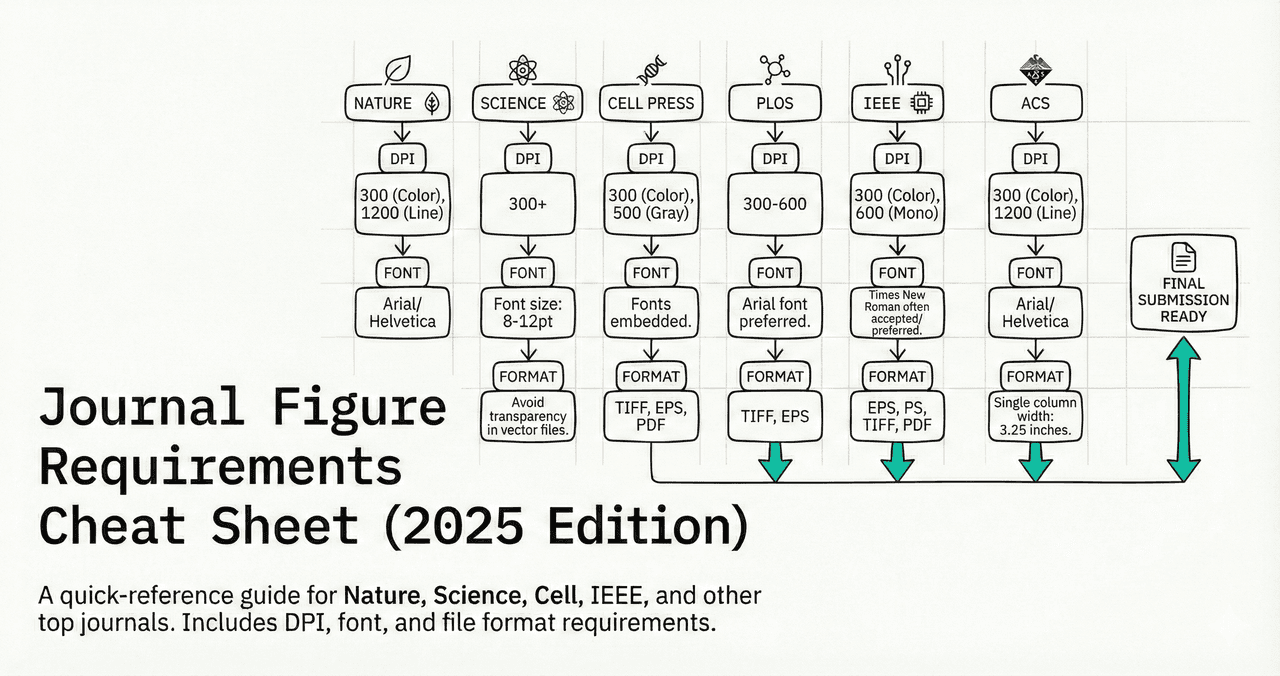
Bookmark this page. Every major journal has different figure requirements for DPI, format, fonts, and sizing. This cheat sheet gives you the specs in one place.
Sections
0.Live Code: Journal-Compliant Figure
1.Quick-Reference Table
2.DPI and Resolution
3.File Format Rules
4.Font and Sizing
5.Color and Accessibility
0. Live Code: Journal-Compliant Figure
This figure meets Nature single-column specs: 89 mm width, 8 pt Arial, 300 DPI, panel label, minimal decoration. Edit the code to match your journal.
1. Quick-Reference Table
| Journal | Min DPI | Formats | Fonts | Single Col | Double Col |
|---|---|---|---|---|---|
| Nature | 300 | TIFF, EPS, PDF | Arial, Helvetica | 89 mm | 183 mm |
| Science | 300 | EPS, PDF, AI | Helvetica, Arial | 85 mm | 174 mm |
| Cell | 300 | TIFF, EPS, PDF | Arial, Helvetica | 85 mm | 174 mm |
| PLOS ONE | 300 | TIFF, EPS | Arial | 83 mm | 173 mm |
| IEEE | 300 | TIFF, EPS, PDF | Times New Roman | 88 mm | 181 mm |
| ACS | 300 | TIFF, EPS | Arial, Helvetica | 84 mm | 175 mm |
| Elsevier | 300 | TIFF, EPS, PDF | Arial, Helvetica | 90 mm | 190 mm |
| Springer | 300 | TIFF, EPS | Arial | 84 mm | 174 mm |
2. DPI and Resolution
Try it
Try it now: review your figure before submission
Upload your current plot and get an AI critique with concrete fixes for clarity, typography, color, and journal readiness.
Open AI Figure Reviewer →Newsletter
Get a weekly Python plotting tip
One concise tip each week for cleaner, faster scientific figures. Built for researchers who publish.
300 DPI
Photographs, continuous tone
600 DPI
Line art, graphs, charts
1200 DPI
Fine line art, thin lines
Common Mistake
Upsampling a 96 DPI image to 300 DPI does not add detail - it just makes the file bigger with blurry pixels. Always generate figures at the target DPI from the start.
3. File Format Rules
TIFF (LZW)
+ Universally accepted, lossless compression
- Large file sizes (10-50 MB)
EPS / PDF
+ Vector = infinite resolution for line art
- Not all journals accept PDF
PNG
+ Small files, lossless, web-friendly
- Some journals reject (use TIFF instead)
JPEG
+ Small file size
- Lossy compression introduces artifacts - avoid for data figures
4. Font and Sizing
Arial or Helvetica (sans-serif). Never use decorative or serif fonts in figures.
6 pt after scaling. Most journals require 7-8 pt for legibility.
8-10 pt bold. Must be readable at final print size.
10-12 pt bold, lowercase (a, b, c) or uppercase (A, B, C) per journal style.
Usually NOT on the figure - goes in the caption instead.
5. Color and Accessibility
Colorblind-safe
Use palettes like viridis, cividis, or Wong palette. Avoid red-green only distinctions.
Grayscale test
Print your figure in B&W. If you can't distinguish groups, add patterns or markers.
Color charges
Some journals charge $500+ for color. Provide a grayscale alternative.
Contrast ratio
Minimum 4.5:1 contrast ratio for text against backgrounds (WCAG AA).
Chart gallery
Journal-Ready Chart Templates
Start from a template that already meets these specs.

Bar Chart
Create a bar chart in Python to compare categorical values with proportional bars, error bars, clear labels, and grouped comparisons.
Sample code / prompt
import numpy as np
import pandas as pd
import matplotlib.pyplot as plt
import seaborn as sns
from scipy import stats

# Generate performance scores for 5 treatment groups
np.random.seed(42)
groups = ['Control', 'Treatment A', 'Treatment B', 'Treatment C', 'Treatment D']
n_samples = 30
Scatterplot
A scatter plot displays two quantitative variables as points, helping you examine relationships, clusters, outliers, and regression trends.
Sample code / prompt
import matplotlib.pyplot as plt
import numpy as np
from scipy import stats
import pandas as pd

# Generate sample data
np.random.seed(42)
n_samples = 200
height = np.random.normal(170, 8, n_samples)
weight = height * 0.6 + np.random.normal(0, 8, n_samples) - 50
Line Graph
Create a line graph in Python to connect ordered data points, reveal time-series trends, and compare how multiple values change across a continuous scale.
Sample code / prompt
import matplotlib.pyplot as plt
import numpy as np

# Generate temperature data for 3 major US cities over 12 months
months = ['Jan', 'Feb', 'Mar', 'Apr', 'May', 'Jun', 'Jul', 'Aug', 'Sep', 'Oct', 'Nov', 'Dec']
nyc = [30, 32, 40, 52, 65, 75, 82, 81, 74, 63, 50, 38]
miami = [65, 66, 70, 76, 82, 87, 90, 90, 87, 80, 72, 66]
chicago = [25, 27, 35, 48, 62, 72, 80, 79, 71, 60, 45, 32]

# Create figure with enhanced styling
Heatmap
Represents data values as colors in a two-dimensional matrix format.
Sample code / prompt
import matplotlib.pyplot as plt
import seaborn as sns
import pandas as pd
import numpy as np

# Create correlation matrix for financial metrics
metrics = ['Revenue', 'Profit', 'Expenses', 'ROI', 'Customers', 'AOV', 'Marketing', 'Employees']
correlation_data = np.array([
    [1.00, 0.85, -0.45, 0.72, 0.88, 0.65, 0.72, 0.55],
[0.85, 1.00, -0.78, 0.92, 0.75, 0.58, 0.63, 0.48],.png&w=1280&q=70)
Box and Whisker Plot
Create a box plot in Python to compare distributions using quartiles, medians, whiskers, and outliers.
Sample code / prompt
import numpy as np
import pandas as pd
import matplotlib.pyplot as plt
import seaborn as sns
from scipy import stats

# Generate gene expression data for 4 genotypes
np.random.seed(42)
genotypes = ['WT', 'KO1', 'KO2', 'Mutant']
n_per_group = 20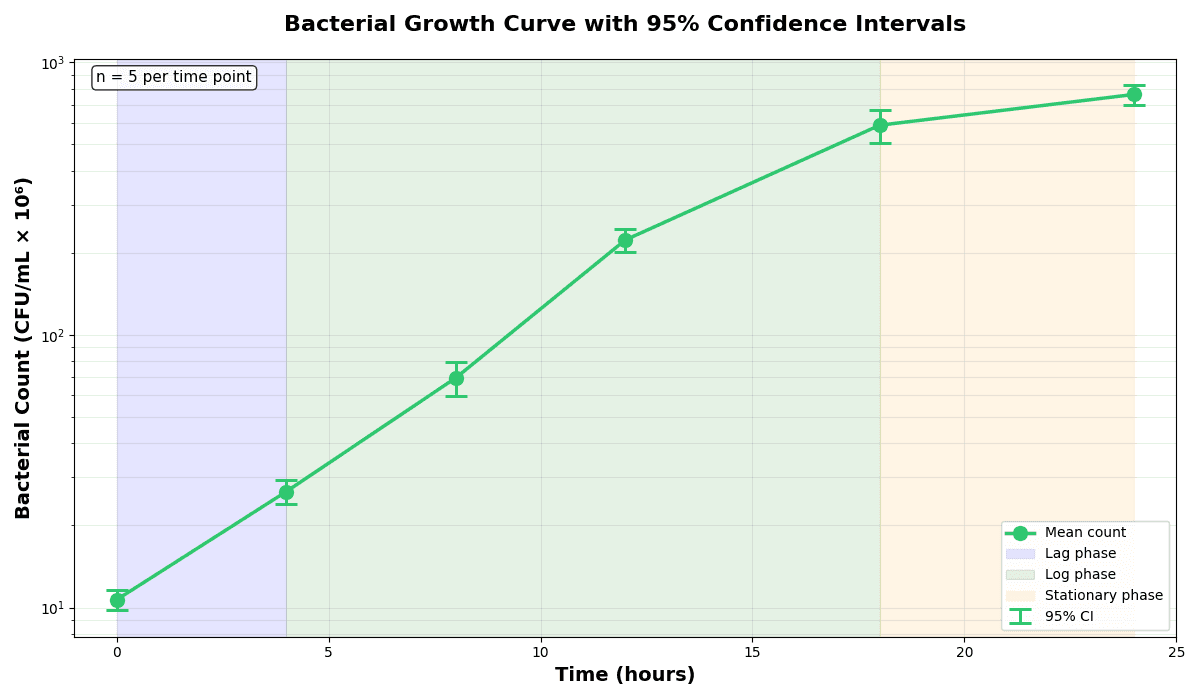
Error Bars
Create error bars in Python with Matplotlib to show standard deviation, standard error, confidence intervals, or other measurement uncertainty.
Sample code / prompt
import numpy as np
import matplotlib.pyplot as plt
from scipy import stats

# Generate bacterial growth data with replicates
np.random.seed(42)
time_points = np.array([0, 4, 8, 12, 18, 24])
mean_values = np.array([10, 25, 80, 250, 600, 800])

# Generate 5 replicates per time point with noiseGenerate Journal-Compliant Figures Instantly
Tell Plotivy your target journal and it applies the correct DPI, fonts, and dimensions automatically.
Technique guides scientists read next
scipy.signal.find_peaks guide
Tune prominence and width parameters for robust peak extraction.
Savitzky-Golay smoothing
Reduce noise while preserving peak shape and position.
PCA visualization workflow
Move from high-dimensional measurements to interpretable components.
ANOVA with post-hoc brackets
Add statistically correct pairwise significance annotations.
Found this helpful? Share it with your network.
Experimental Physicist & Photonics Researcher
Hands-on experience in silicon photonics, semiconductor fabrication (DRIE/ICP-RIE), optical simulation, and data-driven analysis. Built Plotivy to help researchers focus on discoveries instead of data struggles.
More about the authorVisualize your own data
Apply the techniques from this article to your own datasets. Upload CSV, Excel, or paste data directly.