Nature Figure Guidelines: Dimensions, Fonts and Python Example
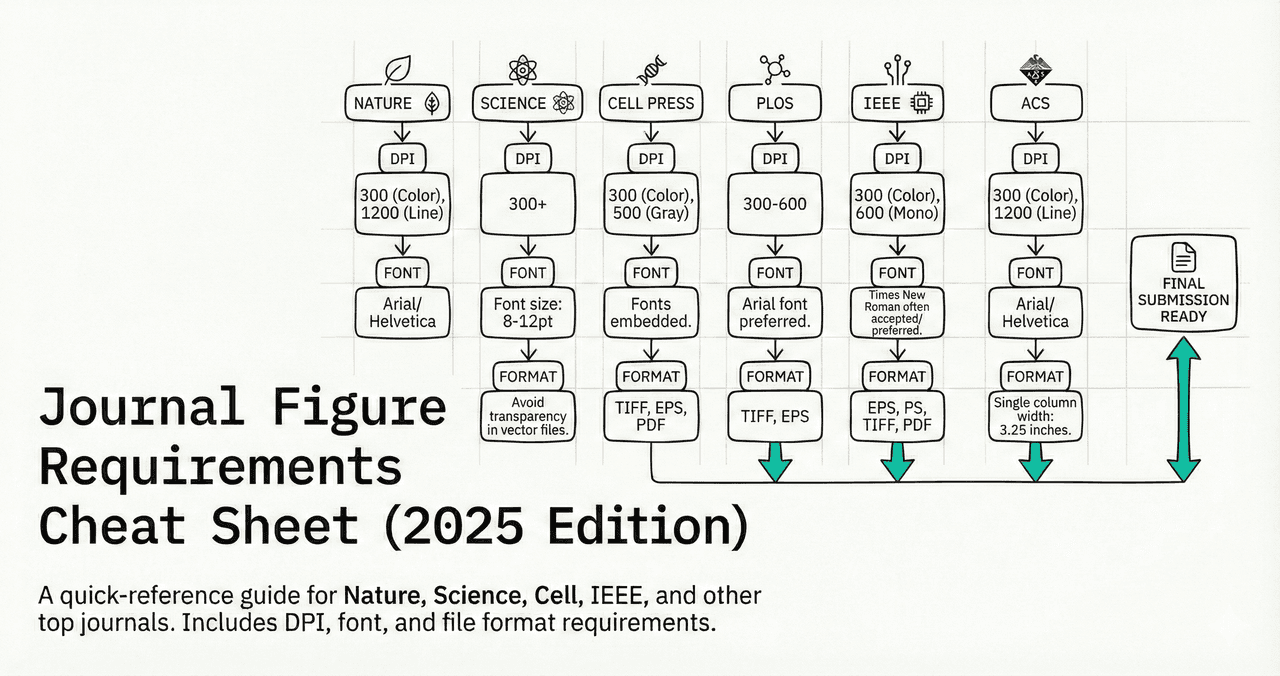
Prepare your figure at its intended publication size. Check the labels, data, and exported file before submission.
This guide covers Nature's final print-figure instructions. Other journals, initial submissions, and Extended Data have separate requirements. Our example is a starting point, not a guarantee of acceptance. Source: Nature's final-submission instructions, checked September 6, 2026.
What You Will Learn
0.Live Code Lab: Nature-Ready Figure
1.Figure Dimensions
2.Resolution (DPI) Requirements
3.Fonts and Text
4.Color Mode & Accessibility
5.File Formats
6.Common Rejection Reasons
0. Live Code Lab: Nature-Ready Figure
This example shows synthetic observations, group means, and sample SEM error bars. It performs no statistical test and claims no significance. Replace the data and review the analysis before using it in research.
Modify the data, add more groups, or change the figure width to double-column (7.2 inches). The preview uses DejaVu Sans when Arial and Helvetica are unavailable. Check the font in your final export before submission.
For line-based figure examples, pair this with our linear regression plotting guide.
1. Figure Dimensions
Single Column
89 mm
3.5 inches wide. Most common for simple plots, bar charts, single-panel figures.
1.5 Column
120-136 mm
4.7-5.4 inches. Good for 2-panel figures or plots with wide legends.
Double Column
183 mm
7.2 inches wide. For multi-panel figures spanning the full page width.
Pro Tip
Maximum height is 247 mm (9.7 inches). Design your figure to be compact - tall, narrow figures waste valuable page space and are harder to read.
Skip the math: Plotivy's AI automatically sizes your figures to Nature specifications. Just select "Nature" from the journal dropdown.
2. Resolution (DPI) Requirements
Check resolution at the intended output size. Vector graphs do not have a fixed DPI.
Line Art (Graphs)
Editable vector
Use PDF/EPS for graphs; keep text editable.
Photos / Micrographs
300-600 DPI
Color images, confocal images, gel images, staining photos.
Combination
Retain layers
Keep graph and text components editable rather than flattening the entire figure.
Learn more: See our complete guide on exporting high-resolution figures for step-by-step PNG, PDF, and SVG export instructions.
Try it
Try it now: review your figure before submission
Upload your current plot and get an AI critique with concrete fixes for clarity, typography, color, and journal readiness.
Open AI Figure Reviewer →Newsletter
Get a weekly Python plotting tip
One concise tip each week for cleaner, faster scientific figures. Built for researchers who publish.
3. Fonts and Text
Font Family
Sans-serif only. Arial or Helvetica are preferred. Avoid Times New Roman and decorative fonts.
plt.rcParams["font.family"] = "Arial"Font Sizes
- Axis labels: 5-7 pt
- Axis tick labels: 5-7 pt
- Panel labels (a, b, c): 8 pt bold
- Line weights: 0.25-1 pt at final size
Try it now: Adapt a bar chart, scatter plot, or heatmap and inspect the exported labels.
4. Color Mode & Accessibility
- Submit in RGB for online publication. Avoid neon colors that are out of CMYK gamut.
- Check colorblind accessibility. Avoid relying on red-green differences.
- Do not rely on color alone to encode meaning - add pattern, shape, or label differences too.
Check accessibility: Read our visualization mistakes guide for ways to make categories easier to distinguish.
5. File Formats
PDF / EPS
Preferred for line art. Vector output means sharp text at any zoom level.
TIFF
Required by some Nature journals for photographs. Use LZW compression to reduce file size.
PNG
Useful for previews; not listed among Nature's preferred final print formats.
Quick reference: Check our journal requirements cheat sheet for a side-by-side comparison of file format requirements across top journals.
6. Common Rejection Reasons
Check your figure before submission
Catch technical issues early with an AI review focused on journal standards, readability, and rejection risks.
Open Plot ReviewerRasterized graph text
Fix: Export editable PDF/EPS and check font embedding
Unreadable labels
Fix: Check 5-7 pt text at final size; panel labels are 8 pt bold
Incorrect export width
Fix: Convert millimetres to inches with mm / 25.4 and verify the saved file dimensions
Missing panel labels
Fix: Add bold 8 pt labels (a, b, c) in the upper-left corner of each panel
Red-green color scheme
Fix: Use colorblind-safe palettes (blue-orange, viridis)
Start with a journal style
Use the Nature style as a starting point, then inspect your exported figure against the submission instructions.
Chart gallery
Nature-ready chart templates
Adapt these examples to your data, journal, and final figure size.

Scatterplot
A scatter plot displays two quantitative variables as points, helping you examine relationships, clusters, outliers, and regression trends.
Sample code / prompt
import matplotlib.pyplot as plt
import numpy as np
from scipy import stats
import pandas as pd

# Generate sample data
np.random.seed(42)
n_samples = 200
height = np.random.normal(170, 8, n_samples)
weight = height * 0.6 + np.random.normal(0, 8, n_samples) - 50
Bar Chart
Create a bar chart in Python to compare categorical values with proportional bars, error bars, clear labels, and grouped comparisons.
Sample code / prompt
import numpy as np
import pandas as pd
import matplotlib.pyplot as plt
import seaborn as sns
from scipy import stats

# Generate performance scores for 5 treatment groups
np.random.seed(42)
groups = ['Control', 'Treatment A', 'Treatment B', 'Treatment C', 'Treatment D']
n_samples = 30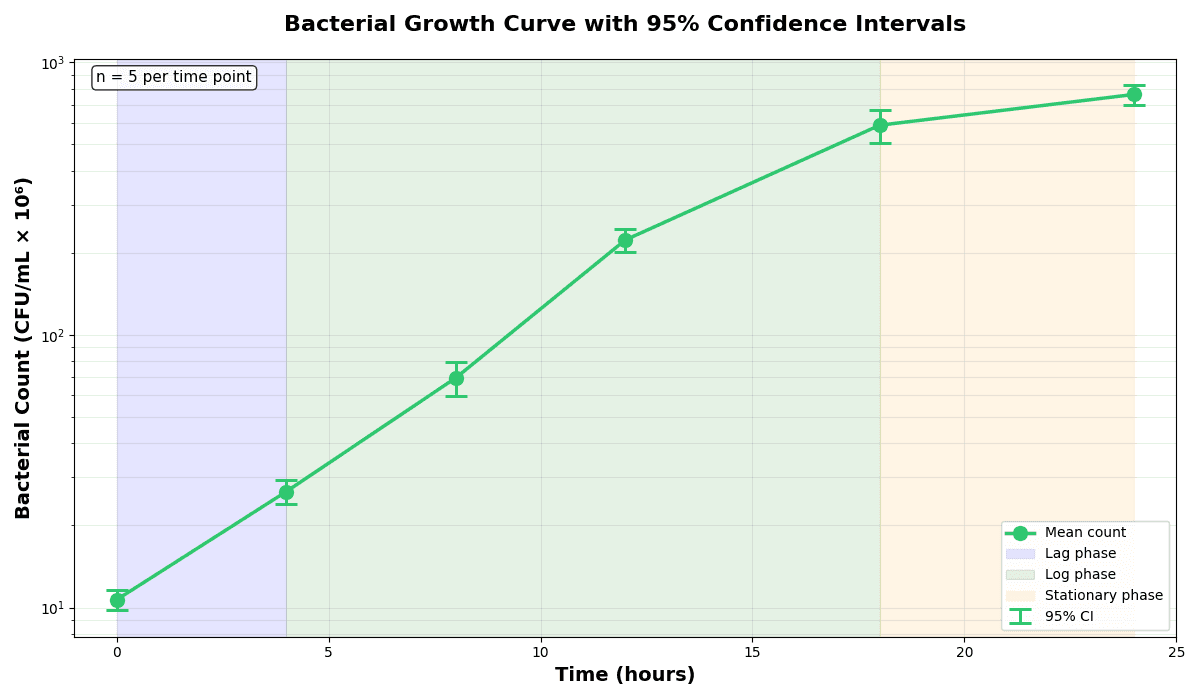
Error Bars
Create error bars in Python with Matplotlib to show standard deviation, standard error, confidence intervals, or other measurement uncertainty.
Sample code / prompt
import numpy as np
import matplotlib.pyplot as plt
from scipy import stats

# Generate bacterial growth data with replicates
np.random.seed(42)
time_points = np.array([0, 4, 8, 12, 18, 24])
mean_values = np.array([10, 25, 80, 250, 600, 800])

# Generate 5 replicates per time point with noise.png&w=1280&q=70)
Box and Whisker Plot
Create a box plot in Python to compare distributions using quartiles, medians, whiskers, and outliers.
Sample code / prompt
import numpy as np
import pandas as pd
import matplotlib.pyplot as plt
import seaborn as sns
from scipy import stats

# Generate gene expression data for 4 genotypes
np.random.seed(42)
genotypes = ['WT', 'KO1', 'KO2', 'Mutant']
n_per_group = 20Related Guides
Figures That Pass Peer Review
Practical quality checks for submission-ready visuals
Journal Requirements Cheat Sheet
Quick reference for Nature, Science, Cell and more
Publication Ready in 10 Minutes
Speed up your figure creation workflow
Export High-Res Figures
PNG, PDF, SVG export guide with code examples
Common Visualization Mistakes
Avoid these errors before submission
Stop Worrying About Figure Formatting
Upload your data, choose a journal style, and review the result. Check both the analysis and formatting before submission.
Free account required - export publication-ready figures instantly.
Technique guides scientists read next
scipy.signal.find_peaks guide
Tune prominence and width parameters for robust peak extraction.
Savitzky-Golay smoothing
Reduce noise while preserving peak shape and position.
PCA visualization workflow
Move from high-dimensional measurements to interpretable components.
ANOVA with post-hoc brackets
Add statistically correct pairwise significance annotations.
Found this helpful? Share it with your network.
Experimental Physicist & Photonics Researcher
Hands-on experience in silicon photonics, semiconductor fabrication (DRIE/ICP-RIE), optical simulation, and data-driven analysis. Built Plotivy to help researchers focus on discoveries instead of data struggles.
More about the authorVisualize your own data
Apply the techniques from this article to your own datasets. Upload CSV, Excel, or paste data directly.